- Capabilities
- Getting started
- Architecture center
- Platform updates
Add modeling resources to a Marketplace product
You can use Foundry DevOps to include your modeling resources in Marketplace products for other users to install and reuse. Learn how to create your first product.
Supported features
Models can be packaged as part of products in DevOps and deployed via Marketplace for release management purposes. You can also package a model's direct deployment and published model function in the same product. Models are also supported as product inputs, allowing users to select models during installation.
Package a model
Models can be packaged into a Marketplace product as outputs (content that will be deployed) or included as inputs that users select during installation.
There are two ways to include a model in a product's outputs, Include with content, and Include with producer.
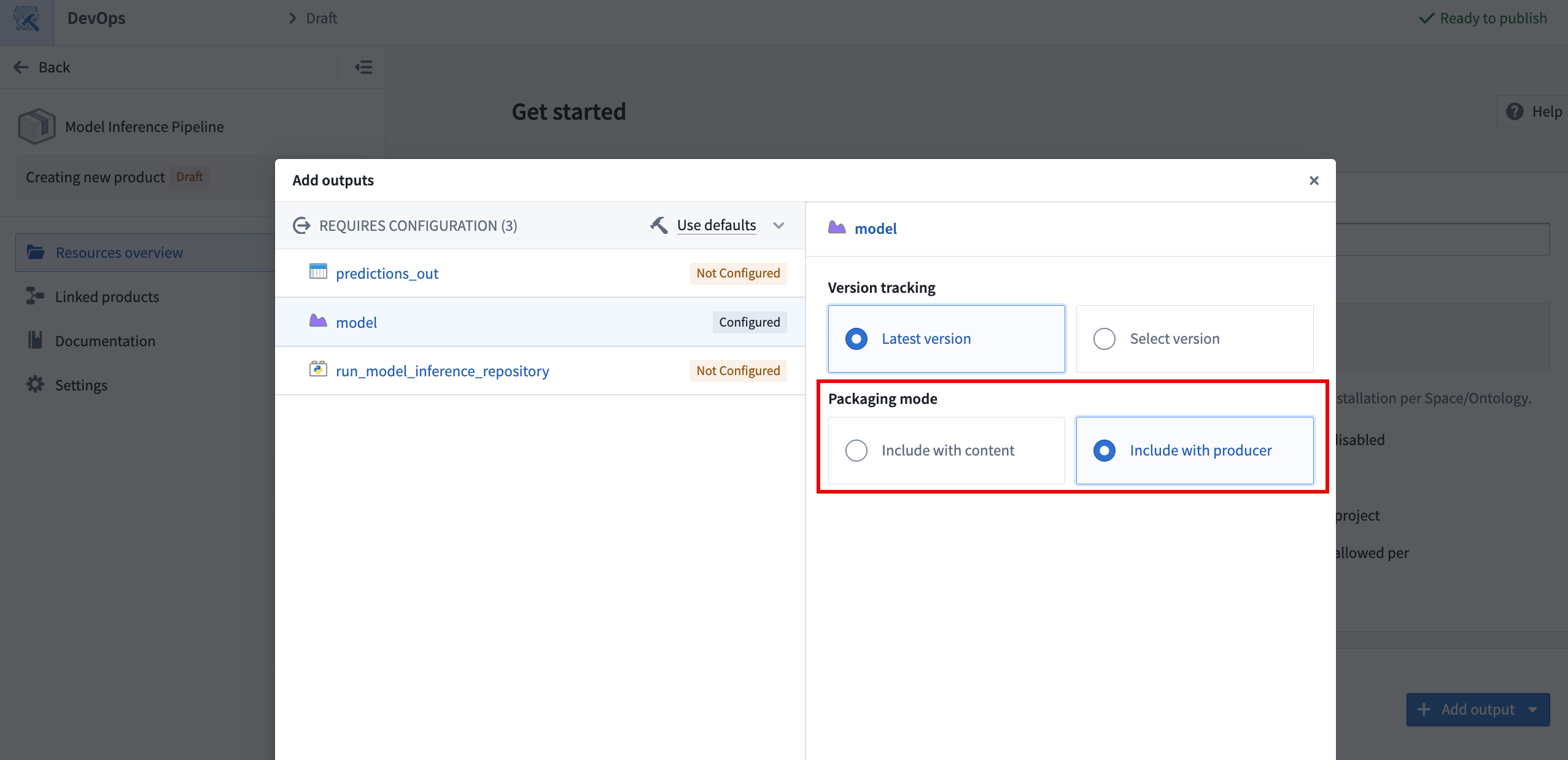
Include with content
The Include with content option installs the model as a static asset that cannot be rebuilt after it is deployed. The following are copied into the model resource when using this option:
- Saved model files and weights.
- The Python library containing the model adapter class.
- The container image that is used to back live deployments in the model application and in Modeling Objectives.
- The sidecar model inference in transforms.
Models can only be deployed as Include with content if the total model size, including files and underlying container images, is under eight gibibytes. The DevOps application will validate this condition and display an error if it is not met.
Include with producer
The Include with producer option installs the logic used to build the model so it can be built after it is deployed. This enables users to deploy models that can be trained continuously by a schedule. This is available for models built in Code Repositories, in Jupyter® notebooks published as transforms, and in Model Studio, but not for models published interactively from a Jupyter® notebook. This is because models published interactively are considered static assets and do not have logic associated with them. When using this option, it is recommended that you package the latest version of the model to avoid confusion.
Models deployed with a code repository producer do not have a defined container image by default, since this is produced when checks are run in the repository and used for subsequent builds that produce the model. Checks do not run when installing a product, so installed model builds are unable to produce a container image for the model. The lack of a container image on a model version will prevent the use of sidecar model inference in transforms and live deployments for the deployed version.
To solve this issue, manually trigger checks on the installed repository that produces the model to build the container image and make it available for subsequent model training builds. Manually triggering checks is required to ensure that the Python adapter logic and the environment in the container are the same as in the source model. This must be done whenever a new version of the model is deployed.
Use a model as a product input
In addition to packaging models as outputs, product builders can include models as inputs to a product. During installation, users select the model to use via a model selector, which allows them to resolve specific model versions required by dependent components. This avoids the need to package the model itself, reducing package size and giving installers the flexibility to choose a model already available on their enrollment.
When a model is used as a ModelInput in packaged transforms, the transform must set use_sidecar=True. The sidecar runs the model adapter in its own container, removing the need to import the adapter library into the repository environment. Using use_sidecar=True is recommended in all cases. Learn more about running models as sidecar containers.
Live deployments
You can package a direct model deployment with its model. Marketplace installs the deployment with its saved configuration, including compute resources, replica limits, scaling configuration, environment variables, and thread count.
Package a live deployment
Before packaging, create a direct deployment on the model's default branch and save its configuration. Deployments on other branches, Modeling Objective deployments, and deployments configured with external sources are not supported.
To include the deployment in a product:
- Add the model as a product output in DevOps.
- Choose Include with content or Include with producer for the model's Packaging mode.
- Under Package live deployment, select Yes. This option is available when the model has a direct deployment on its default branch.
- Review the product outputs. DevOps includes the live deployment and, if you have published one, the model function associated with that deployment.
The Package live deployment option works with both packaging modes. If you select No or leave the option unset, the model does not automatically include its deployment or function. You can still create a direct deployment manually on the installed model.
Install and start a live deployment
During installation, configure the Auto-start live deployment input:
- Set it to
trueto start a newly installed or stopped deployment automatically. - Leave it at the default value of
falseto keep a new deployment stopped until you start it manually.
After installation, open the installed model and select Live deployment to inspect its status. To start a stopped deployment, select Start deployment on the Overview tab. A model function can be installed before its deployment is running, but the deployment must be running before the function can serve inference requests.
With Include with content, Marketplace uses the installed model version to create the deployment. With Include with producer, the deployment waits for a model version to be built if one is not yet available. Configure the product's Build settings to build models during installation, or build the installed model before starting the deployment. For code repository producers, follow the container image requirements.
Upgrade a live deployment
Product upgrades apply the packaged deployment configuration to the installed deployment. New model versions published on the default branch update the deployment automatically, including versions created by regular builds and Marketplace upgrades.
Setting Auto-start live deployment to false during an upgrade does not stop a running deployment. A stopped deployment remains stopped unless you start it manually or set this input to true.
Model functions
You can package a published model function with its model and direct deployment. Marketplace connects the installed function to the model and deployment in the destination environment.
Package a model function
To include a function when packaging a model, publish the function on the model's default-branch deployment before packaging. Then select Yes under Package live deployment for the model output. DevOps automatically includes the published function; you do not need to publish it manually after installation.
You can also add the model function as a function output and select its version directly. The function includes dependencies on its backing deployment and the model version associated with that function version. The live deployment packaging requirements still apply.
Select matching model and function versions. You can explicitly select an older function version, but Marketplace reports a conflict if it requires a different model version from the one selected in the product. When a function version is not explicitly selected, Marketplace resolves it automatically; it does not search older function versions to match your selected model version.
Use the model function in another function
You can package a model, its deployment, its function, and the applications or functions that call it in a single product. For example, package a model function alongside a Workshop application or another function that imports it. Marketplace updates these references to use the installed model function.
If you prefer to reuse an existing function in the destination environment, configure the model function as a product input and select it during installation.
Marketplace tracks model functions imported into repositories. It does not track model functions queried directly through the Platform SDK without an import, so those references are not automatically updated during installation.
For Python and TypeScript v2 functions, the model function must be registered to an ontology to be importable into the repository. If your model function is still space-bound, migrate it to be ontology-bound to take advantage of structured dependency tracking and Marketplace input mapping.
Upgrade a model function
Marketplace manages publication of packaged model functions during installation and product upgrades. For models that remain outputs of a Marketplace installation, publishing a new model version on the default branch updates the live deployment without automatically publishing another function version. This applies regardless of the Package live deployment setting used when packaging the model.
For Include with producer, scheduled or manual retraining therefore updates the default-branch deployment while the function stays at its installed version. If retraining preserves the model API, the installed function can continue to serve requests.
When the model API changes, the installed function may no longer match the deployment, and inference requests can fail. To install a matching function, update the source model function and any functions or applications that call it, then publish a new product version and upgrade the installation. Update consumers outside the product separately, including installations that use the model function as an input.
Unsupported modeling features and limitations
- Modeling Objectives: Use direct model deployments for live objective deployments and model transforms for batch deployments.
- Live deployments: Only direct deployments on the model's default branch can be packaged. Deployments on other branches and deployments configured with external sources are not supported.
- Models packaged with content can only be packaged if their total size, including weights, Python environment and underlying container image, is under eight gibibytes.
- External models are not supported in DevOps or in Marketplace.