# Render hints
Foundry uses **render hints** to communicate information about the use of Ontology [properties](../properties-overview/index.md) to [Object Storage v1 (Phonograph)](../../object-databases/object-storage-v1/index.md) and user applications in the platform. For example, the `sortable` render hint on a string property tells applications to allow users to sort on that property, as in a timeline or a chart.
Many render hints are tied to reindex performance for an object type. For instance, you can use render hints to indicate to [Object Storage v1 (Phonograph)](../../object-databases/object-storage-v1/index.md) that a property does not need to be aggregated or sorted in applications, so that Object Storage v1 has less work to do when indexing those properties.
You can select and deselect render hints in the properties pane of the property editor (see image below).
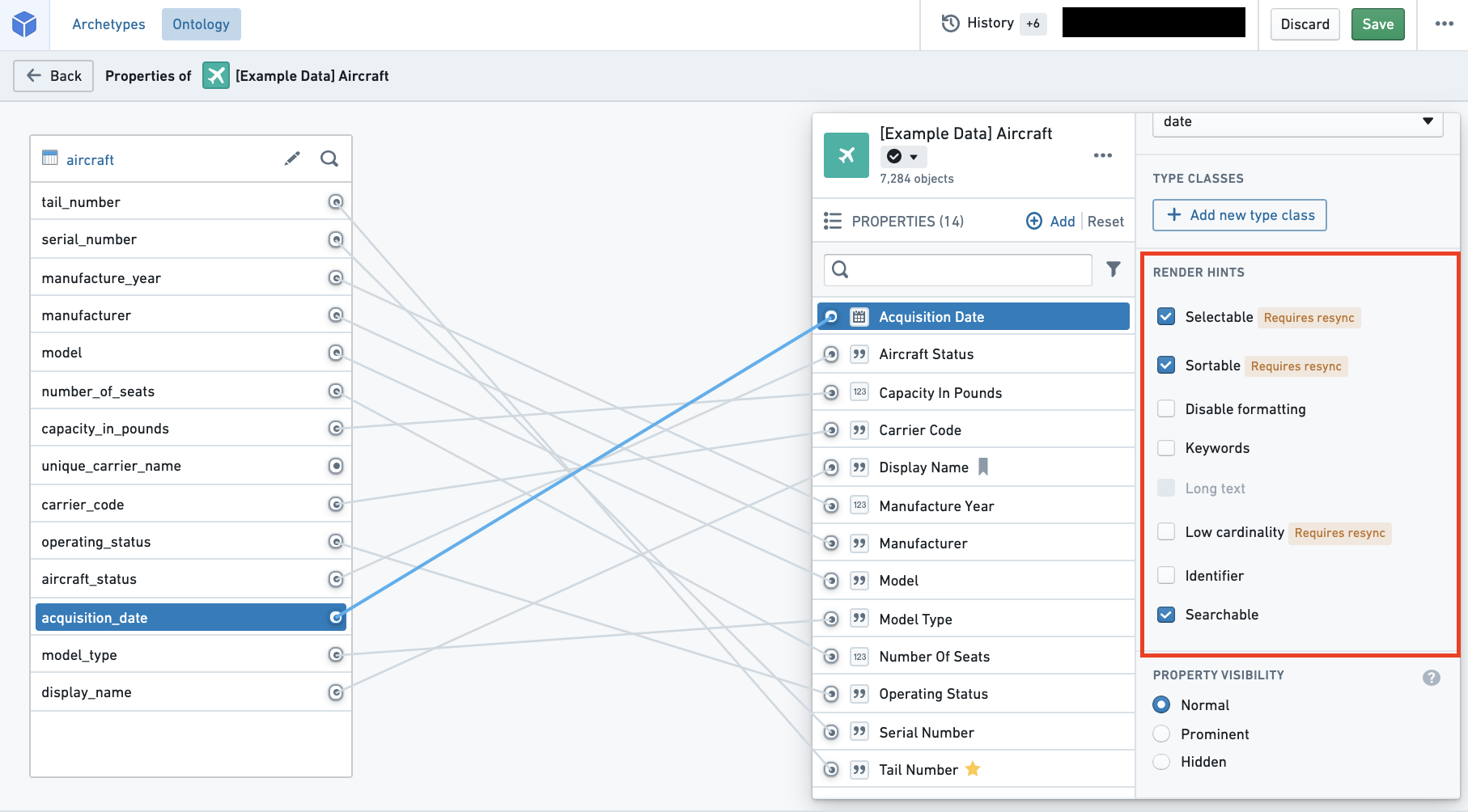
The following table shares the **Name** and **Description** for each of the available render hints. The table also provides information on two technical aspects of render hints: "Adds raw index?" and "Requires reindex?" (described below).
* **Adds raw index?**
* In order to apply a render hint that adds a raw index, Object Storage v1 (Phonograph) stores the render hint information by creating another index when storing the backing dataset.
* Because of this additional index, for the property with a render hint applied, two columns will be counted toward the total number of columns indexed into Object Storage v1 (Phonograph).
* This explains why deselecting these render hints improves performance of reindex into Object Storage v1 (Phonograph).
* **Requires reindex?**
* Some render hints will be immediately applied in user applications as soon as their selection is saved in the Ontology Manager.
* For other render hints that require a reindex, the object type's backing datasources must be reindexed into Objects Storage V1 (Phonograph) before the changes will be reflected in user applications.
* You can wait for the next triggered reindex or you can manually start the reindex by navigating to the **Datasources** tab of the object type and selecting the blue **Reindex** button in the **Phonograph** pane.
|Name |Description |Adds raw index? |Requires reindex? |
|--- |--- |--- |--- |
|Disable formatting |- **Enable** if property values should not be formatted in Object Views according to a browser location’s local numerical formatting standards. | | |
|Identifier |- **Enable** to improve reindex performance and specify primary keys and foreign keys that have a numerical base type and do not need to be formatted or treated as numbers.
- For example, Object Views will not format the property values as numbers and Object Explorer will not enable filtering the keys by a range. | | |
|Keywords |- **Enable** to highlight this property in its own section when displaying properties in Object Views. | | |
|Long text |- **Enable** if property values contain a large amount of text.
- For example, Object Views will display this property’s values in a more readable format. | | |
|Low cardinality |- **Enable** to indicate to applications that there are not many possible values for this property.
- For example, some Object View widgets will only allow filtering on properties with not many possible values.
- The Searchable render hint **must also be selected** along with Low cardinality. |yes |yes |
|Selectable |- **Enable** on string properties to allow users to perform aggregations on this property.
- For example, this property will be aggregated in Object Explorer histograms and Object View charts.
- **Enable** on numeric and date properties to allow users to perform aggregation on exact term values and not only distributions.
- **Disable** to improve reindex performance if the property will not be aggregated in applications.
- **Enable** to use the Exact Match filter capability.
- The Searchable render hint **must also be selected** along with Selectable. |yes |yes |
|Sortable |- **Enable** on string properties to allow users to sort on this property.
- Numeric and date properties are always sortable.
- For example, timelines and charts in Object Views will be sorted on this property.
- **Disable** to improve reindex performance if the property will not be sorted on in applications.
- **Not recommended for arrays**, which will sort based on the minimum value in the array.
- The Searchable render hint **must also be selected** along with Sortable. |yes |yes |
|Searchable |- **Disable** to improve reindex performance if the property will not be searched or sorted on in applications.
- The performance improvements will be especially significant if the property contains large strings.
- Searchable **must be selected** in order for applications to apply the Selectable, Sortable, or Low cardinality render hints. |yes |yes |
|Enable leading wildcards |- **Enable** on string properties to support leading wildcard queries.
- The Searchable render hint **must also be selected** along with Enable leading wildcards. |yes |yes |
|Enable regex queries |- **Enable** on string properties to support regex queries.
- The Searchable render hint **must also be selected** along with Enable regex queries. |yes |yes |