# Edit an interface definition
:::callout{theme="warning" title="Breaking changes"}
Given that interfaces expose API names, any change to an interface definition has the potential to break downstream applications and will necessarily break existing object implementations. When adding a new required property, link type constraint, or action type constraint to an interface, all implementations for object types that use the interface **must** be made in the same update to your Ontology. We also recommend updating your interface definitions and consumers at the same time.
If your downstream applications cannot be updated at the same time as interface changes, you can alternatively create a new version of the interface (as an [extension](../extend-interface/index.md) or a standalone interface) and migrate to the new interface definition as soon as possible.
:::
## Add new properties
From the **Properties** tab of the interface configuration, choose **New property**. This will open an interface property configuration side panel.
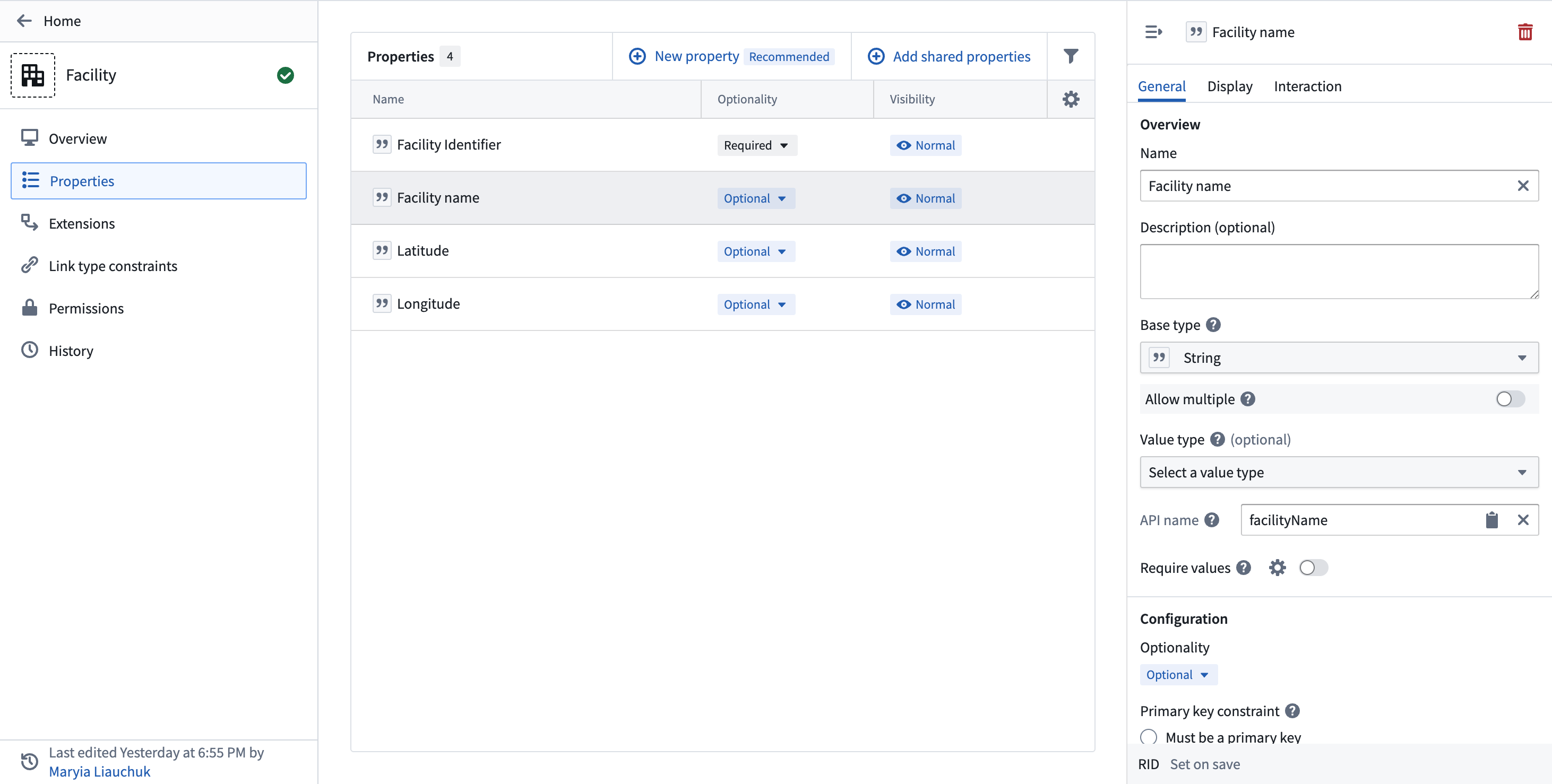 The available options for editing property metadata are clustered into four different tabs which give access to the following configurations:
1. **Display name and description:** Select into the existing display name or description to edit the text.
2. **API name:** Select into the existing API name to change its value.
3. **Property base type:** Select the property’s base type from the dropdown menu. The type of the property constrains the possible set of operations that can be done on the property’s values.
* For example, a property with base type `timestamp` can be shown in a timeline widget in Object Explorer.
4. **Primary key constraint:** Indicate whether a property should be a primary key or cannot be a primary key.
:::callout{theme="warning"}
If you make a change to the interface property types, you must also update all object types implementing this interface.
:::
5. **Type classes:** Apply type classes as additional metadata that can be interpreted by applications.
* Review the [type classes documentation](../../object-link-types/metadata-typeclasses/index.md) for a list of available type classes.
6. **Render hints:** Improve how a property value is rendered and indexed into Object Storage v1 (Phonograph) by selecting render hints from the checklist.
* See the [render hints documentation](../../object-link-types/metadata-render-hints/index.md) for descriptions of the available render hints.
7. **Visibility:** Select the existing visibility to open a dropdown menu of available visibilities. A `prominent` property will lead applications to show this property first to users. A `hidden` property will not appear in user applications.
## Add shared properties
From the **Properties** tab of the interface configuration, select **Add shared properties** and choose a shared property to add to the interface.
## Add a link type constraint
From the **Link type constraints** tab, select **Create new link type constraint** and add the necessary [constraint metadata](../create-interface/index.md#create-interface-link-types-optional).
## Add an action type constraint
From the **Action type constraints** tab, select **Create new action type constraint** and add the necessary [constraint metadata](../interface-action-type-constraints/index.md#action-type-constraints) and [parameter constraints](../interface-action-type-constraints/index.md#parameter-constraints).
## Remove properties
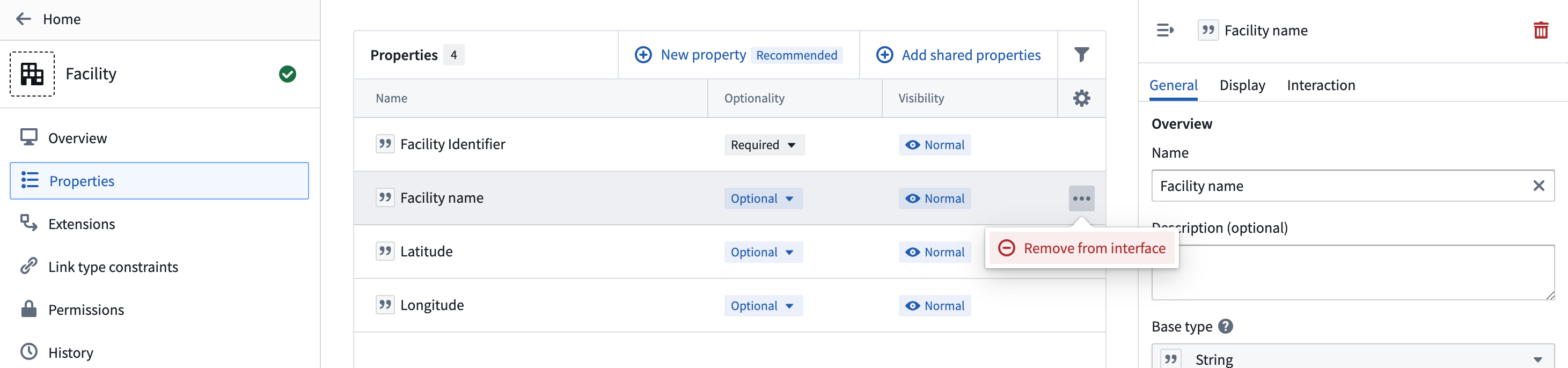
From the **Properties** tab, select **...** next to the property you wish to remove from the interface. Alternatively, open the interface property side panel and select the trash icon in the upper right corner.
The available options for editing property metadata are clustered into four different tabs which give access to the following configurations:
1. **Display name and description:** Select into the existing display name or description to edit the text.
2. **API name:** Select into the existing API name to change its value.
3. **Property base type:** Select the property’s base type from the dropdown menu. The type of the property constrains the possible set of operations that can be done on the property’s values.
* For example, a property with base type `timestamp` can be shown in a timeline widget in Object Explorer.
4. **Primary key constraint:** Indicate whether a property should be a primary key or cannot be a primary key.
:::callout{theme="warning"}
If you make a change to the interface property types, you must also update all object types implementing this interface.
:::
5. **Type classes:** Apply type classes as additional metadata that can be interpreted by applications.
* Review the [type classes documentation](../../object-link-types/metadata-typeclasses/index.md) for a list of available type classes.
6. **Render hints:** Improve how a property value is rendered and indexed into Object Storage v1 (Phonograph) by selecting render hints from the checklist.
* See the [render hints documentation](../../object-link-types/metadata-render-hints/index.md) for descriptions of the available render hints.
7. **Visibility:** Select the existing visibility to open a dropdown menu of available visibilities. A `prominent` property will lead applications to show this property first to users. A `hidden` property will not appear in user applications.
## Add shared properties
From the **Properties** tab of the interface configuration, select **Add shared properties** and choose a shared property to add to the interface.
## Add a link type constraint
From the **Link type constraints** tab, select **Create new link type constraint** and add the necessary [constraint metadata](../create-interface/index.md#create-interface-link-types-optional).
## Add an action type constraint
From the **Action type constraints** tab, select **Create new action type constraint** and add the necessary [constraint metadata](../interface-action-type-constraints/index.md#action-type-constraints) and [parameter constraints](../interface-action-type-constraints/index.md#parameter-constraints).
## Remove properties
From the **Properties** tab, select **...** next to the property you wish to remove from the interface. Alternatively, open the interface property side panel and select the trash icon in the upper right corner.
 ## Remove or edit link type constraints
From the **Link type constraint** tab, select **...** next to the link type constraint you wish to edit or remove from the interface.
## Remove or edit link type constraints
From the **Link type constraint** tab, select **...** next to the link type constraint you wish to edit or remove from the interface.
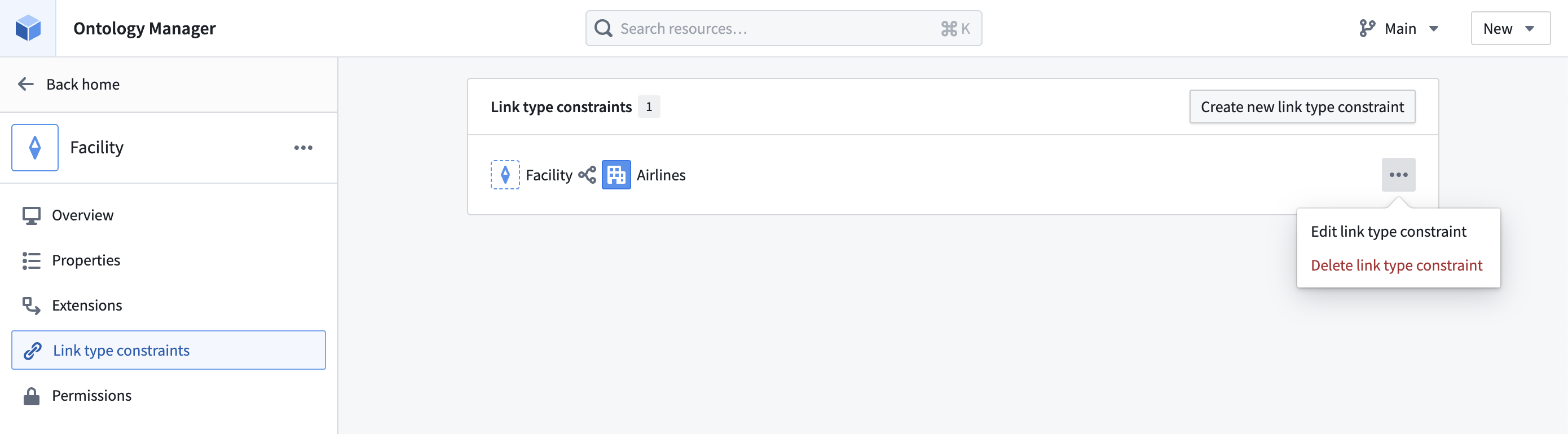 If editing a constraint, you can update the metadata as you would if you were [creating the link type constraint](../create-interface/index.md#create-interface-link-types-optional) for the first time.
## Remove or edit action type constraints
From the **Action type constraints** tab, select **...** next to the action type constraint you wish to edit or remove from the interface.
If editing a constraint, you can update the metadata and parameter configuration as you would if you were [creating the action type constraint](../interface-action-type-constraints/index.md#action-type-constraints) for the first time.
If editing a constraint, you can update the metadata as you would if you were [creating the link type constraint](../create-interface/index.md#create-interface-link-types-optional) for the first time.
## Remove or edit action type constraints
From the **Action type constraints** tab, select **...** next to the action type constraint you wish to edit or remove from the interface.
If editing a constraint, you can update the metadata and parameter configuration as you would if you were [creating the action type constraint](../interface-action-type-constraints/index.md#action-type-constraints) for the first time.