# Train a model in Code Repositories
[Models](../../model-integration/models/index.md) can be trained in the [Code Repositories](../../code-repositories/overview/index.md) application with the `Model Training Template`.
To train a model, complete the following steps:
1. [Author a model adapter](#1-author-a-model-adapter)
2. [Write a Python transform to train a model](#2-write-a-python-transform-to-train-a-model)
3. [Build your Python transform to publish the trained model](#4-build-your-python-transform-to-publish-the-trained-model)
4. [Consume the model](#5-consume-the-model)
## 1. Author a model adapter
A model uses a [model adapter](../model-adapter-overview/index.md) to ensure Foundry correctly initializes, serializes, deserializes, and performs inference on a Model. You can author model adapters in Code Repositories from either the [`Model Adapter Library` template](../model-adapter-creation/index.md#model-adapter-library-template) or the [`Model Training` template](../model-adapter-creation/index.md#model-training-template).
:::callout{theme="warning"}
Model adapters cannot be authored directly in Python transforms repositories. To produce a model from an existing repository, use a `Model Adapter Library` and import the library into the transforms repository or migrate to the `Model Training` template.
:::
Read more about when to use each type of model adapter repository, and how to create them in the [Model Adapter creation](../model-adapter-creation/index.md) documentation. The steps below assume usage of the Model Training template.
### Model adapter implementation
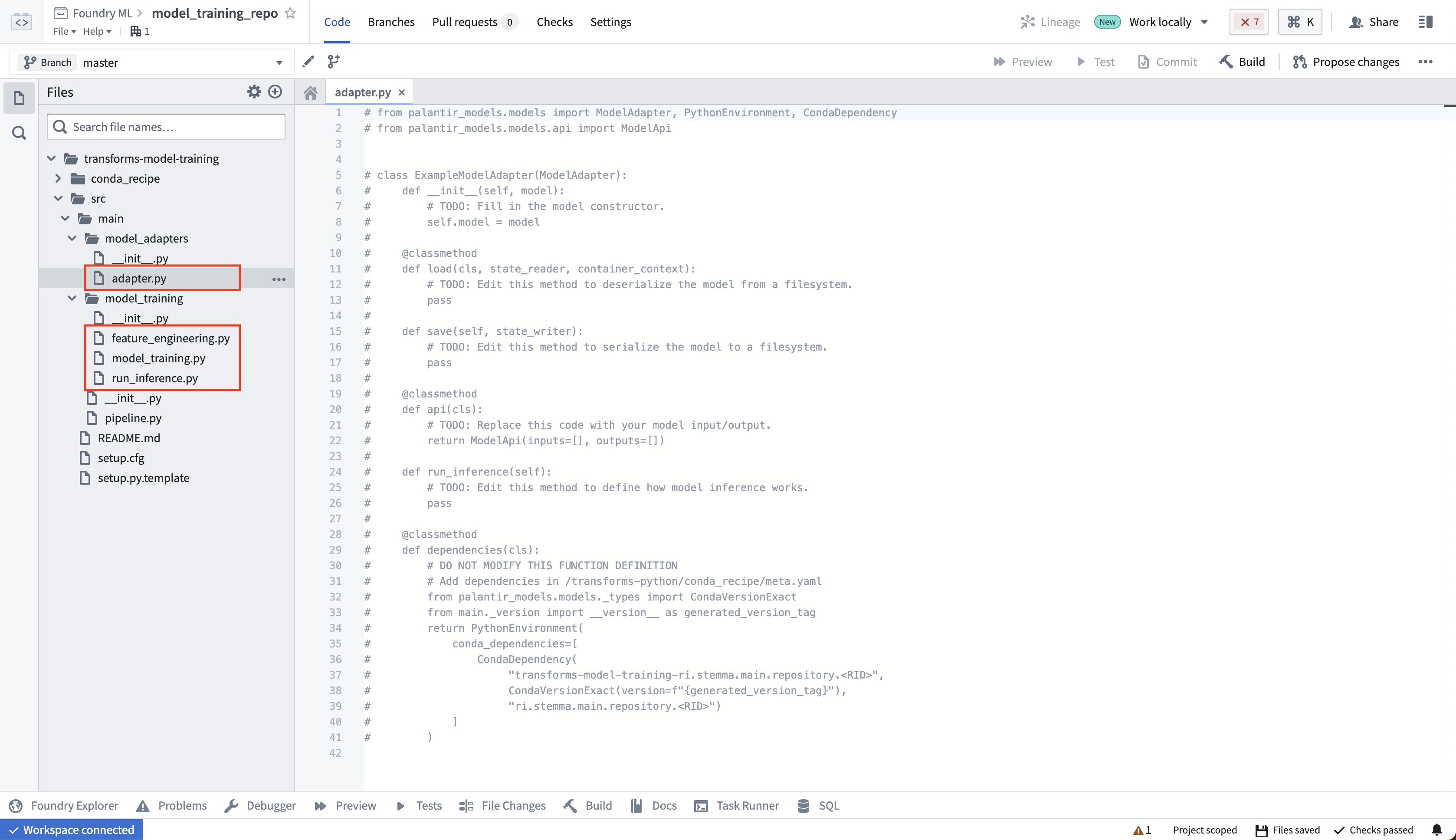
The model adapter and model training code should be in separate Python modules to ensure the trained model can be used in downstream transforms. In the template, we have separate `model_adapters` and `model_training` modules for this purpose. Author your model adapter in the `adapter.py` file.
The model adapter definition will be dependent on the model being trained. To learn more, consult the [ModelAdapter API reference](../model-adapter-reference/index.md), review the [example sklearn model adapter](../model-asset-code-repositories-sklearn/index.md), or read through the [supervised machine learning tutorial](../../model-integration/tutorial-intro/index.md) to learn more.
## 2. Write a Python transform to train a model
Next, in your code repository, create a new Python file to house your training logic.
```python
from transforms.api import transform, Input
from palantir_models.transforms import ModelOutput
from model_adapter.example_adapter import ExampleModelAdapter # This is your custom ModelAdapter
def train_model(training_data):
'''
This function contains your custom training logic.
'''
pass
@transform.using(
training_data=Input("/path/to/training_data"),
model_output=ModelOutput("/path/to/model") # This is the path to the model
)
def compute(training_data, model_output):
'''
This function contains logic to read and write to Foundry.
'''
trained_model = train_model(training_data) # 1. Train the model in a Python transform
wrapped_model = ExampleModelAdapter(trained_model) # 2. Wrap the trained model in your custom ModelAdapter
model_output.publish( # 3. Save the wrapped model to Foundry
model_adapter=wrapped_model # Foundry will call ModelAdapter.save to produce a model
)
```
This logic is publishing to a `ModelOutput`. Foundry will automatically create a model resource at the provided path after you commit your changes. On enrollments that use [classification-based access controls (CBAC)](../../security/classification-based-access-controls/index.md), transforms cannot create their own output resources, so create the model by selecting **+ New > Model** in the target folder before you build, set a file classification on it as required for newly created resources, then point your `ModelOutput` at that existing path. The same restriction applies to any `Output` datasets your transform declares; building a transform whose output does not yet exist fails with an error stating that dataset creation is not allowed when classification-based access control is enabled. You can also configure the required resources for model training such as CPU, memory, and GPU requirements with the [`@configure` annotation](../../api-reference/transforms-python-library/api-configure/index.md#transforms.api.configure).
### (Optional) Log metrics and hyperparameters to a model experiment
[Model experiments](../../model-integration/experiments/index.md) is a lightweight framework for logging metrics and hyperparameters produced during a model training run, which can then be published alongside a model and persisted in the model page.
[Learn more about creating and writing to experiments.](../experiments-overview/index.md)
## 3. Preview your Python transform to test your logic
In the Code Repositories application, you can select **Preview** to test your transform logic without running a full build, though preview will run on a smaller resource profile than you may have otherwise configured with the [`@configure` annotation](../../api-reference/transforms-python-library/api-configure/index.md#transforms.api.configure).
### ModelOutput preview
`ModelOutput` preview allows you to validate your model training logic as well as your model serialization, deserialization, and API implementation.
### ModelInput preview
`ModelInput` preview allows you to validate your inference logic against an existing model. For preview in Code Repositories, there is a 5GB size limit for every `ModelInput`.
## 4. Build your Python transform to publish the trained model
In your code repository, select **Build** to run your transform. Foundry will resolve both the Python dependencies and dependencies of your model before executing your training logic.
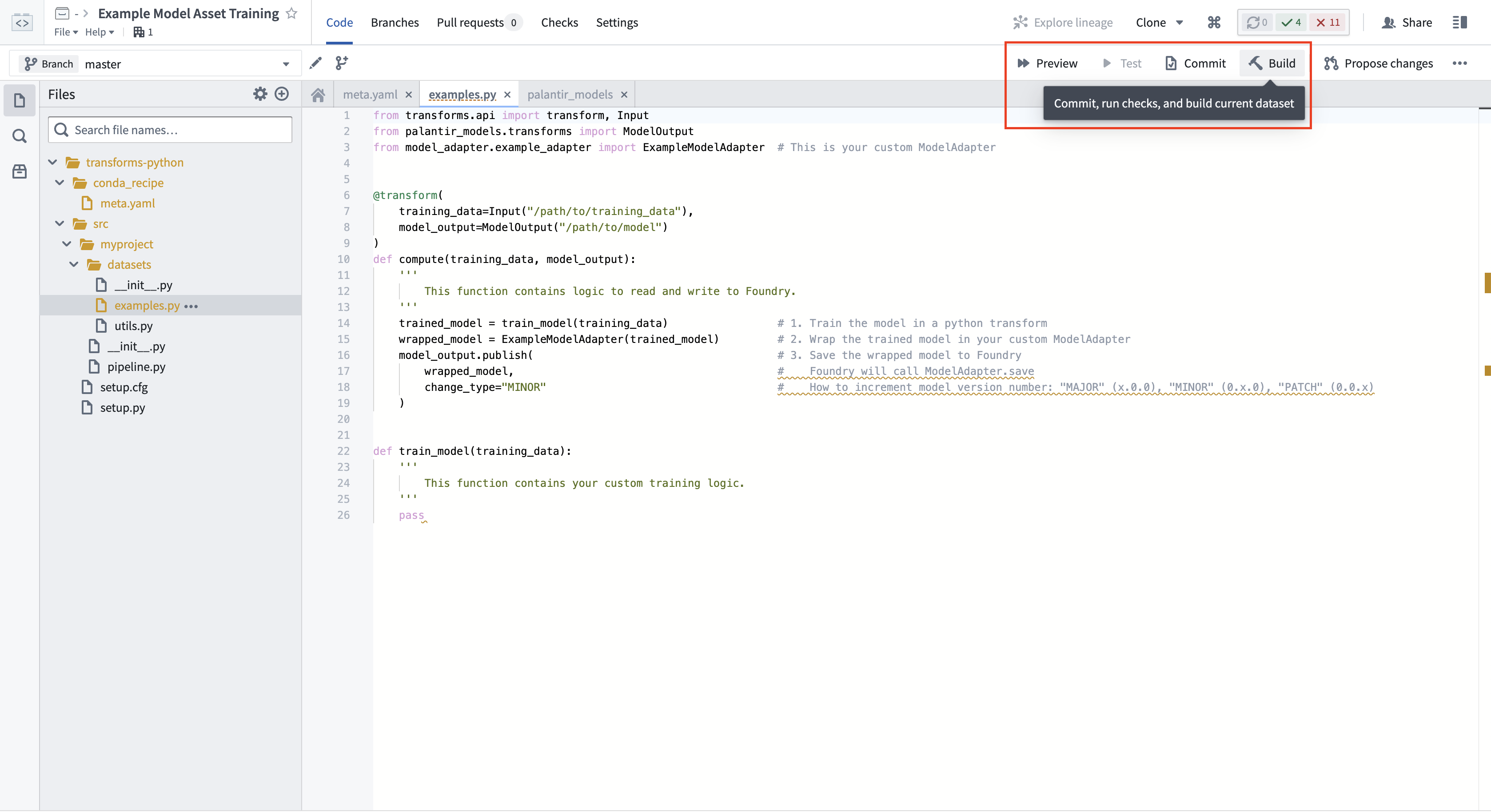
Calling `ModelOutput.publish()` will publish a version of your model to Foundry. Foundry will call the `ModelAdapter.save()` function and give your ModelAdapter the ability to serialize all required fields for execution.
## 5. Consume the model
### Submit to a Modeling Objective
A model can be published to a modeling objective for:
* [Automatic model evaluation](../../evaluate-models/model-evaluation-automatic/index.md)
* [Batch pipelines](../../manage-models/set-up-batch/index.md)
* [Live hosting](../../manage-models/set-up-live/index.md)
### Run inference in Python Transforms
You can also use the Palantir model in a pipeline as detailed below.
To run a model within a transform repository in which the model was not defined, set `use_sidecar = True` in `ModelInput`. This will automatically import the model adapter and its dependencies while running them in a separate environment to prevent dependency conflicts. Review [the `ModelInput` class reference](../transform-model-input/index.md) for more details. This feature is available for non-Spark transforms (using the `@lightweight` or `@transform.using` decorator) from `palantir_models` version 0.2010.0 onwards.
If `use_sidecar` is not set to `True`, the model adapter and its dependencies must be imported into or defined within the current code repository.
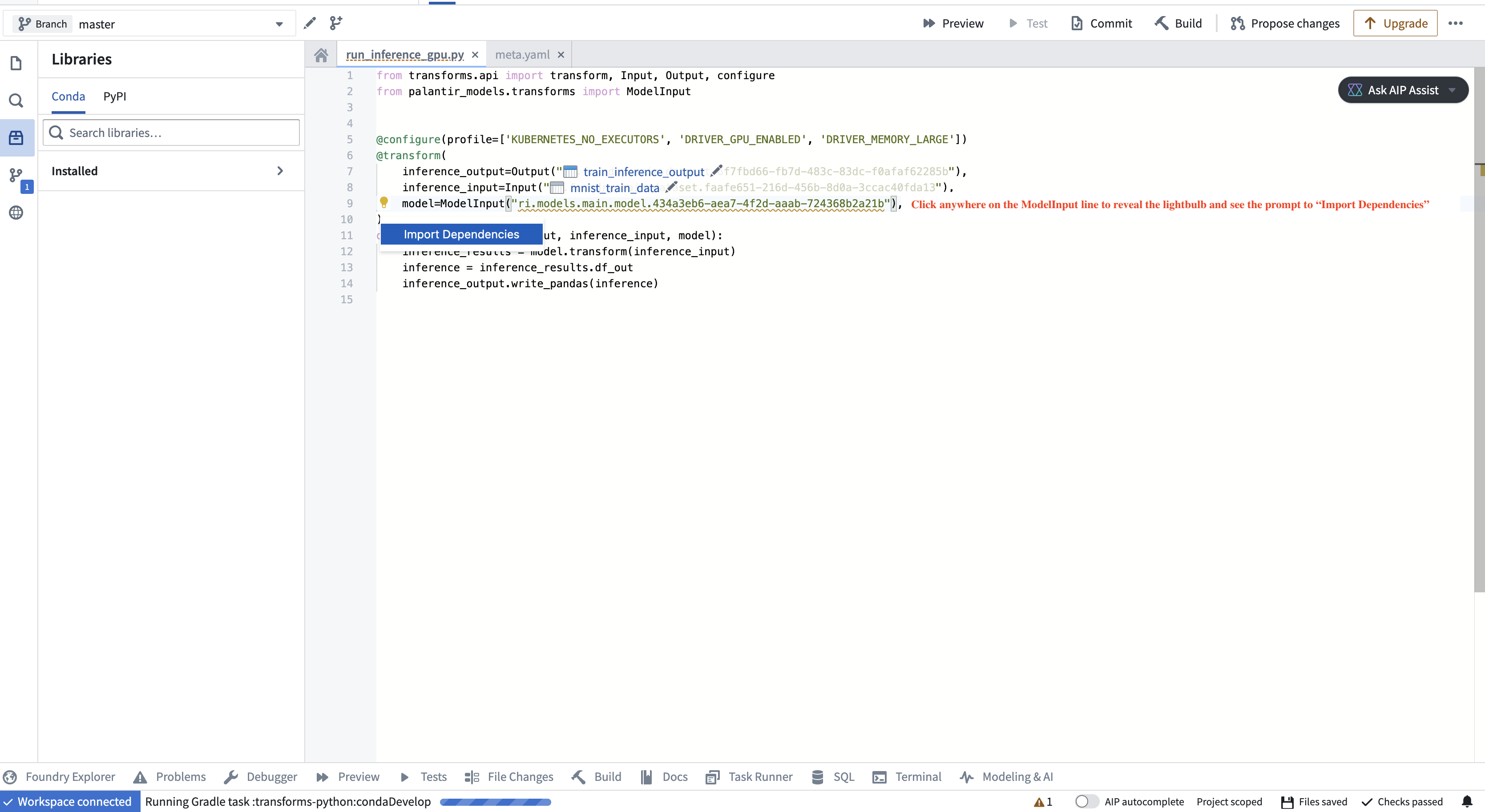
If you are using a model in a different Python transform repository from the repository in which the model was created, you must add the model adapter Python library to your [authoring Python environment](../../transforms-python/overview/index.md). This brings the Python packages required to load the model into the consuming repository's environment. The code authoring user interface will detect if a model's dependencies are not present in the repository and offer to perform the library import when hovering over the warning. The adapter library and its version corresponding to a specific model version can be found on the model page in Foundry.
```python
from transforms.api import transform, Input, Output, LightweightInput, LightweightOutput
from palantir_models.transforms import ModelInput
from palantir_models import ModelAdapter
@transform.using(
inference_input=Input("/path/to/inference_input"),
model=ModelInput(
"/path/to/model",
# use_sidecar=True is recommended for models defined outside the current transform repository
),
inference_output=Output("/path/to/inference_output"),
)
def compute(
inference_input: LightweightInput,
model: ModelAdapter,
inference_output: LightweightOutput
):
inference_results = model.transform(inference_input)
# Replace "output_data" with an output specified in the Model Version's API, viewable on the Model Version's web page.
# For example, inference_results.output_data is appropriate output for Hugging Face adapters.
inference = inference_results.output_data
inference_output.write_pandas(inference)
```
## ModelInput and ModelOutput APIs
The `ModelInput` and `ModelOutput` objects invoked in the above transforms are the objects directly responsible for interacting with models in Code Repositories. A summary of the objects is as follows:
### ModelInput
```python
# ModelInput can be imported from palantir_models.transforms
class ModelInput:
def __init__(self, model_rid_or_path: str, model_version: Optional[str] = None):
'''
The `ModelInput` retrieves an existing model for use in a transform. It takes up to two arguments:
1. A path to a model (or the model's RID).
2. (Optional) A version RID of the model to retrieve.
If this is not provided, the most recently published model will be used.
For example: ModelInput("/path/to/model/asset")
'''
pass
```
In the transform function, the model specified by the `ModelInput` will be instantiated as an instance of the model adapter associated with the retrieved model version. Foundry will call the `ModelAdapter.load` or use the defined `@auto_serialize` instance to set up the model before initiating the transform build. Thus, the ModelInput instance has access to its associated loaded model state and all methods defined in the model adapter.
### ModelOutput
```python
# ModelOutput can be imported from palantir_models.transforms
class ModelOutput:
def __init__(self, model_rid_or_path: str):
'''
The `ModelOutput` is used to publish new versions to a model.
`ModelOutput` takes one argument, which is the path to a model (or model RID).
If the asset does not yet exist, the ModelOutput will create the asset when a user selects Commit or Build and transforms checks (CI) are executed.
'''
pass
```
In the transform function, the object retrieved by assigning a `ModelOutput` is a `WritableModel` capable of publishing a new model version through the use of the `publish()` method. This method takes a model adapter as a parameter and creates a new model version associated with it. During `publish()`, the platform uses the defined `@auto_serialize` instance or executes the implemented `save()` method. This allows the model adapter to serialize model files or checkpoints to the `state_writer` object.