# Search Functions
Search Functions enable users to quickly find and evaluate possible solutions to the specific, unique problems that arise in their scheduling workflow.
Each Search Function is backed by a TypeScript function. The flexible interface allows builders to write functions that can return pucks, time slots, or a combination of both. Additionally, Search Functions can be row-based or puck-based.
For row-based Search Functions, users must right-click on an empty space and pass in row object and time as function inputs. For puck-based Search Functions, users must right-click on a puck to pass in object and time as function inputs.
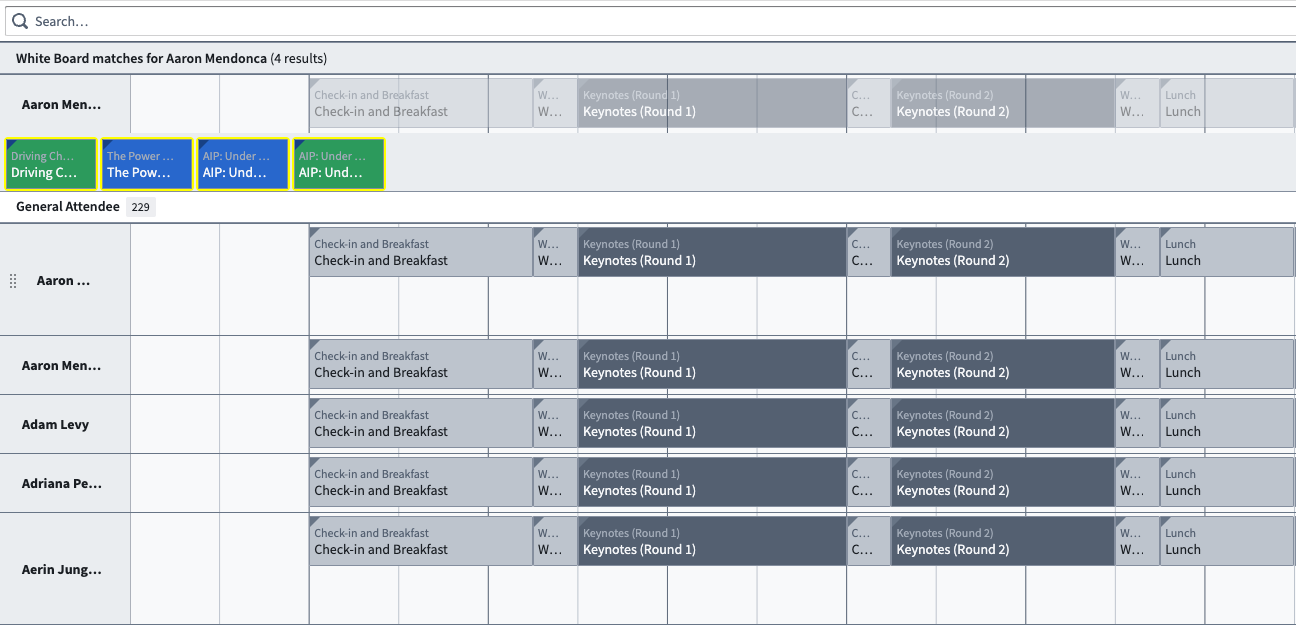
The image below displays the interface for a Search Function returning pucks.
 The image below displays the interface for a Search Function returning time slots.
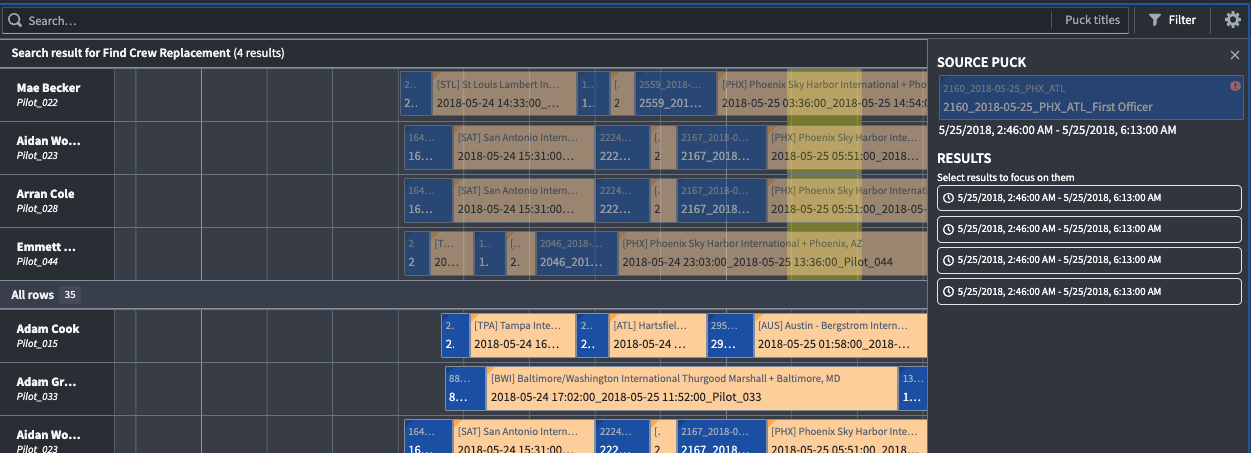
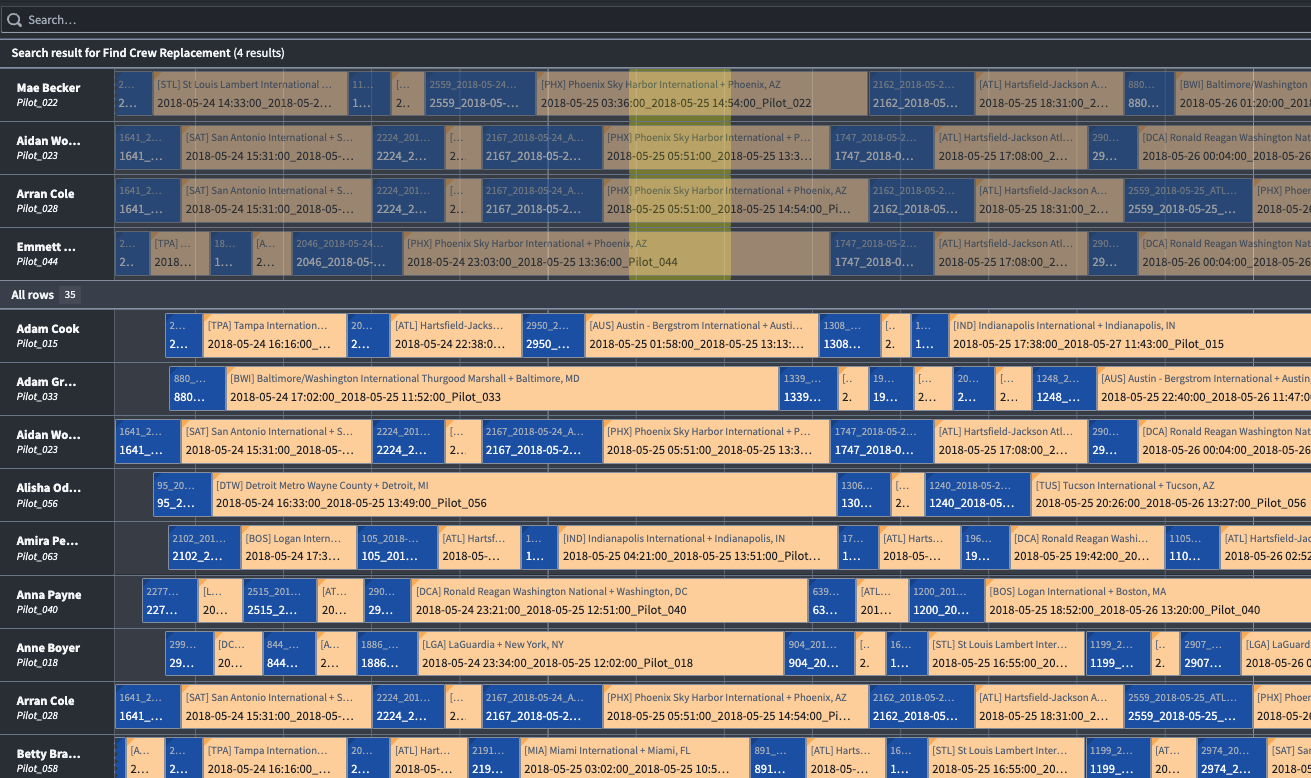 After a Search Function is executed, a new search group will be created in the Scheduling Gantt Chart with the results highlighted in yellow. Search groups can be collapsed and expanded by selecting the caret symbol (**^**) on the right side of the group header. Additionally, users can view search results in detail by selecting the **Results Overview** option to open a panel with the output of the Search Function, as displayed in the below image.
 ## Functions interface
The types below represent the necessary information to write a Search Function when triggered from either a row or a puck, including details about the search group.
```
type IPuckSearch = (puck: ObjectReference) => ISearchResult
type IRowSearch = (rowId: string, selectedTime: Timestamp) => ISearchResult
/*
Search Functions can return time slots, pucks, or both. SLOT and PUCK
are used as types in IHighlight.
*/
export enum HighlightType {
SLOT = "SLOT",
PUCK = "PUCK",
}
/*
Used in IHighlight for functions that will return a set of timeslots.
*/
export interface IDomain {
start: Long;
end: Long;
}
/*
Used to determine what is highlighted in the UI after search function is run
*/
export interface IHighlight {
type: string;
// needed for "SLOT"
domain?: IDomain;
containerId?: string;
// needed for "PUCK"
schedulableObjectPrimaryKey?: string;
schedulableObjectTypeId?: string;
// optional
comment?: string;
}
/*
Defines the title of newly created search group and the rows the
function returns.
*/
export interface IRowGroup {
title: string;
containerIds: string[];
highlights: IHighlight[];
}
/*
Overall return type of function.
*/
export interface ISearchResult {
rowGroup?: IRowGroup;
sourcePuckIds?: string[];
error?: string;
}
```
## Functions interface
The types below represent the necessary information to write a Search Function when triggered from either a row or a puck, including details about the search group.
```
type IPuckSearch = (puck: ObjectReference) => ISearchResult
type IRowSearch = (rowId: string, selectedTime: Timestamp) => ISearchResult
/*
Search Functions can return time slots, pucks, or both. SLOT and PUCK
are used as types in IHighlight.
*/
export enum HighlightType {
SLOT = "SLOT",
PUCK = "PUCK",
}
/*
Used in IHighlight for functions that will return a set of timeslots.
*/
export interface IDomain {
start: Long;
end: Long;
}
/*
Used to determine what is highlighted in the UI after search function is run
*/
export interface IHighlight {
type: string;
// needed for "SLOT"
domain?: IDomain;
containerId?: string;
// needed for "PUCK"
schedulableObjectPrimaryKey?: string;
schedulableObjectTypeId?: string;
// optional
comment?: string;
}
/*
Defines the title of newly created search group and the rows the
function returns.
*/
export interface IRowGroup {
title: string;
containerIds: string[];
highlights: IHighlight[];
}
/*
Overall return type of function.
*/
export interface ISearchResult {
rowGroup?: IRowGroup;
sourcePuckIds?: string[];
error?: string;
}
```