# Virtual tables
**Virtual tables** allow you to query tables in supported data platforms without first storing the data in a Foundry [dataset](../datasets/index.md).
A virtual table acts as a pointer to a table in a source system outside of Foundry. Virtual tables abstract away the underlying source system and storage formats, enabling you to build workflows that combine data from different source systems seamlessly. Virtual tables can also be combined with datasets stored in Foundry as part of a flexible architecture where data need not be consolidated in one place. You can also create new virtual tables as outputs from Foundry data transformations, enabling workflows where storage is fully external and Foundry handles orchestration, security, and other functions.
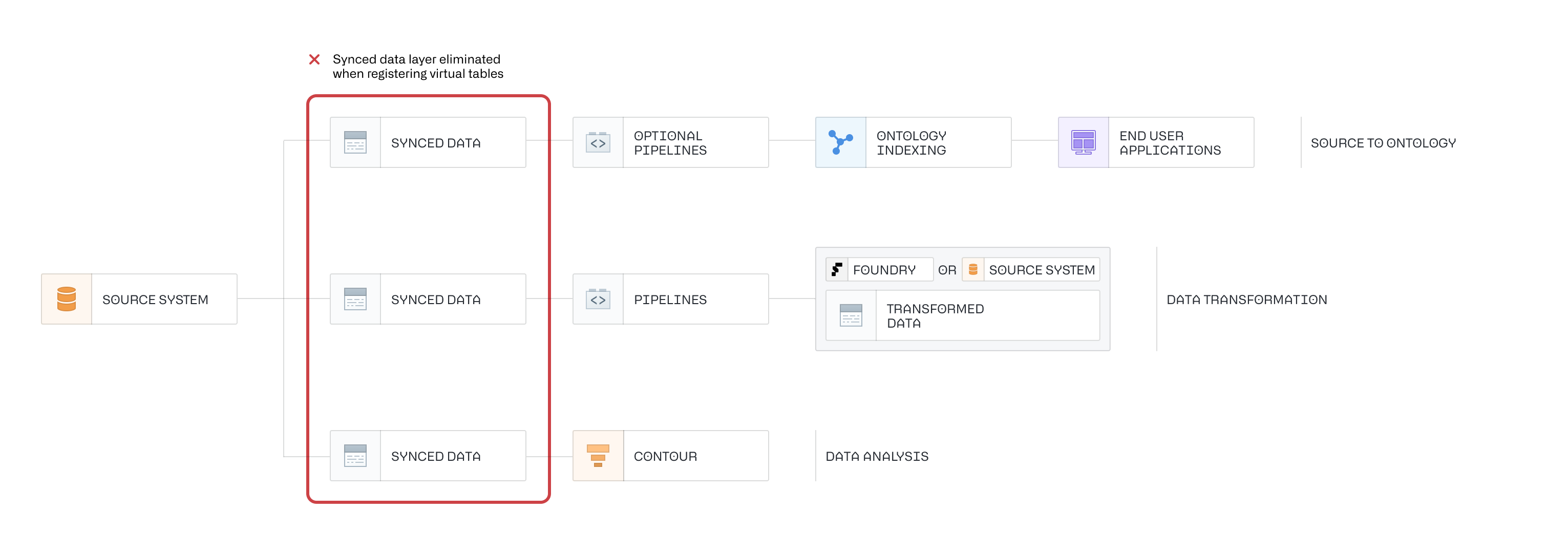
A virtual table is defined by:
* A *connection* to the source storage system (for example, a source URL or credentials). This connection is established by [setting up a source](../../data-connection/set-up-source/index.md) in Foundry's data connection application.
* A *locator* which identifies the table in the source system (for example, the database, schema, and table name).
As with any resource in Foundry, virtual tables are governed by Foundry's security and permissions model and can be opened or used in various Foundry applications.
## Supported sources
The following sources support virtual tables. Refer to the [source documentation](../source-type-overview/index.md) for more details on how to configure the connection as well as the supported capabilities.
| Source | Status | Supported Formats | Manual Registration | Automatic Registration |
| --- | --- | --- | --- | --- |
| [Amazon S3](../../available-connectors/amazon-s3/index.md) | 🟢 Generally available | [Avro ↗](https://avro.apache.org/), [Delta ↗](https://docs.delta.io/latest/), [Iceberg ↗](https://iceberg.apache.org/), [Parquet ↗](https://parquet.apache.org/) | ✔️ | |
| [OneLake and Azure Data Lake Storage Gen2 (Azure Blob Storage)](../../available-connectors/onelake-and-azure-blob-filesystem/index.md) | 🟢 Generally available | [Avro ↗](https://avro.apache.org/), [Delta ↗](https://docs.delta.io/latest/), [Iceberg ↗](https://iceberg.apache.org/), [Parquet ↗](https://parquet.apache.org/) | ✔️ | |
| [BigQuery](../../available-connectors/bigquery/index.md) | 🟢 Generally available | Table, View, Materialized View | ✔️ | ✔️ |
| [Databricks](../../available-connectors/databricks/index.md) | 🟢 Generally available | Table, View, Materialized View | ✔️ | ✔️ |
| [Foundry](../../available-connectors/foundry/index.md) | 🟡 Beta | Only [managed Iceberg](../iceberg-tables/index.md) | ✔️ | |
| [Google Cloud Storage](../../available-connectors/google-cloud-storage/index.md) | 🟢 Generally available | [Avro ↗](https://avro.apache.org/), [Delta ↗](https://docs.delta.io/latest/), [Iceberg ↗](https://iceberg.apache.org/), [Parquet ↗](https://parquet.apache.org/) | ✔️ | ✔️ for Iceberg tables when a catalog is configured |
| [Snowflake](../../available-connectors/snowflake/index.md) | 🟢 Generally available | Table, View, Materialized View | ✔️ |✔️ |
### Iceberg catalogs
An *Iceberg catalog* records which Iceberg tables exist and where each table's files are currently stored, and is required to load virtual tables backed by an Apache Iceberg table. [Learn more about Iceberg tables.](../iceberg-tables/index.md) Virtual tables support different catalogs depending on the source being used. Every column heading other than **Source** names an Iceberg catalog that Foundry supports. Refer to the [source documentation](../source-type-overview/index.md) for more details on how to configure each catalog and use Iceberg tables from the source.
| Source | AWS Glue | Horizon Catalog | Lakehouse | Object Storage | Polaris | Unity Catalog |
| --- | --- | --- | --- | --- | --- | --- |
| [Amazon S3](../../available-connectors/amazon-s3/index.md) | 🟢 Generally available | 🔴 Not available | 🔴 Not available | 🟢 Generally available | 🟢 Generally available | 🟡 Legacy: recommended to use Databricks source. |
| [Databricks](../../available-connectors/databricks/index.md) | - | - | - | - | - | 🟢 Generally available |
| [Google Cloud Storage](../../available-connectors/google-cloud-storage/index.md) | 🔴 Not available | 🔴 Not available | [🟢 Generally available](../../available-connectors/lakehouse-iceberg-rest-catalog/index.md) | 🟢 Generally available | 🔴 Not available | 🔴 Not available |
| [OneLake and Azure Data Lake Storage Gen2 (Azure Blob Storage)](../../available-connectors/onelake-and-azure-blob-filesystem/index.md) | 🔴 Not available | 🔴 Not available | 🔴 Not available | 🟢 Generally available | 🟢 Generally available | 🟡 Legacy: recommended to use Databricks source. |
| [Snowflake](../../available-connectors/snowflake/index.md) | - | 🟢 Generally available | - | - | - | - |
## Supported Foundry workflows
Virtual tables are supported as inputs in the below applications and workflows, and as outputs in Pipeline Builder and Code Repositories.
|Supported application |Supported workflow |Not supported |
|--- |--- |--- |
| [Data Connection](../../data-connection/overview/index.md) | Configure source
Register virtual tables | Agent-based connections |
| [Contour](../../contour/overview/index.md) | Analyze in Contour | Save as dataset |
| [Ontology](../../ontology/overview/index.md) | Object creation via Ontology Manager
Object creation via Pipeline Builder | |
| [Data Lineage](../../data-lineage/overview/index.md) | View Foundry lineage | |
| [Pipeline Builder](../../pipeline-builder/outputs-overview/index.md#virtual-tables-beta) | Pipeline input
[Pipeline output](../../pipeline-builder/overview/index.md)
Snapshot builds
Incremental builds (append-only)
[External pipeline (compute pushdown)](../../building-pipelines/create-external-pipeline-pb/index.md) | Streaming builds
[Faster pipelines](../../building-pipelines/create-faster-pipeline-pb/index.md) |
| [Code Repositories](../../building-pipelines/create-batch-pipeline-cr/index.md) | [Python Transforms](../../transforms-python/tables-overview/index.md)
Java Transforms
SQL Transforms
Snapshot builds
Incremental builds (append-only)
[Compute pushdown](../../transforms-python/tables-compute-pushdown/index.md) | |
| [Observability](../../observability/overview/index.md) | [Health checks supported for virtual tables](../../health-checks/checks-reference/index.md)
[Data expectations in Pipeline Builder](../../pipeline-builder/dataexpectations-overview/index.md)
[Data expectations in Code Repositories](../../transforms-python/data-expectations-getting-started/index.md) | In single-node transforms, setting `on_error='FAIL'` to [abort jobs on failed expectations](../../transforms-python/data-expectations-getting-started/index.md#create-checks) is not supported for virtual table outputs. However, it is supported for virtual table inputs, Foundry-managed Iceberg tables, and generally in Spark transforms. |
| [Code Workspaces](../../code-workspaces/data/index.md) | [JupyterLab®](../../code-workspaces/jupyterlab/index.md)
[VS Code](../../vs-code/overview/index.md) | |
Some source types may not support all these capabilities. Refer to the [source-specific documentation](../source-type-overview/index.md) for more details. [Learn more about how to configure a source when using virtual tables in Code Repositories.](#virtual-tables-in-code-repositories)
In general, virtual tables can be used to back most common Foundry workflows by either:
* Directly interacting with the virtual table as described above, or
* Creating a transformation pipeline backed by a virtual table that outputs Foundry datasets or objects. These outputs can be used as normal in the platform.
## Virtual table compatibility matrix by source & table type
The matrix below provides an overview of the key capabilities available for virtual tables, broken down by data source and table type. For full details, including any source-specific limitations or advanced features, refer to the source-specific documentation.
| Source | Table type | Capability | Foundry compute | Compute pushdown\* |
|-------------|------------------------------------------|-------------------------------|--------------------------------------|------------------------------------|
| [BigQuery](../../available-connectors/bigquery/index.md#virtual-tables) | Tables, Views, Materialized Views, Other | ✅ Read
✅ Write | ✅ Python: Single-node
✅ Python: Spark
❌ Pipeline Builder: Single-node
✅ Pipeline Builder: Spark | ✅ Python (Ibis)
❌ Pipeline Builder |
| [Databricks](../../available-connectors/databricks/index.md#virtual-tables) | External Delta, Managed Iceberg | ✅ Read
✅ Write | ✅ Python: Single-node
✅ Python: Spark
❌ Pipeline Builder: Single-node
✅ Pipeline Builder: Spark | ✅ Python (PySpark)
✅ Pipeline Builder |
| [Databricks](../../available-connectors/databricks/index.md#virtual-tables) | Managed Delta | ✅ Read
❌ Write | ✅ Python: Single-node
✅ Python: Spark
❌ Pipeline Builder: Single-node
✅ Pipeline Builder: Spark | ✅ Python (PySpark)
✅ Pipeline Builder |
| [Databricks](../../available-connectors/databricks/index.md#virtual-tables) | Views, Materialized Views, Other | ✅ Read
❌ Write | ✅ Python: Single-node
✅ Python: Spark
❌ Pipeline Builder: Single-node
✅ Pipeline Builder: Spark | ✅ Python (PySpark)
✅ Pipeline Builder |
| [Snowflake](../../available-connectors/snowflake/index.md#virtual-tables) | Tables, Views, Materialized Views, Other | ✅ Read
✅ Write | ✅ Python: Single-node
✅ Python: Spark
❌ Pipeline Builder: Single-node
✅ Pipeline Builder: Spark | ✅ Python (Snowpark)
✅ Pipeline Builder |
| [Snowflake](../../available-connectors/snowflake/index.md#virtual-tables) | Managed Iceberg | ✅ Read
❌ Write |❌ Python: Single-node
✅ Python: Spark
❌ Pipeline Builder: Single-node
✅ Pipeline Builder: Spark | ✅ Python (Snowpark)
✅ Pipeline Builder |
| [AWS S3](../../available-connectors/amazon-s3/index.md#virtual-tables) | Parquet, Avro, CSV, Delta | ✅ Read
✅ Write | ❌ Python
❌ Pipeline Builder | NA |
| [Azure ADLS](../../available-connectors/onelake-and-azure-blob-filesystem/index.md#virtual-tables) | Parquet, Avro, CSV, Delta | ✅ Read
✅ Write | ❌ Python
❌ Pipeline Builder | NA |
| [Google Cloud Storage](../../available-connectors/google-cloud-storage/index.md#virtual-tables) | Parquet, Avro, CSV, Delta | ✅ Read
✅ Write | ❌ Python
❌ Pipeline Builder | NA |
| [Google Cloud Storage](../../available-connectors/lakehouse-iceberg-rest-catalog/index.md) | Iceberg tables in Lakehouse catalog | ✅ Read
✅ Write | ✅ Python
✅ Pipeline Builder | NA |
\* [Compute pushdown](../../transforms-python/tables-compute-pushdown/index.md) refers to using the native compute engine of the source system.
## Set up a connection for a virtual table
Sources supporting virtual tables are set up in the [Data Connection](../../data-connection/overview/index.md) application. Select the source that you want to use, then navigate to the **Virtual tables** tab in the source configuration. Follow the [source-documentation](../source-type-overview/index.md) and any requirements listed there for using virtual tables.
### Create virtual tables
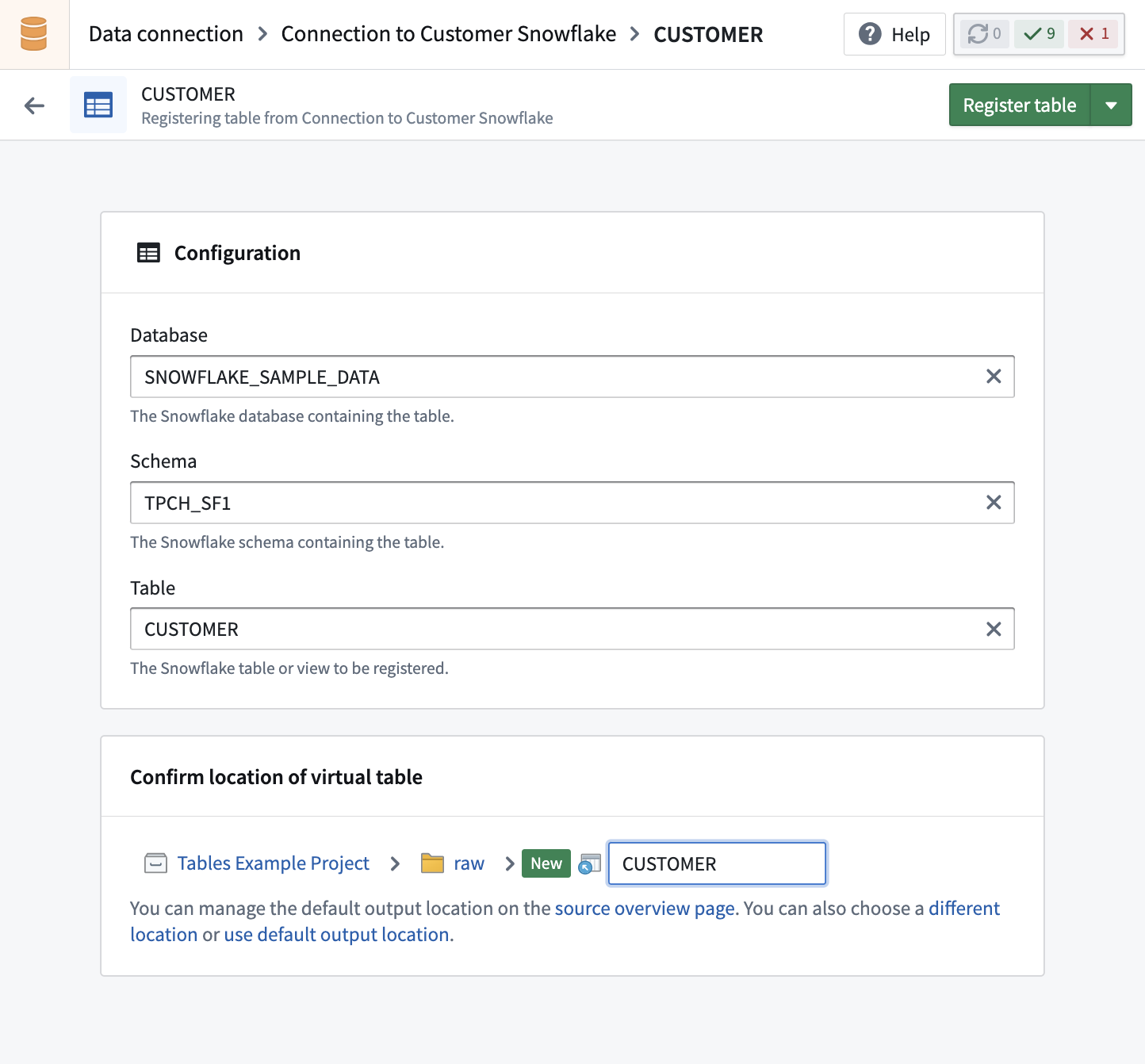
All supported sources allow you to register individual tables from the source system in Foundry. Tabular source types also support **bulk registration** of multiple virtual tables at once. Some sources additionally support **automatic registration**, which will periodically register all tables in the source that are accessible to the configured credentials in a designated project.
To register a virtual table, select **Create virtual table** in the **Virtual tables** tab in the source. Browse available tables and select the table to register. Unless you choose a different location, the virtual table will be created in the default output folder of the source.
#### Bulk registration
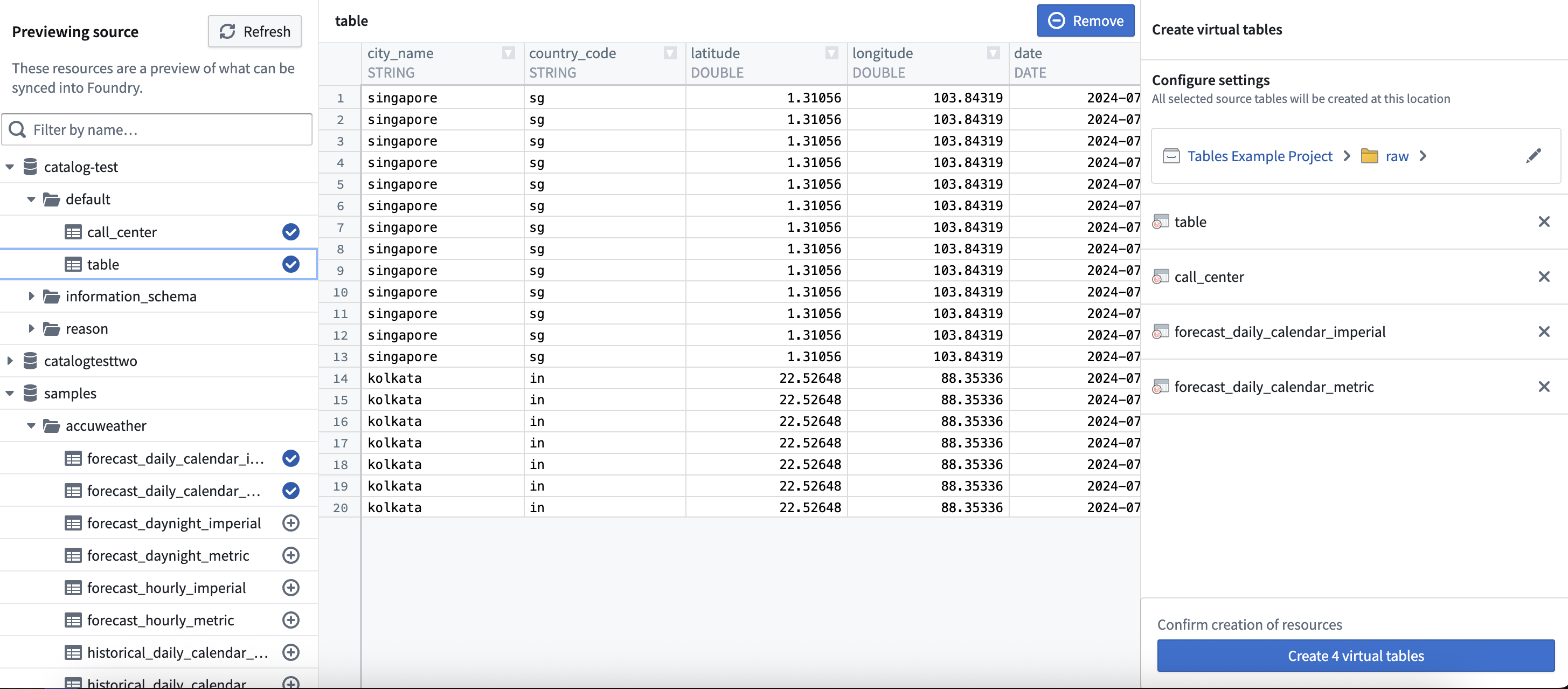
When working with tabular source types such as [Databricks](../../available-connectors/databricks/index.md), [BigQuery](../../available-connectors/bigquery/index.md), and [Snowflake](../../available-connectors/snowflake/index.md), you will be able to **bulk register** multiple virtual tables at once. To begin, select one or more external tables from the left panel. Use the right panel to change where your new virtual tables will be saved, or update their names. Changing the name of a virtual table in Foundry does not change the table name in the source.
#### Auto-registration
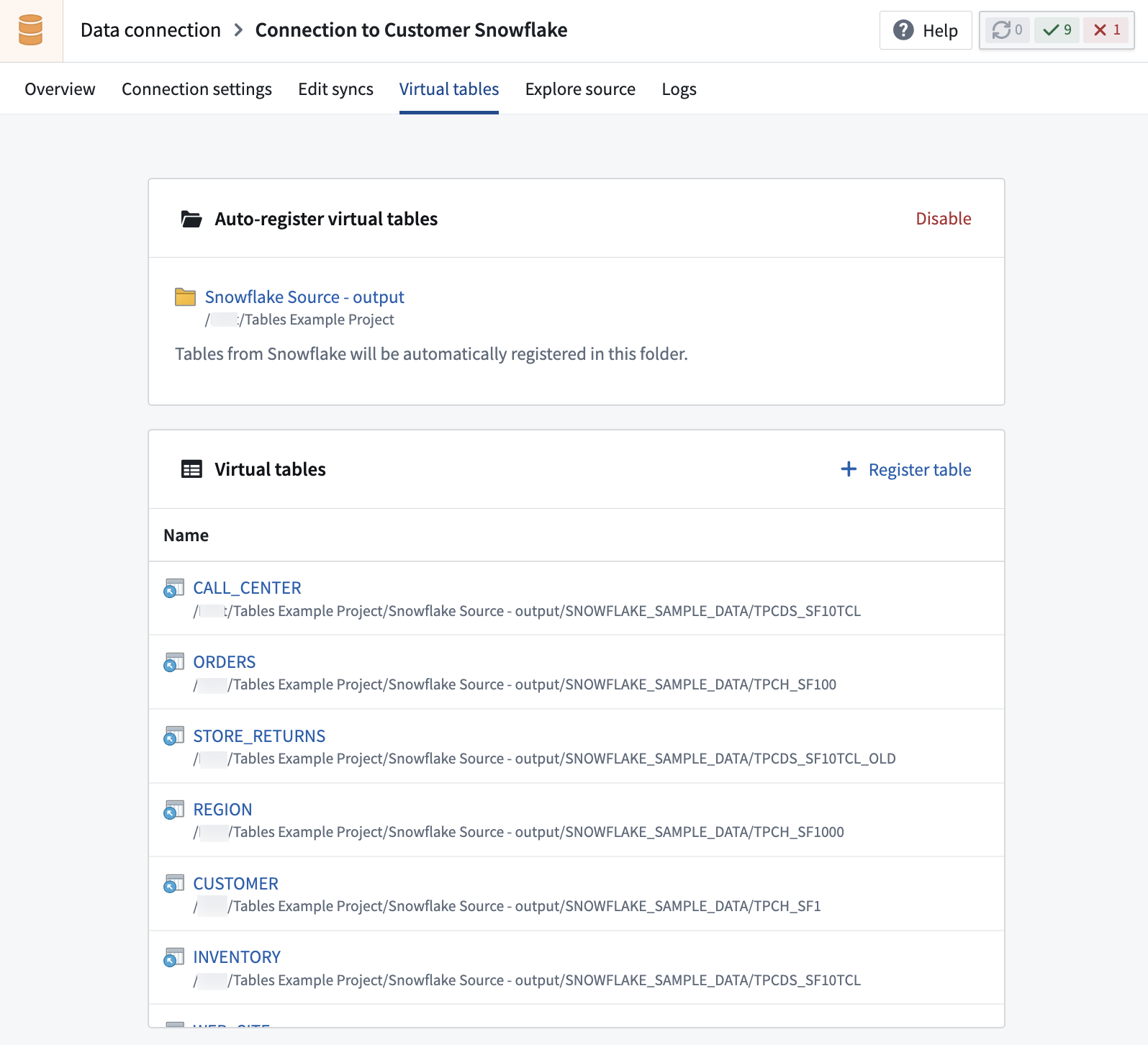
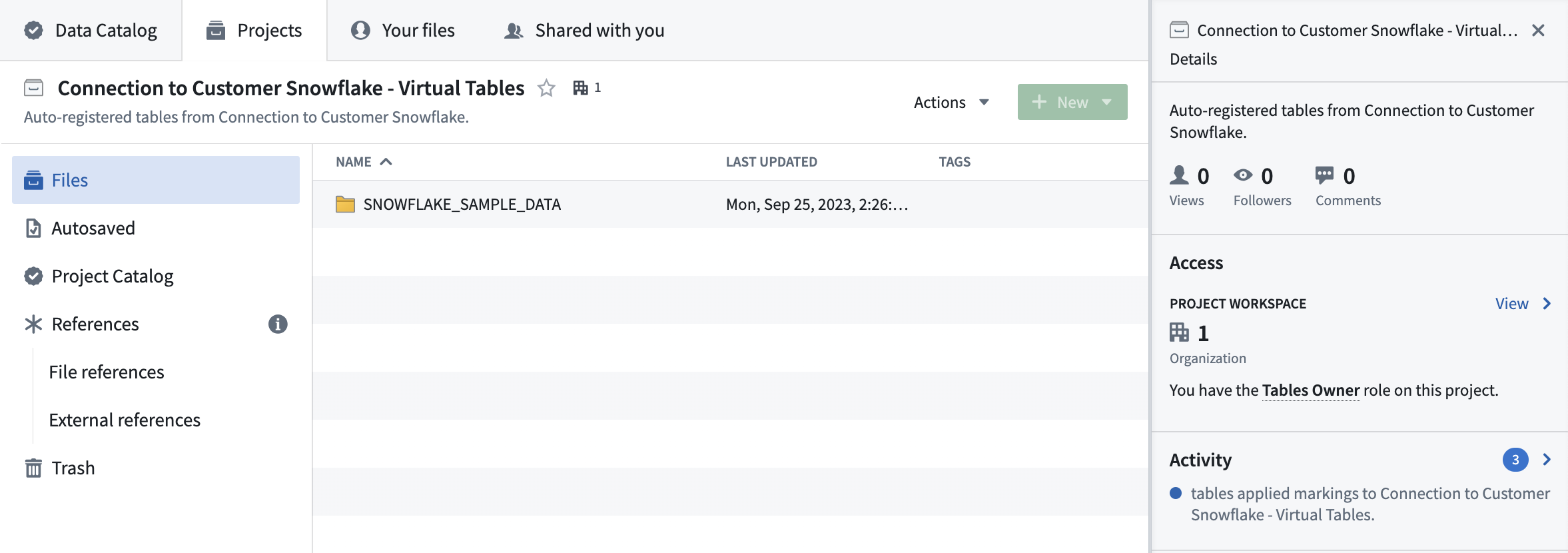
When enabling **auto-registration**, you create a new Foundry [project](../../compass/move-and-share-resources/index.md) where virtual tables will be created automatically. The folder hierarchy in this project will mirror the structure of the source system, and be periodically updated as new tables are created in the source. When source tables are deleted, related virtual tables will not be auto-deleted in the project, but accessing them will not load any data.
To enable auto-registration, you must have [project creation permissions](../../security/projects-and-roles/index.md#create-projects) in Foundry.
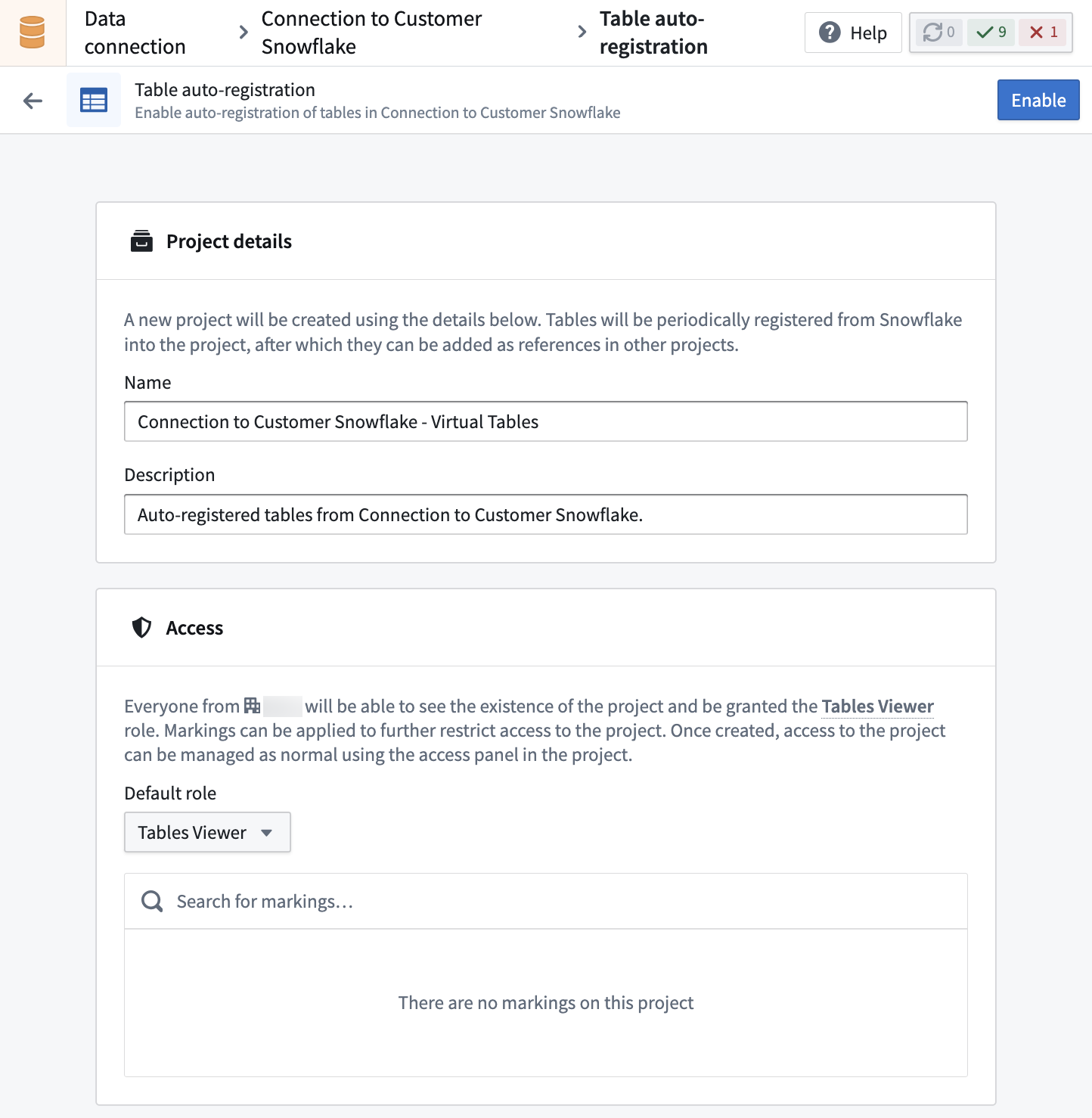
The project is managed by Foundry, and users cannot manually create or update resources in it. Virtual tables registered in this project can be imported into other projects for use in workflow development.
Enabling auto-registration allows setting permissions and access to the project, which can later be managed by the project owner using the access sidebar.
##### Tag filtering for Databricks sources
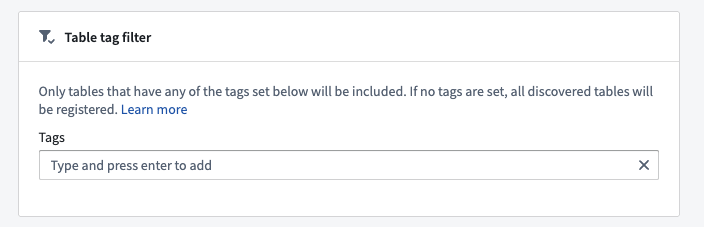
When configuring auto-registration for Databricks sources, you have the option of specifying a list of table tags to filter by. Only tables that have at least one of these tags set in the Databricks [`TABLE_TAGS` ↗](https://docs.databricks.com/aws/en/sql/language-manual/information-schema/table_tags) system table will be registered.
### Virtual tables in Code Repositories
When virtual tables are used in Code Repositories, the transforms consuming them will automatically obtain network egress based on the [egress policies](../../data-connection/set-up-direct-connection/index.md#configure-a-network-policy) configured on the source. The credentials configured on the source will necessarily be made available to connect to the source. This is similar behavior to [External Transforms](../../data-connection/external-transforms/index.md).
The following settings must be enabled on the source:
1. **Code imports:** This allows the source to be imported and used in a code repository. Further details of this setting and how to enable it can be found [here](../../data-connection/external-transforms/index.md#prerequisite-import-a-source-into-code).
2. **Export controls:** This controls which [security markings](../../security/markings/index.md) and organizations will be allowed on inputs to a Python Transform using a virtual table. Further details of this setting and how to enable it can be found [here](../../data-connection/external-transforms/index.md#configure-export-controls-on-the-source).
Once a source has been configured and imported into a code repository, virtual tables can be used as inputs to [Python Transforms](../../transforms-python/overview/index.md) in the same way a dataset would be used, using `transforms.api.Input`. [Incremental computation](../../transforms-python/incremental-overview/index.md) has a consistent API to that of datasets and is supported by a subset of sources. Refer to the [source-specific documentation](../source-type-overview/index.md) for more information.
In general, virtual tables are supported as inputs to Python, SQL, and Java Transforms. Only Python Transforms support creating a new virtual table as a transform output, while SQL and Java Transforms support writing to existing virtual tables.
[Learn more about creating new virtual tables via Python Transforms.](../../transforms-python/tables-overview/index.md)
## Viewing virtual table details
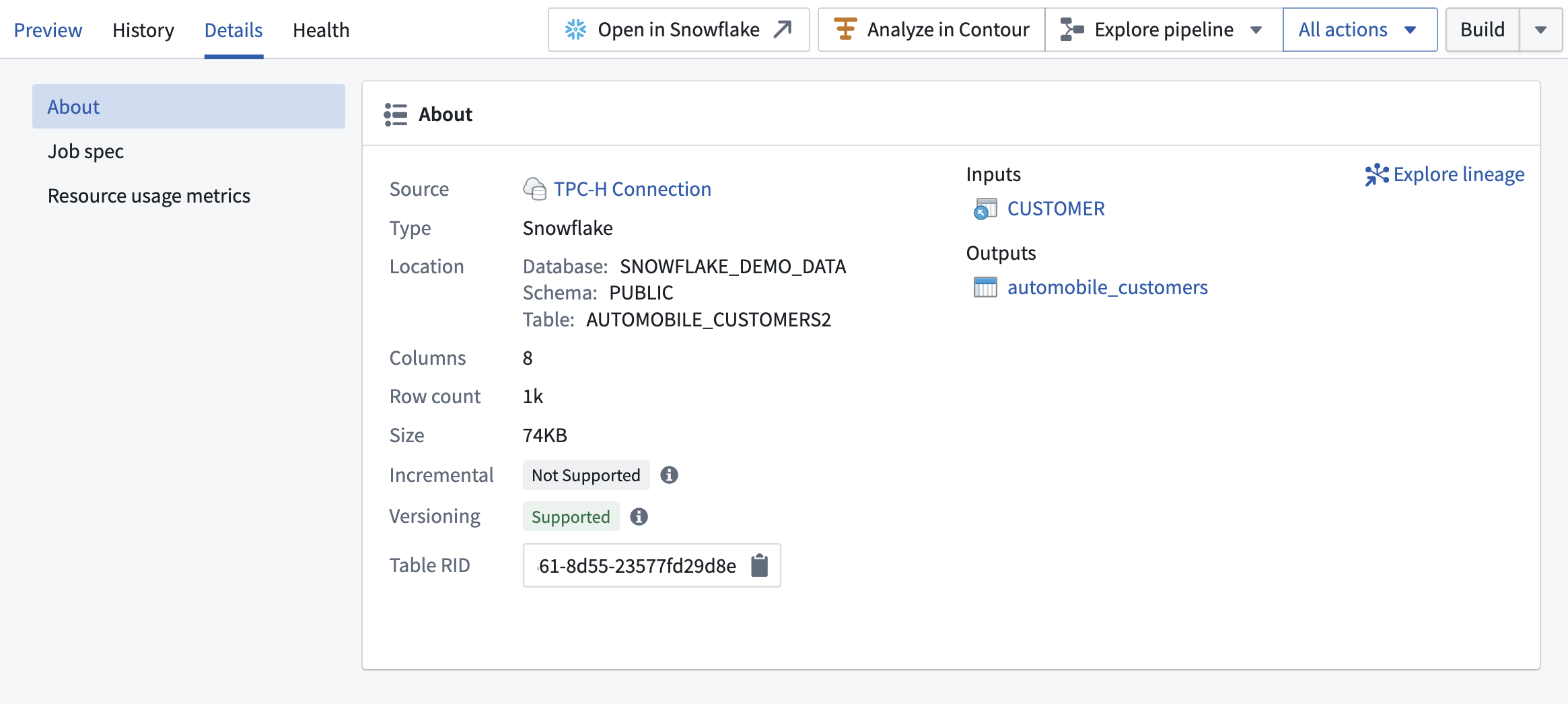
You can access key information about virtual tables in the Details panel of [Dataset preview](../../dataset-preview/overview/index.md).
This includes:
* **Incremental:** If supported, you can configure incremental pipelines with the table, so downstream builds process only new or changed data instead of reprocessing all rows.
* **Versioning:** If supported, the table provides versioning, allowing Foundry to detect updates and skip unnecessary downstream builds when the data has not changed.
## Update detection for virtual table inputs
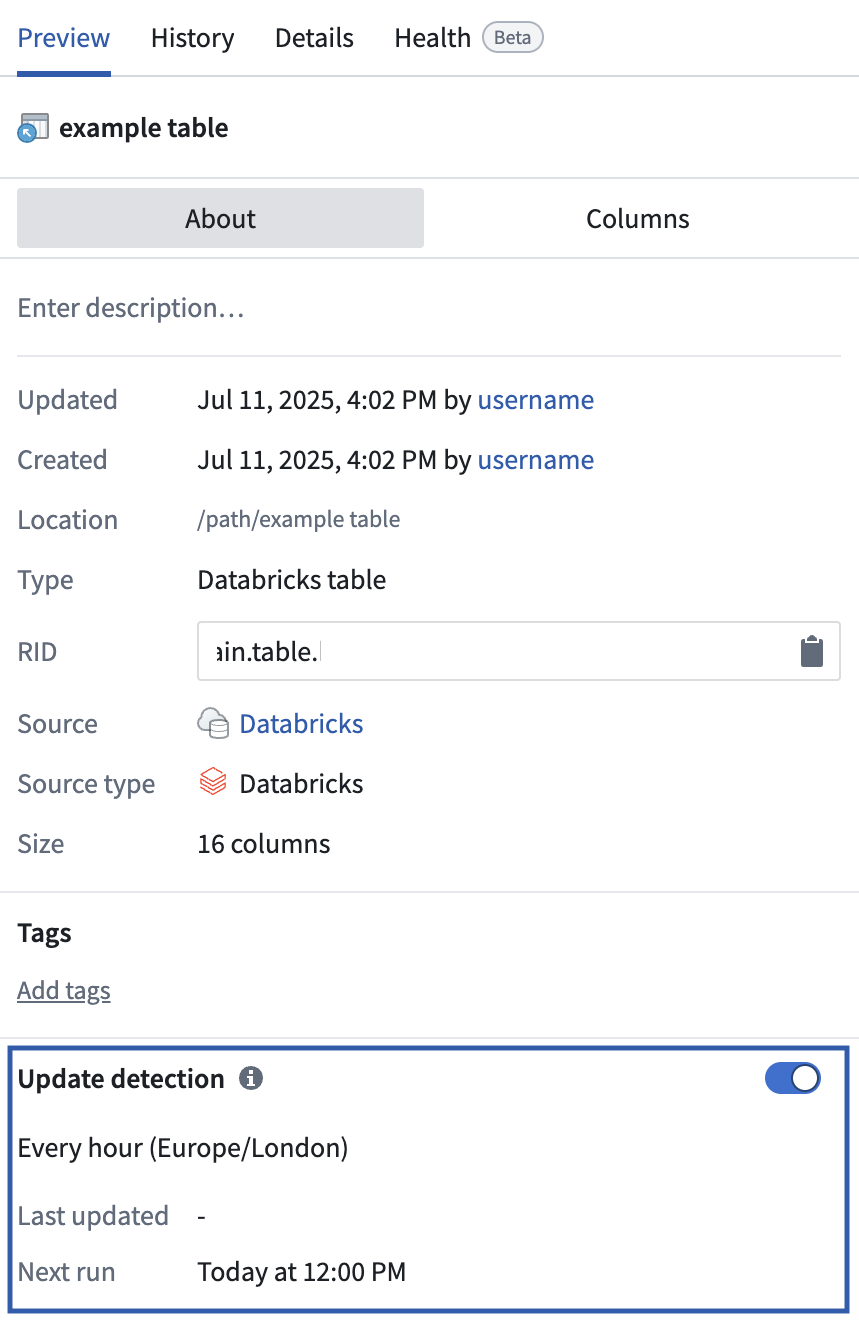
The update detection feature monitors virtual tables and detects changes to the table in the source system. This allows you to use virtual tables as build triggers for dependent resources, such as pipelines or objects.
Update detection is intended for virtual table inputs, which are tables managed externally and registered in Foundry. Update detection is not necessary for *virtual table outputs* (created by Foundry pipelines), as Foundry automatically tracks updates for these using pipeline build information.
When update detection is enabled, Foundry regularly polls the source system to check for updates to the table. If the source table format supports versioning (for example, Delta or Iceberg), Foundry can detect changes and only trigger downstream builds when necessary. If versioning is not supported, every poll is treated as a potential update, which may result in unnecessary downstream builds.
You can check whether your virtual table supports versioning by [viewing virtual table details](#viewing-virtual-table-details).
Update detection only controls *when* a downstream build is triggered. It does not determine whether the resulting build is a snapshot or an [incremental build](../../building-pipelines/pipeline-types/index.md#incremental). Sources with versioning support can also support incremental (append-only) builds, where Foundry identifies the specific rows that were added since the previous build and processes only that new data, rather than reprocessing the entire table. Incremental support for virtual tables is currently limited to append-only changes and has additional source-specific prerequisites, such as enabling Delta's [Change Data Feed ↗](https://docs.databricks.com/en/delta/delta-change-data-feed.html#enable-change-data-feed) or Iceberg's [Incremental Reads ↗](https://iceberg.apache.org/docs/latest/spark-queries/#incremental-read). Refer to the [source-specific documentation](../source-type-overview/index.md) for details. If a source does not support versioning, downstream pipelines built on that virtual table must use snapshot builds, which reprocess the entire table on every triggered run.
### Enable update detection
Update detection is only available if your virtual table input has been used to create downstream resources, such as downstream tables, datasets, or objects.
To enable update detection for a virtual table input, follow these instructions:
1. Open the virtual table in [Dataset preview](../../dataset-preview/overview/index.md).
2. Go to the update detection section in the left panel.
3. Enable **Update detection** and set the desired polling schedule (for example, hourly or daily).
Once enabled, you can use the virtual table input as a [schedule trigger](../../building-pipelines/create-schedule/index.md) for downstream tables and datasets. Any objects backed by the virtual table will reindex automatically when source updates are detected.
 ## Configure objects backed by virtual tables
You can configure objects backed directly by virtual tables in [Ontology Manager](../../ontology-manager/overview/index.md).
If the backing virtual table is updated outside of Foundry, you should enable [update detection](#update-detection-for-virtual-table-inputs) on the virtual table to ensure the objects receive regular updates from the source system.
## Using virtual tables vs syncing to datasets
The decision to use virtual tables vs. sync to Foundry datasets depends on your architecture goals and the target workflow to be supported. We recommend considering the appropriate integration pattern on a workflow-by-workflow basis. The two approaches can be used in conjunction to complement one another.
Below are some considerations to keep in mind about the potential benefits, drawbacks, and limitations of using virtual tables vs. syncing data to datasets.
### Benefits of using virtual tables
Virtual tables provide a number of benefits, including:
* Reduction of duplicate storage by not storing source data in Foundry, although Foundry will still store data for any downstream-created resources, such as datasets and objects that are outputs from Foundry pipelines.
* Queries can be pushed down to the source system to limit total data transfer. Availability of compute pushdown varies by source system and query type.
* Virtual tables may be especially beneficial for very large tables where duplicative storage costs become material.
* With virtual tables, data is queried directly upon use, without the need to synchronize data or consider potential for data staleness.
* Virtual tables provide optionality to help align Foundry implementation with target architecture patterns.
### Drawbacks of using virtual tables
Virtual tables may not be the best choice in all circumstances. Some considerations include:
* Interactive performance may be slower than working with data stored in Foundry datasets.
* Compute usage may increase depending on the types of queries being run on the virtual table. For example, tables that are used as an input into a scheduled pipeline may generate limited compute compared to tables that are frequently accessed interactively in Contour analyses.
* Virtual tables do not benefit from Foundry dataset capabilities such as dataset versioning or branching.
### Limitations of using virtual tables
Limitations of virtual tables include:
* Virtual tables are not available for all sources.
* Virtual tables require a [Foundry worker](../../data-connection/core-concepts/index.md#foundry-worker) source and [direct egress policies](../../administration/configure-egress/index.md#direct-connection-egress-policies).
* Connections using [self-service private link egress policies](../../administration/configure-egress/index.md#private-link-egress-policies) are generally not supported. However, [private links](../../private-link/overview/index.md) set up by a Palantir representative are supported.
* Connections using [agent proxy policies](../../administration/configure-egress/index.md#agent-proxy-egress-policies) are not supported.
* Connections using [bucket endpoint egress policies](../../administration/configure-egress/index.md#bucket-endpoint-egress-policies) are not supported.
* Connections using an [agent worker](../../data-connection/core-concepts/index.md#agent-worker) are not supported.
* Not all Foundry applications and features support using virtual tables as inputs. However, any materialized resources created downstream of virtual tables, such as datasets and object outputs from pipelines, are fully supported across the Foundry ecosystem as usual.
* Transforms that use the `use_external_systems` decorator are currently not compatible with Virtual Tables. Switch to [source-based external\_transforms](../../data-connection/external-transforms/index.md) or split your transform into multiple transforms, one that uses Virtual Tables as input and one that uses the `use_external_systems` decorator.
## Compute for queries on virtual tables
For queries run directly on virtual tables, compute may be split between Foundry and the source system. The specific behavior depends on the query and the degree of pushdown computation supported by the source system. Refer to the [source-specific documentation](../source-type-overview/index.md) for more information.
## Configure objects backed by virtual tables
You can configure objects backed directly by virtual tables in [Ontology Manager](../../ontology-manager/overview/index.md).
If the backing virtual table is updated outside of Foundry, you should enable [update detection](#update-detection-for-virtual-table-inputs) on the virtual table to ensure the objects receive regular updates from the source system.
## Using virtual tables vs syncing to datasets
The decision to use virtual tables vs. sync to Foundry datasets depends on your architecture goals and the target workflow to be supported. We recommend considering the appropriate integration pattern on a workflow-by-workflow basis. The two approaches can be used in conjunction to complement one another.
Below are some considerations to keep in mind about the potential benefits, drawbacks, and limitations of using virtual tables vs. syncing data to datasets.
### Benefits of using virtual tables
Virtual tables provide a number of benefits, including:
* Reduction of duplicate storage by not storing source data in Foundry, although Foundry will still store data for any downstream-created resources, such as datasets and objects that are outputs from Foundry pipelines.
* Queries can be pushed down to the source system to limit total data transfer. Availability of compute pushdown varies by source system and query type.
* Virtual tables may be especially beneficial for very large tables where duplicative storage costs become material.
* With virtual tables, data is queried directly upon use, without the need to synchronize data or consider potential for data staleness.
* Virtual tables provide optionality to help align Foundry implementation with target architecture patterns.
### Drawbacks of using virtual tables
Virtual tables may not be the best choice in all circumstances. Some considerations include:
* Interactive performance may be slower than working with data stored in Foundry datasets.
* Compute usage may increase depending on the types of queries being run on the virtual table. For example, tables that are used as an input into a scheduled pipeline may generate limited compute compared to tables that are frequently accessed interactively in Contour analyses.
* Virtual tables do not benefit from Foundry dataset capabilities such as dataset versioning or branching.
### Limitations of using virtual tables
Limitations of virtual tables include:
* Virtual tables are not available for all sources.
* Virtual tables require a [Foundry worker](../../data-connection/core-concepts/index.md#foundry-worker) source and [direct egress policies](../../administration/configure-egress/index.md#direct-connection-egress-policies).
* Connections using [self-service private link egress policies](../../administration/configure-egress/index.md#private-link-egress-policies) are generally not supported. However, [private links](../../private-link/overview/index.md) set up by a Palantir representative are supported.
* Connections using [agent proxy policies](../../administration/configure-egress/index.md#agent-proxy-egress-policies) are not supported.
* Connections using [bucket endpoint egress policies](../../administration/configure-egress/index.md#bucket-endpoint-egress-policies) are not supported.
* Connections using an [agent worker](../../data-connection/core-concepts/index.md#agent-worker) are not supported.
* Not all Foundry applications and features support using virtual tables as inputs. However, any materialized resources created downstream of virtual tables, such as datasets and object outputs from pipelines, are fully supported across the Foundry ecosystem as usual.
* Transforms that use the `use_external_systems` decorator are currently not compatible with Virtual Tables. Switch to [source-based external\_transforms](../../data-connection/external-transforms/index.md) or split your transform into multiple transforms, one that uses Virtual Tables as input and one that uses the `use_external_systems` decorator.
## Compute for queries on virtual tables
For queries run directly on virtual tables, compute may be split between Foundry and the source system. The specific behavior depends on the query and the degree of pushdown computation supported by the source system. Refer to the [source-specific documentation](../source-type-overview/index.md) for more information.