# Drag and drop between Ontology SDK applications
Palantir provides a [React ↗](https://react.dev/) library you can integrate with the [Ontology SDK (OSDK)](../../ontology-sdk/overview/index.md), enabling you to create and implement drag and drop functionality between custom applications. The `@palantir/dnd-osdk-react` library provides type-safe components and hooks you can use to configure [drag and drop zones](../drag-and-drop-overview/index.md) to transfer objects and object sets between different parts of your application and other Palantir platform applications, such as [Workshop](../../workshop/overview/index.md), [Object Explorer](../../object-explorer/overview/index.md), or Gaia.
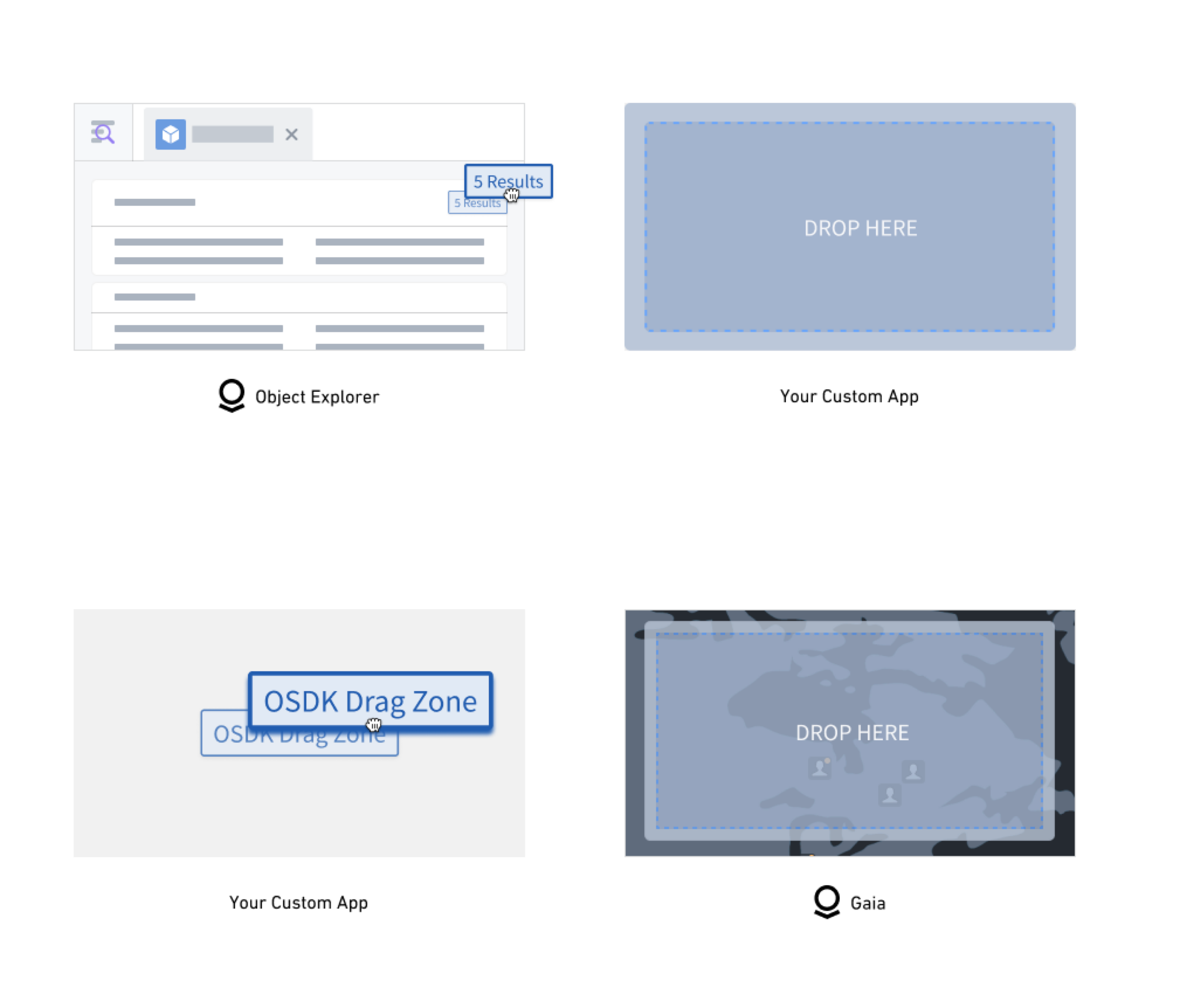
## Core library features and key concepts
* **OSDK integration:** Built specifically for Palantir's OSDK with automatic object set hydration and metadata handling.
* **Flexible data support and serialization:** Accepts both OSDK objects and object sets as well as custom data types in the same drop zone. Additionally, the library serializes all object and object set data.
* **Performance optimization:** Uses deep comparison memoization to prevent unnecessary backend calls.
* **Customizable visual feedback:** Offers built-in, customizable support for styling drop zones based on drag state.
* **Object type definition:** You can define which [object types](../../object-link-types/object-types-overview/index.md) your drag and drop zones accept.
* **Object set conversion and transportation:** All dropped objects are automatically converted to object sets for consistent handling across application boundaries.
* **Client integration:** The library requires that you generate an [OSDK client](../../developer-console/create-application/index.md) to enable metadata fetching and object set operations.
## Add the library to Code Workspaces
To begin building with the OSDK and the `@palantir/dnd-osdk-react` library, navigate to [Code Workspaces](../../code-workspaces/overview/index.md) and create a new [VS Code workspace](../../vs-code/overview/index.md) with **React** as the repository type.
Search for and select the `@palantir/dnd-osdk-react` library from your workspace's **Libraries** panel. If you are unable to locate the library in Code Workspaces, contact Palantir Support.
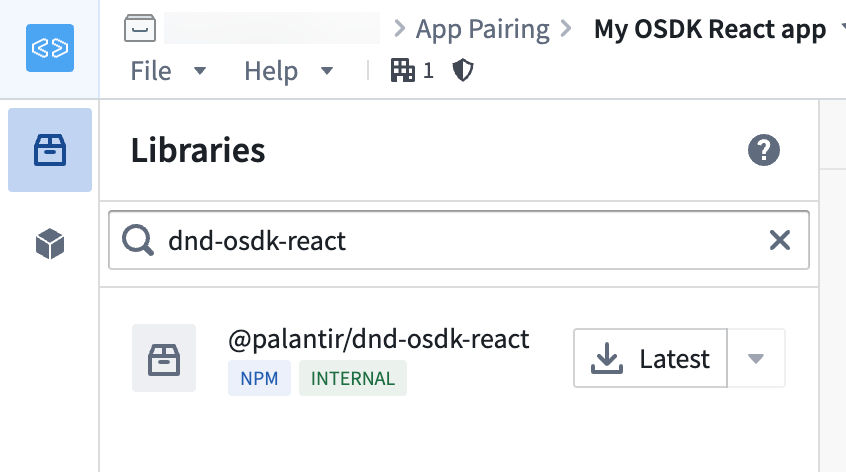
Once you add the library to your workspace, you will be able to use its hooks and components to handle drag and drop workflows across custom OSDK and Palantir platform applications. Review the examples below to help you get started.
### Example: Create a drag zone
Use the `OsdkObjectDragZone` component to render OSDK object data as draggable. When your application's users drag the content, then the associated object data is automatically included in the drag payload.
To create a drag zone with an object set, you can reference the code sample below which:
1. Imports the specific object types from your generated OSDK, which you will use to construct object sets or singular objects for your drag zone.
2. Uses a generated OSDK client to create object sets that represent queries or collections of objects. Alternatively, you can use previously fetched object instances.
3. Places relevant [JSX ↗](https://react.dev/learn/writing-markup-with-jsx) content inside the `OsdkObjectDragZone` component, ensuring the content is draggable.
4. Configures the `client` to reference a generated OSDK client and an `objectSet` that will be included in the drag payload.
```typescript
import { MyObjectType } from "@my-osdk-lib/sdk"; // Import your object type
import { OsdkObjectDragZone } from "@palantir/dnd-osdk-react";
import client from "./client";
import { ObjectSet } from "@osdk/api";
// create an object set from MyObjectType
const objectSet = client(MyObjectType);
function ObjectSetDragExample() {
return (
Drag me!
);
}
export default ObjectSetDragExample;
```
### Example: Create a drop zone
Use the `OsdkObjectDropZone` component to render OSDK object data as droppable. When your application's users drop the content, then the component automatically handles object data deserialization and provides the dropped object data.
To create a drop zone with an object set, you can reference the code sample below which, like the [drag example above](#example-create-a-drag-zone), imports an object type and generated OSDK client.
```typescript
import { MyObjectType } from "@my-osdk-lib/sdk"; // Import your object type
import { OsdkObjectDropZone } from "@palantir/dnd-osdk-react";
import client from "./client";
import { ObjectSet } from "@osdk/api";
// Restrict drop zone to only accept MyObjectType
const acceptedObjectTypes = [MyObjectType];
// Define actions that occur when objects are dropped
const handleObjectSetsDrop = React.useCallback<
OnOsdkObjectSetsDrop<[MyObjectType]>
>(async (objectSetsByApiName) => {
// Access dropped object sets by their API name
const myObjectObjectSets = objectSetsByApiName.MyObjectType;
...
}, []);
```
Next, configure the drop zone component.
```typescript
import styles from "./DropZoneExample.module.css";
Drop objects here!
;
```
The full example below creates a drop zone that accepts objects and object sets within the `MyObjectType` object type. When objects are dropped, the zone fetches the first 100 objects from the dropped object set and displays them in a list alongside a **Clear** button. The example uses the `@blueprintjs/core` library for all user interface components, such as the **Clear** button.
```typescript
import {
OnOsdkObjectSetsDrop,
OsdkInstanceObjects,
OsdkObjectDropZone,
} from "@palantir/dnd-osdk-react";
import { MyObjectType } from "@my-osdk-lib/sdk";
import React from "react";
import client from "./client";
import { Button, Card, CardList } from "@blueprintjs/core";
import styles from "./DropZoneExample.module.css";
// Accept only MyObjectTypes
const acceptedObjectTypes = [MyObjectType];
export function MyObjectTypeDropZoneExample() {
const [loadedObjects, setLoadedObjects] = React.useState<
OsdkInstanceObjects<[typeof MyObjectType]>
>([]);
const handleObjectSetsDrop = React.useCallback<
OnOsdkObjectSetsDrop<[MyObjectType]>
>(async (objectSetsByApiName) => {
// Access dropped object sets by their API name
const myCoolObjectObjectSets = objectSetsByApiName.MyObjectType;
const firstObjectSet = myCoolObjectObjectSets?.[0];
// If no object set was dropped, exit early
if (firstObjectSet == null) {
return;
}
// Fetch the first 100 objects from the dropped object set
const objects = (
await firstObjectSet.fetchPage({
$pageSize: 100,
$includeRid: true,
})
).data;
// Update state with the loaded objects
setLoadedObjects(objects);
}, []);
const handleClear = React.useCallback(() => {
// Clear the loaded objects when the clear button is clicked
setLoadedObjects([]);
}, []);
return (
Drop Zone Example
Drop MyObjectTypes here!
{/* Conditionally render either a clear button or empty state message */}
{loadedObjects.length > 0 ? (
// If objects have been dropped and loaded, show a clear button with count
) : (
// If no objects have been loaded yet, show instructional text
Dropped objects will appear here once you drop them
into the drop zone.
)}
{/* Render the list of dropped objects using Blueprint CardList */}
{loadedObjects.map((object) => (
{/* Display the object's title using the $title property */}
{object.$title}
))}
);
}
```
[Learn more about building custom OSDK React applications.](../../ontology-sdk-react-applications/overview/index.md)