# Announcements
**REMINDER:** Sign up for the Foundry Newsletter to receive a summary of new products, features, and improvements across the platform directly to your inbox. For more information on how to subscribe, see the [Foundry Newsletter and Product Feedback channels announcement](../2023-11/index.md#foundry-newsletter-and-product-feedback-channels-available-for-sign-up-now-ga).
Share your thoughts about these announcements in our [Developer Community Forum ↗](https://community.palantir.com/c/announcements/6).
***
## Find and replace is now available in Pipeline Builder
Date published: 2025-03-27
Pipeline Builder's new find and replace feature allows users to search over a pipeline graph to identify nodes and quickly replace columns. Users can search by name, description, column, parameter referenced, and more. With the **Replace columns** option, users can replace a group, a single instance, or all instances of a column name.
### Get started
Access the **Find** feature by using the magnifying glass icon to search your pipelines by various parameters, such as node names and column references. You can customize search by selecting or unselecting specific criteria.
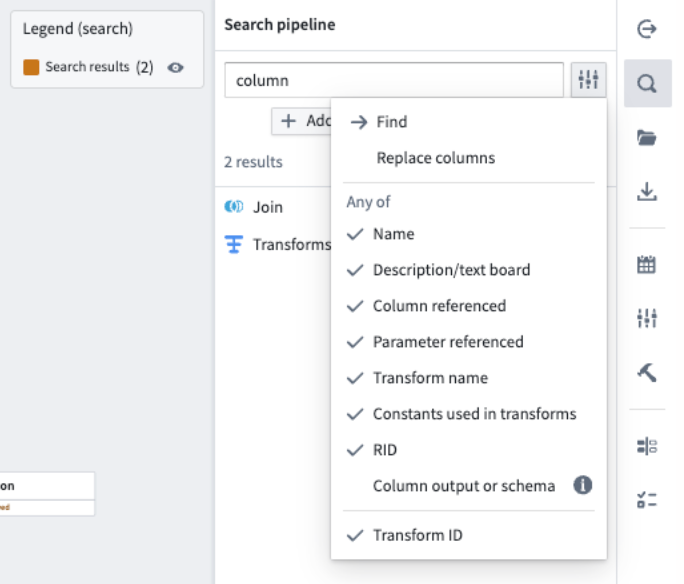 *The* ***Find*** *option, accessible using the magnifying glass icon on the left toolbar.*
Save time on column name updates by replacing all instances of a column name simultaneously. The **Replace columns** option can be accessed from the dropdown next to the search input, where you can enter a replacement term and preview changes before applying. Here, you can customize your replacement strategy and replace column names individually or all at once.
*The* ***Find*** *option, accessible using the magnifying glass icon on the left toolbar.*
Save time on column name updates by replacing all instances of a column name simultaneously. The **Replace columns** option can be accessed from the dropdown next to the search input, where you can enter a replacement term and preview changes before applying. Here, you can customize your replacement strategy and replace column names individually or all at once.
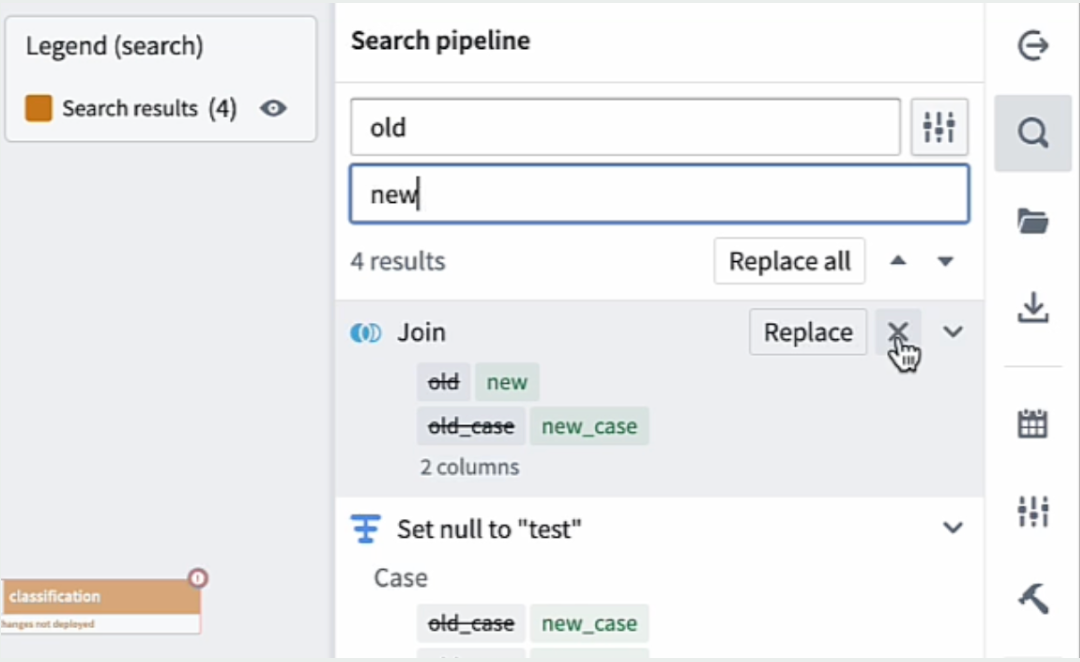 *The replace columns interface, displaying search results and the option to* ***Replace*** *and* ***Replace all.***
These enhancements improve pipeline management efficiency by enabling bulk updates to expedite tasks and minimize manual errors. [For more details, visit the documentation.](../../pipeline-builder/management-find-and-replace/index.md)
### Your feedback matters
We want to hear about your experiences with Pipeline Builder and welcome your feedback. Share your thoughts with Palantir Support channels or on our [Developer Community ↗](https://community.palantir.com/) using the [pipeline-builder tag ↗](https://community.palantir.com/tag/pipeline-builder).
***
## Enhancements to model experiments
Date published: 2025-03-27
We are excited to announce three new enhancements to [experiments](../../integrate-models/experiments-overview/index.md) in the Palantir platform: [MLflow ↗](https://mlflow.org/) integration, image logging, and a parallel coordinate chart view.
Beginning the week of March 24, we are introducing a new [MLflow ↗](https://mlflow.org/) integration allowing users to use MLflow in the Palantir platform for model training metrics tracking, image logging in experiments to better support computer vision workflows and custom charts, and a parallel coordinate chart view to get a better understanding of how different parameters impact the performance of a model.
### MLflow integration
The experiments framework in `palantir_models` now includes a first class integration with [MLflow ↗](https://mlflow.org/). You can use [MLflow ↗](https://mlflow.org/) in the Palantir platform for model training metrics tracking. MLflow provides:
* Out-of-the-box integrations with numerous open source machine learning frameworks.
* Auto-logging functionality.
* Callbacks that can be added when training more complex models in libraries, such as PyTorch or TensorFlow.
To get started, install MLflow, create an experiment, and register it as the current in progress MLflow run:
```python
import mlflow
experiment = model_output.create_experiment("my-experiment")
with experiment.as_mlflow_run():
# This example model is a keras model
model.fit(
x_train,
y_train,
batch_size=32,
epochs=5,
validation_split=0.1,
callbacks=[mlflow.keras.MlflowCallback()],
)
```
Any logs written to MLflow in the `as_mlflow_run` block will be routed to the corresponding experiment, and can be published alongside the model version at the end of the training job.
### Image logging
When developing a computer vision model, it can be useful to test the model against a fixed set of validation images during the training job. The experiments framework now allows users to log images at runtime. This allows you to visualize how well a computer vision model is converging over time.
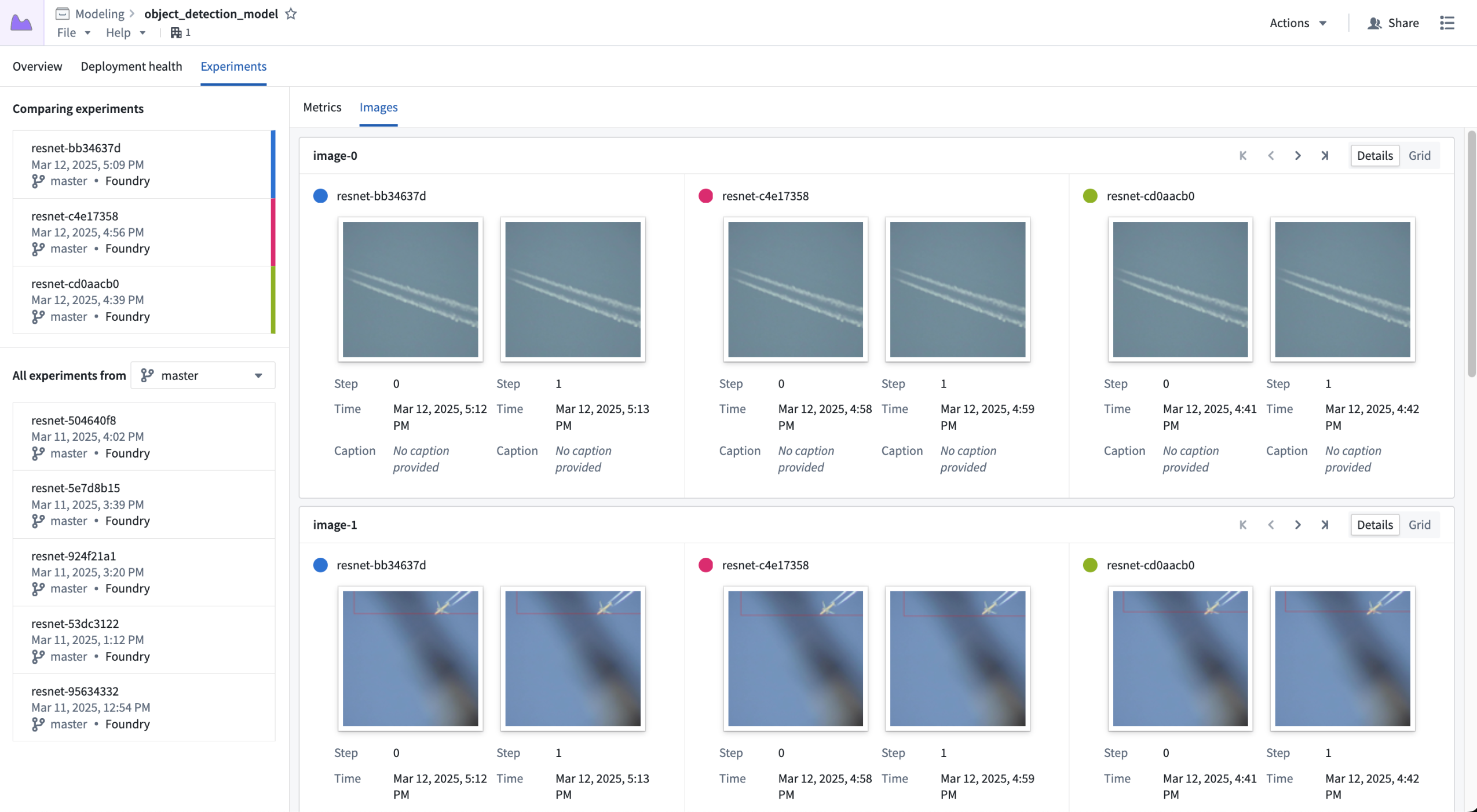
*Visualizing the "image-0" and "image-1" series across three experiments.*
Image logging also offers the ability to log user-generated charts as images. This feature opens up support for creating any type of chart a user may find valuable, such as ROC curves, confusion matrices, and more.
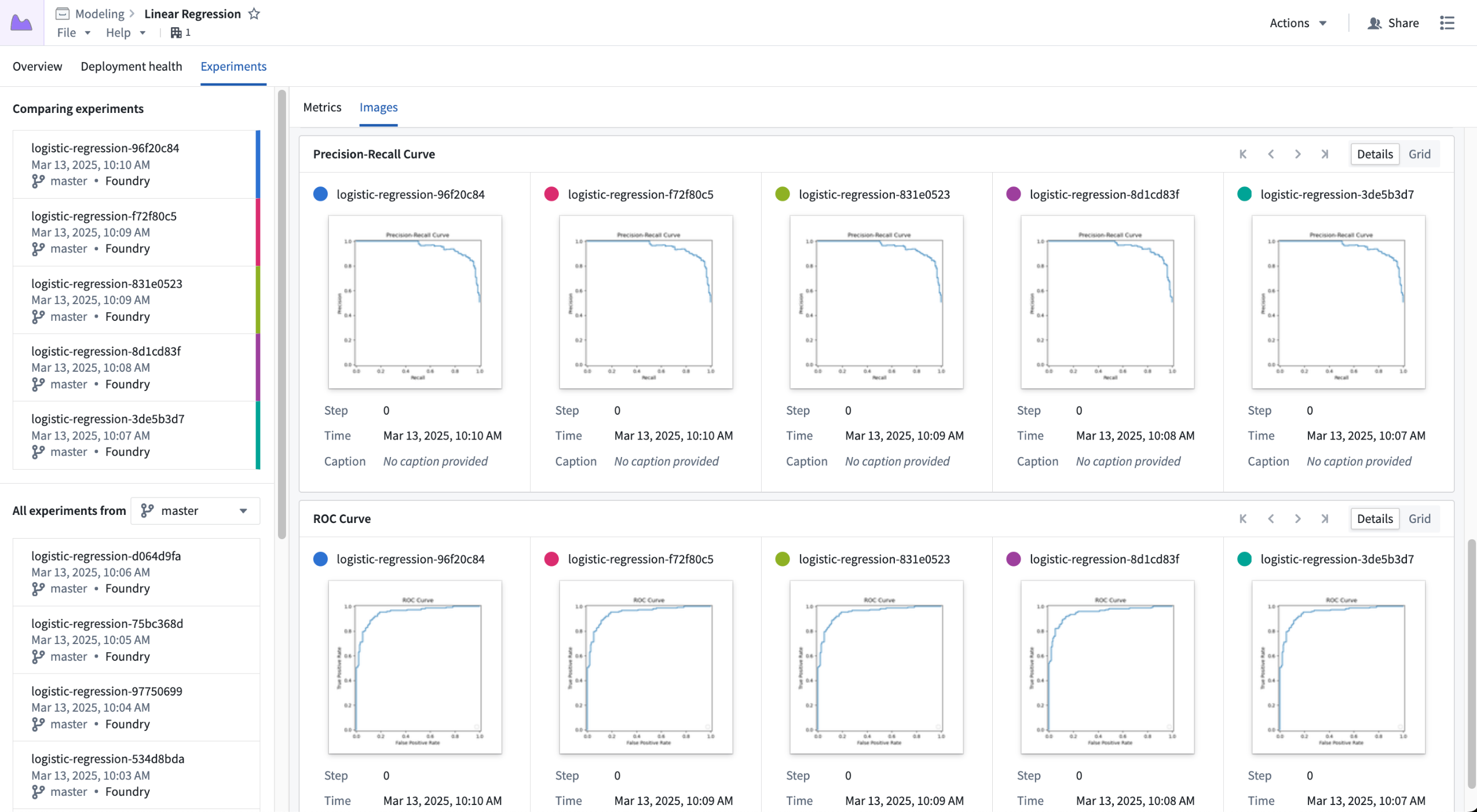
*Storing custom charts in image series, shown across five experiments.*
### Parallel coordinate chart
It can be difficult to get a full understanding of how different parameters impact the outcome of model training. To help users get a better idea of how parameters impact a metric value, we are introducing the ability to view a parallel coordinate chart. This allows users to better understand how a set of parameters impact some aggregated metric value.
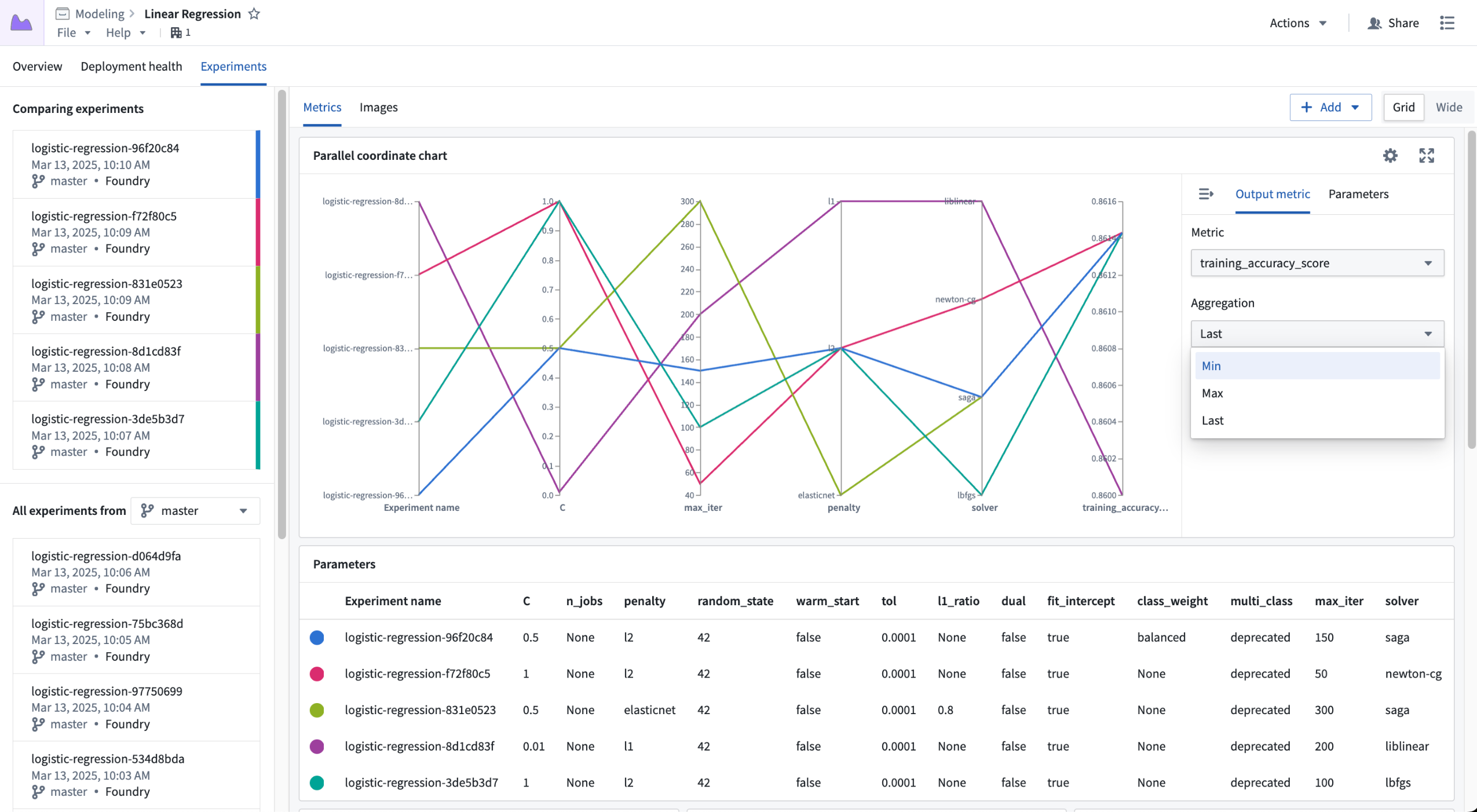
*Configuring the output metric for a parallel coordinate chart.*
### What's next for experiments?
Over the next few months we will continue to make further enhancements to model experiments, including:
* First class support for logging charts from charting libraries like Matplotlib, Plotly, and more.
* Better searching and filtering of experiments for comparison.
* New dashboarding capabilities.
[Explore the documentation to get started with model experiments.](../../integrate-models/experiments-overview/index.md)
***
## Bulk delete objects and actions in Workflow Lineage
Date published: 2025-03-25
Workflow Lineage users can now bulk delete objects and actions in the workflow graph. When performing bulk deletions, users will be able to create proposals and see a detailed list of the selected objects, actions, and any corresponding object links slated for deletion.
### Key features
* **Intuitive selection:** Select the nodes you wish to delete on the graph, then right-click and choose **Delete resources**.
*The replace columns interface, displaying search results and the option to* ***Replace*** *and* ***Replace all.***
These enhancements improve pipeline management efficiency by enabling bulk updates to expedite tasks and minimize manual errors. [For more details, visit the documentation.](../../pipeline-builder/management-find-and-replace/index.md)
### Your feedback matters
We want to hear about your experiences with Pipeline Builder and welcome your feedback. Share your thoughts with Palantir Support channels or on our [Developer Community ↗](https://community.palantir.com/) using the [pipeline-builder tag ↗](https://community.palantir.com/tag/pipeline-builder).
***
## Enhancements to model experiments
Date published: 2025-03-27
We are excited to announce three new enhancements to [experiments](../../integrate-models/experiments-overview/index.md) in the Palantir platform: [MLflow ↗](https://mlflow.org/) integration, image logging, and a parallel coordinate chart view.
Beginning the week of March 24, we are introducing a new [MLflow ↗](https://mlflow.org/) integration allowing users to use MLflow in the Palantir platform for model training metrics tracking, image logging in experiments to better support computer vision workflows and custom charts, and a parallel coordinate chart view to get a better understanding of how different parameters impact the performance of a model.
### MLflow integration
The experiments framework in `palantir_models` now includes a first class integration with [MLflow ↗](https://mlflow.org/). You can use [MLflow ↗](https://mlflow.org/) in the Palantir platform for model training metrics tracking. MLflow provides:
* Out-of-the-box integrations with numerous open source machine learning frameworks.
* Auto-logging functionality.
* Callbacks that can be added when training more complex models in libraries, such as PyTorch or TensorFlow.
To get started, install MLflow, create an experiment, and register it as the current in progress MLflow run:
```python
import mlflow
experiment = model_output.create_experiment("my-experiment")
with experiment.as_mlflow_run():
# This example model is a keras model
model.fit(
x_train,
y_train,
batch_size=32,
epochs=5,
validation_split=0.1,
callbacks=[mlflow.keras.MlflowCallback()],
)
```
Any logs written to MLflow in the `as_mlflow_run` block will be routed to the corresponding experiment, and can be published alongside the model version at the end of the training job.
### Image logging
When developing a computer vision model, it can be useful to test the model against a fixed set of validation images during the training job. The experiments framework now allows users to log images at runtime. This allows you to visualize how well a computer vision model is converging over time.

*Visualizing the "image-0" and "image-1" series across three experiments.*
Image logging also offers the ability to log user-generated charts as images. This feature opens up support for creating any type of chart a user may find valuable, such as ROC curves, confusion matrices, and more.

*Storing custom charts in image series, shown across five experiments.*
### Parallel coordinate chart
It can be difficult to get a full understanding of how different parameters impact the outcome of model training. To help users get a better idea of how parameters impact a metric value, we are introducing the ability to view a parallel coordinate chart. This allows users to better understand how a set of parameters impact some aggregated metric value.

*Configuring the output metric for a parallel coordinate chart.*
### What's next for experiments?
Over the next few months we will continue to make further enhancements to model experiments, including:
* First class support for logging charts from charting libraries like Matplotlib, Plotly, and more.
* Better searching and filtering of experiments for comparison.
* New dashboarding capabilities.
[Explore the documentation to get started with model experiments.](../../integrate-models/experiments-overview/index.md)
***
## Bulk delete objects and actions in Workflow Lineage
Date published: 2025-03-25
Workflow Lineage users can now bulk delete objects and actions in the workflow graph. When performing bulk deletions, users will be able to create proposals and see a detailed list of the selected objects, actions, and any corresponding object links slated for deletion.
### Key features
* **Intuitive selection:** Select the nodes you wish to delete on the graph, then right-click and choose **Delete resources**.
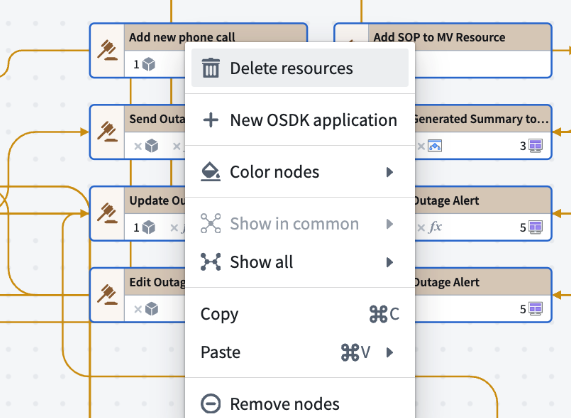
*The context menu in Workflow Lineage, with the option to **Delete resources.***
* **Comprehensive deletion proposal:** Upon initiating a bulk deletion, you will be prompted to create a proposal. This proposal will detail the number of link types associated with the objects slated for deletion, as well as the total number of objects and actions being deleted.
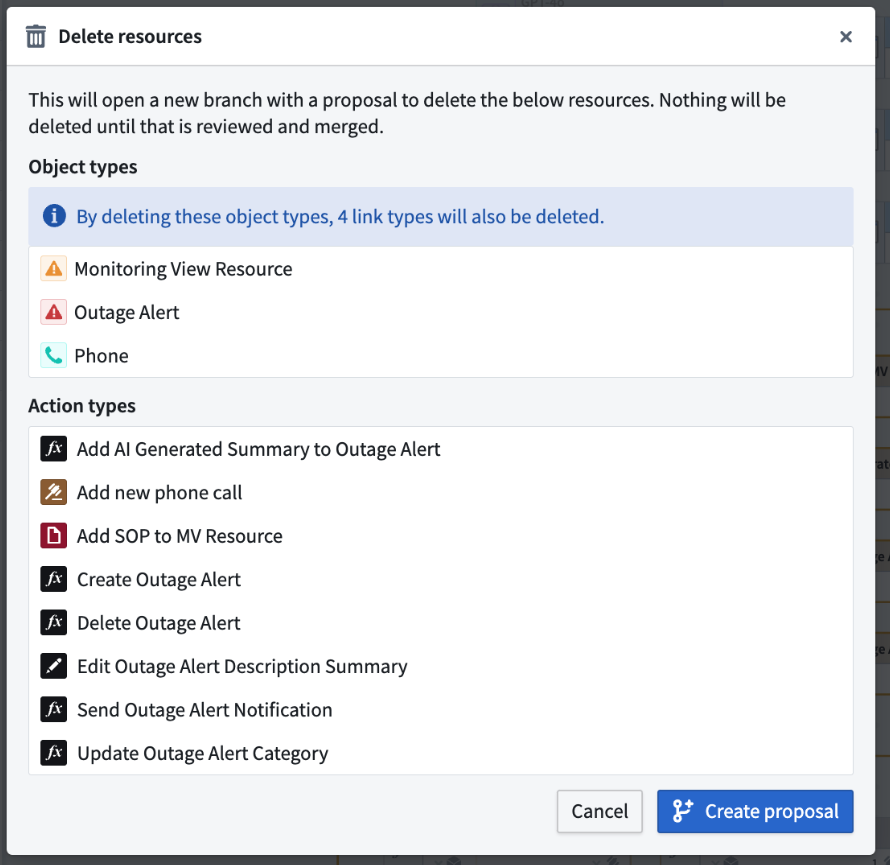 *The list of resources that will be deleted following a bulk deletion.*
* **Seamless integration with Ontology Manager:** Merge your deletion proposal using Ontology Manager, ensuring that your Ontology remains up to date and accurate.
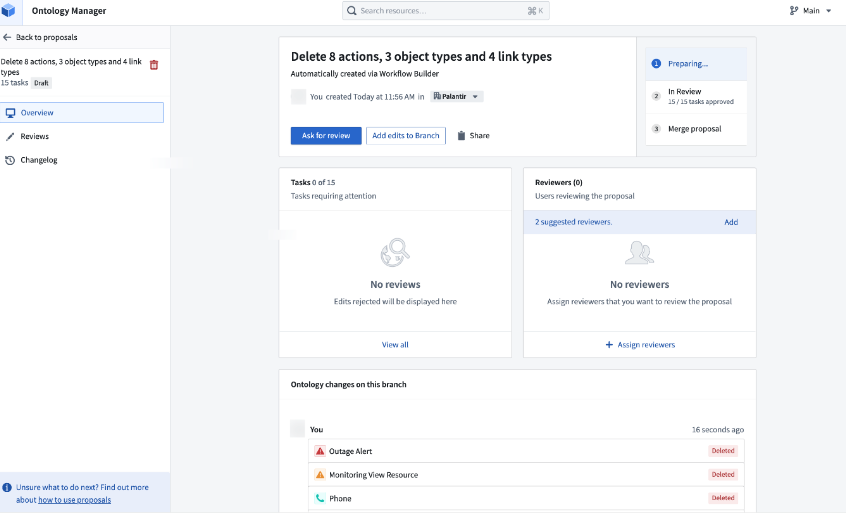
*A sample proposal in Ontology Manager.*
Workflow Lineage's bulk delete feature helps you maintain an organized workflow, ensuring your data remains relevant and manageable. [Learn more about making changes to your workflows in Workflow Lineage.](../../workflow-lineage/refactor-and-understand-workflows/index.md)
### Share your feedback
We want to hear what you think about our updates to Workflow Lineage. Send your feedback to our Palantir Support teams, or share in our [Developer Community ↗](https://community.palantir.com/).
***
## Agent change history is now available
Date published: 2025-03-25
Data Connection [agents](../../data-connection/set-up-agent/index.md) now display the history of configuration changes and restarts, offering transparency into agent actions to better diagnose connection issues. Agent change history is now available in beta and enabled by default on all enrollments.
Data connections are typically facilitated through a [direct connection](../../data-connection/set-up-direct-connection/index.md) (without an agent), but some organizations may choose to use agents to create a security boundary between Foundry and a data source that lives in their network. To follow proper agent hygiene, these organizations should use maintenance windows and practice frequent restarts; however, these events were previously not captured in a historical record. Therefore, critical actions taken against an agent were difficult to reference when debugging a failing data connection. With agent change history, we solve this issue by providing a historical list of actions related to agent health. This insight into change history is particularly helpful in circumstances where many users have access to an agent, since you can now view the users associated with each agent event.
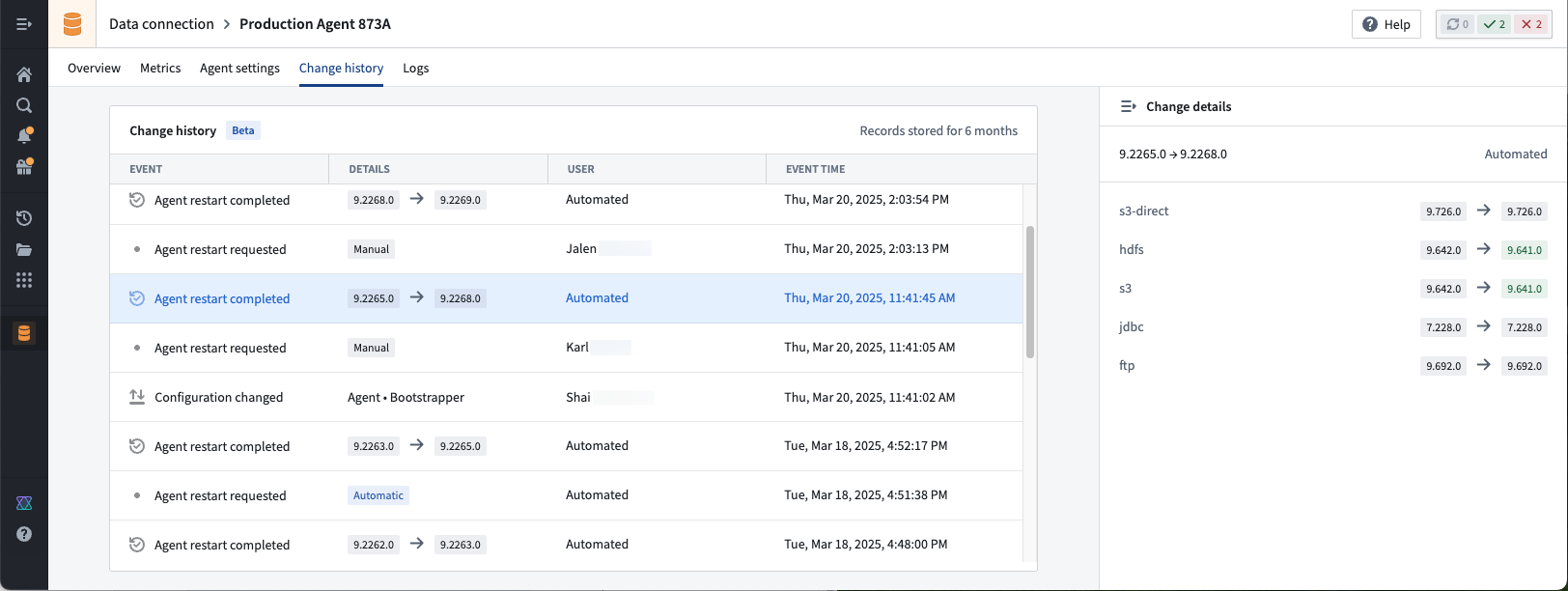
*In this example, several teammates made changes to the agent's configuration. If any managed plug-in versions changed upon agent restart, we can view the user associated with the change.*
In our first release, we capture agent configuration changes, restart requests, and successful restarts. With our ongoing work, we anticipate adding more event types to capture a greater variety of actions associated with agents.
As a reminder, agents should only be used when a [direct connection](../../data-connection/set-up-direct-connection/index.md) is not possible.
### We want to hear from you
Share your feedback about agent change history by contacting our Palantir Support teams, or let us know in our [Developer Community ↗](https://community.palantir.com/) using the [`data-connection` tag ↗](https://community.palantir.com/tag/data-connection).
***
## AI coding for Python transforms and OSDK now available in VS Code Workspaces
Date published: 2025-03-25
VS Code Workspaces now ships with the [Continue ↗](https://docs.continue.dev/) open-source extension preinstalled and preconfigured to work with Palantir-provided models. Continue offers many features for AI code generation, including [chat ↗](https://docs.continue.dev/features/chat), [making inline edits ↗](https://docs.continue.dev/features/edit), [codebase indexing ↗](https://docs.continue.dev/features/codebase-context), [custom context selection ↗](https://docs.continue.dev/features/codebase-context), and more.
In the Palantir platform, Continue is configured to have knowledge about Palantir SDKs for Python transforms and TypeScript OSDK repositories. This contextual understanding of your data structures, Ontology, and organization allows Continue to generate more accurate and relevant code.
[For more details, review our AI development tools documentation.](../../vs-code/ai-development-tools/index.md)
### Python transforms repositories
In Python transforms repositories, Continue has knowledge of your dataset metadata alongside Python transforms SDKs.
*Generating a Python transform with Continue in VS Code Workspaces.*
### TypeScript OSDK repositories
In TypeScript OSDK repositories, Continue has full context on your OSDK, including Ontology objects, properties, links, actions, and imported functions.
*Editing a TypeScript OSDK application with Continue in VS Code Workspaces.*
### Your feedback matters
Your insights are crucial in helping us understand how we can improve VS Code Workspaces. Share your feedback through Palantir Support channels and our [Developer Community ↗](https://community.palantir.com/) using the [`vscode` tag ↗](https://community.palantir.com/tag/vscode).
***
## Improved performance and support for actionable resources in admin view
Date published: 2025-03-25
Admin view now supports individual resource viewing, assignment, and status-setting. This change is coupled with new admin view performance improvements for faster navigation of resources and intervention statistics.
The new functionality can be accessed by maintenance operators through the **Admin view** toggle in the Upgrade Assistant home page, and navigating to the desired intervention. There, a panel presenting resources split by organizations is available for maintenance operators to navigate through, leading to a table of actionable resources.
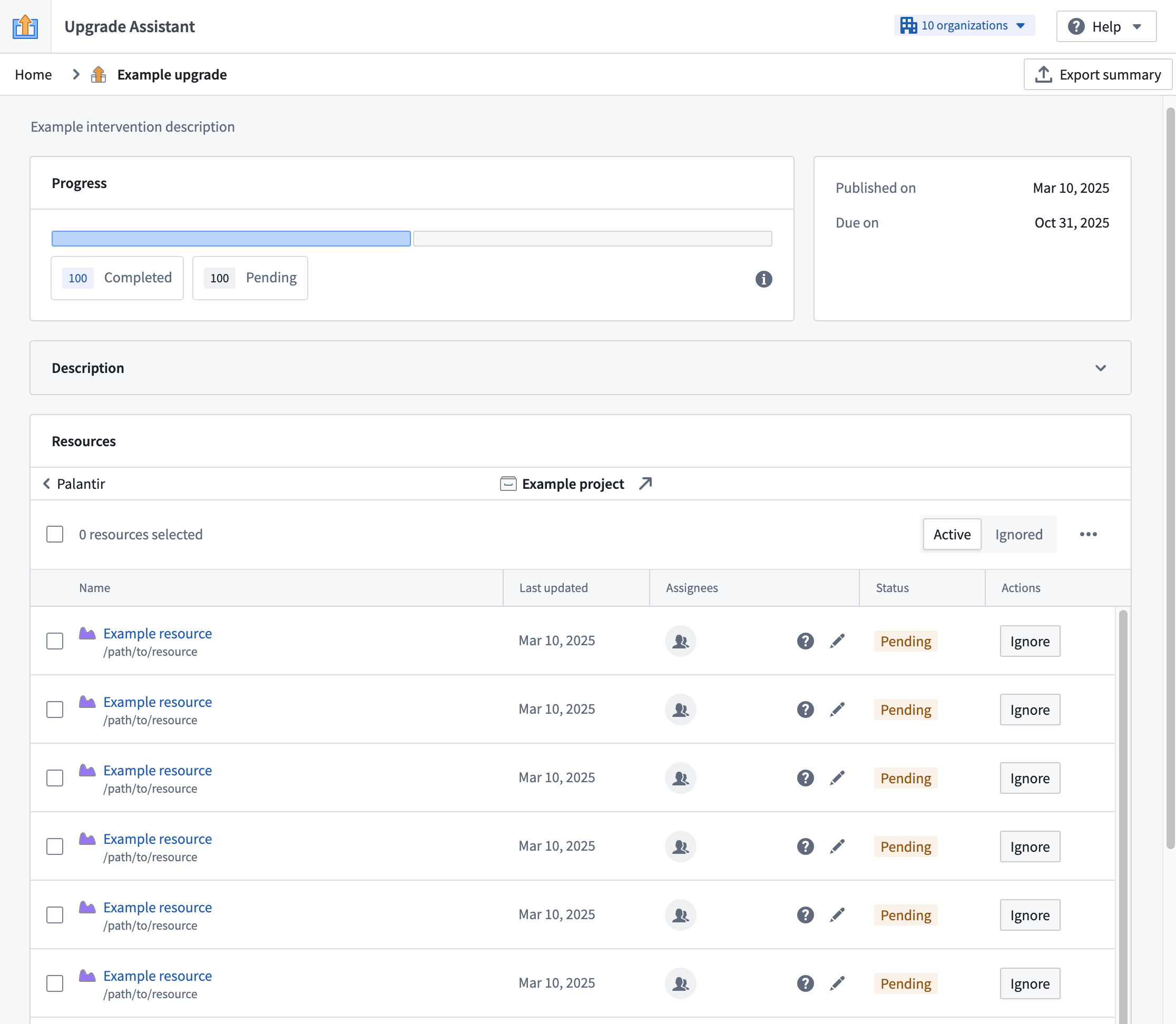
*New admin view of an example intervention.*
From our work in optimizing the performance, the loading of resources in admin view should now be significantly faster, streamlining workflows for our maintenance operators on Palantir platforms.
***
## New and improved derived series creation and management features are now available
Date published: 2025-03-20
We are excited to announce a variety of features for [derived series](../../time-series/derived-series-overview/index.md): a new discovery space in Time Series Catalog, a new derived series type, a streamlined creation flow, and a Workshop widget.
### What are derived series?
Derived series allow you to save and replicate calculations and transformations applied to time series in the Ontology. Once in the Ontology, derived series behave like any other time series property but are calculated on an adhoc basis, eliminating the need to manage or store derived data or duplicate those calculations across the platform.
### Time Series Catalog
The recently released [Time Series Catalog](../../time-series/time-series-time-series-catalog/index.md) acts as a splash page and home for multiple time series resource types, including derived series. Time Series Catalog allows you to create new time series in a no-code environment and manage derived series in the Ontology.
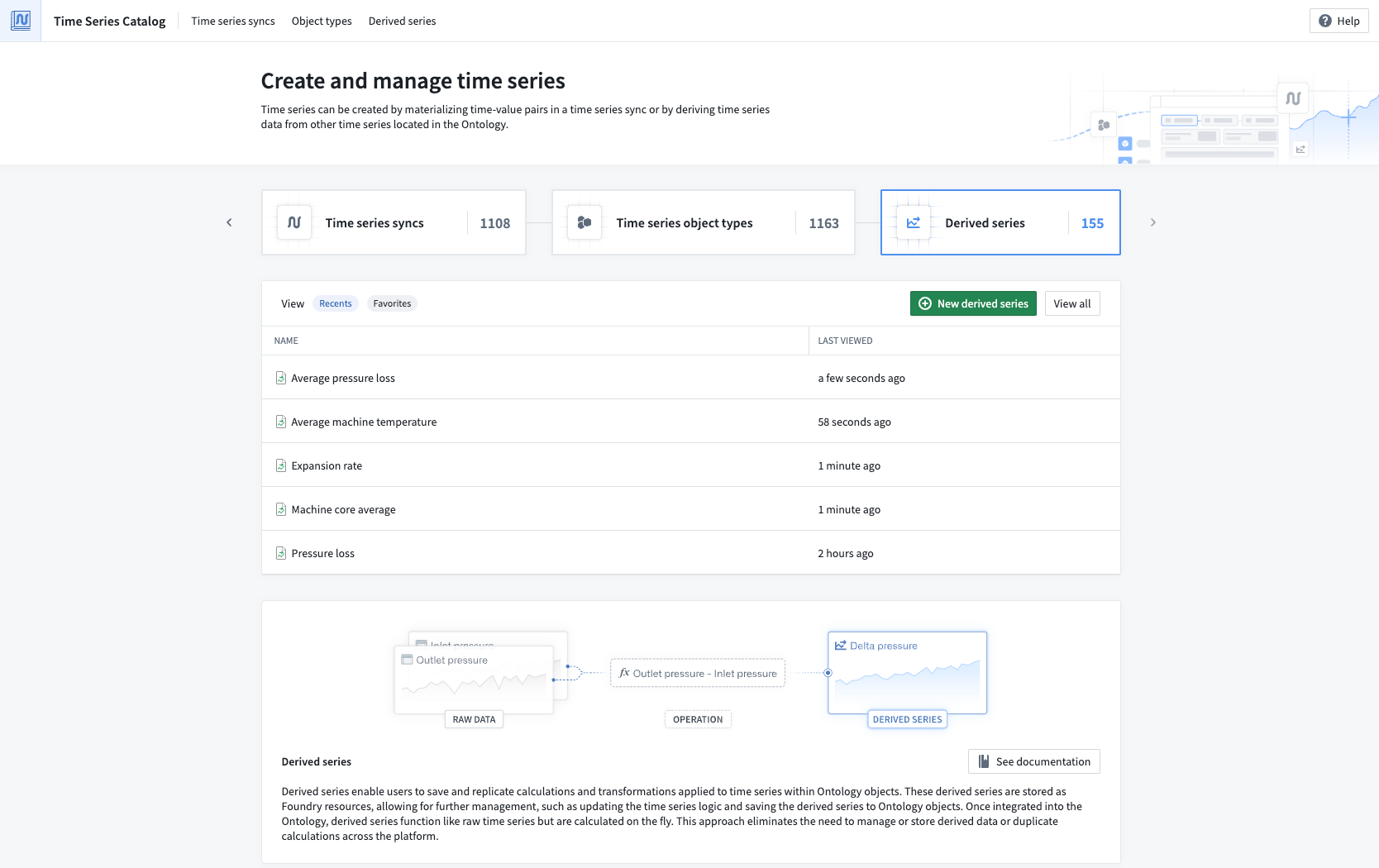
*The Time Series Catalog. Navigate to the ***Derived Series*** tab to view all available derived series.*
### Single derived series
With our new Time Series Catalog, you can now configure [single derived series](../../time-series/derived-series-overview/index.md) in addition to templated derived series. Single derived series allow you to create logic that is not constrained to all inputs coming from one object. Instead, single derived series are not templated and can operate on many objects. You can also choose to enable [automatic Ontology saving](../../time-series/derived-series-overview/index.md#automatic-saving-requirements) for single derived series rather than resorting to manual saving, allowing you to manage your derived series with ease.
### Streamlined creation flow
Previously, you would have to create derived series from a Quiver analysis. Using Quiver offers the ability to promote the results of some time series analysis into a derived series. However, due to the large amount of available operations, it can be easy to construct logic in Quiver that is not actually supported in derived series.
Now, you can access a new, [streamlined creation flow from the Time Series Catalog](../../time-series/derived-series-create/index.md#create-derived-series). This flow guides you through the entire creation process, starting from the first step of choosing the derived series type you would like to make.
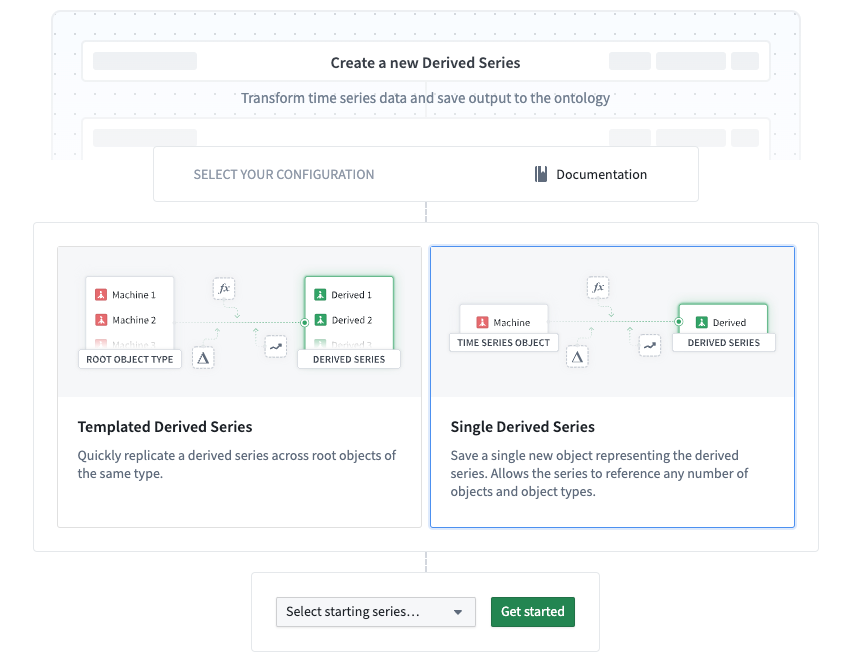
*The first step of the derived series creation flow in Time Series Catalog, allowing you to choose a derived series type.*
After selecting a type, you will be brought to a time series logic editing view. Here, only operations that are supported for derived series are available to use on your time series data.
### Derived series Workshop widget
Finally, we are excited to announce the [Derived Series widget in Workshop](../../time-series/derived-series-widget/index.md). With the widget, you can embed the creation and management details and capabilities of a derived series belonging to an object type, then use the widget within a Workshop module.
The Derived Series widget offers a user-friendly platform for managing derived series, focusing on constructing the time series logic. With the Derived Series widget, users can view a simplified version of derived series management options rather than the advanced configurations used in the standard creation flow.
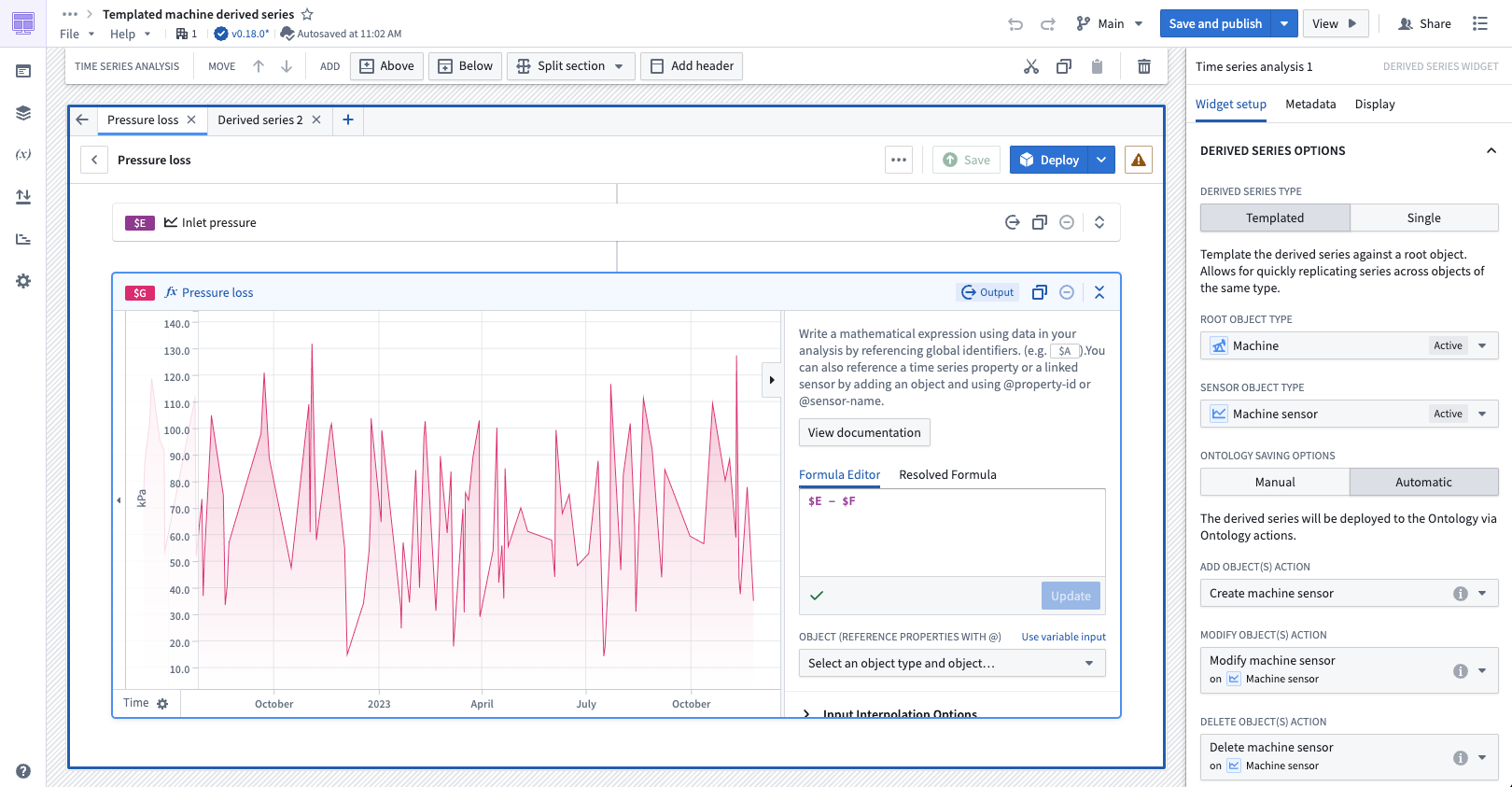
*The Derived Series widget in Workshop, displaying templated derived series details for the Machine object type.*
### Share your feedback
We want to hear what you think about our updates for derived series and Time Series Catalog. Send your feedback to our Palantir Support teams, or share in our [Developer Community ↗](https://community.palantir.com/) using the [`time-series` ↗](https://community.palantir.com/tag/time-series) tag.
***
## Enrollment-level branch protection now available in Pipeline Builder
Date published: 2025-03-20
Administrators can now enable default branch protection for the `Main` branch of all new Pipeline Builder pipelines on an enrollment. Branch protection enhances the security and integrity of your pipelines by requiring proposals to be approved before any changes can be made to protected branches.
### Enable default branch protection
To enable branch protection for `Main` branches by default, navigate to Control Panel and access **Pipeline Builder** settings. Then, toggle the option to **Enable branch protection by default for new pipelines**. This will make `Main` branches on new pipelines protected branches, so they will require proposals before changes can be merged.
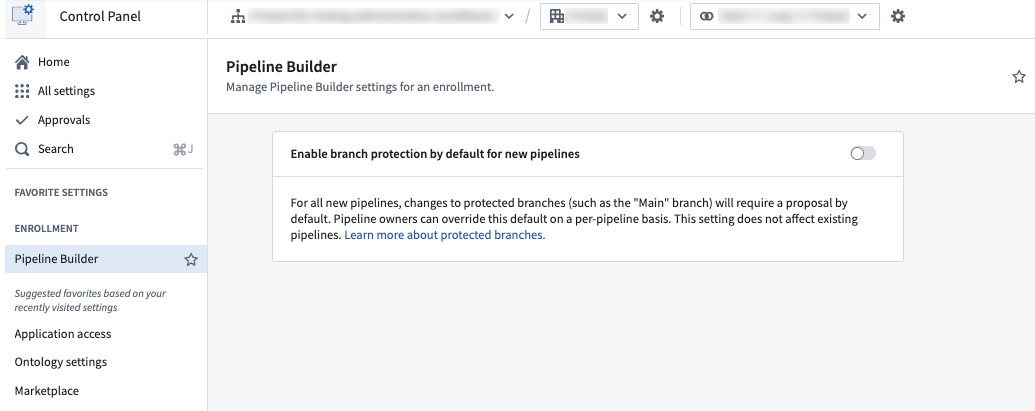
*The option to enable default branch protection in Control Panel.*
Note that enabling enrollment-level branch protection will **not** affect existing pipelines. To change branch protection settings on existing pipelines, or to mark new branches as protected, refer to the documentation on [how to protect branches](../../pipeline-builder/branches-protected-branches/index.md#how-to-protect-branches).
[Learn more about protected branches in Pipeline Builder.](../../pipeline-builder/branches-protected-branches/index.md)
***
## Bulk publish Workshop modules in Workflow Lineage
Date published: 2025-03-20
We are excited to announce that you can now bulk publish Workshop modules in Workflow Lineage. This feature allows you to publish multiple Workshop modules at once, streamlining your workflow and saving time by eliminating the need to update each module individually.
### Get started
With the bulk publish feature, you can simultaneously publish updates to Workshop modules that do not automatically publish the latest versions. To get started, navigate to Workflow Lineage and select the Workshop nodes you want to publish, right click, and select **Publish** from the context menu.
Upon initiating a bulk publish, a dialog will display the status of your Workshop modules with the following tags:
* **Latest published:** Indicates that the Workshop application is set to automatically publish the latest version.
* **Published:** Indicates that even though the Workshop application is not configured to automatically update, it currently holds the latest version.
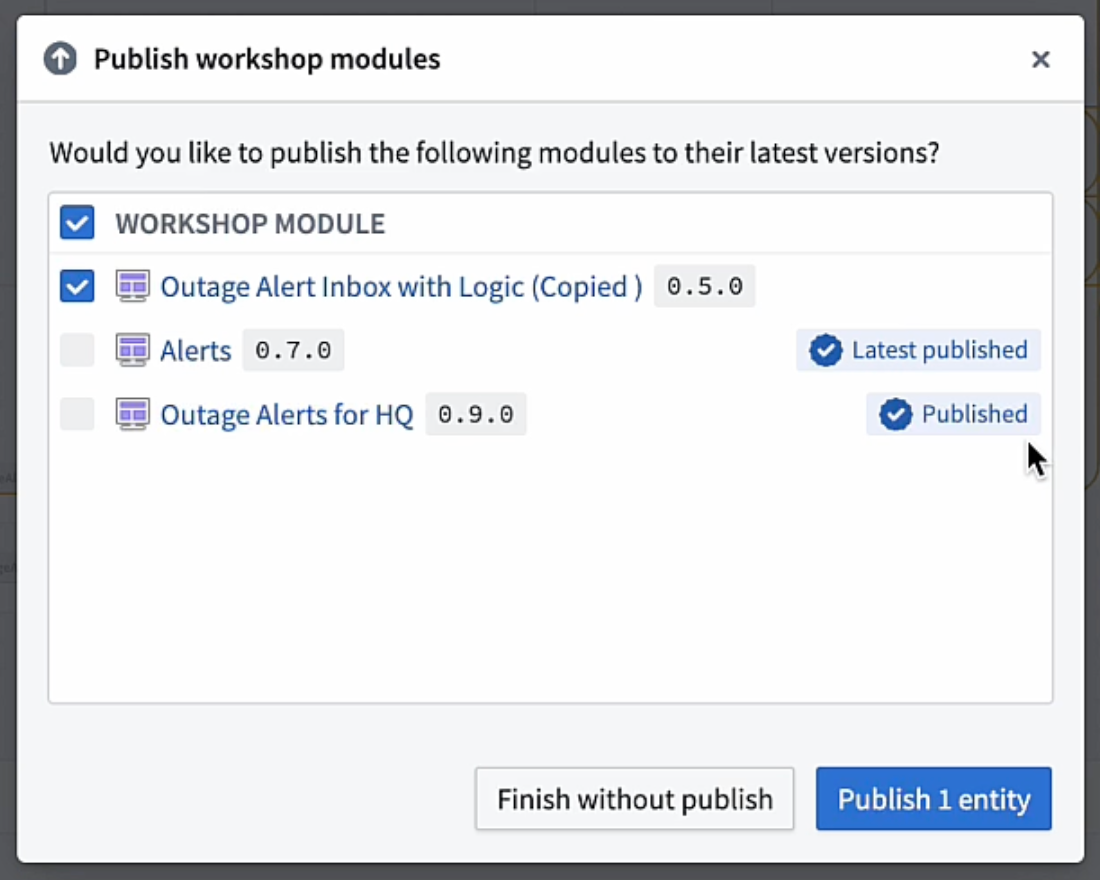 *The **Publish Workshop modules** dialog in Workflow Lineage, displaying the **Latest published** and **Published**\* tags.*
Workshop modules not marked with these tags have not published the latest available versions, and will be eligible for selection in the bulk publish dialog. You can then select **Publish entities** to publish the latest versions of your chosen Workshop modules.
### Seamless integration with Function updates
Along with publishing the latest available version of a Workshop module, you can update the Functions in a module and publish those modules directly from Workflow Lineage. After updating Functions, select **Continue to publish** to open the **Publish Workshop modules** dialog, where you can select **Publish entities** to bulk publish your chosen Workshop modules.
*The **Publish Workshop modules** dialog in Workflow Lineage, displaying the **Latest published** and **Published**\* tags.*
Workshop modules not marked with these tags have not published the latest available versions, and will be eligible for selection in the bulk publish dialog. You can then select **Publish entities** to publish the latest versions of your chosen Workshop modules.
### Seamless integration with Function updates
Along with publishing the latest available version of a Workshop module, you can update the Functions in a module and publish those modules directly from Workflow Lineage. After updating Functions, select **Continue to publish** to open the **Publish Workshop modules** dialog, where you can select **Publish entities** to bulk publish your chosen Workshop modules.
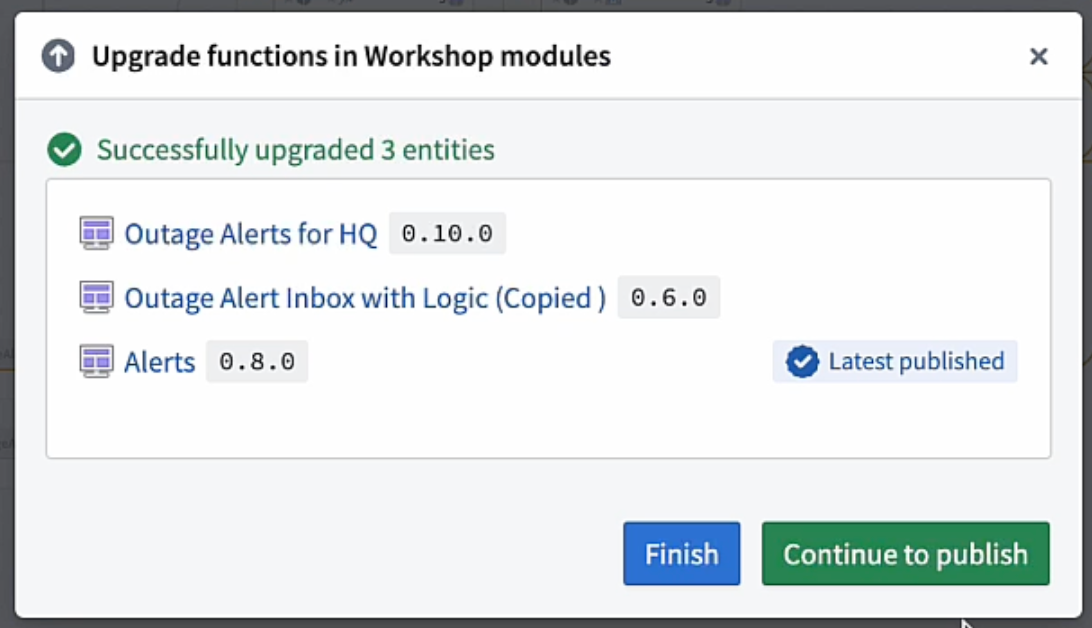 The **Upgrade functions in Workshop modules** dialog, with the option to **Continue to publish**.
Leverage the convenience and efficiency of bulk publishing in Workflow Lineage to keep your Workshop modules up to date. Identify modules with unpublished versions, publish multiple modules simultaneously, and update Functions as needed; all from a single, centralized location.
[Learn more about bulk publishing Workshop modules in Workflow Lineage.](../../workflow-lineage/refactor-and-understand-workflows/index.md#bulk-publish-workshop-applications)
***
## Discover time series capabilities in the Time Series Catalog application
Date published: 2025-03-13
The Time Series Catalog, available this week across all enrollments, is your starting point and home for creating, managing, and discovering time series in the Palantir platform. Time series are a sequence of data points over a period of time that can help you understand trends and patterns for your specific use case. The Time Series Catalog is designed to facilitate your work with time series syncs, time series object types and derived series.
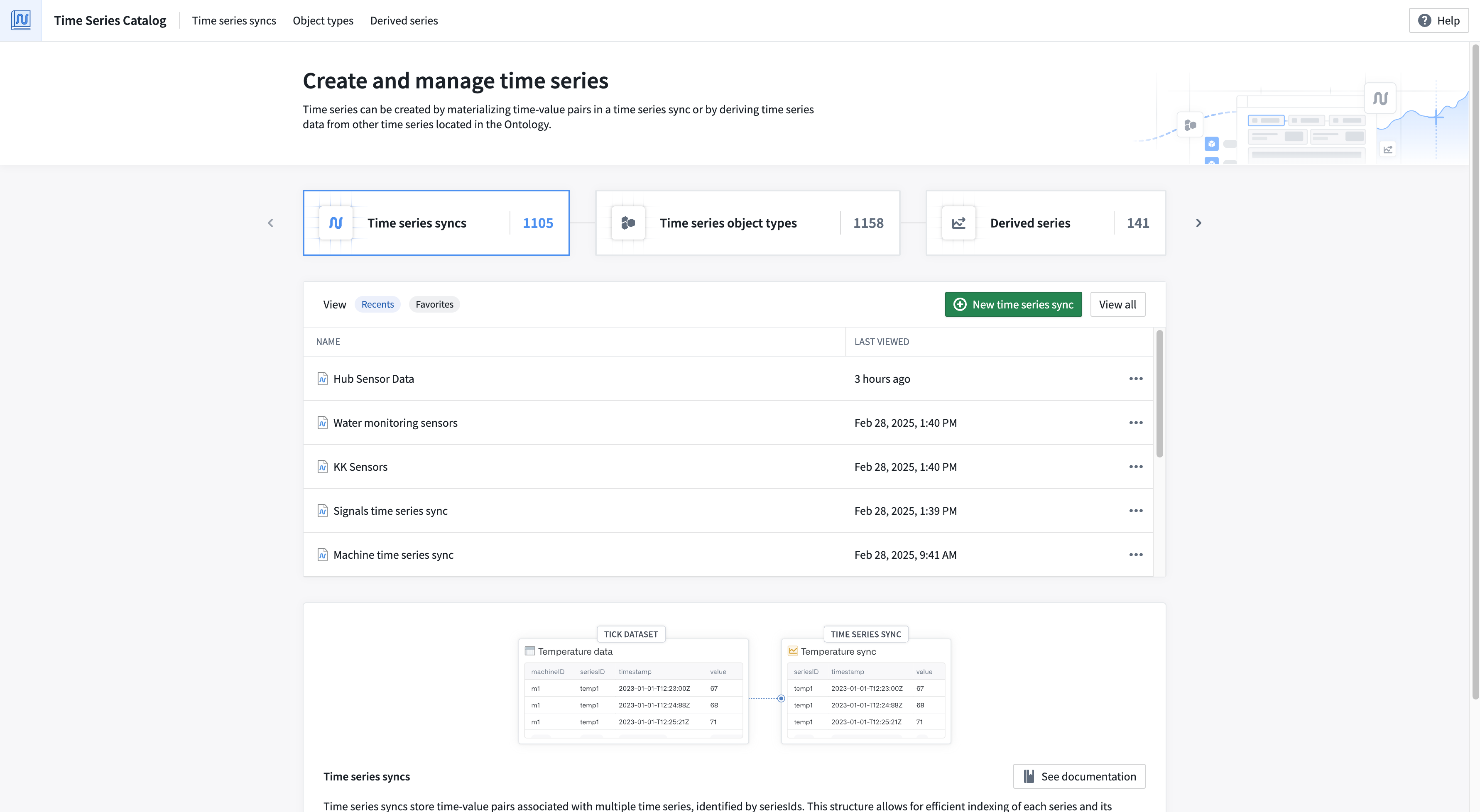
*From the Time Series Catalog, you can view recently accessed time series syncs and derived series, your saved "favorite" time series syncs and derived series, and the "most viewed" time series object types. Navigate to each resource type's associated tab to explore all resources of that type.*
[Learn more about the Time Series Catalog.](../../time-series/time-series-time-series-catalog/index.md)
### A reminder on existing resource types that can be explored in the Time Series Catalog
You can use the improved Time Series Catalog to review the following existing resource types:
**Time series syncs**
Time series syncs store time-value pairs associated with multiple time series, identified by `seriesIds`. You can access time series syncs directly through code or in no-code applications like the time series sync resource viewer, or Quiver.
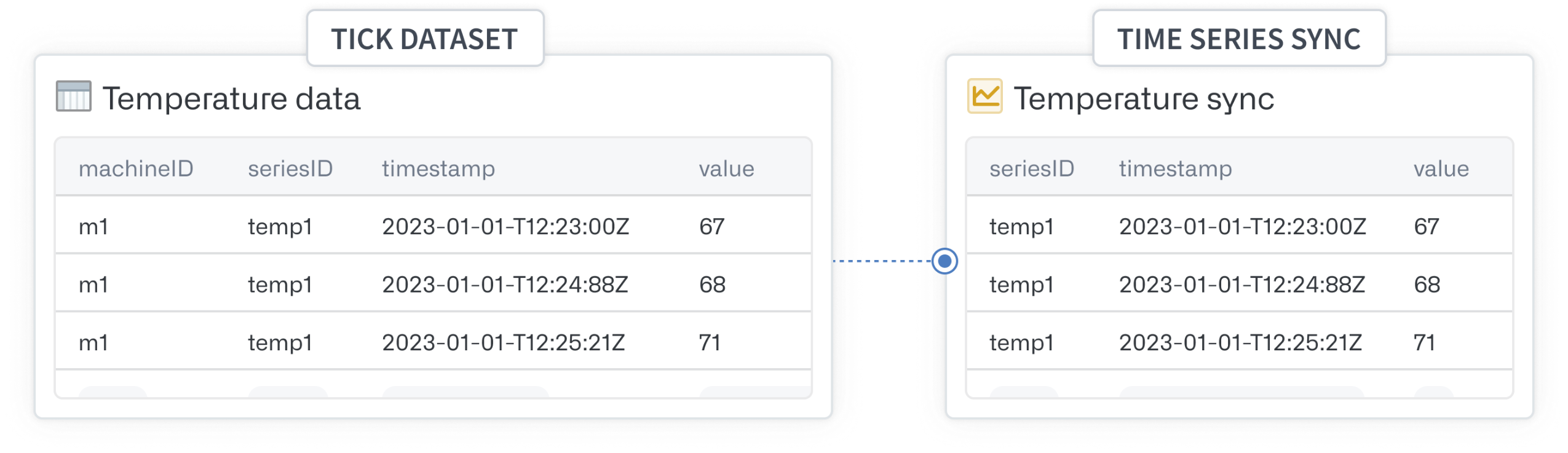
*Time series syncs are backed by datasets or streams and require mapping three columns: series identifier, time and value.*
[Learn more about time series syncs.](../../time-series/time-series-syncs/index.md)
**Time series object types**
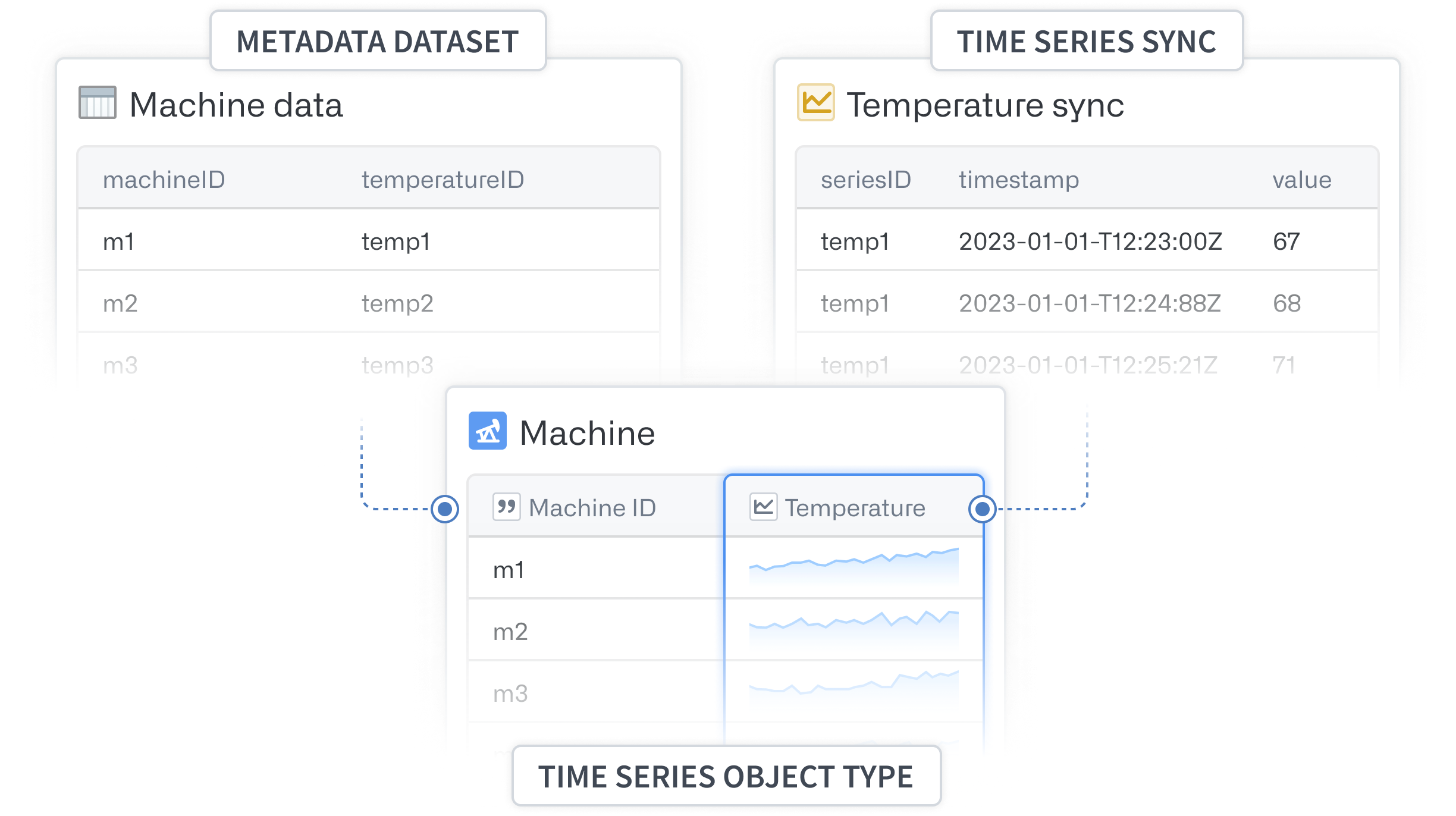
Time series object types are object types with time series functionality enabled via time series properties. In applications that consume Ontology objects, time series property values are displayed as plots. The backing datasource of a time series property is a time series sync.
**Derived series**
Derived series enable users to save and replicate calculations and transformations applied to time series within Ontology objects. These derived series are stored as Foundry resources, allowing for further management, such as updating the time series logic and saving the derived series to Ontology objects. Once integrated into the Ontology, derived series function like raw time series but are calculated on the fly.

*Derived series enable you to save and replicate calculations and transformations applied to time series within Ontology objects.*
[Learn more about derived series.](../../time-series/derived-series-overview/index.md)
***
## Introducing the Palantir Extension for Visual Studio Code for Python transforms
Date published: 2025-03-13
We are excited to announce that you can now develop Python transforms **locally** inside your own instance of Visual Studio Code. This feature is available to all users who have been granted permissions through [Control Panel](../../code-repositories/configure-repositories-in-control-panel/index.md). The Palantir extension bridges VS Code and Foundry, allowing you to perform and use Python transform operations (such as transform previews, debugging, and the library panel) natively in VS Code.
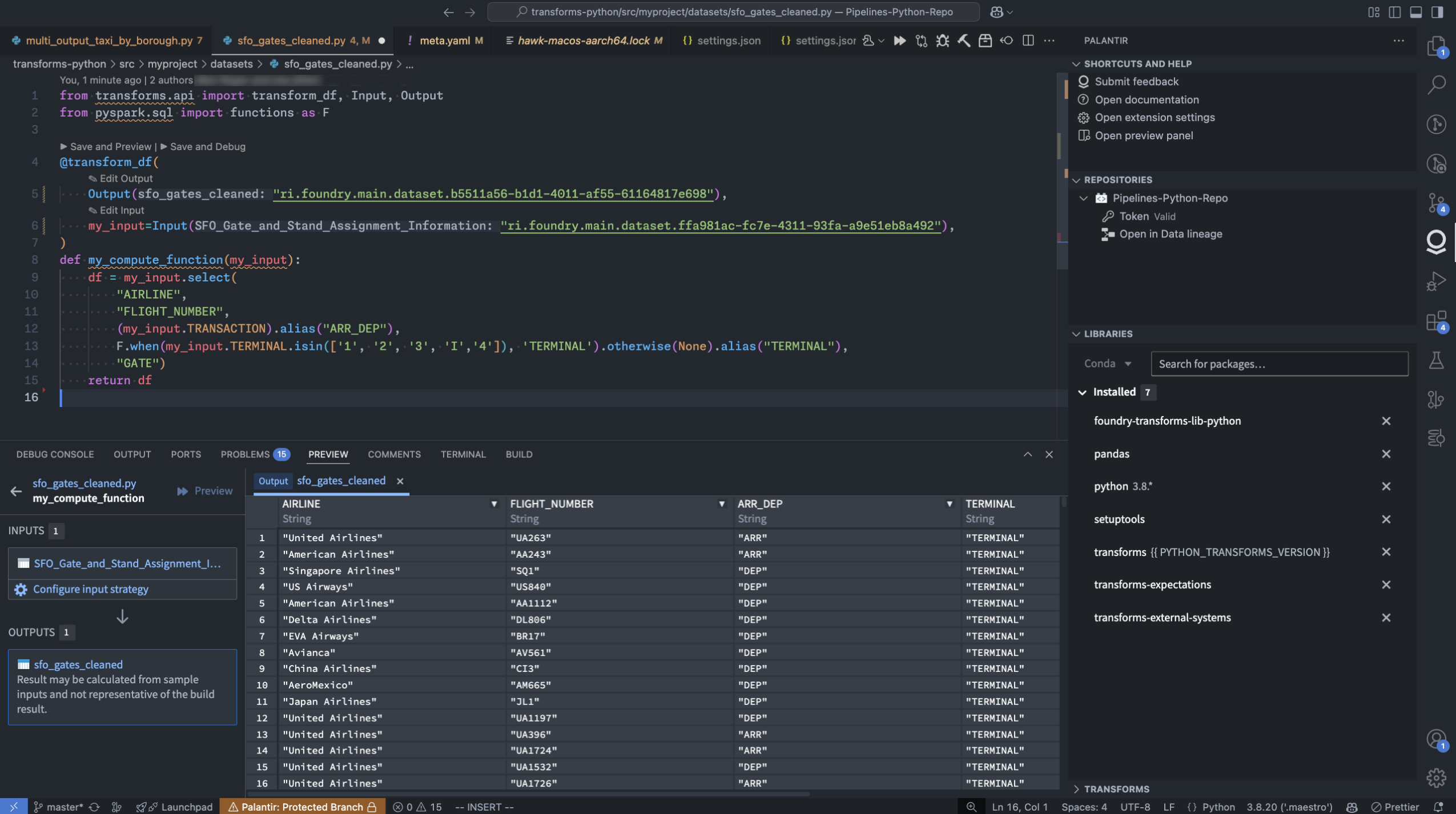
*The Palantir extension for Visual Studio Code within a local VS Code instance.*
### Extension features
* [Preview your Python transforms](../../palantir-extension-for-visual-studio-code/transforms-preview/index.md) directly from your local Visual Studio Code environment. Additionally, the Palantir extension for Visual Studio Code supports [full dataset (sample-less preview)](../../palantir-extension-for-visual-studio-code/transforms-preview/index.md#full-dataset), so you can preview with the full datasets and not lose any precision. Note: To run previews locally, you will need your platform administrators to enable local preview through the [Control Panel](../../code-repositories/configure-repositories-in-control-panel/index.md).
* [Initiate a build](../../palantir-extension-for-visual-studio-code/transforms-build/index.md#how-to-initiate-a-build) directly from the comfort of your own code editor.
* **Debug your code** and run tests directly from the editor.
* **Leverage the [library panel](../../palantir-extension-for-visual-studio-code/python-libraries/index.md#python-libraries)** to add libraries.
* **Use Palantir’s latest high-performance environment management tool** to set up your Python environment quickly and efficiently.
### Get started
To start using the Palantir extension for Visual Studio Code, open your transforms repository in the Code Repositories application. From here, select the settings icon next to the **VS Code** button in the top right corner of your screen. Choose **Local VS Code** to change the default button language. Select the updated **Local VS Code** button and follow the instructions in the pop-up window to download the extension.
*Note: You only need to download the extension once.*

*The* ***VS Code*** *button in Code Repositories, with the option to configure the button to open in* ***Local VS Code.***
### Current limitations
* The Palantir extension for Visual Studio Code is not yet listed in the Visual Studio Code Marketplace. It is currently available for download exclusively through the Palantir platform.
* As this is a new feature, some transform preview components are still being developed. We are continually working to improve support for these components. For more information, consult [our documentation](../../palantir-extension-for-visual-studio-code/overview/index.md).
### Your feedback matters
Your insights are crucial in helping us understand how this extension impacts your workflow and where we can concentrate our enhancement efforts. Share your feedback through Palantir Support channels and our [Developer Community ↗](https://community.palantir.com/) forum using the [vscode ↗](https://community.palantir.com/tag/vscode) tag.
***
## Publish AIP Agents as Functions for increased platform integration
Date published: 2025-03-13
**Note:** As of the week of April 27, 2026, AIP Agent Studio was renamed AIP Chatbot Studio. All existing features and functionalities remain unchanged.
AIP Agents can now be published as [Functions](../../functions/overview/index.md), allowing them to be used anywhere in the platform where Functions can be executed. With agents as Functions, builders can evaluate agents in [AIP Evals](../../aip-evals/overview/index.md), automate agent workflows with [Automate](../../automate/overview/index.md), and use agents in [Code Repositories](../../code-repositories/overview/index.md), among other use cases. This also enables using agent Functions in AIP Agent Studio, enabling agents to call other agents as tools.
### Publish an agent as a Function
To publish an agent as a Function, select the publish settings icon to the right of the **Publish** option in Agent Studio. This will open the **Publish settings** dialog, where you can enable or disable Function publishing, name your Function, and configure version settings.
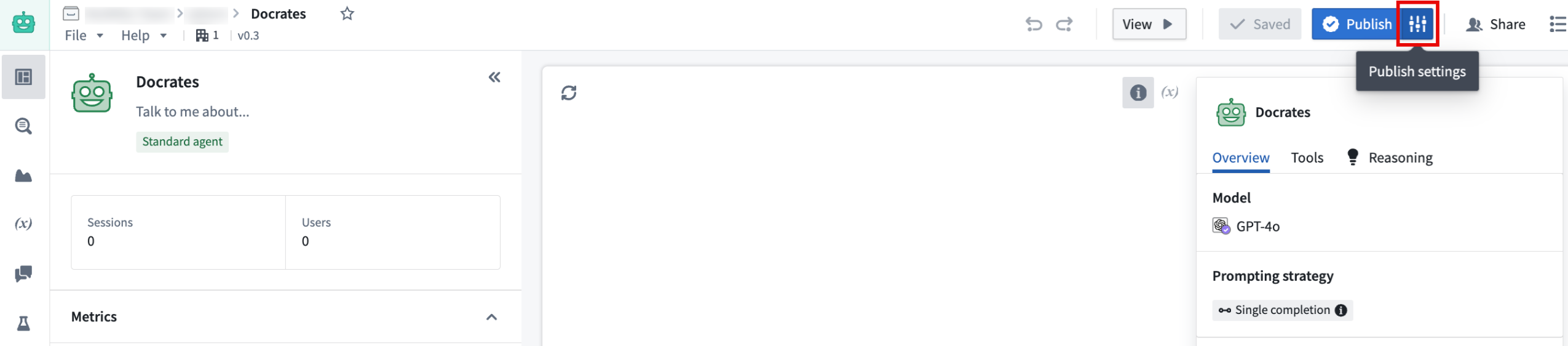
*The publish settings in AIP Agent Studio, next to the* ***Publish*** *button.*
### Evaluate Agents with AIP Evals
Once an agent has been published as a Function, you can use [AIP Evals](../../aip-evals/overview/index.md) to assess agent performance and iteratively improve outcomes. With AIP Evals, you can define test cases and evaluation criteria for agent performance, as well as compare the performance of different models. These evaluations can help build confidence in your AIP agents.
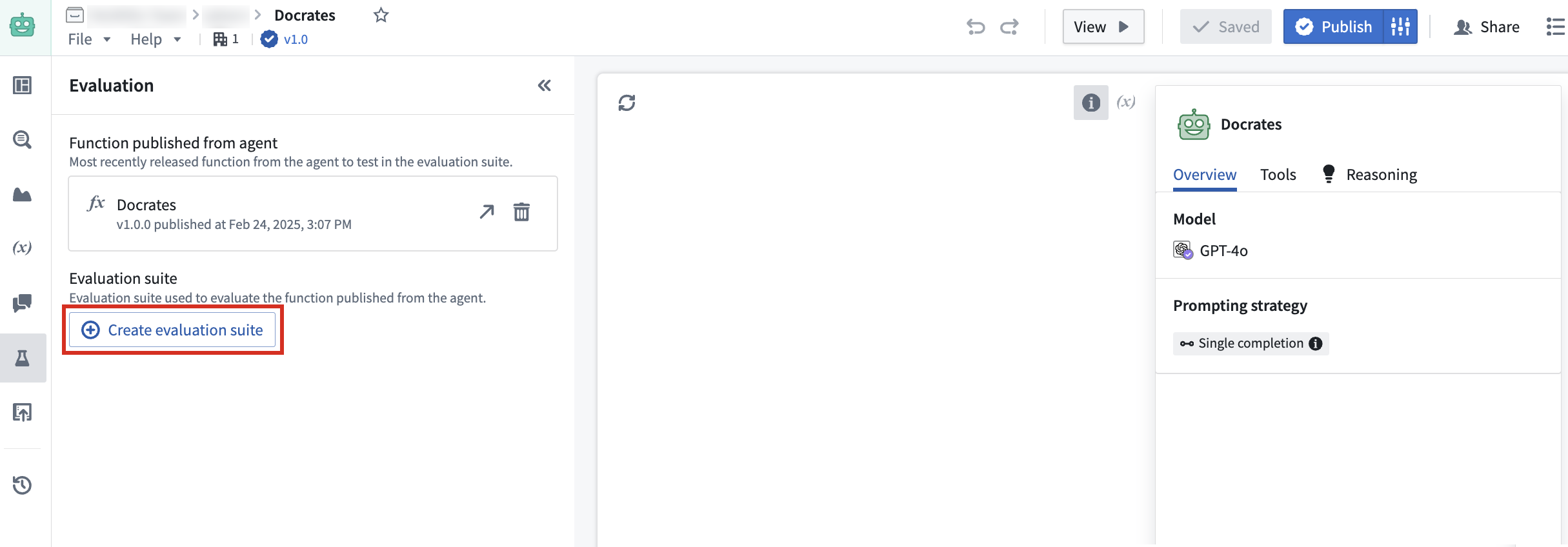
*The* ***Create evaluation suite*** *option in AIP Agent Studio.*
Evaluation suites can now be created directly from Agent Studio in the **Evaluation** tab on the left toolbar, allowing for a continuous workflow that leads from agent creation to evaluation.
Leverage this new feature to enhance agent versatility and facilitate seamless integration into a wide range of workflows. With agent evaluation in Evals, you can confidently deploy agents in production and customize agent use to align with your operational requirements.
[Learn more about publishing AIP Agents as Functions](../../chatbot-studio/chatbots-as-functions/index.md#publish-a-chatbot-as-a-function).
***
## Introducing new LLMs to AIP
Date published: 2025-03-13
New large language models (LLMs) have been added to the Palantir platform's Language Modeling Service, giving AIP enrollments access to some of the latest and most powerful models available for your use case needs.
### New Anthropic models
* Claude 3.7 Sonnet
* Claude 3.5 Haiku
* Claude 3.5 Sonnet v2
To learn more about these models, [visit the official AWS website ↗](https://aws.amazon.com/bedrock/claude/).
### New Google Gemini models
* Gemini Flash 2.0
To learn more about these models, [visit the official Google website ↗](https://ai.google.dev/gemini-api/docs/models/gemini#gemini-2.0-flash).
### New Azure OpenAI models
* o1-preview
* o1-mini
To learn more about these models, [visit the official Microsoft Azure website ↗](https://azure.microsoft.com/en-us/blog/introducing-o1-openais-new-reasoning-model-series-for-developers-and-enterprises-on-azure/).
### New open-source Palantir-hosted models
* Llama3.3 70B
To learn more about these models, [visit the official Hugging Face website ↗](https://huggingface.co/meta-llama/Llama-3.3-70B-Instruct).
### Higher efficiency models for every use case
These new releases deliver major leaps in multimodal and natural language processing, empowering teams to handle more complex document workflows with enhanced vision-based parsing, entity extraction, summarization, and semantic chunking. Containing substantial improvements in reasoning and natural language understanding, these models support large context windows for processing large amounts of data in fewer calls than many models in use today. Users can experience improvements in use cases while benefiting from improved accuracy, scalability, efficiency, and speed.
| Model name | Context window | Input token cost (USD price per 1M tokens) | Output token cost (USD price per 1M tokens) | Capability | Latest training data date |
|-----------------------|----------------|------------------------------------------|------------------------------------------|---------------|---------------------------|
| Claude 3.7 Sonnet | 200k tokens | $3 | $15 | Text, Vision | November 2024 |
| Claude 3.5 Haiku | 200k tokens | $0.80 | $4 | Text | July 2024 |
| Claude 3.5 Sonnet v2 | 200k tokens | $3 | $15 | Text, Vision | April 2024 |
| Gemini 2.0 Flash | 1M tokens | $0.10 | $0.40 | Text, Vision | June 2024 |
| o1-preview | 128k tokens | $15 | $60 | Text, Vision | October 2023 |
| o1-mini | 128k tokens | $1.10 | $4.40 | Text, Vision | October 2023 |
| Llama3.3 70B | 128k tokens | $0.23 | $0.40 | Text | December 2023 |
### Model availability by region
Each of these new supported models is available in global, or non geo-restricted enrollments by default. In addition, these models can service requests from a subset of geo-restricted regions. For more detailed information on geographic restrictions, [review our documentation](../../aip/supported-llms/index.md#llm-availability-by-geography).
| Model | United States | European Union | United Kingdom | Canada | Australia | Japan |
|-----------------------|---------------|----------------|----------------|--------|-----------|-------|
| Claude 3.7 Sonnet | ✅ | | | | | |
| Claude 3.5 Haiku | ✅ | | | | | |
| Claude 3.5 Sonnet v2 | ✅ | | | | ✅ | |
| Gemini 2.0 Flash | ✅ | ✅ | | | | |
| o1-preview | ✅ | ✅ | | | | |
| o1-mini | ✅ | ✅ | | | | |
| Llama3.3 70B | ✅ | ✅ | ✅ | ✅ | ✅ | |
### Enable a model provider to use respective models
To use these models, the respective model provider (Amazon Bedrock, Google Vertex AI, Microsoft Azure, Llama-3.1 - 3.3) must first be enabled by an [enrollment administrator in Control Panel](../../aip/enable-aip-features/index.md#enable-llms). Once the provider has been enabled, the model will be ready for use.
If you believe a model provider should be enabled for your enrollment but were unable to configure it in Control Panel, contact your Palantir representative for assistance.
### Weigh in on our Developer Community
We are always working on bringing support for the latest LLMs, and welcome your feedback on how we can improve your LLM experience. Share your thoughts with Palantir Support channels or our [Developer Community ↗](https://community.palantir.com/) and use the [language model service ↗](https://community.palantir.com/tag/language-model-service) tag.
***
## Multilingual speech to text now available in AIP Assist
Date published: 2025-03-11
AIP Assist now supports speech to text, allowing users to save time by asking questions using voice input. This feature enables users to speak into their device's microphone and receive a real-time speech transcription, which can then be sent as input to AIP Assist. Audio transcription provides an alternative input method for users who may have difficulty typing, and allows users to communicate in their preferred language, including Spanish, Japanese, Korean, French, and more.
### Use speech-to-text in AIP Assist
To access speech to text in AIP Assist, open the AIP Assist sidebar and select the microphone icon in the chat input field. Note that the microphone icon is only visible when the chat input field is empty. Select the microphone icon, start speaking, and select the stop icon when you are done.
*The microphone icon in the AIP Assist input field is used to record and generate an audio transcription.*
The transcription will now appear in the chat input box, making it faster and easier to send lengthy inputs, and providing accessible speech-to-text transcription anywhere on the platform.
[Learn more about AIP Assist capabilities.](../../assist/overview/index.md)
Note: AIP feature availability is subject to change and may differ between customers.
***
## Project templates now support Markings and Project constraints
Date published: 2025-03-11
We are excited to announce that [Project templates](../../platform-security-management/manage-project-templates/index.md) now support Markings, Project constraints, and group management. These enhancements increase the configurability available for Project templates and expand what can be encoded and mandated for all new Projects.
### Markings
Project templates can now be configured with existing or new [Markings](../../security/markings/index.md) in the Markings section of the creation wizard. These markings will be applied to the Project upon creation.
[Learn more about applying Markings to Project templates.](../../platform-security-management/manage-project-templates/index.md#markings)
### Project constraints
Project constraints allow Project owners to set limits on which Markings may or may not be applied on files within a Project. Project constraints prevent users from saving violating files to a Project.
When creating a Project template, you can apply [Project constraints](../../security/project-constraints/index.md) by toggling on **Marking constraints**. You can then choose one of the following settings:
* **Allowed Markings:** Allows only resources with the specified Markings to be added to the Project.
* **Prohibited Markings:** Prohibits resources with the specified Markings from being added to the Project.
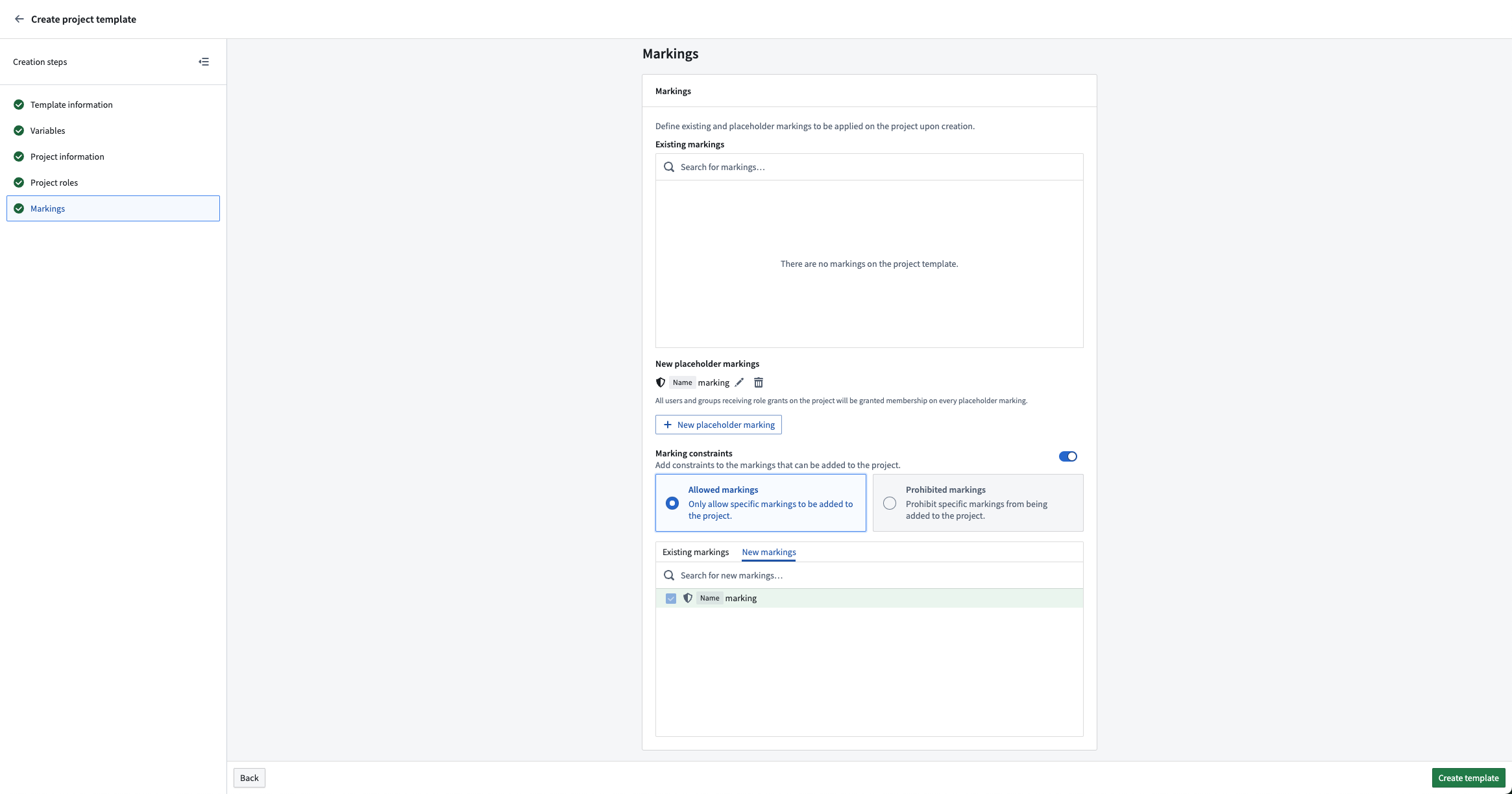
*Example of configuring a new marking to be an allowed Project constraint.*
### Group management
A common setup is to create viewer, editor, and owner groups with each project. These groups can now be configured in the **Project roles** section. This allows the owner group to have the owner role on the Project and be able to manage membership to the editor and viewer groups.
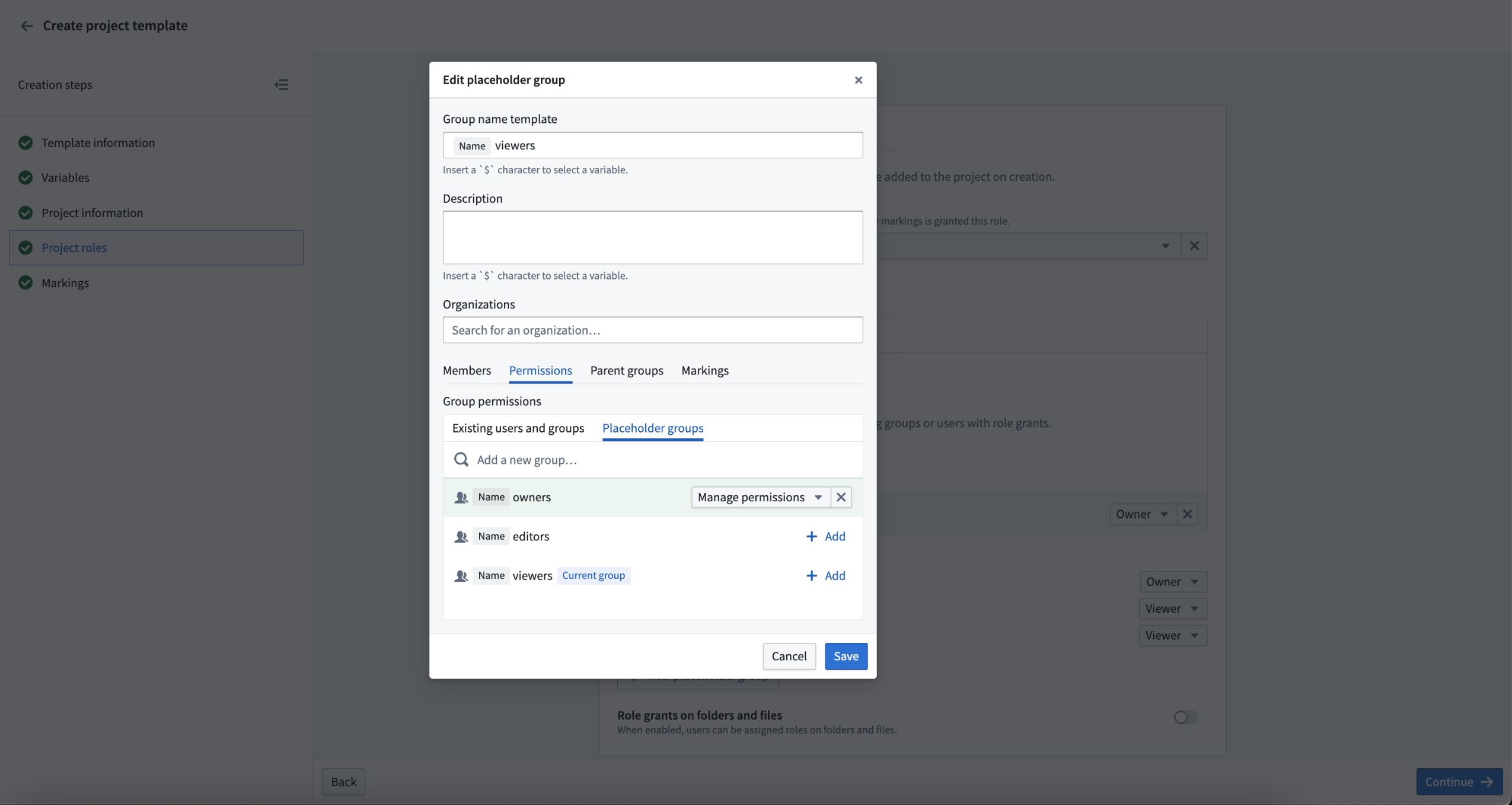
*Example of a new group being granted manage permissions of a different new group.*
***
## Foundry Connector 2.0 for SAP Applications v2.33.0 (SP33) is now available
Date published: 2025-03-11
Version 2.33.0 (SP33) of the [Foundry Connector 2.0 for SAP Applications add-on](../../sap/overview/index.md), used to connect Foundry to SAP systems, is now available for download from within the Palantir platform.
This latest release features bug fixes and minor enhancements, including:
* Improved housekeeping job performance
* Fixed remote decompression and empty schema content issues
We recommend sharing this notice with your organization's SAP Basis team.
For more on downloading the latest add-on version, review our [documentation](../../sap/download-sap-addon/index.md).
***
## Add a point of contact for your object types
Date published: 2025-03-11
We are happy to announce you can now assign a point of contact for object types in [Ontology Manager](../../ontology-manager/overview/index.md). By setting a point of contact, users can identify the subject-matter expert to reach out to with questions or report issues regarding the particular resource. For example, if a user needs to understand more about recent changes to an `Alert` object type, they will be able to view the name and/or contact details of the knowledgeable user who is best suited to answer such questions.
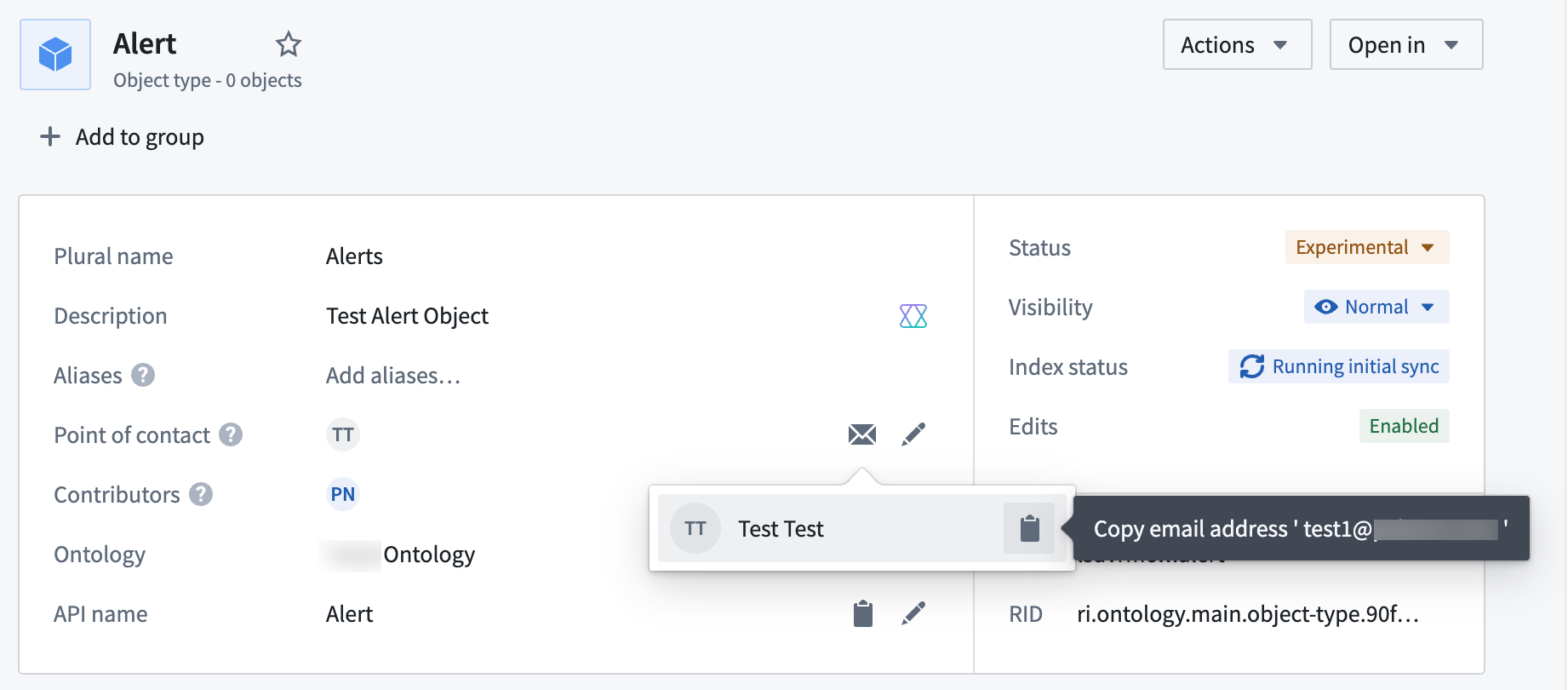
*An individual point of contact is set for the* `Alert` *object type, displaying the user's name and email.*
The point of contact for an object type is typically the user associated with the Project containing the object type's data source and can be either an individual user or a user group.
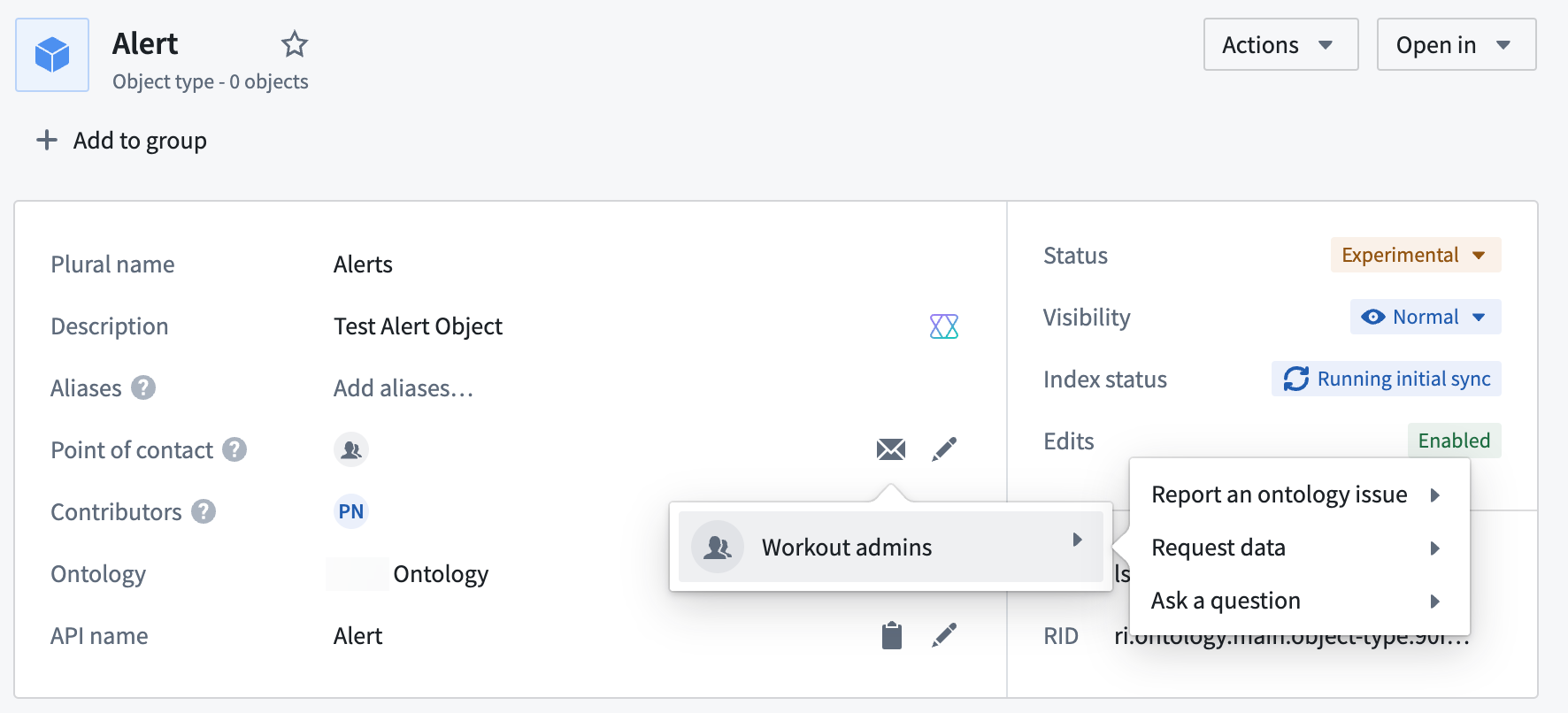
*In this notional example, the* ***Workout admins*** *user group is assigned as the point of contact for the* `Alert` *object type.*
If an object type comprises multiple data sources from multiple Projects, the object type can have multiple points of contact (one per Project).
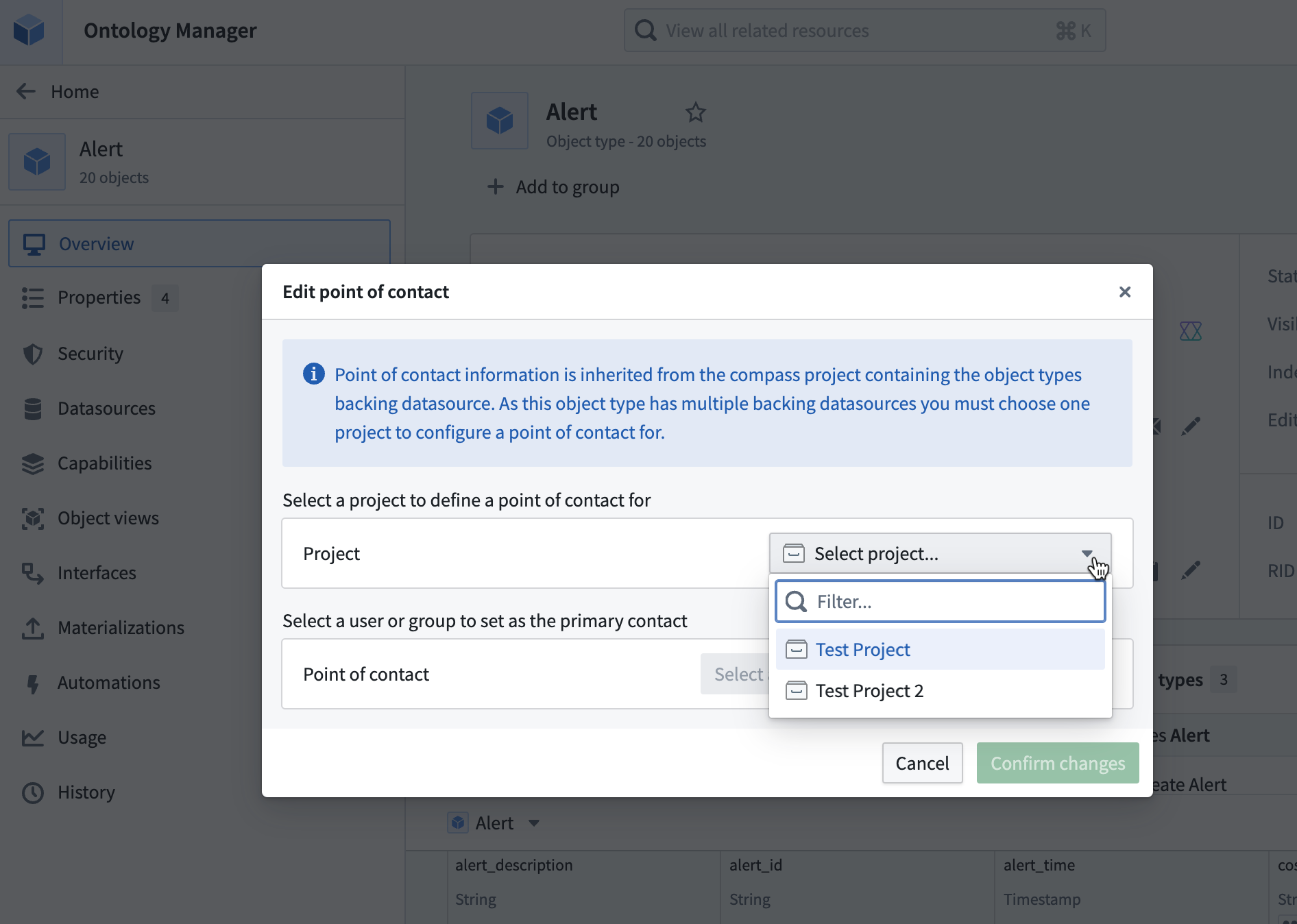
*The* ***Edit Point of Contact*** *dialog in Ontology Manager, where you can set a primary contact for each Project that contains a data source for a given object type.*
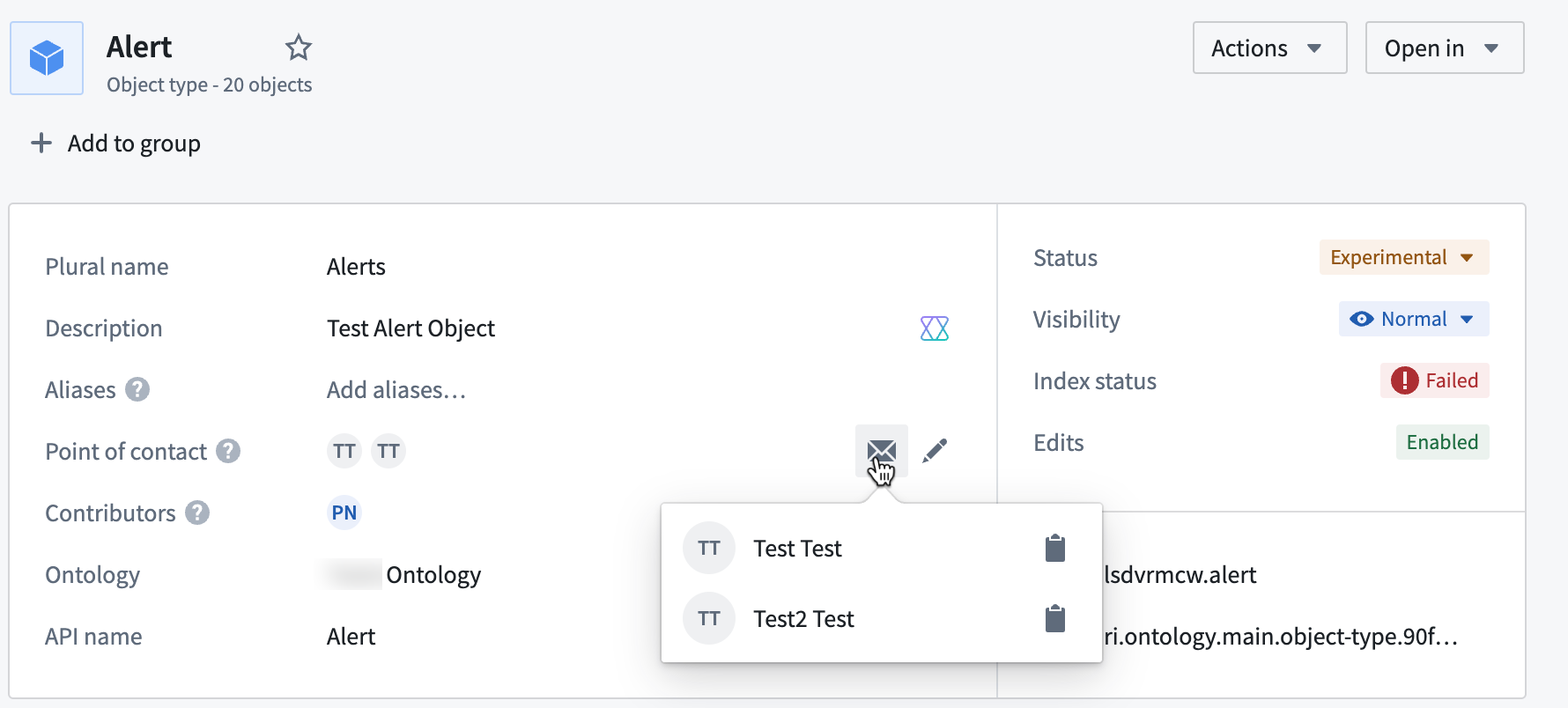
*Multiple users set as points of contact for the* `Tree` *object type.*
You can modify the point of contact directly within Ontology Manager, and any updates will be reflected in the corresponding Project. The assigned user(s) or group point of contact will also be automatically suggested as a reviewer for proposals or interventions that modify the object type, streamlining the review process and allowing for faster updates to your Ontology.
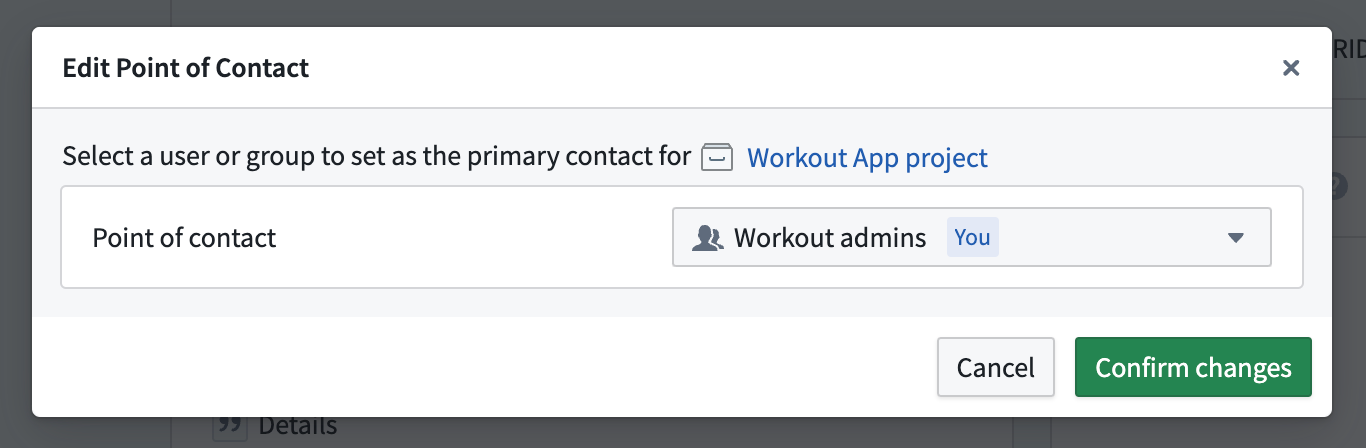
*The* ***Edit Point of Contact*** *dialog in Ontology Manager, indicating the set point of contact group will also be the primary contact for the notional* ***Workout App project****.*
### Share your thoughts
We want to hear what you think about our updates in Ontology Manager. Send your feedback to our Palantir Support teams, or share in our [Developer Community ↗](https://community.palantir.com/) using the [ontology-management ↗](https://community.palantir.com/tag/ontology-management) tag.
***
## Create interactive tutorials with Walkthroughs
Date published: 2025-03-06
Walkthroughs will be generally available the week of March 17th, enabling users to generate targeted in-platform tutorials that guide audiences through an application or workflow. With Walkthroughs, you can offer personalized, on-demand resources that improve learning experiences and meet the specific needs of your organization. Walkthroughs will be enabled by default and can be disabled for all users or a subset of users in Control Panel.
### Key features
* **Guidance across applications:** Walkthroughs are not limited to one application; a walkthrough can guide users to complete workflows that span multiple applications on the Palantir platform.
* **Customizable content:** Create tailored tutorials that address use cases and workflows that are specific to your operational needs.
* **Rich media integration:** Enhance your tutorials with images, videos, and interactive elements.
* **Progress tracking:** Walkthroughs tracks progress across steps, allowing users to come back later and continue where they left off.
As part of this release, we are also introducing two new features:
* **Walkthrough metrics:** see how users are interacting with your walkthrough.
* **Advanced Workshop integration:** Highlight specific widgets in Workshop modules during a walkthrough.
### Create and access walkthroughs
You can create a walkthrough in the Walkthroughs application by selecting **New walkthrough** in the upper right corner. To access published walkthroughs, users must have viewer permissions to the walkthrough and related resources. The **Walkthroughs** option will appear in the side panel when a user is viewing a resource with an associated walkthrough, allowing those users to easily access tutorials when available.
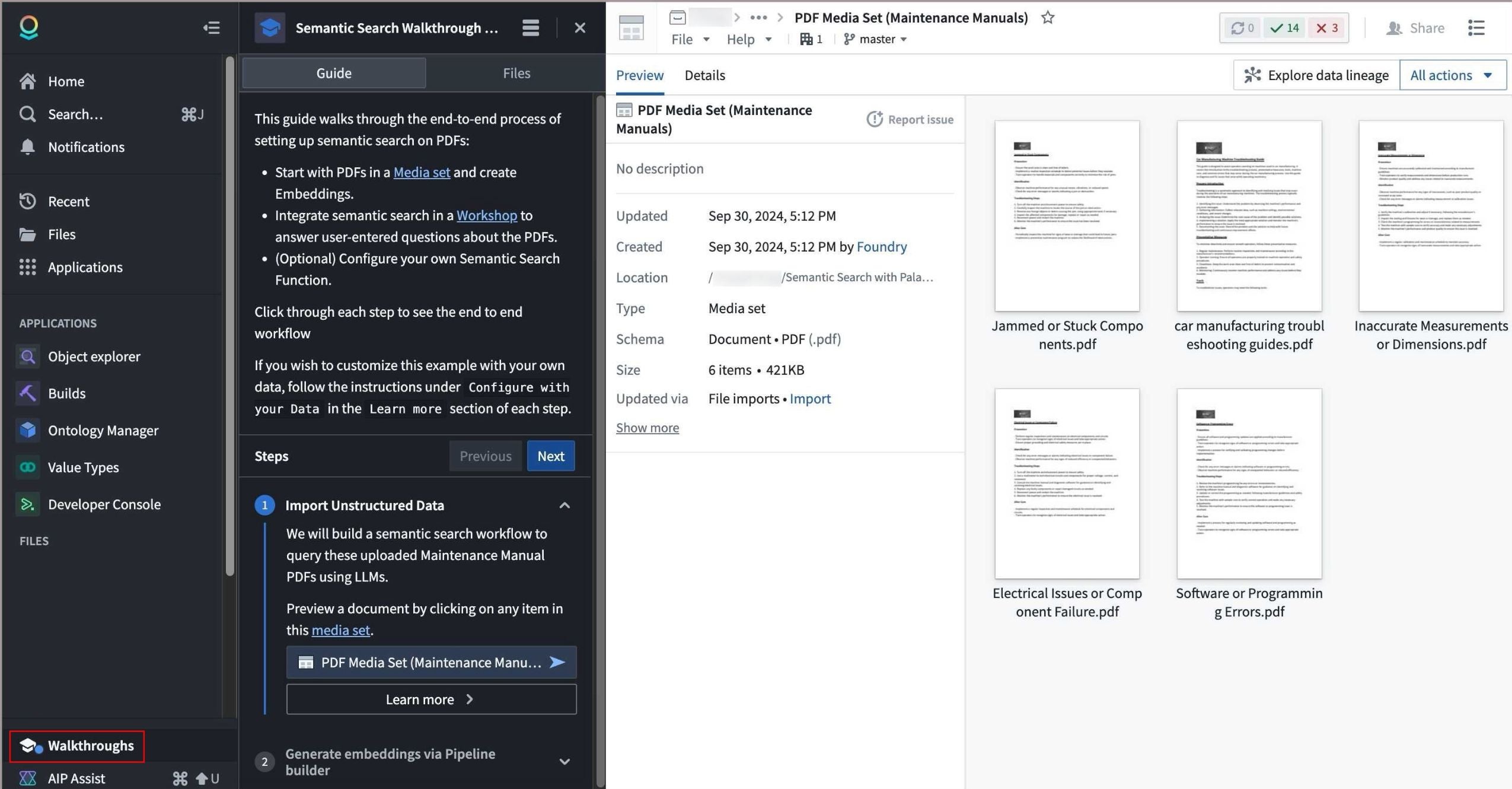
*The **Walkthroughs** option in the workspace side panel visible when viewing a media set, and the associated tutorial on semantic search for PDFs.*
Leverage walkthroughs to share knowledge across your organization and provide targeted, on-demand support for workflows and use cases, making the most of Palantir offerings.
[Learn more about Walkthroughs.](../../walkthroughs/overview/index.md)
***
## Review LLM usage metrics for your workflow in Workflow Lineage
Date published: 2025-03-06
Workflow Lineage now has AIP usage metrics designed to provide deeper insights and transparency into the LLM usage of your workflow. You can view which resources are using the most tokens, how often they are getting rate limited, and more.
### Model usage coloring for easy visualization
Dig deeper into your model's usage with our new model usage color legend option. There are a few types of model usage colors; for each one, you can specify whether you want to view the metrics associated with the total attempted model usage, only successful usage, or only rate-limited model usage.
* **Model requests:** Identify the total number of specified requests on model nodes within your Workflow Lineage. Specify whether you want to view the total number of model requests across the entire enrollment or only requests from models visible on the graph.
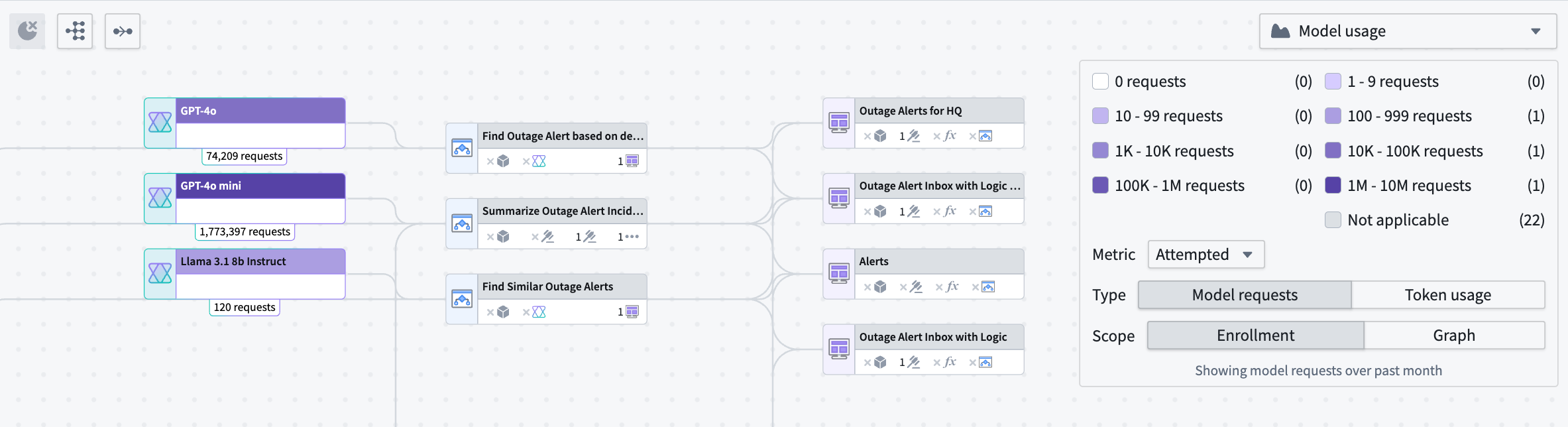
*An example breakdown of the number of attempted model requests at an enrollment level for model nodes on your Workflow Lineage graph.*
* **Token usage coloring:** Visualize the number of tokens used across Workshop applications, Automations, or third-party OSDK applications. Note that the token counts on Logic nodes reflect only the usage in the Logic application debugger.
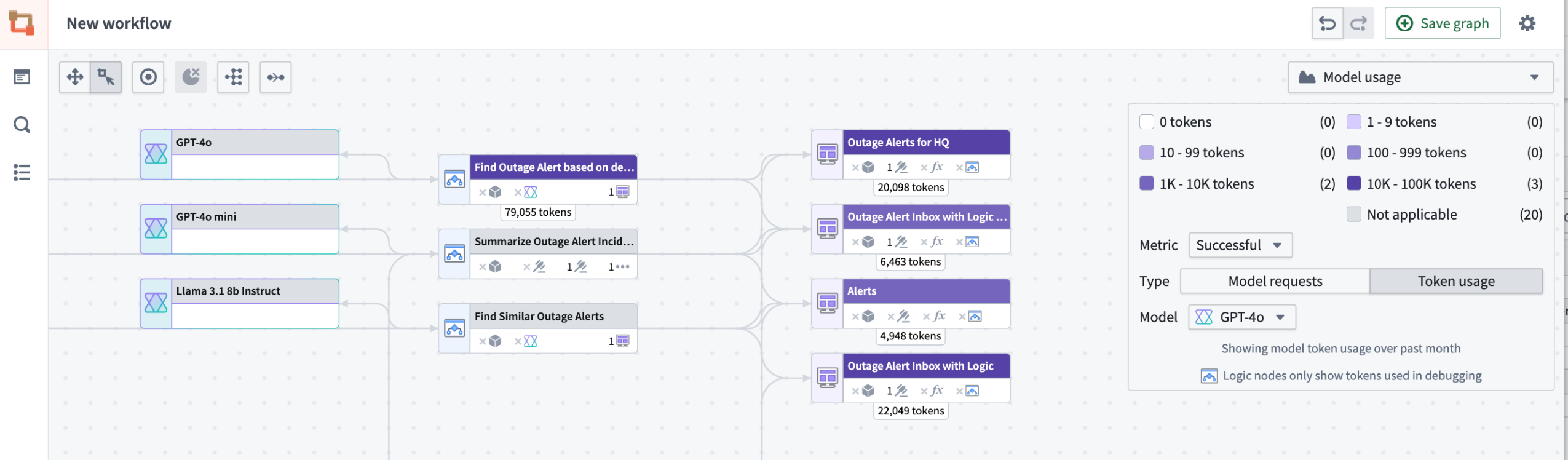
*Example of the number of tokens used across Workshop applications and one Logic Function's debugger token usage.*
### Model usage charts to track model activity over time
Model usage charts are a powerful visualization tool that allows you to track your model's activity over time:
* **Line charts:** Observe token usage or model requests over time for Workshop applications, Automations, and third-party applications (Ontology SDK applications).
* **Interactive graphs:** Hover over the graph to view specific values for particular resources.
* **Customizable filters:** Use the same filters from the color legend to tailor your view in the charts panel.
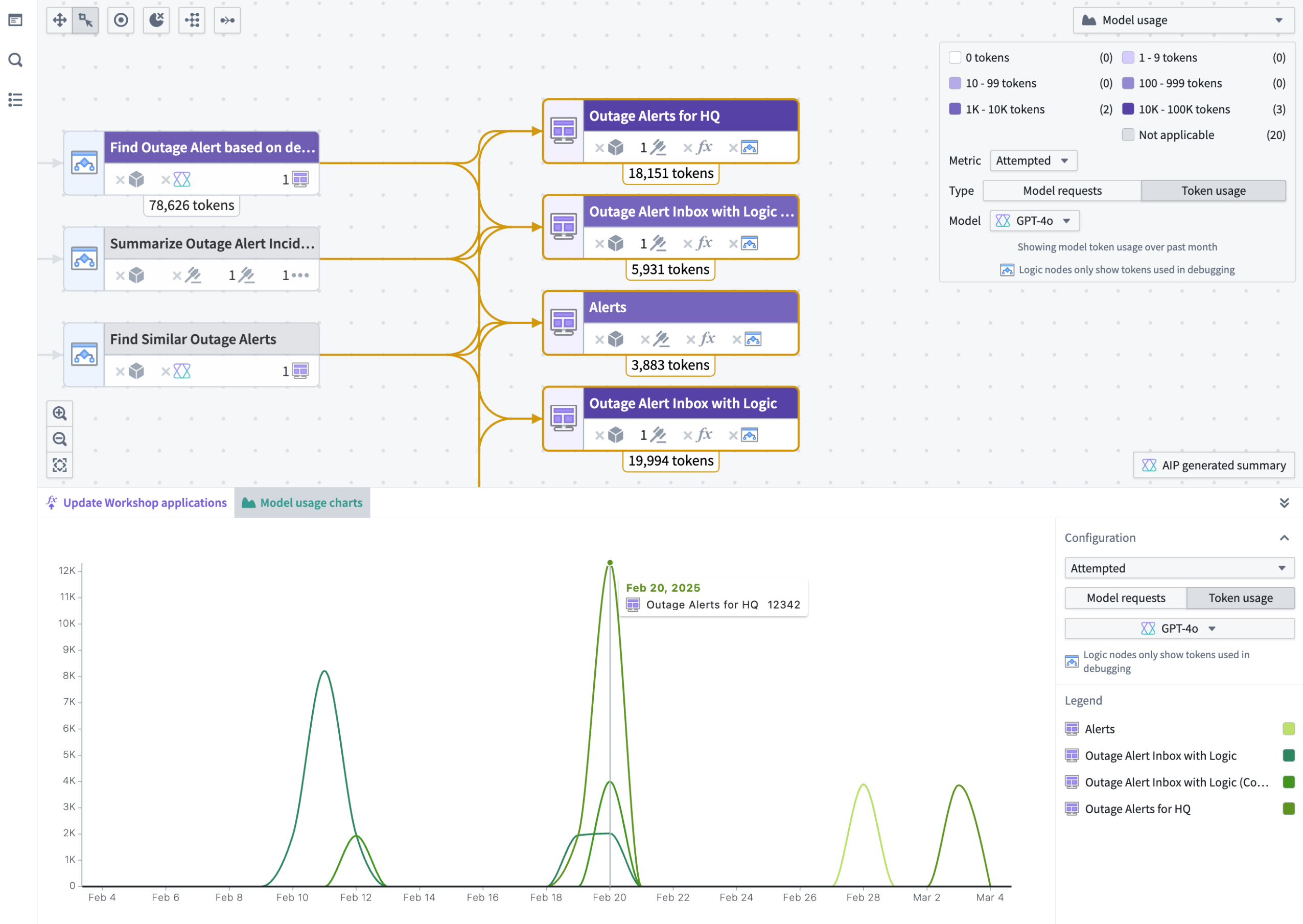
*You can visualize usage through a chart, with the availability to track specific token usage and model requests for particular resources.*
Our new features are designed to provide you a more comprehensive understanding of your LLM usage and AI used in your workflows. Learn more about these [AIP model metrics in the documentation](../../workflow-lineage/aip-usage-observability/index.md#aip-usage-metrics).
### Tell us what you think
As we continue to develop Workflow Lineage, we want to hear about your experiences and welcome your feedback. Share your thoughts with Palantir Support channels or our [Developer Community ↗](https://community.palantir.com/).
***
## Configure a custom domain for your enrollment using self-service setup in Control Panel
Date published: 2025-03-06
We are happy to announce that the Palantir platform can now be accessed from your own custom domain through self-service configuration. Enrollment administrators can directly [specify the domain used for the Palantir platform and manage certificates](../../administration/configure-domains-and-certificates/index.md) from within Control Panel.
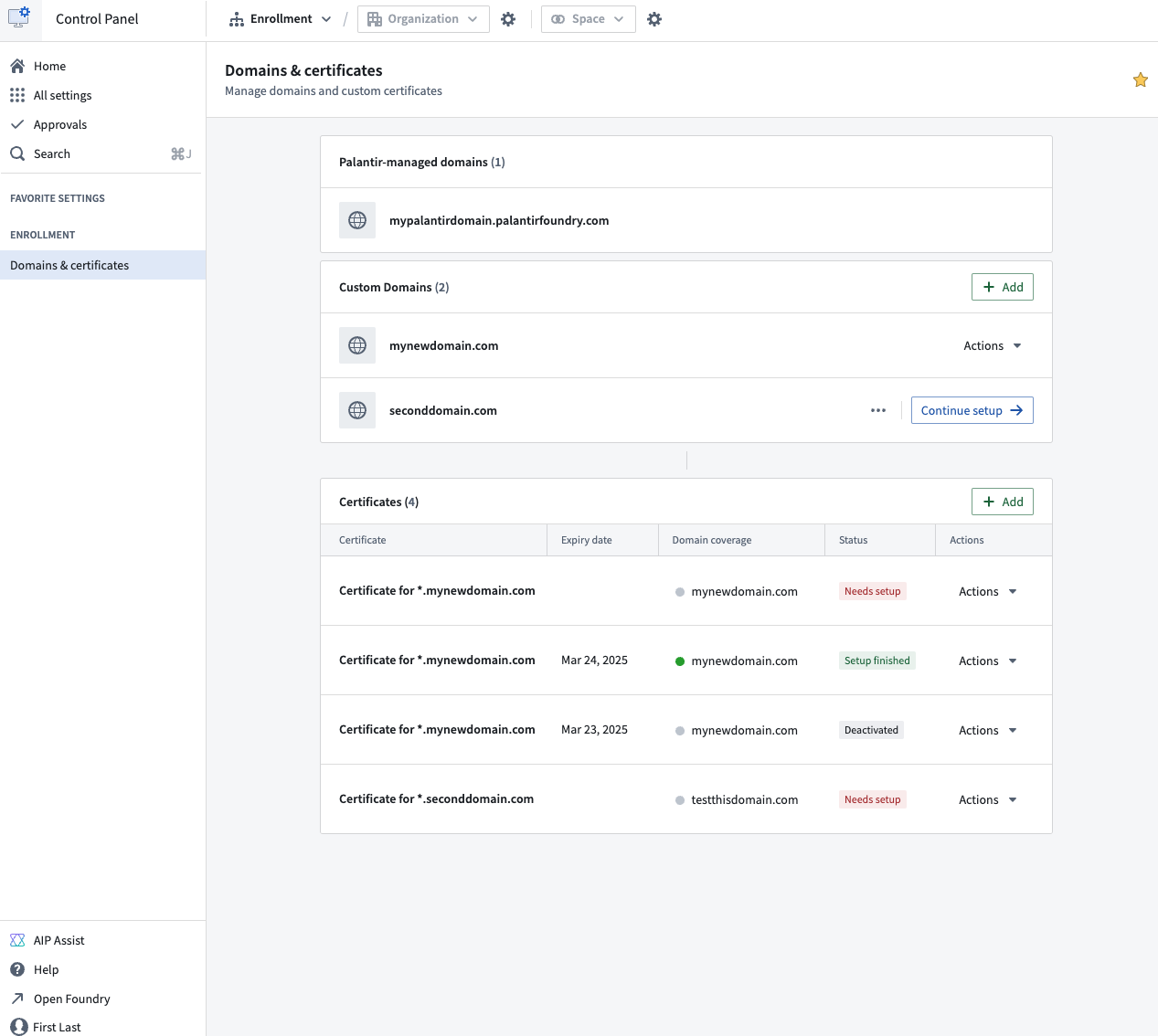
*Configure your custom domain through the ***Domains & certificates*** configuration page in Control Panel.*
Note that if a custom domain for your Palantir platform enrollment was set up by our team before February 2025, self-service configuration is not yet available on your enrollment. You will need to contact Palantir Support to make changes to domains or renew your certificates.
To learn more about these updates and how they can be configured, [review the domains and certificates documentation](../../administration/configure-domains-and-certificates/index.md).
### Tell us your thoughts
We want to hear about your experiences with Control Panel and welcome your feedback. Share your thoughts with Palantir Support channels or on our [Developer Community ↗](https://community.palantir.com/) using the [control-panel ↗](https://community.palantir.com/tag/control-panel) tag.
***
## Choose the best model for your workflow with AIP Model Selector
Date published: 2025-03-04
AIP's new Model Selector makes it easier for you to choose and deploy the best-suited AI models for your workflows. To help guide your choice of model, the Model Selector provides comprehensive information about model performance indicators (such as model class, cost, speed, and availability) and other key metadata. The model selector is now available on all enrollments as of the week of March 3, 2025.
### Model metadata to help you decide a suitable model for your use case
To enable quick selection of a model that meets your specific criteria and needs, the Model Selector provides data on each model's capabilities, context window, and training data.
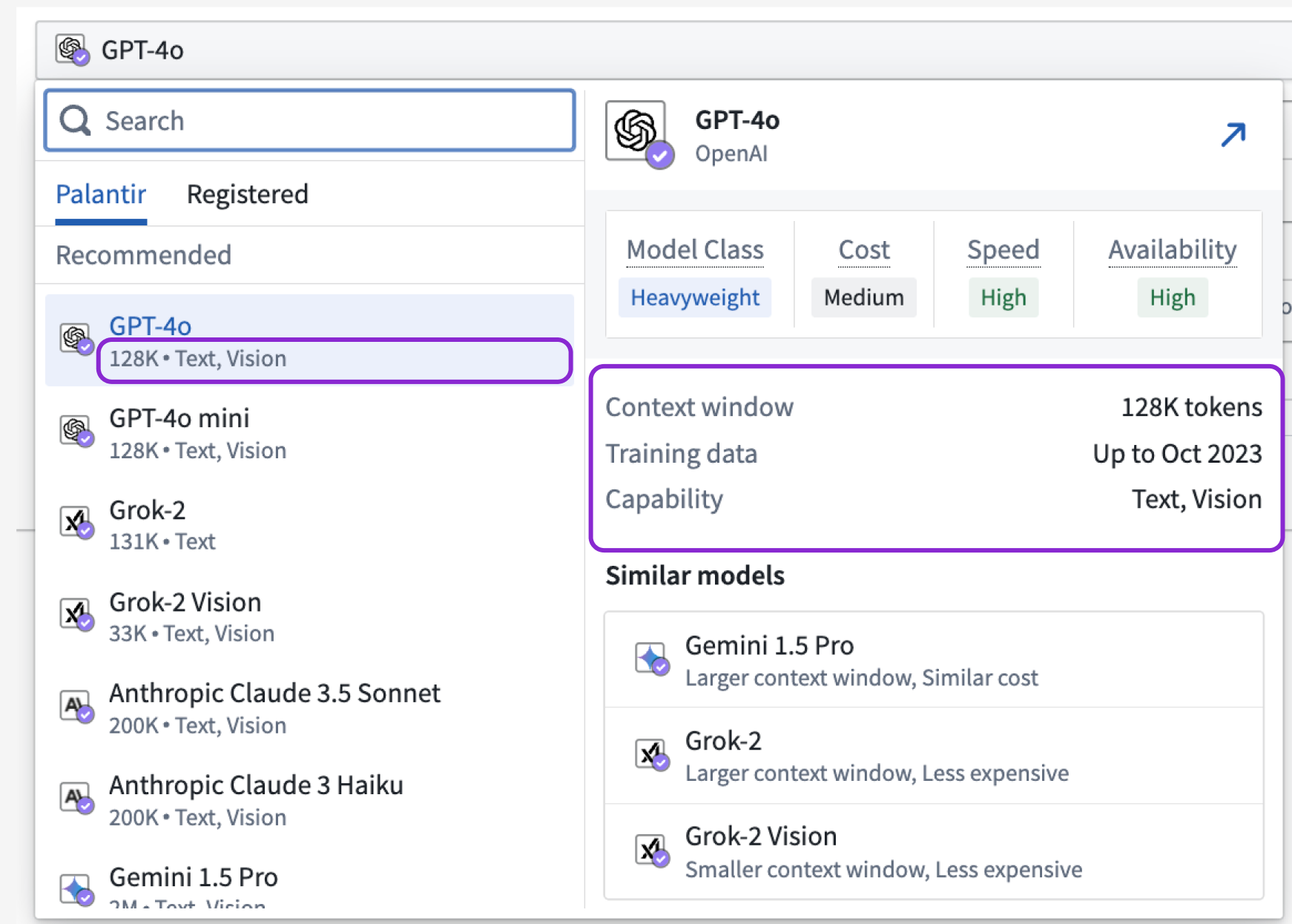
*The Model Selector shows you model metadata at a glance when you hover over an LLM selection.*
### Model relational attributes to help you compare between available models
Model relational attributes are performance indicators designed to help you analyze and compare models in order to identify the best-suited models for your specific use cases.
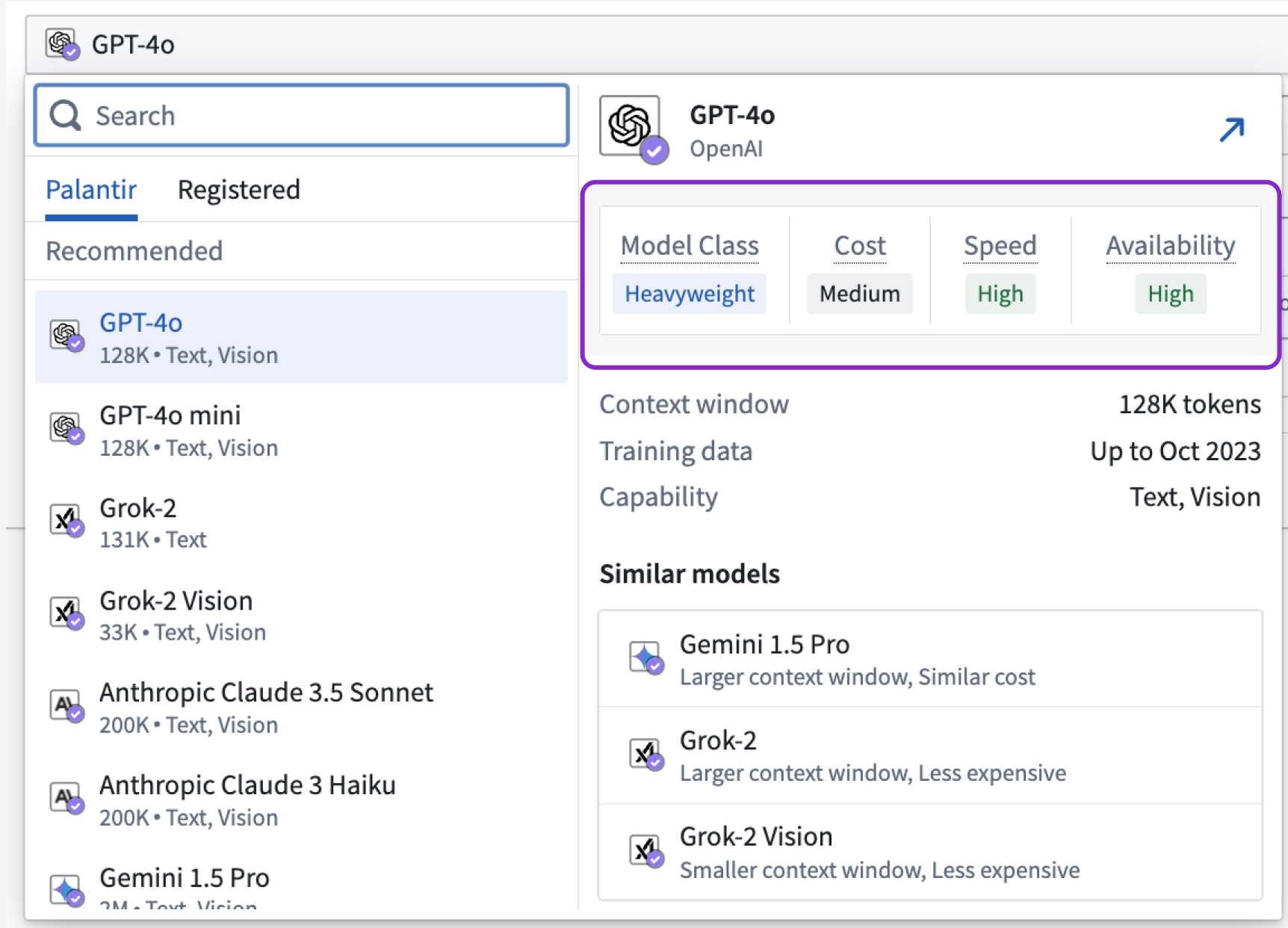
*From within the Model Selector, you can view model relational attributes that help you compare between models using class, cost, speed, and availability considerations.*
#### Model class
Each model class serves distinct purposes, balancing trade-offs between performance, resource consumption, and task complexity. A `Lightweight` model is typically characterized by faster and less intensive computation, making lightweight models ideal for smaller tasks. In contrast, a `Heavyweight` model is designed to handle complex tasks with a higher degree of accuracy and depth, at the cost of being more resource-intensive. A `Reasoning` model is specialized for tasks that require logical inference and decision-making capabilities, excelling in applications that demand understanding and manipulation of complex relationships and abstract concepts.
#### Cost
The cost attribute measures the average expense of processing input and generating output tokens. Lower-cost models will have a value of `Low` while more expensive models will have a value of `High`.
#### Speed
The speed attribute measures the time it takes a model on average to generate output tokens back to the user. Faster models will have a value of `High` while slower models will have a value of `Low`.
#### Availability
The availability attribute reflects the capacity and readiness of a model to handle requests, directly derived from its enrollment limit sizes. Availability is determined by comparing the maximum tokens per minute (TPM) and requests per minute (RPM) that each model can utilize without running into rate limits. `High` availability signifies that a model can consume large amounts of TPM/RPM, making it suitable for high-demand scenarios, while `Low` availability indicates a more limited capacity. For detailed information on each model's specific enrollment limit sizes, refer to [documentation on LLM capacity management](../../aip/llm-capacity-management/index.md).
### Similar models highlighted to provide you more options
Building on the model relational attributes, the **Similar models** section aggregates insights and lists models with the most similar attributes, helping you find other model options quickly.
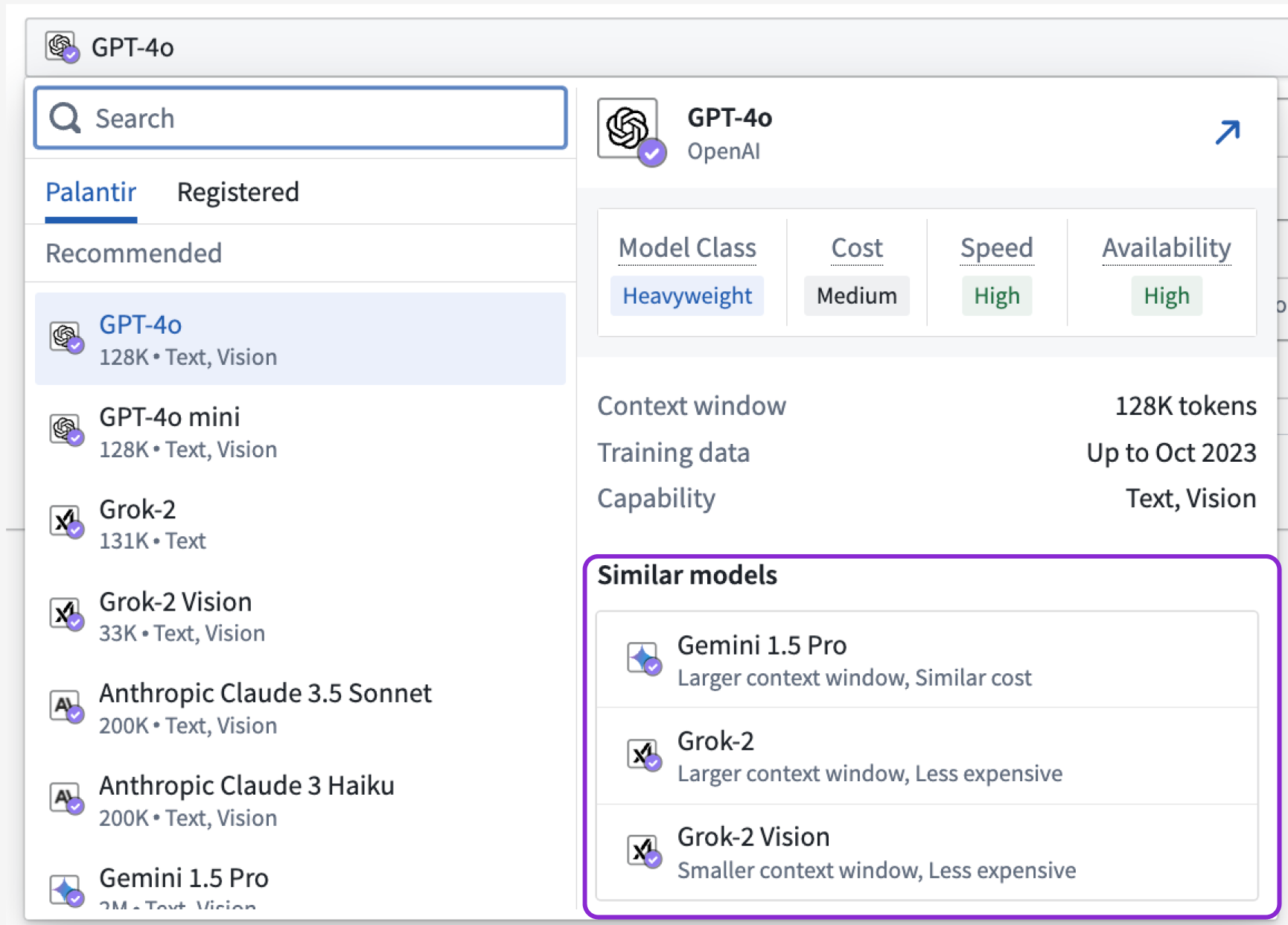
*Review the **Similar models** section to understand what other models are within range of the attributes held by the LLM you are currently considering.*
[Learn more about the models available in the platform](../../aip/supported-llms/index.md).
### Let us know what you think
We want to hear about your experiences with our language model service and welcome your feedback. Share your thoughts with Palantir Support channels or on our [Developer Community ↗](https://community.palantir.com/) using the [control-panel ↗](https://community.palantir.com/tag/language-model-service) tag.
***
## Introducing the ability to bulk update submission criteria for workflow Actions in Workflow Lineage
Date published: 2025-03-04
We are thrilled to announce a new feature in Workflow Lineage designed to streamline your action submission criteria management process. You can now [bulk update the submission criteria on multiple Actions in Workflow Lineage](../../workflow-lineage/keyboard-shortcuts/index.md), instead of doing so one-by-one.
### Introducing a more efficient way to manage your workflow Actions
To update the submission criteria, start by selecting the Actions you wish to update within the Workflow Lineage graph. Once you have chosen the desired actions, navigate to the bottom panel and select **Update submission criteria**.
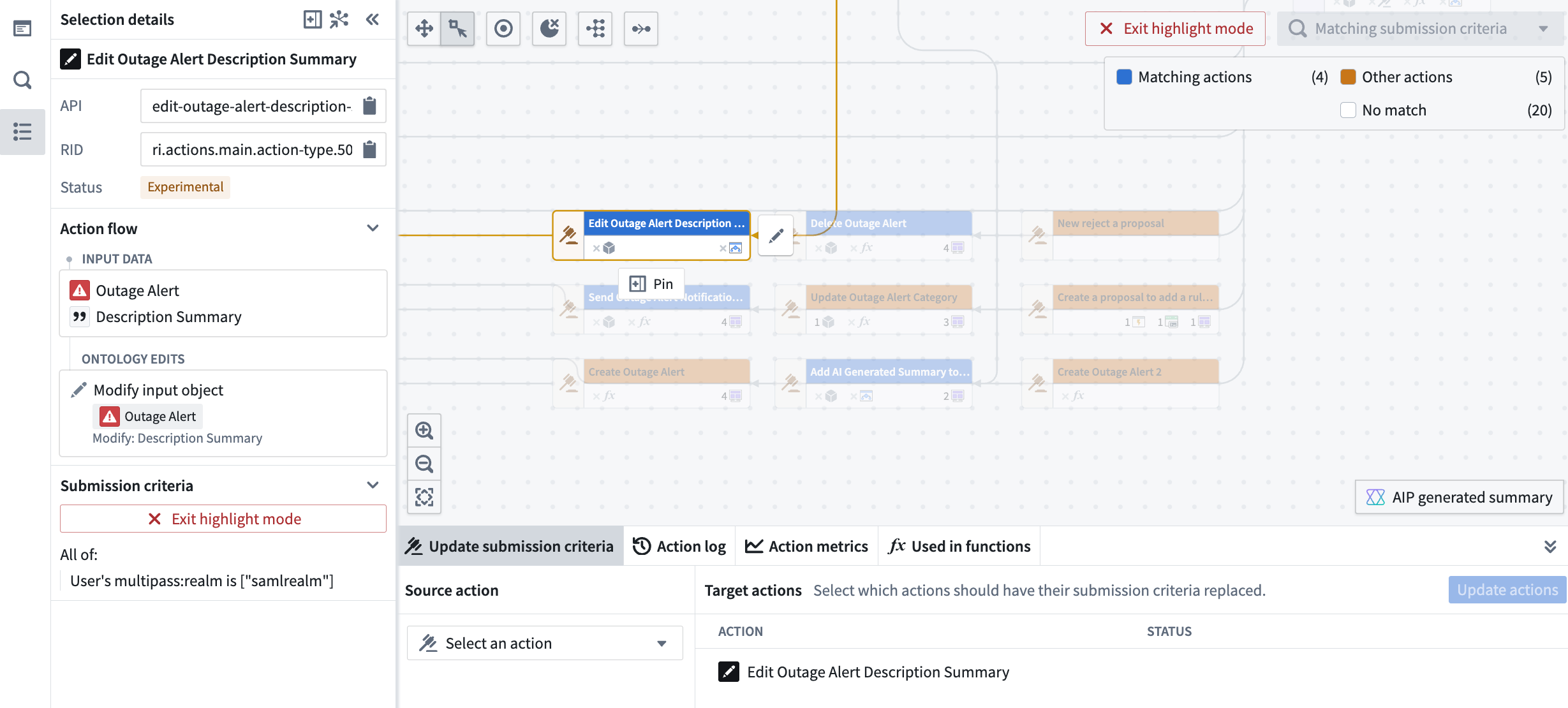
*The **Update submission criteria** pane located at the bottom of Workflow Lineage allows you to update submission criteria for multiple Actions at once.*
Here, you can choose the source Action that has the submission criteria you want to apply to the selected Actions. After reviewing the proposed updates, simply approve and submit them to ensure the changes take effect seamlessly.
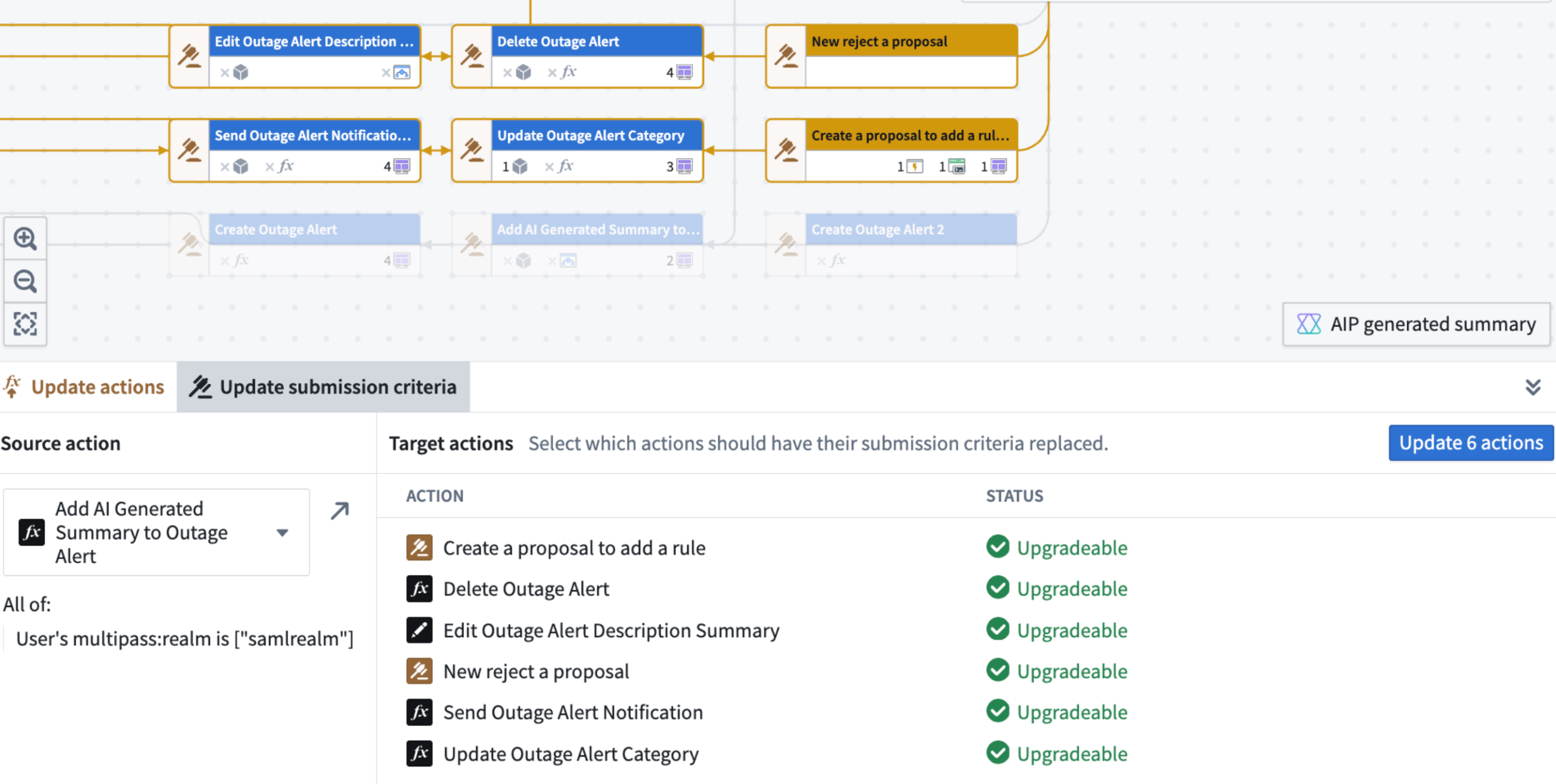
*Review the proposed changes to your submission criteria and then you can update them all at once.*
This new feature is designed to enhance your productivity and streamline your workflow management, allowing you to focus on driving results.
### Share your feedback with us
As we continue to develop Workflow Lineage, we want to hear about your experiences and welcome your feedback. Share your thoughts with Palantir Support channels or our [Developer Community ↗](https://community.palantir.com/).
The **Upgrade functions in Workshop modules** dialog, with the option to **Continue to publish**.
Leverage the convenience and efficiency of bulk publishing in Workflow Lineage to keep your Workshop modules up to date. Identify modules with unpublished versions, publish multiple modules simultaneously, and update Functions as needed; all from a single, centralized location.
[Learn more about bulk publishing Workshop modules in Workflow Lineage.](../../workflow-lineage/refactor-and-understand-workflows/index.md#bulk-publish-workshop-applications)
***
## Discover time series capabilities in the Time Series Catalog application
Date published: 2025-03-13
The Time Series Catalog, available this week across all enrollments, is your starting point and home for creating, managing, and discovering time series in the Palantir platform. Time series are a sequence of data points over a period of time that can help you understand trends and patterns for your specific use case. The Time Series Catalog is designed to facilitate your work with time series syncs, time series object types and derived series.

*From the Time Series Catalog, you can view recently accessed time series syncs and derived series, your saved "favorite" time series syncs and derived series, and the "most viewed" time series object types. Navigate to each resource type's associated tab to explore all resources of that type.*
[Learn more about the Time Series Catalog.](../../time-series/time-series-time-series-catalog/index.md)
### A reminder on existing resource types that can be explored in the Time Series Catalog
You can use the improved Time Series Catalog to review the following existing resource types:
**Time series syncs**
Time series syncs store time-value pairs associated with multiple time series, identified by `seriesIds`. You can access time series syncs directly through code or in no-code applications like the time series sync resource viewer, or Quiver.

*Time series syncs are backed by datasets or streams and require mapping three columns: series identifier, time and value.*
[Learn more about time series syncs.](../../time-series/time-series-syncs/index.md)
**Time series object types**
Time series object types are object types with time series functionality enabled via time series properties. In applications that consume Ontology objects, time series property values are displayed as plots. The backing datasource of a time series property is a time series sync.

**Derived series**
Derived series enable users to save and replicate calculations and transformations applied to time series within Ontology objects. These derived series are stored as Foundry resources, allowing for further management, such as updating the time series logic and saving the derived series to Ontology objects. Once integrated into the Ontology, derived series function like raw time series but are calculated on the fly.

*Derived series enable you to save and replicate calculations and transformations applied to time series within Ontology objects.*
[Learn more about derived series.](../../time-series/derived-series-overview/index.md)
***
## Introducing the Palantir Extension for Visual Studio Code for Python transforms
Date published: 2025-03-13
We are excited to announce that you can now develop Python transforms **locally** inside your own instance of Visual Studio Code. This feature is available to all users who have been granted permissions through [Control Panel](../../code-repositories/configure-repositories-in-control-panel/index.md). The Palantir extension bridges VS Code and Foundry, allowing you to perform and use Python transform operations (such as transform previews, debugging, and the library panel) natively in VS Code.

*The Palantir extension for Visual Studio Code within a local VS Code instance.*
### Extension features
* [Preview your Python transforms](../../palantir-extension-for-visual-studio-code/transforms-preview/index.md) directly from your local Visual Studio Code environment. Additionally, the Palantir extension for Visual Studio Code supports [full dataset (sample-less preview)](../../palantir-extension-for-visual-studio-code/transforms-preview/index.md#full-dataset), so you can preview with the full datasets and not lose any precision. Note: To run previews locally, you will need your platform administrators to enable local preview through the [Control Panel](../../code-repositories/configure-repositories-in-control-panel/index.md).
* [Initiate a build](../../palantir-extension-for-visual-studio-code/transforms-build/index.md#how-to-initiate-a-build) directly from the comfort of your own code editor.
* **Debug your code** and run tests directly from the editor.
* **Leverage the [library panel](../../palantir-extension-for-visual-studio-code/python-libraries/index.md#python-libraries)** to add libraries.
* **Use Palantir’s latest high-performance environment management tool** to set up your Python environment quickly and efficiently.
### Get started
To start using the Palantir extension for Visual Studio Code, open your transforms repository in the Code Repositories application. From here, select the settings icon next to the **VS Code** button in the top right corner of your screen. Choose **Local VS Code** to change the default button language. Select the updated **Local VS Code** button and follow the instructions in the pop-up window to download the extension.
*Note: You only need to download the extension once.*

*The* ***VS Code*** *button in Code Repositories, with the option to configure the button to open in* ***Local VS Code.***
### Current limitations
* The Palantir extension for Visual Studio Code is not yet listed in the Visual Studio Code Marketplace. It is currently available for download exclusively through the Palantir platform.
* As this is a new feature, some transform preview components are still being developed. We are continually working to improve support for these components. For more information, consult [our documentation](../../palantir-extension-for-visual-studio-code/overview/index.md).
### Your feedback matters
Your insights are crucial in helping us understand how this extension impacts your workflow and where we can concentrate our enhancement efforts. Share your feedback through Palantir Support channels and our [Developer Community ↗](https://community.palantir.com/) forum using the [vscode ↗](https://community.palantir.com/tag/vscode) tag.
***
## Publish AIP Agents as Functions for increased platform integration
Date published: 2025-03-13
**Note:** As of the week of April 27, 2026, AIP Agent Studio was renamed AIP Chatbot Studio. All existing features and functionalities remain unchanged.
AIP Agents can now be published as [Functions](../../functions/overview/index.md), allowing them to be used anywhere in the platform where Functions can be executed. With agents as Functions, builders can evaluate agents in [AIP Evals](../../aip-evals/overview/index.md), automate agent workflows with [Automate](../../automate/overview/index.md), and use agents in [Code Repositories](../../code-repositories/overview/index.md), among other use cases. This also enables using agent Functions in AIP Agent Studio, enabling agents to call other agents as tools.
### Publish an agent as a Function
To publish an agent as a Function, select the publish settings icon to the right of the **Publish** option in Agent Studio. This will open the **Publish settings** dialog, where you can enable or disable Function publishing, name your Function, and configure version settings.

*The publish settings in AIP Agent Studio, next to the* ***Publish*** *button.*
### Evaluate Agents with AIP Evals
Once an agent has been published as a Function, you can use [AIP Evals](../../aip-evals/overview/index.md) to assess agent performance and iteratively improve outcomes. With AIP Evals, you can define test cases and evaluation criteria for agent performance, as well as compare the performance of different models. These evaluations can help build confidence in your AIP agents.

*The* ***Create evaluation suite*** *option in AIP Agent Studio.*
Evaluation suites can now be created directly from Agent Studio in the **Evaluation** tab on the left toolbar, allowing for a continuous workflow that leads from agent creation to evaluation.
Leverage this new feature to enhance agent versatility and facilitate seamless integration into a wide range of workflows. With agent evaluation in Evals, you can confidently deploy agents in production and customize agent use to align with your operational requirements.
[Learn more about publishing AIP Agents as Functions](../../chatbot-studio/chatbots-as-functions/index.md#publish-a-chatbot-as-a-function).
***
## Introducing new LLMs to AIP
Date published: 2025-03-13
New large language models (LLMs) have been added to the Palantir platform's Language Modeling Service, giving AIP enrollments access to some of the latest and most powerful models available for your use case needs.
### New Anthropic models
* Claude 3.7 Sonnet
* Claude 3.5 Haiku
* Claude 3.5 Sonnet v2
To learn more about these models, [visit the official AWS website ↗](https://aws.amazon.com/bedrock/claude/).
### New Google Gemini models
* Gemini Flash 2.0
To learn more about these models, [visit the official Google website ↗](https://ai.google.dev/gemini-api/docs/models/gemini#gemini-2.0-flash).
### New Azure OpenAI models
* o1-preview
* o1-mini
To learn more about these models, [visit the official Microsoft Azure website ↗](https://azure.microsoft.com/en-us/blog/introducing-o1-openais-new-reasoning-model-series-for-developers-and-enterprises-on-azure/).
### New open-source Palantir-hosted models
* Llama3.3 70B
To learn more about these models, [visit the official Hugging Face website ↗](https://huggingface.co/meta-llama/Llama-3.3-70B-Instruct).
### Higher efficiency models for every use case
These new releases deliver major leaps in multimodal and natural language processing, empowering teams to handle more complex document workflows with enhanced vision-based parsing, entity extraction, summarization, and semantic chunking. Containing substantial improvements in reasoning and natural language understanding, these models support large context windows for processing large amounts of data in fewer calls than many models in use today. Users can experience improvements in use cases while benefiting from improved accuracy, scalability, efficiency, and speed.
| Model name | Context window | Input token cost (USD price per 1M tokens) | Output token cost (USD price per 1M tokens) | Capability | Latest training data date |
|-----------------------|----------------|------------------------------------------|------------------------------------------|---------------|---------------------------|
| Claude 3.7 Sonnet | 200k tokens | $3 | $15 | Text, Vision | November 2024 |
| Claude 3.5 Haiku | 200k tokens | $0.80 | $4 | Text | July 2024 |
| Claude 3.5 Sonnet v2 | 200k tokens | $3 | $15 | Text, Vision | April 2024 |
| Gemini 2.0 Flash | 1M tokens | $0.10 | $0.40 | Text, Vision | June 2024 |
| o1-preview | 128k tokens | $15 | $60 | Text, Vision | October 2023 |
| o1-mini | 128k tokens | $1.10 | $4.40 | Text, Vision | October 2023 |
| Llama3.3 70B | 128k tokens | $0.23 | $0.40 | Text | December 2023 |
### Model availability by region
Each of these new supported models is available in global, or non geo-restricted enrollments by default. In addition, these models can service requests from a subset of geo-restricted regions. For more detailed information on geographic restrictions, [review our documentation](../../aip/supported-llms/index.md#llm-availability-by-geography).
| Model | United States | European Union | United Kingdom | Canada | Australia | Japan |
|-----------------------|---------------|----------------|----------------|--------|-----------|-------|
| Claude 3.7 Sonnet | ✅ | | | | | |
| Claude 3.5 Haiku | ✅ | | | | | |
| Claude 3.5 Sonnet v2 | ✅ | | | | ✅ | |
| Gemini 2.0 Flash | ✅ | ✅ | | | | |
| o1-preview | ✅ | ✅ | | | | |
| o1-mini | ✅ | ✅ | | | | |
| Llama3.3 70B | ✅ | ✅ | ✅ | ✅ | ✅ | |
### Enable a model provider to use respective models
To use these models, the respective model provider (Amazon Bedrock, Google Vertex AI, Microsoft Azure, Llama-3.1 - 3.3) must first be enabled by an [enrollment administrator in Control Panel](../../aip/enable-aip-features/index.md#enable-llms). Once the provider has been enabled, the model will be ready for use.
If you believe a model provider should be enabled for your enrollment but were unable to configure it in Control Panel, contact your Palantir representative for assistance.
### Weigh in on our Developer Community
We are always working on bringing support for the latest LLMs, and welcome your feedback on how we can improve your LLM experience. Share your thoughts with Palantir Support channels or our [Developer Community ↗](https://community.palantir.com/) and use the [language model service ↗](https://community.palantir.com/tag/language-model-service) tag.
***
## Multilingual speech to text now available in AIP Assist
Date published: 2025-03-11
AIP Assist now supports speech to text, allowing users to save time by asking questions using voice input. This feature enables users to speak into their device's microphone and receive a real-time speech transcription, which can then be sent as input to AIP Assist. Audio transcription provides an alternative input method for users who may have difficulty typing, and allows users to communicate in their preferred language, including Spanish, Japanese, Korean, French, and more.
### Use speech-to-text in AIP Assist
To access speech to text in AIP Assist, open the AIP Assist sidebar and select the microphone icon in the chat input field. Note that the microphone icon is only visible when the chat input field is empty. Select the microphone icon, start speaking, and select the stop icon when you are done.
*The microphone icon in the AIP Assist input field is used to record and generate an audio transcription.*
The transcription will now appear in the chat input box, making it faster and easier to send lengthy inputs, and providing accessible speech-to-text transcription anywhere on the platform.
[Learn more about AIP Assist capabilities.](../../assist/overview/index.md)
Note: AIP feature availability is subject to change and may differ between customers.
***
## Project templates now support Markings and Project constraints
Date published: 2025-03-11
We are excited to announce that [Project templates](../../platform-security-management/manage-project-templates/index.md) now support Markings, Project constraints, and group management. These enhancements increase the configurability available for Project templates and expand what can be encoded and mandated for all new Projects.
### Markings
Project templates can now be configured with existing or new [Markings](../../security/markings/index.md) in the Markings section of the creation wizard. These markings will be applied to the Project upon creation.
[Learn more about applying Markings to Project templates.](../../platform-security-management/manage-project-templates/index.md#markings)
### Project constraints
Project constraints allow Project owners to set limits on which Markings may or may not be applied on files within a Project. Project constraints prevent users from saving violating files to a Project.
When creating a Project template, you can apply [Project constraints](../../security/project-constraints/index.md) by toggling on **Marking constraints**. You can then choose one of the following settings:
* **Allowed Markings:** Allows only resources with the specified Markings to be added to the Project.
* **Prohibited Markings:** Prohibits resources with the specified Markings from being added to the Project.

*Example of configuring a new marking to be an allowed Project constraint.*
### Group management
A common setup is to create viewer, editor, and owner groups with each project. These groups can now be configured in the **Project roles** section. This allows the owner group to have the owner role on the Project and be able to manage membership to the editor and viewer groups.

*Example of a new group being granted manage permissions of a different new group.*
***
## Foundry Connector 2.0 for SAP Applications v2.33.0 (SP33) is now available
Date published: 2025-03-11
Version 2.33.0 (SP33) of the [Foundry Connector 2.0 for SAP Applications add-on](../../sap/overview/index.md), used to connect Foundry to SAP systems, is now available for download from within the Palantir platform.
This latest release features bug fixes and minor enhancements, including:
* Improved housekeeping job performance
* Fixed remote decompression and empty schema content issues
We recommend sharing this notice with your organization's SAP Basis team.
For more on downloading the latest add-on version, review our [documentation](../../sap/download-sap-addon/index.md).
***
## Add a point of contact for your object types
Date published: 2025-03-11
We are happy to announce you can now assign a point of contact for object types in [Ontology Manager](../../ontology-manager/overview/index.md). By setting a point of contact, users can identify the subject-matter expert to reach out to with questions or report issues regarding the particular resource. For example, if a user needs to understand more about recent changes to an `Alert` object type, they will be able to view the name and/or contact details of the knowledgeable user who is best suited to answer such questions.

*An individual point of contact is set for the* `Alert` *object type, displaying the user's name and email.*
The point of contact for an object type is typically the user associated with the Project containing the object type's data source and can be either an individual user or a user group.

*In this notional example, the* ***Workout admins*** *user group is assigned as the point of contact for the* `Alert` *object type.*
If an object type comprises multiple data sources from multiple Projects, the object type can have multiple points of contact (one per Project).

*The* ***Edit Point of Contact*** *dialog in Ontology Manager, where you can set a primary contact for each Project that contains a data source for a given object type.*

*Multiple users set as points of contact for the* `Tree` *object type.*
You can modify the point of contact directly within Ontology Manager, and any updates will be reflected in the corresponding Project. The assigned user(s) or group point of contact will also be automatically suggested as a reviewer for proposals or interventions that modify the object type, streamlining the review process and allowing for faster updates to your Ontology.

*The* ***Edit Point of Contact*** *dialog in Ontology Manager, indicating the set point of contact group will also be the primary contact for the notional* ***Workout App project****.*
### Share your thoughts
We want to hear what you think about our updates in Ontology Manager. Send your feedback to our Palantir Support teams, or share in our [Developer Community ↗](https://community.palantir.com/) using the [ontology-management ↗](https://community.palantir.com/tag/ontology-management) tag.
***
## Create interactive tutorials with Walkthroughs
Date published: 2025-03-06
Walkthroughs will be generally available the week of March 17th, enabling users to generate targeted in-platform tutorials that guide audiences through an application or workflow. With Walkthroughs, you can offer personalized, on-demand resources that improve learning experiences and meet the specific needs of your organization. Walkthroughs will be enabled by default and can be disabled for all users or a subset of users in Control Panel.
### Key features
* **Guidance across applications:** Walkthroughs are not limited to one application; a walkthrough can guide users to complete workflows that span multiple applications on the Palantir platform.
* **Customizable content:** Create tailored tutorials that address use cases and workflows that are specific to your operational needs.
* **Rich media integration:** Enhance your tutorials with images, videos, and interactive elements.
* **Progress tracking:** Walkthroughs tracks progress across steps, allowing users to come back later and continue where they left off.
As part of this release, we are also introducing two new features:
* **Walkthrough metrics:** see how users are interacting with your walkthrough.
* **Advanced Workshop integration:** Highlight specific widgets in Workshop modules during a walkthrough.
### Create and access walkthroughs
You can create a walkthrough in the Walkthroughs application by selecting **New walkthrough** in the upper right corner. To access published walkthroughs, users must have viewer permissions to the walkthrough and related resources. The **Walkthroughs** option will appear in the side panel when a user is viewing a resource with an associated walkthrough, allowing those users to easily access tutorials when available.

*The **Walkthroughs** option in the workspace side panel visible when viewing a media set, and the associated tutorial on semantic search for PDFs.*
Leverage walkthroughs to share knowledge across your organization and provide targeted, on-demand support for workflows and use cases, making the most of Palantir offerings.
[Learn more about Walkthroughs.](../../walkthroughs/overview/index.md)
***
## Review LLM usage metrics for your workflow in Workflow Lineage
Date published: 2025-03-06
Workflow Lineage now has AIP usage metrics designed to provide deeper insights and transparency into the LLM usage of your workflow. You can view which resources are using the most tokens, how often they are getting rate limited, and more.
### Model usage coloring for easy visualization
Dig deeper into your model's usage with our new model usage color legend option. There are a few types of model usage colors; for each one, you can specify whether you want to view the metrics associated with the total attempted model usage, only successful usage, or only rate-limited model usage.
* **Model requests:** Identify the total number of specified requests on model nodes within your Workflow Lineage. Specify whether you want to view the total number of model requests across the entire enrollment or only requests from models visible on the graph.

*An example breakdown of the number of attempted model requests at an enrollment level for model nodes on your Workflow Lineage graph.*
* **Token usage coloring:** Visualize the number of tokens used across Workshop applications, Automations, or third-party OSDK applications. Note that the token counts on Logic nodes reflect only the usage in the Logic application debugger.

*Example of the number of tokens used across Workshop applications and one Logic Function's debugger token usage.*
### Model usage charts to track model activity over time
Model usage charts are a powerful visualization tool that allows you to track your model's activity over time:
* **Line charts:** Observe token usage or model requests over time for Workshop applications, Automations, and third-party applications (Ontology SDK applications).
* **Interactive graphs:** Hover over the graph to view specific values for particular resources.
* **Customizable filters:** Use the same filters from the color legend to tailor your view in the charts panel.

*You can visualize usage through a chart, with the availability to track specific token usage and model requests for particular resources.*
Our new features are designed to provide you a more comprehensive understanding of your LLM usage and AI used in your workflows. Learn more about these [AIP model metrics in the documentation](../../workflow-lineage/aip-usage-observability/index.md#aip-usage-metrics).
### Tell us what you think
As we continue to develop Workflow Lineage, we want to hear about your experiences and welcome your feedback. Share your thoughts with Palantir Support channels or our [Developer Community ↗](https://community.palantir.com/).
***
## Configure a custom domain for your enrollment using self-service setup in Control Panel
Date published: 2025-03-06
We are happy to announce that the Palantir platform can now be accessed from your own custom domain through self-service configuration. Enrollment administrators can directly [specify the domain used for the Palantir platform and manage certificates](../../administration/configure-domains-and-certificates/index.md) from within Control Panel.

*Configure your custom domain through the ***Domains & certificates*** configuration page in Control Panel.*
Note that if a custom domain for your Palantir platform enrollment was set up by our team before February 2025, self-service configuration is not yet available on your enrollment. You will need to contact Palantir Support to make changes to domains or renew your certificates.
To learn more about these updates and how they can be configured, [review the domains and certificates documentation](../../administration/configure-domains-and-certificates/index.md).
### Tell us your thoughts
We want to hear about your experiences with Control Panel and welcome your feedback. Share your thoughts with Palantir Support channels or on our [Developer Community ↗](https://community.palantir.com/) using the [control-panel ↗](https://community.palantir.com/tag/control-panel) tag.
***
## Choose the best model for your workflow with AIP Model Selector
Date published: 2025-03-04
AIP's new Model Selector makes it easier for you to choose and deploy the best-suited AI models for your workflows. To help guide your choice of model, the Model Selector provides comprehensive information about model performance indicators (such as model class, cost, speed, and availability) and other key metadata. The model selector is now available on all enrollments as of the week of March 3, 2025.
### Model metadata to help you decide a suitable model for your use case
To enable quick selection of a model that meets your specific criteria and needs, the Model Selector provides data on each model's capabilities, context window, and training data.

*The Model Selector shows you model metadata at a glance when you hover over an LLM selection.*
### Model relational attributes to help you compare between available models
Model relational attributes are performance indicators designed to help you analyze and compare models in order to identify the best-suited models for your specific use cases.

*From within the Model Selector, you can view model relational attributes that help you compare between models using class, cost, speed, and availability considerations.*
#### Model class
Each model class serves distinct purposes, balancing trade-offs between performance, resource consumption, and task complexity. A `Lightweight` model is typically characterized by faster and less intensive computation, making lightweight models ideal for smaller tasks. In contrast, a `Heavyweight` model is designed to handle complex tasks with a higher degree of accuracy and depth, at the cost of being more resource-intensive. A `Reasoning` model is specialized for tasks that require logical inference and decision-making capabilities, excelling in applications that demand understanding and manipulation of complex relationships and abstract concepts.
#### Cost
The cost attribute measures the average expense of processing input and generating output tokens. Lower-cost models will have a value of `Low` while more expensive models will have a value of `High`.
#### Speed
The speed attribute measures the time it takes a model on average to generate output tokens back to the user. Faster models will have a value of `High` while slower models will have a value of `Low`.
#### Availability
The availability attribute reflects the capacity and readiness of a model to handle requests, directly derived from its enrollment limit sizes. Availability is determined by comparing the maximum tokens per minute (TPM) and requests per minute (RPM) that each model can utilize without running into rate limits. `High` availability signifies that a model can consume large amounts of TPM/RPM, making it suitable for high-demand scenarios, while `Low` availability indicates a more limited capacity. For detailed information on each model's specific enrollment limit sizes, refer to [documentation on LLM capacity management](../../aip/llm-capacity-management/index.md).
### Similar models highlighted to provide you more options
Building on the model relational attributes, the **Similar models** section aggregates insights and lists models with the most similar attributes, helping you find other model options quickly.

*Review the **Similar models** section to understand what other models are within range of the attributes held by the LLM you are currently considering.*
[Learn more about the models available in the platform](../../aip/supported-llms/index.md).
### Let us know what you think
We want to hear about your experiences with our language model service and welcome your feedback. Share your thoughts with Palantir Support channels or on our [Developer Community ↗](https://community.palantir.com/) using the [control-panel ↗](https://community.palantir.com/tag/language-model-service) tag.
***
## Introducing the ability to bulk update submission criteria for workflow Actions in Workflow Lineage
Date published: 2025-03-04
We are thrilled to announce a new feature in Workflow Lineage designed to streamline your action submission criteria management process. You can now [bulk update the submission criteria on multiple Actions in Workflow Lineage](../../workflow-lineage/keyboard-shortcuts/index.md), instead of doing so one-by-one.
### Introducing a more efficient way to manage your workflow Actions
To update the submission criteria, start by selecting the Actions you wish to update within the Workflow Lineage graph. Once you have chosen the desired actions, navigate to the bottom panel and select **Update submission criteria**.

*The **Update submission criteria** pane located at the bottom of Workflow Lineage allows you to update submission criteria for multiple Actions at once.*
Here, you can choose the source Action that has the submission criteria you want to apply to the selected Actions. After reviewing the proposed updates, simply approve and submit them to ensure the changes take effect seamlessly.

*Review the proposed changes to your submission criteria and then you can update them all at once.*
This new feature is designed to enhance your productivity and streamline your workflow management, allowing you to focus on driving results.
### Share your feedback with us
As we continue to develop Workflow Lineage, we want to hear about your experiences and welcome your feedback. Share your thoughts with Palantir Support channels or our [Developer Community ↗](https://community.palantir.com/).