# Announcements
## Introducing the Ontology cleanup tool: streamline and optimize your Ontology
Date published: 2023-10-31
The [Ontology cleanup tool](../../ontology-manager/cleanup/index.md), generally available the week of October 30th, aims to increase the ease of Ontology navigation, search performance, while optimizing storage costs by identifying object types suitable for deletion.
The Ontology cleanup tool provides you the following features to help you efficiently manage your Ontology:
### Flags
Flags help you easily identify object types that require attention. Customize the process to your specific needs by selecting flags you would like to enable from a pre-existing list, and then assigning a level of importance to each one of them.
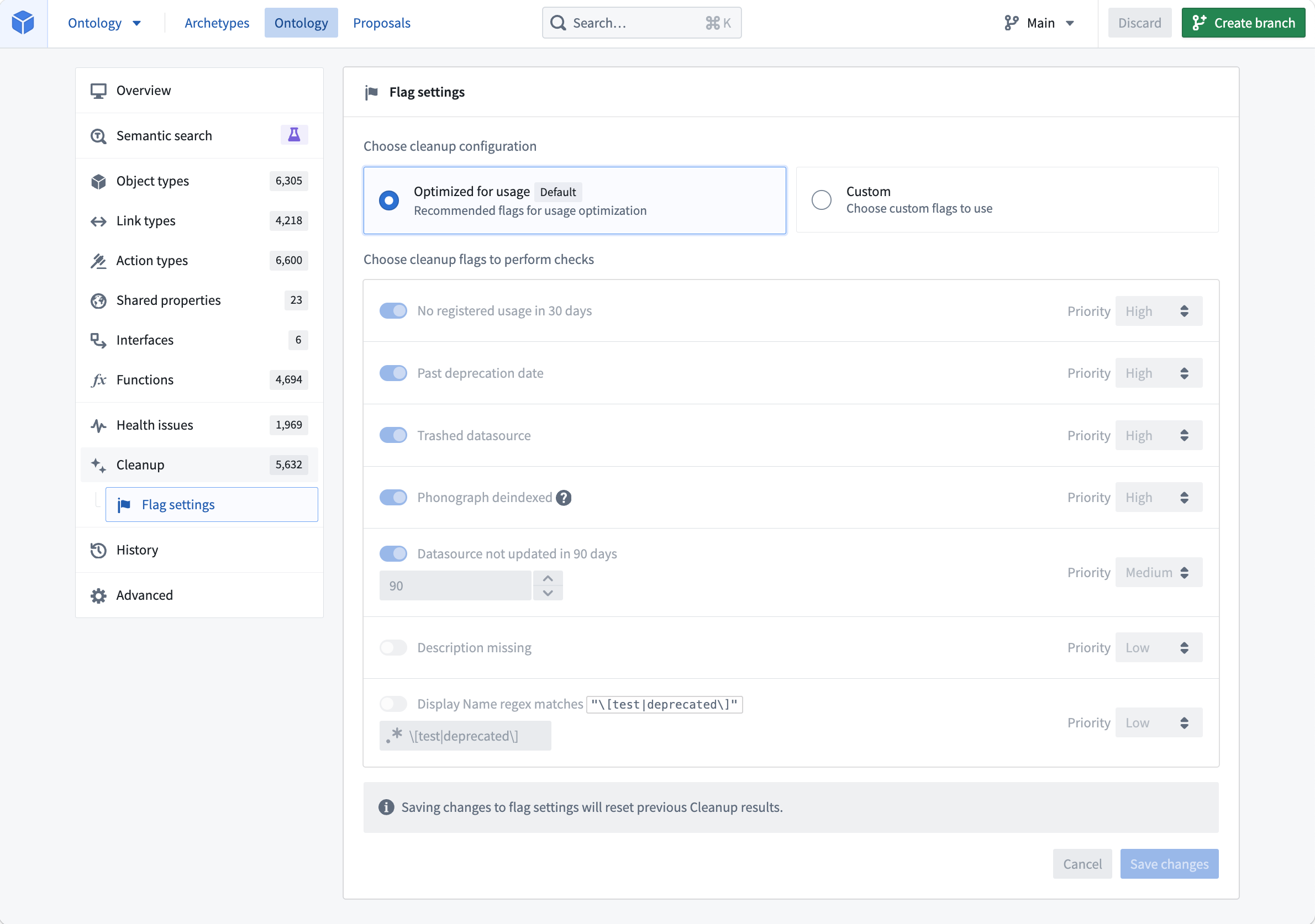
*Customize the flag settings and choose cleanup configuration*
### Actions
The Ontology cleanup tool provides three essential actions to handle flagged object types effectively:
* **Snooze:** Temporarily hide object types from your cleanup queue for a configurable amount of time. This allows you to review and assess their relevance before deprecating or deleting them.
* **Deprecate:** Mark object types as deprecated to indicate their obsolescence. This action provides a transition period for users to adjust to alternative options.
* **Delete:** Permanently remove flagged object types from your Ontology, freeing up storage space while improving the overall performance of your Ontology.
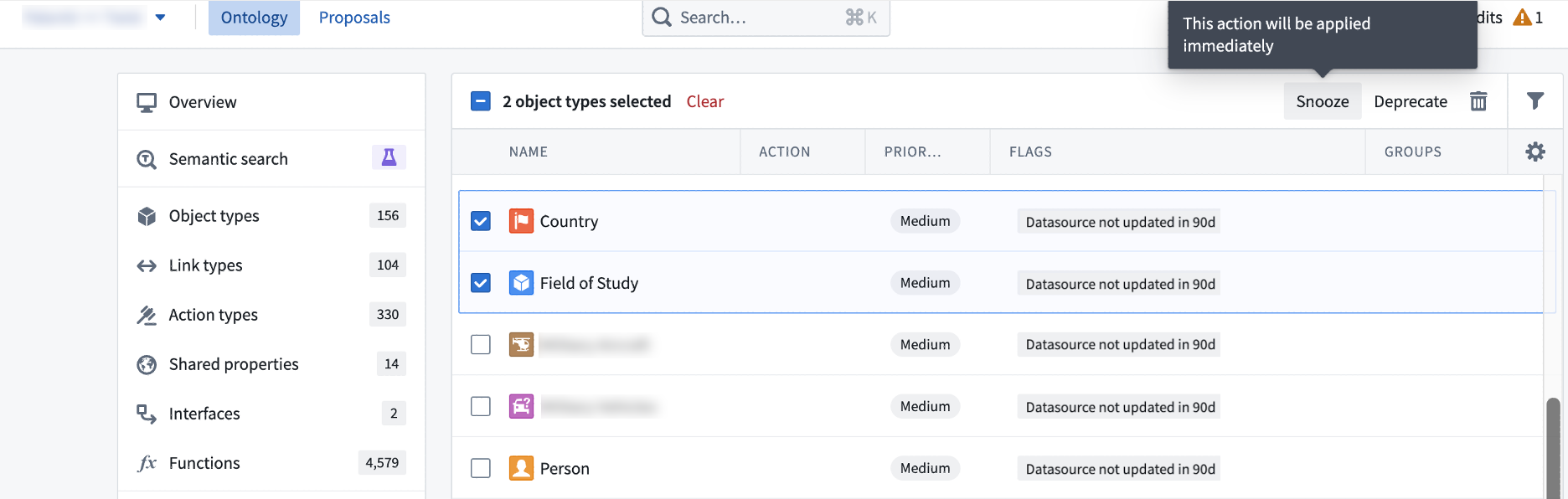
*Object types selected either to be snoozed, deprecated, or deleted*
### Save or propose your changes
When the excess object types have been identified, you can mark and save desired changes directly to your Ontology, ensuring immediate implementation of the cleanup process. Alternatively, you can create a proposal to facilitate a collaborative decision-making and feedback-gathering process from other stakeholders before making any modifications.
Refer to the Foundry documentation on [Ontology cleanup tool](../../ontology-manager/cleanup/index.md) and get started on optimizing your Ontology.
## Introducing AIP-generated Vega plots
Date published: 2023-10-31
[Quiver](../../quiver/cards-vega-plot/index.md) enables users to create fully customizable and interactive visualizations using the [Vega ↗](https://vega.github.io/vega/) or [Vega-Lite ↗](https://vega.github.io/vega-lite/) libraries. However, writing a valid Vega plot configuration in JSON format can be prone to error. We are excited to announce that using AIP, it is now possible to generate Vega plot configurations by simply describing the desired plot or changes in natural language.
### Describe the desired Vega plot
To use AIP to help generate your Vega plot, simply provide a prompt and select **Configure**. AIP will make a suggestion for your review. To accept a suggestion, select **Apply**. If you would like AIP to make an alternative suggestion, edit your prompt and then select **Reconfigure**.
In the example below, AIP uses the prompt to suggest the configuration of a plot which contains the two numerical properties of interest, caffeine and pH levels.
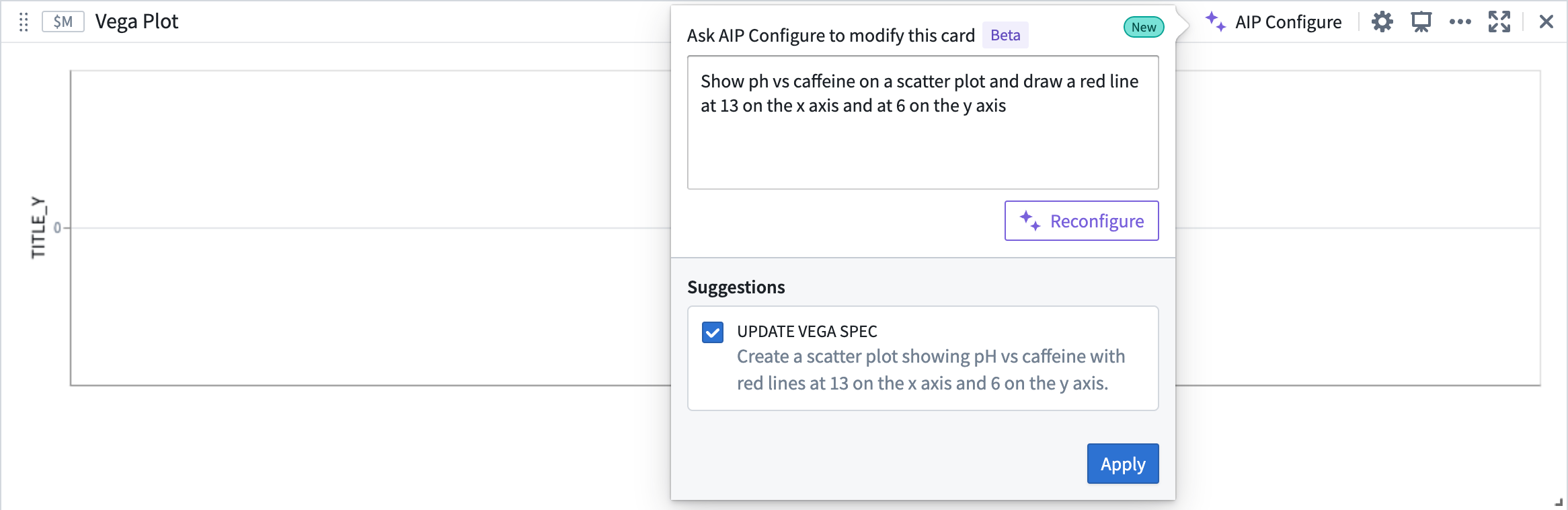
*AIP suggestion based on given prompt*
To accept AIP’s proposed update, select **Apply**. The Vega plot will render a visualization based on the updated Vega specification.
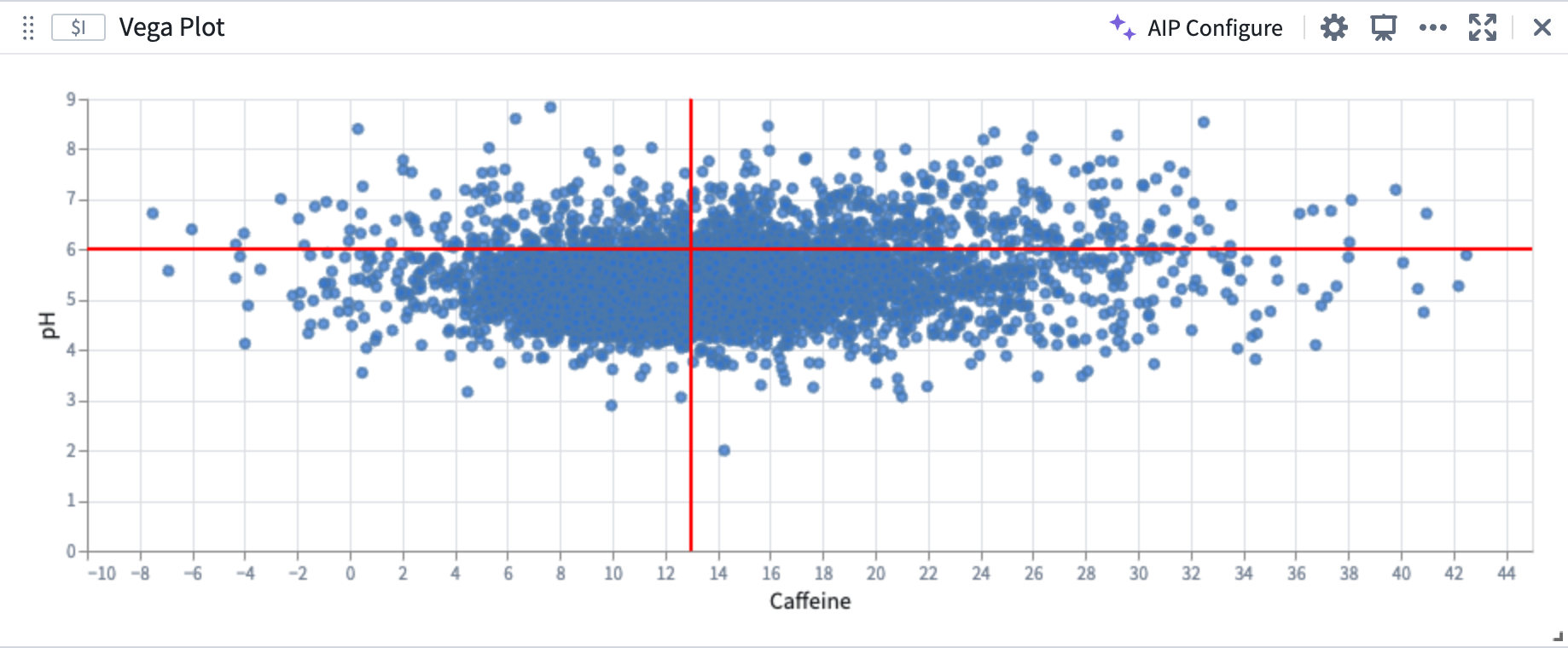
*AIP Vega plot configuration*
### Build on top of existing plots
AIP can recognize and differentiate abstract ideas contained within your prompt and use this information to help generate or modify Vega plots. For example, AIP can use references to the characteristics of previously generated plots, allowing you to “build on top of" your existing plots.
In the image below, the user provides the prompt: “The two lines on the plot split the points into 4 quadrants. Color each quadrant a different color”. AIP recognizes that the areas defined by the vertical and horizontal lines are quadrants, even though the current plot configuration does not contain any definition or configuration of quadrants.
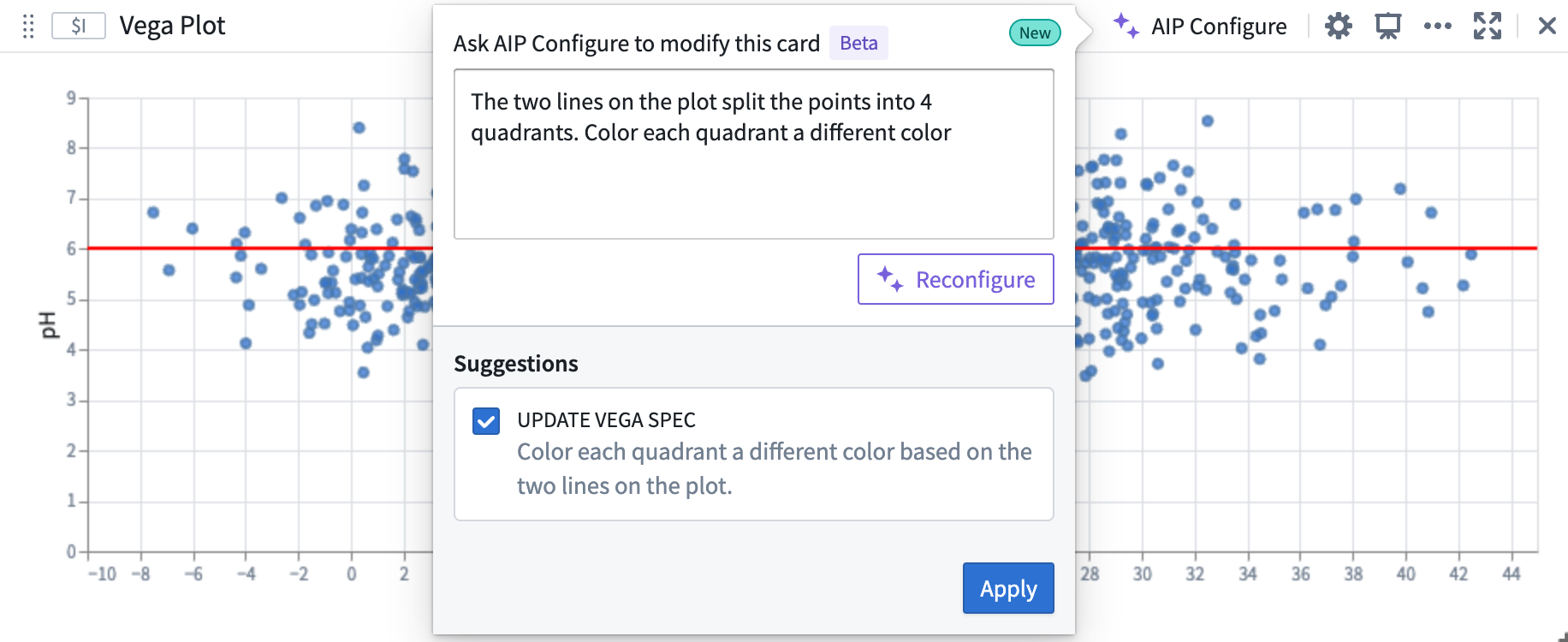
*AIP can use prompts that contain references to previously generated plots*
AIP accurately generates the desired plot, aligned to the user prompt, which builds off of the initial plot.
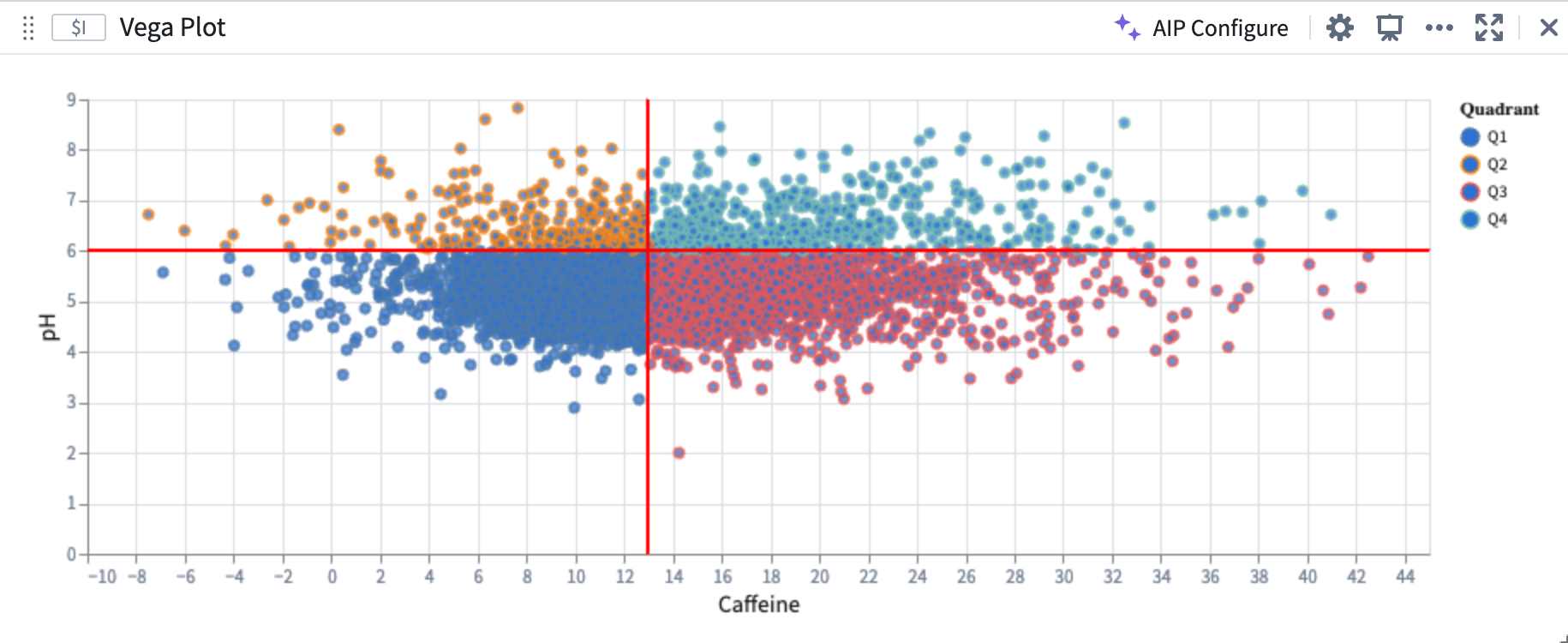
*AIP-generated Vega plot*
### Create Vega plots using AIP Generate
Quiver analysis graphs produced using AIP can include Vega plots. To instruct AIP to produce a Vega plot rather than native Quiver visualizations such as line or scatter plots, make explicit in your prompt that AIP should return a “Vega plot”. For example, an accurate prompt could be: “Show caffeine vs ph on a scatter plot using a vega plot”.
Review the [Vega plots documentation](../../quiver/cards-vega-plot/index.md#what-is-vega).
Note: AIP feature availability is subject to change and may differ between customers.
## Introducing Marketplace \[GA]: Discover and install Foundry products
Date published: 2023-10-19
[Foundry Marketplace](../../marketplace/overview/index.md) enables both technical and non-technical builders to access pre-built solutions for your organization's hardest problems. Available to all enrollments the week of October 30th, users can harness capabilities both from Foundry products built by Palantir and those designed by power users in your own organization with a visit to Marketplace.
Whether you want to use a product out of the box or as a starting point for your next custom use case, leverage the Marketplace product library to get your next project off the ground faster than ever before. Marketplace can power workflows such as:
* Installing a Workshop-based task management application across different departments in your organization with each organization's input data.
* Installing a data connector and Ontology to enable your customers to onboard their own data to Foundry and participate in an ecosystem.
* Installing a Pipeline Builder pipeline in your pre-production and production environments to facilitate controlled release management workflows.
*Browse Marketplace using the Products tab and install relevant products.*
### Clean and simple product discovery
The Marketplace storefront facilitates easy discovery of products available for installation. All new Marketplace users have two stores available by default:
* **The Foundry Store**, providing Palantir-built products. For example, the [Mapbox boundary datasets](../../geospatial/ontology/index.md#using-mapbox-boundaries).
* **Reference Resources** used for training purposes. For example, the [Workshop Design Hub](../../workshop/example-applications/index.md#workshop-design-hub).
You may already have other stores available on your Foundry instance if your organization was an early Marketplace adopter.
[Learn more about browsing products](../../marketplace/browse-products/index.md).
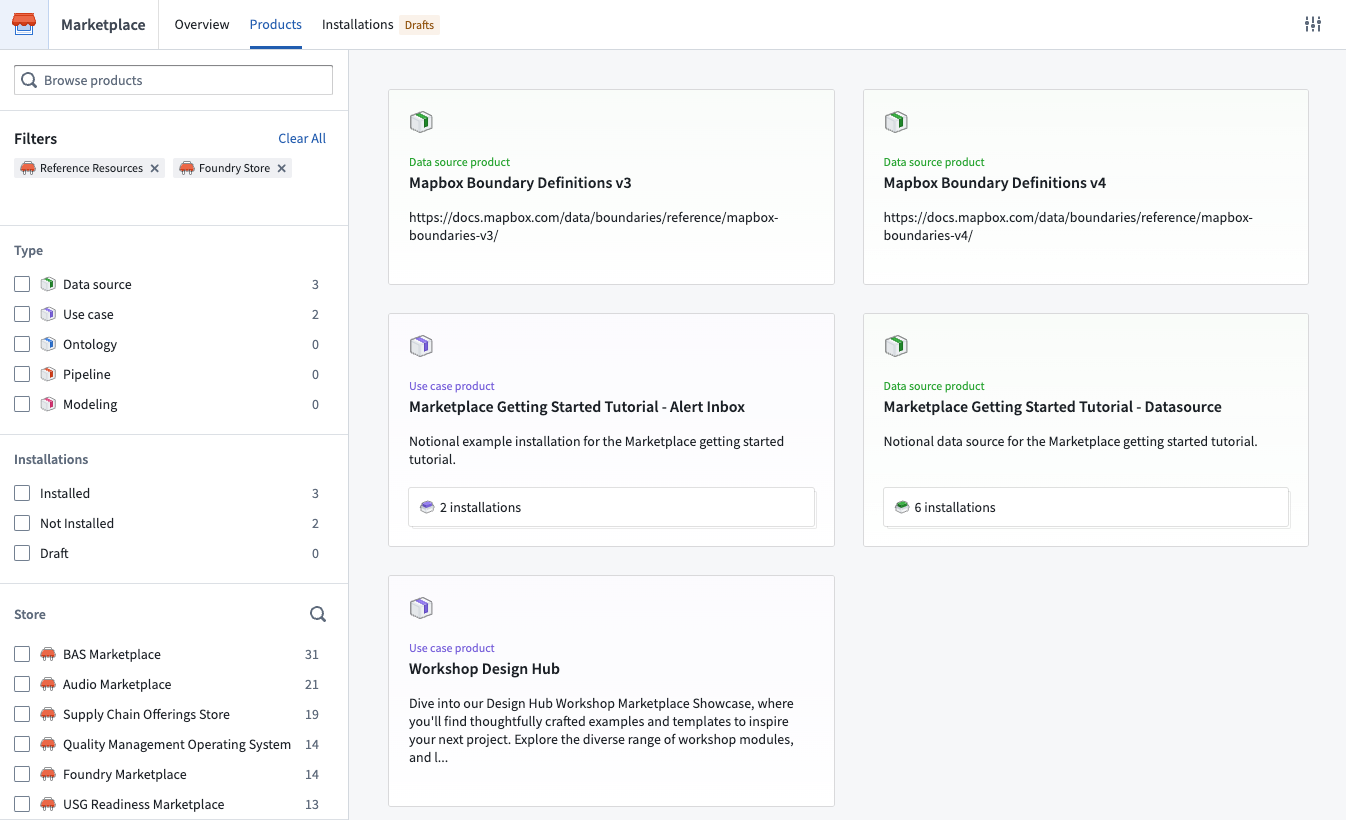
*Browse Foundry products from Palantir and from others within your own organization*
### Bespoke product installations powered by your preferences
Installation is simple. Benefit from Marketplace's guided installation workflow - choose the desired installation location and [map your inputs](../../marketplace/install-product/index.md#inputs) with the intuitive interface. Inputs required to create [content](../../marketplace/install-product/index.md#outputs) (Workshop applications, Pipeline builder pipelines, etc.) are automatically surfaced, as are product owner-provided customization points such as configuration to optionally show or hide a specific section of an application. This allows you to create bespoke product installations powered by your organization's data and preferences.
Simply follow along to complete your installation and start using your new Foundry resources right away.
[Learn more about installing products](../../marketplace/install-product/index.md).
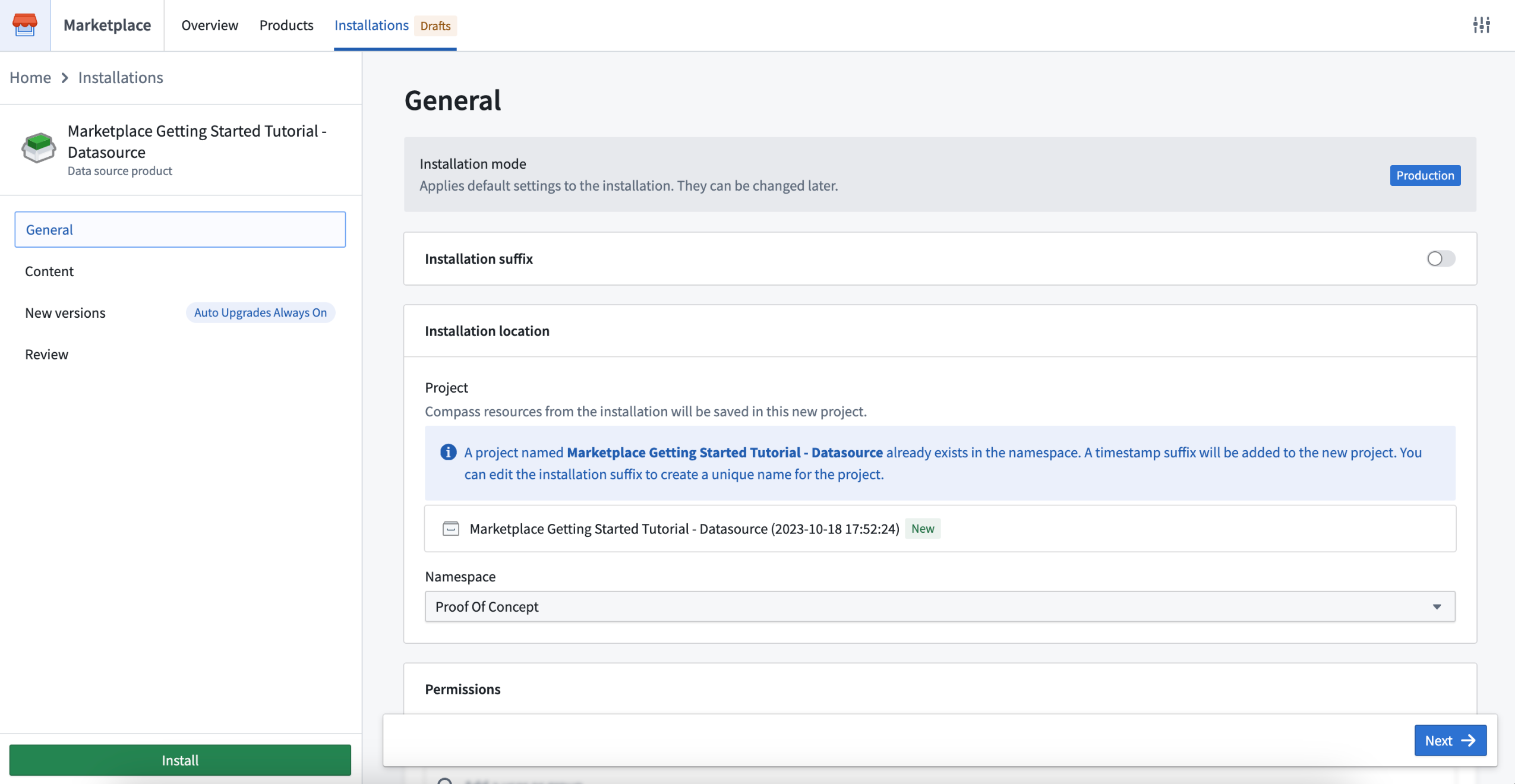
*Intuitive product installation process guided by your preferences*
### Automatic product upgrades with granular control
Use automatic upgrades, maintenance windows, and release channels to keep your product installation up to date with the latest content from the product owner.
* Maintenance windows: Accept upgrades only when it is convenient for you and your users. For example, you may choose to keep operations flowing by only upgrading during out-of-business hours.
* Release channels: You can choose a unique release channel for each installation. For example, you may want to create multiple installations of the same product with department-specific data, or, configure a release management workflow where each installation tracks a different release channel.
[Learn more about upgrades](../../marketplace/installations/index.md#upgrades).
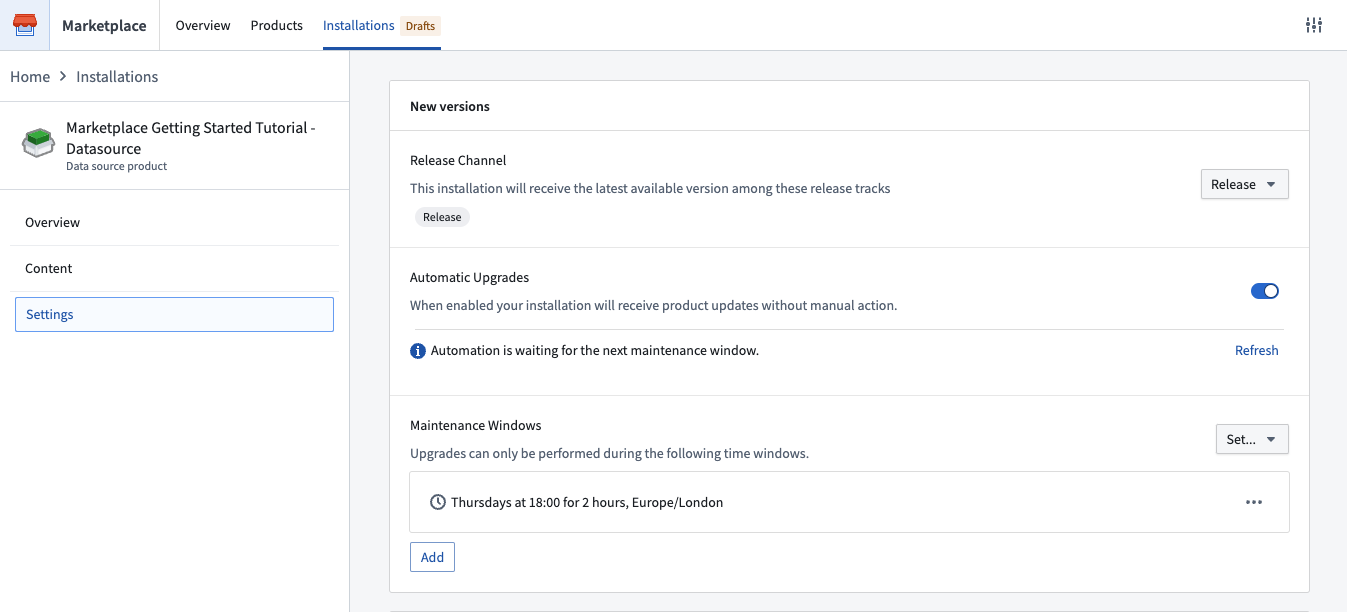
*Controlled product upgrades*
### Marketplace case study: Incentive alerting at J.D. Power
At J.D. Power, Marketplace is used for the secure deployment of use cases to their automotive ecosystem customers on Foundry. For example, their newly developed intelligent alert system tracks vehicle-specific sales activity, competitive dynamics, and macroeconomic trends, allowing OEMs, dealers, and financing companies to optimize incentive strategies based on real-time, hyperlocal data.
Marketplace allows J.D. Power to safely separate development and production versions of the alert system (and others), enabling them to iterate on their Foundry products and automatically release versions to production when they are ready. As product and user needs evolve, Marketplace also provides J.D. Power with the optionality to customize each product installation according to each ecosystem participant's needs.
### What is on the development roadmap?
The release of [Foundry DevOps](../../foundry-devops/overview/index.md), our toolset to create and manage products for installation via Marketplace, currently in limited beta.
Later in 2024, we will make it possible to publish into a central Marketplace store so you can make your products available for other Foundry users to purchase (where relevant) and install.
Learn more about [Marketplace](../../marketplace/overview/index.md) in the documentation.
## Faster Python environment builds in Code Repositories using cached environments \[GA]
Date published: 2023-10-19
We have introduced fast loading environments, a new caching mechanism that significantly speeds up environment build times for Python environments for Python transforms in Code Repositories. Now generally available to all stacks, the caching mechanism makes environment build times 6x faster, on average. As a result, the overall build time for a typical Python transform has now been reduced to ~34 seconds, 2x faster than previous build times.
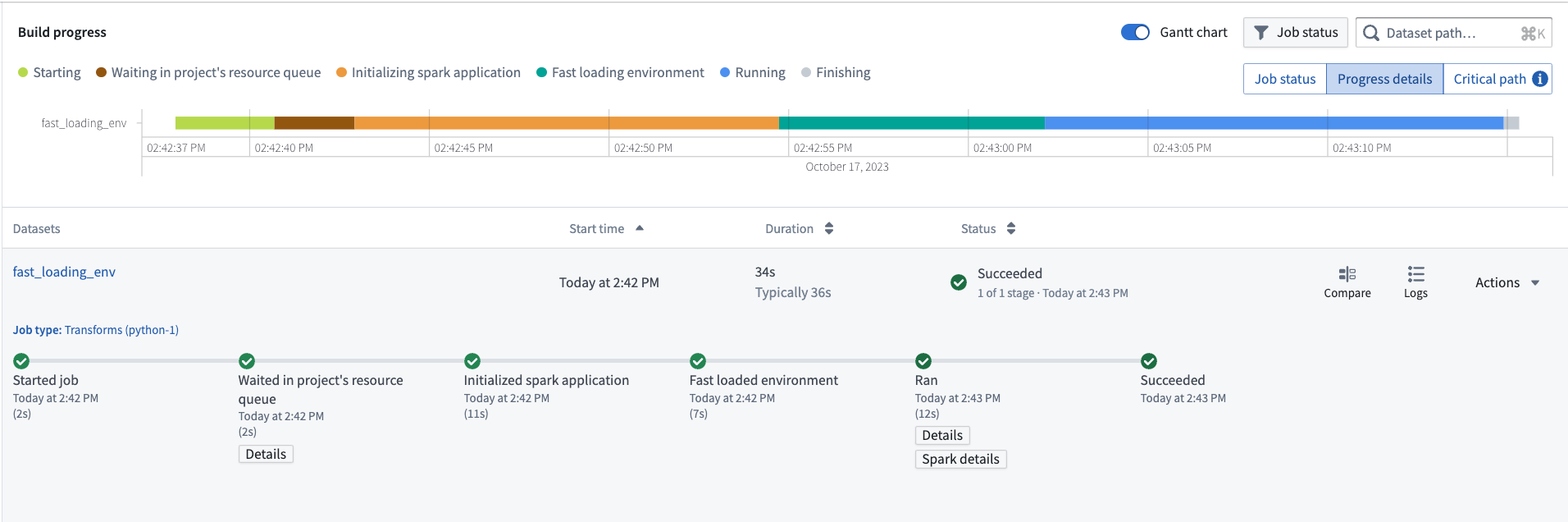
*Typical Python transform full build time reduced to ~34 seconds on average*
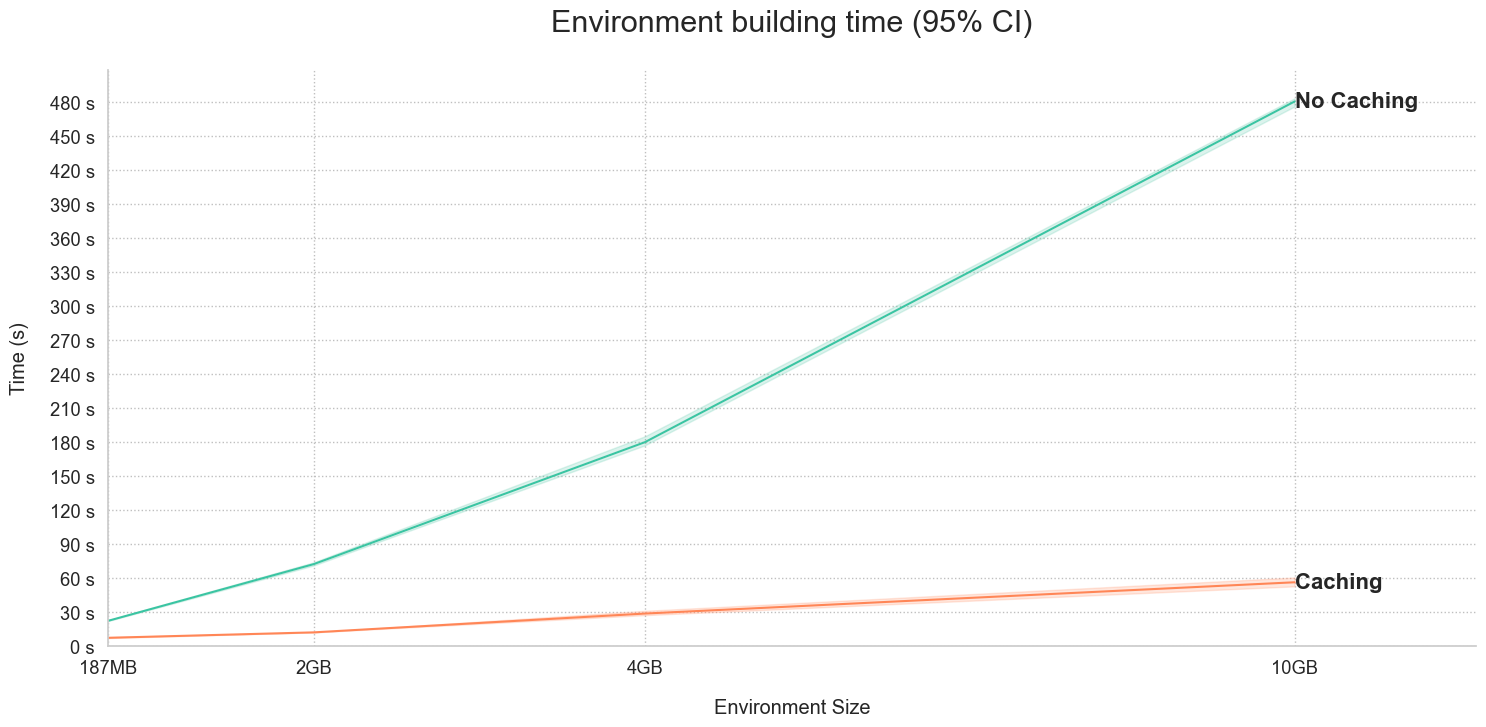
*Metrics showing environment build times with and without caching activated*
For large environments, even faster environment builds can be achieved, as depicted in the image above. For example, for a large 10GB environment, builds with caches take ~60 vs ~480s. This is 8x faster than when caching is not in use!
Users can now experience fast loading environments on all stacks by upgrading existing repositories.
## Introducing Materializations to Quiver
Date published: 2023-10-17
[Materializations](../../object-edits/materializations/index.md) is a new [data type](../../quiver/analysis-data-model/index.md#list-of-input-and-output-types) in Quiver that provides analysts a way to transform, visualize and analyze Ontology data at scale, with the capacity to surpass the 50k row constraint on data joins and transformations present in using transform tables.
Specifically, materializations allows you to:
* Perform joins (left/right/inner/full) on objects data
* Derive new columns, filter, or aggregate objects data
* Plot data using [categorical charts](../../quiver/cards-index-charts/index.md) or [Vega plots](../../quiver/cards-vega-plot/index.md)
### How can I use a dataset?
Use [Dataset cards](../../quiver/cards-index-datasets/index.md) for large-scale analyses that take object sets as inputs, letting Quiver convert object sets seamlessly behind-the-scenes. From an object set, use any of the cards located under the new **Datasets** next actions, or perform an explicit conversion with the **Object set dataset** card.
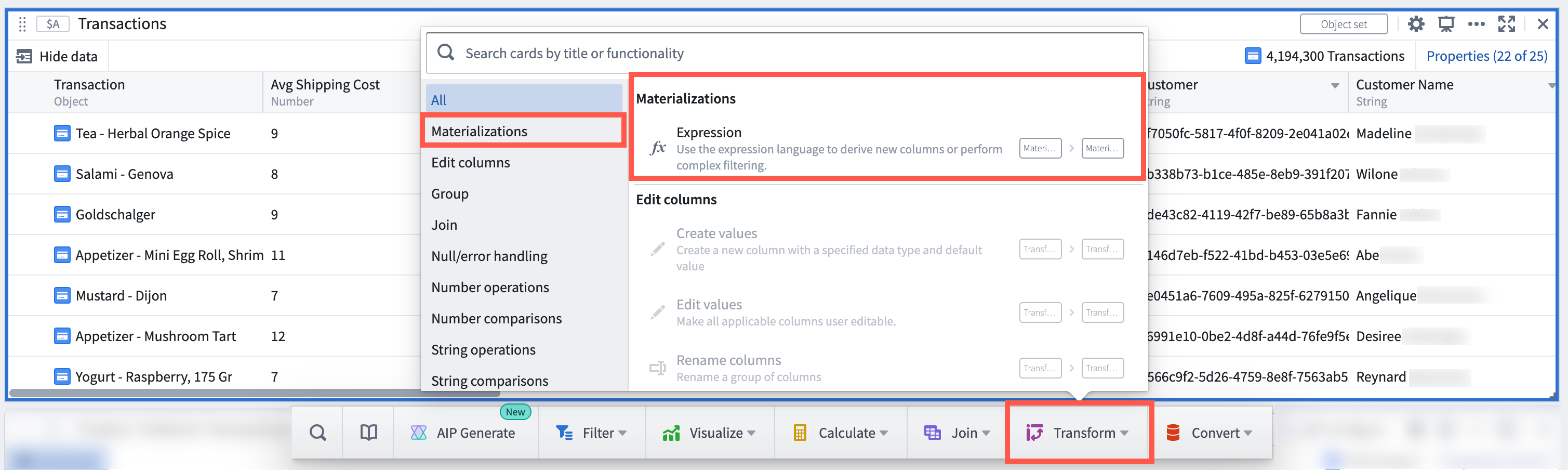
*The Dataset card menu*
To find out which backing dataset primitives are powering a Dataset card, simply hover over the datasource icon to trace.
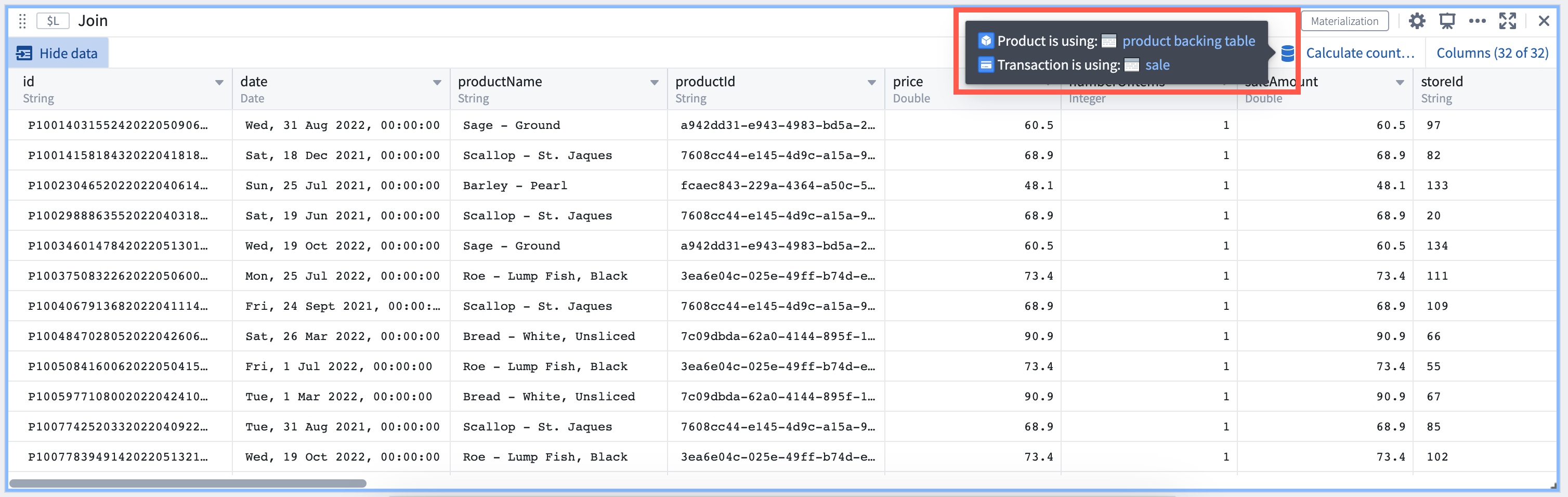
*Trace data quickly in a Dataset card to its backing dataset*
### Expressions and joins for flexible analysis
In addition to the availability of new Dataset cards in Quiver, you may consider unlocking new capabilities and workflows by:
* Using the Expression card, similar to the [Contour expressions board](../../contour/expressions-overview/index.md), to derive new columns or perform complex filtering. Advanced features such as window functions unlock new types of analysis.
* Using the Join card to perform left, right, inner, full joins on Objects data at scale.
* Combining results with existing Quiver cards such as transform tables and Vega Plots to power new workflows.
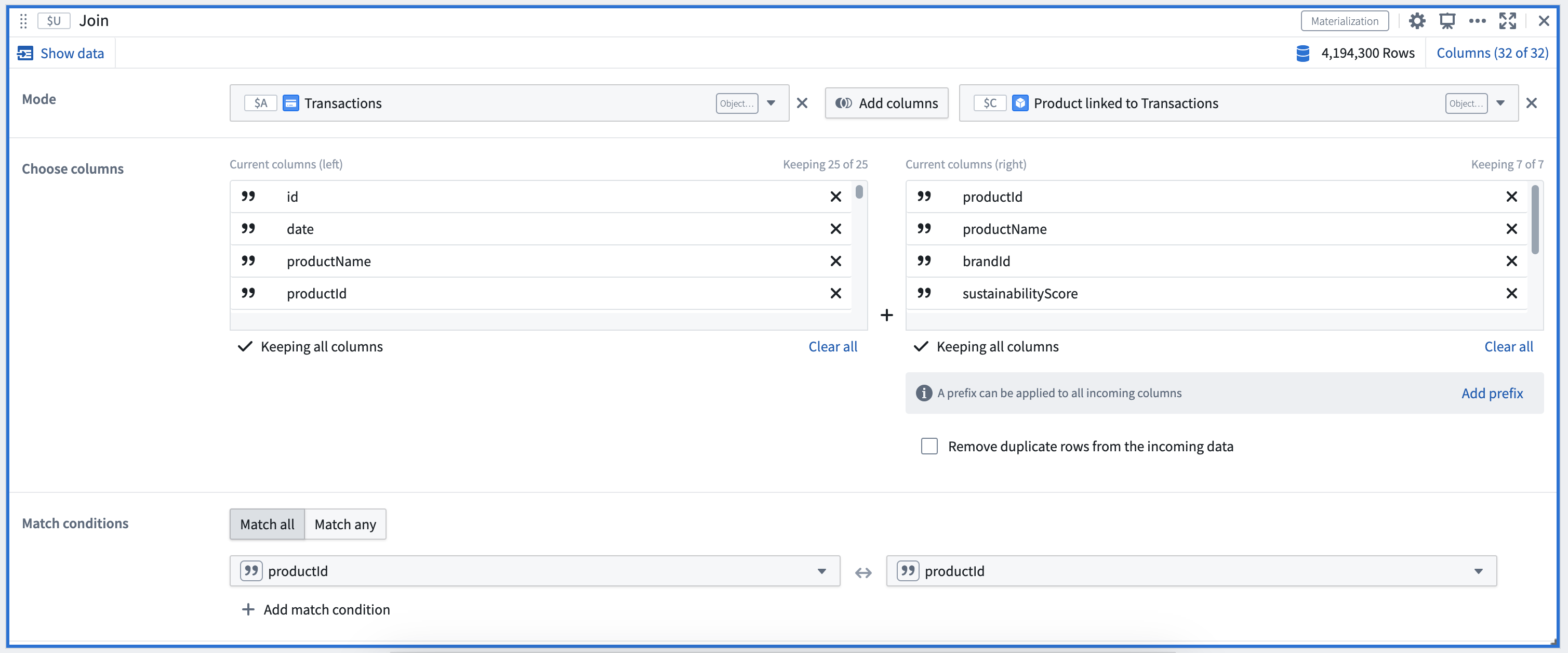
*An example of a Join datasets card configuration*
Select the **AIP Configure** option\* in the Expression card to create expressions using natural language, for example:
* “Compute a new column called 'total user score' by multiplying the two score columns”
* “Compute the 'total user score' defined by multiplying the two score columns for each organic category”
* “Compute the average sustainability score for each organic category”
* “Update the values in the Organic column to camel case”
* “Concatenate the two product name columns into one of them”
* “Compute the total revenue per product for each store, taking into account price and quantity sold”
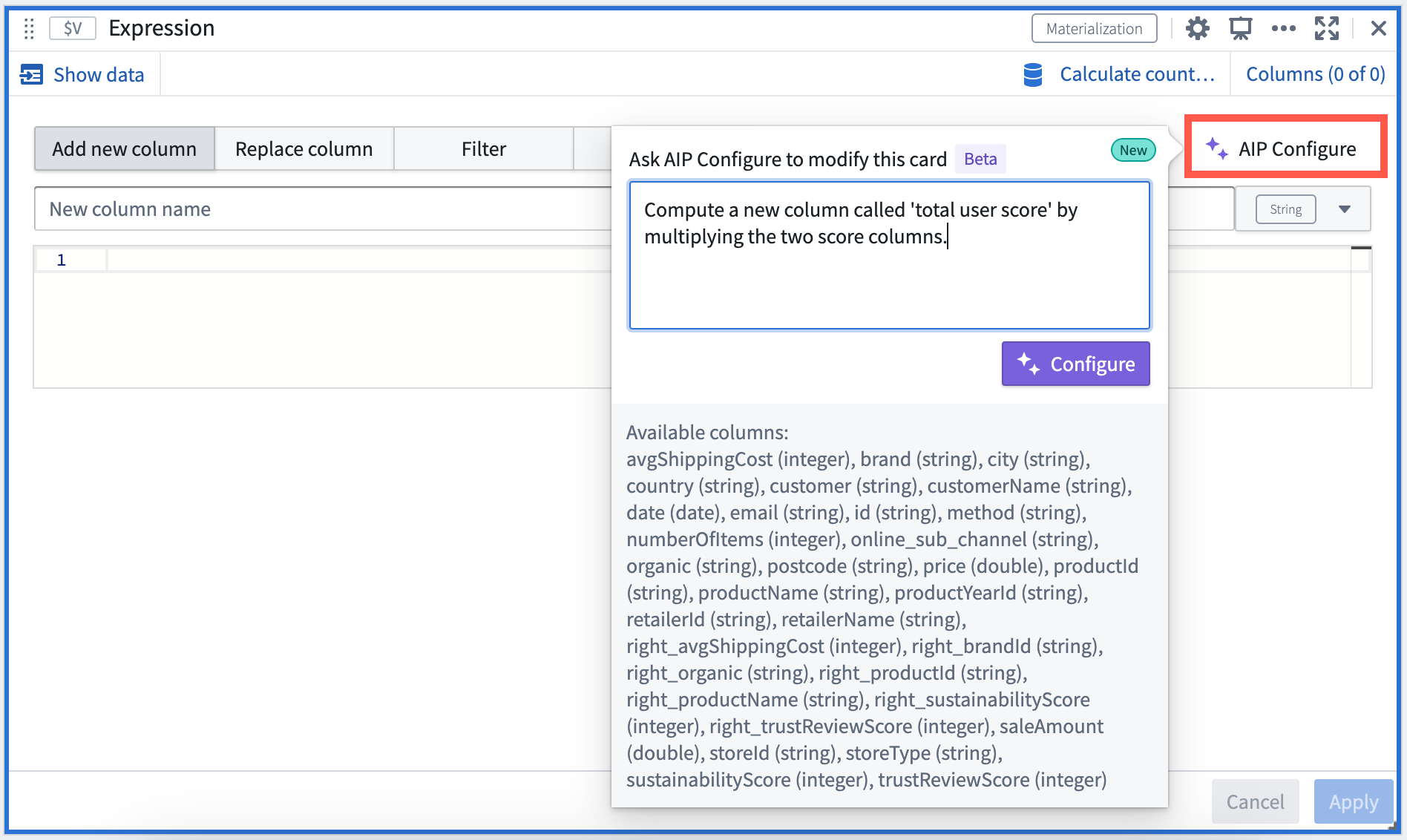
*Natural language prompt input in AIP window*
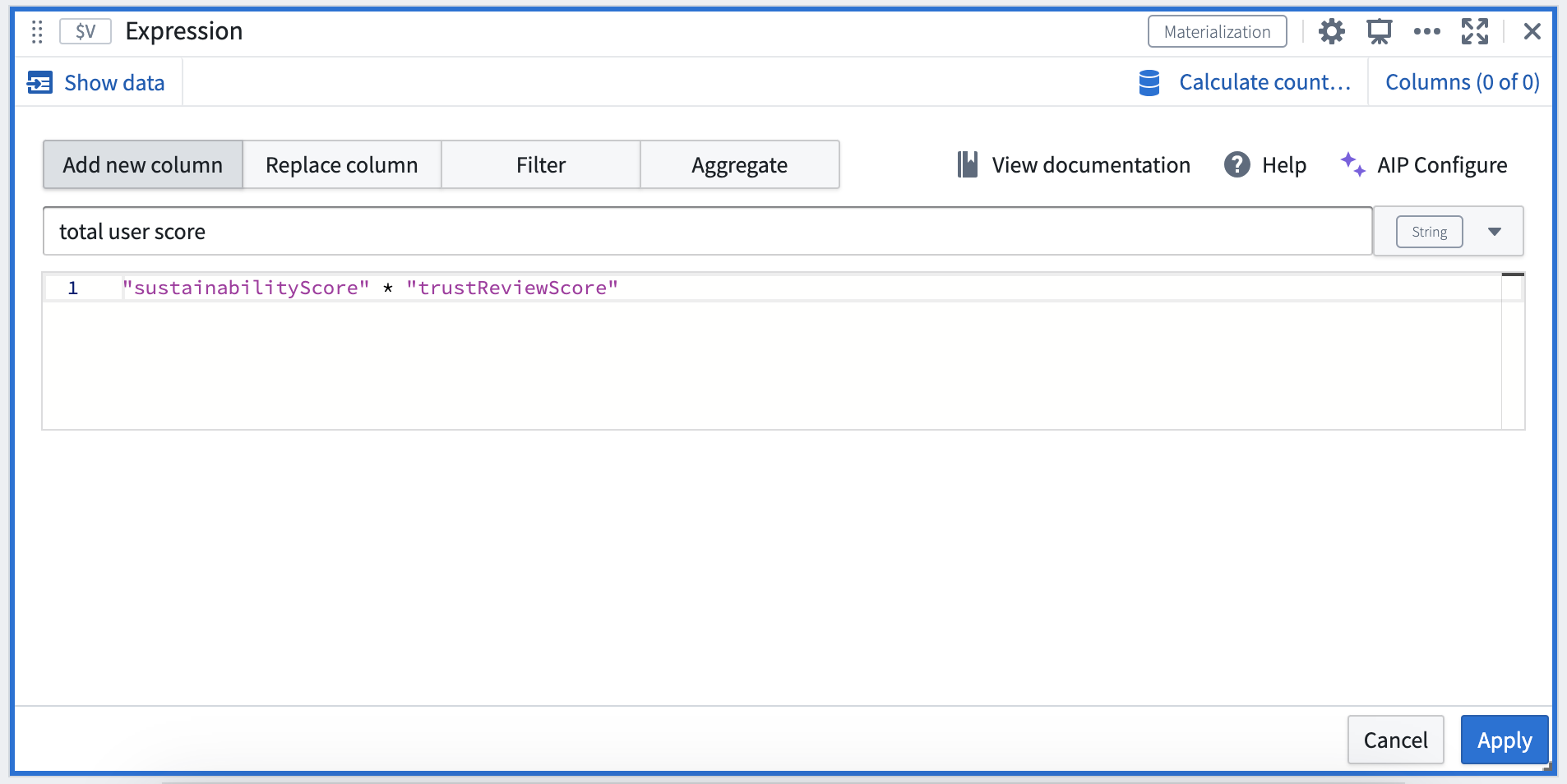
*AIP generating expressions matching the natural language prompt*
Review [Dataset cards](../../quiver/cards-index-datasets/index.md), [Data types of Quiver data model](../../quiver/analysis-data-model/index.md#list-of-input-and-output-types), or [Materializations](../../object-edits/materializations/index.md) for more information.
\*: AIP is available on a limited trial basis.
## Foundry Newsletter and Product Feedback channels: Available for sign-up now \[GA]
Date published: 2023-10-17
We are excited to announce the [release](../../platform-overview/development-life-cycle/index.md#generally-available-ga) of the **Foundry Newsletter** and **Product Feedback** channels, available now for sign-up under the **Updates & News** tab of your **Notifications** preferences, within **User Settings**.
The **Foundry Newsletter** will deliver a summary of new products, features and improvements across the platform, directly to your inbox. The first (GA) Foundry Newsletter will be sent to subscribers in November 2023. You can also opt-in to the newly-released **Product Feedback** channel, which provides opportunities to connect directly with Palantir engineers seeking targeted user input. This update presents an exciting opportunity to have your voice heard and play a role in shaping ongoing developments across the Foundry ecosystem.
Newsletters and other content shared through these opt-in subscriptions will be sent to the email address associated with the Foundry user account. *Note that notifications information, as well as email addresses, is stored solely within the boundaries of the Foundry enrollment and not collected centrally for Notifications communications.*
Steps to subscribe or change your notification preferences are as follows:
1. Open your Foundry instance
2. Navigate to **User Settings**:
* Select **Account** in the bottom left corner
* Select **Settings** in the pop-up menu (gear icon)
3. Once on the **User Settings** page, navigate to the **Notifications** tab
4. Under **Notifications**, select the **Updates & News** tab
5. Subscribe to the **Foundry Newsletter** channel, the **Product Feedback** channel, or both (Subscribe to all) by checking the associated box
6. To unsubscribe from the **Foundry Newsletter** channel and/or the **Product Feedback** channel, deselect the associated checkbox
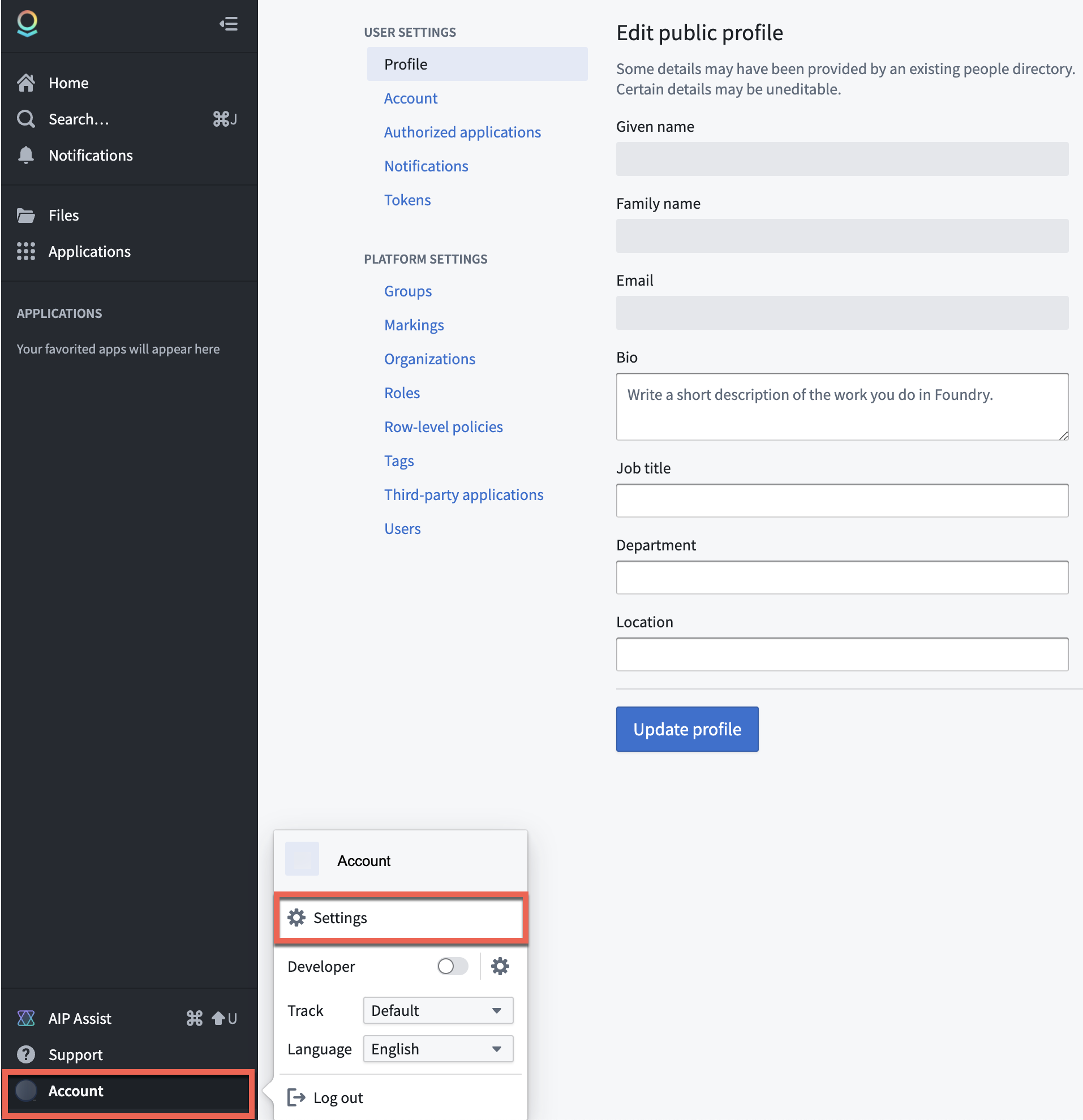
*Account settings*
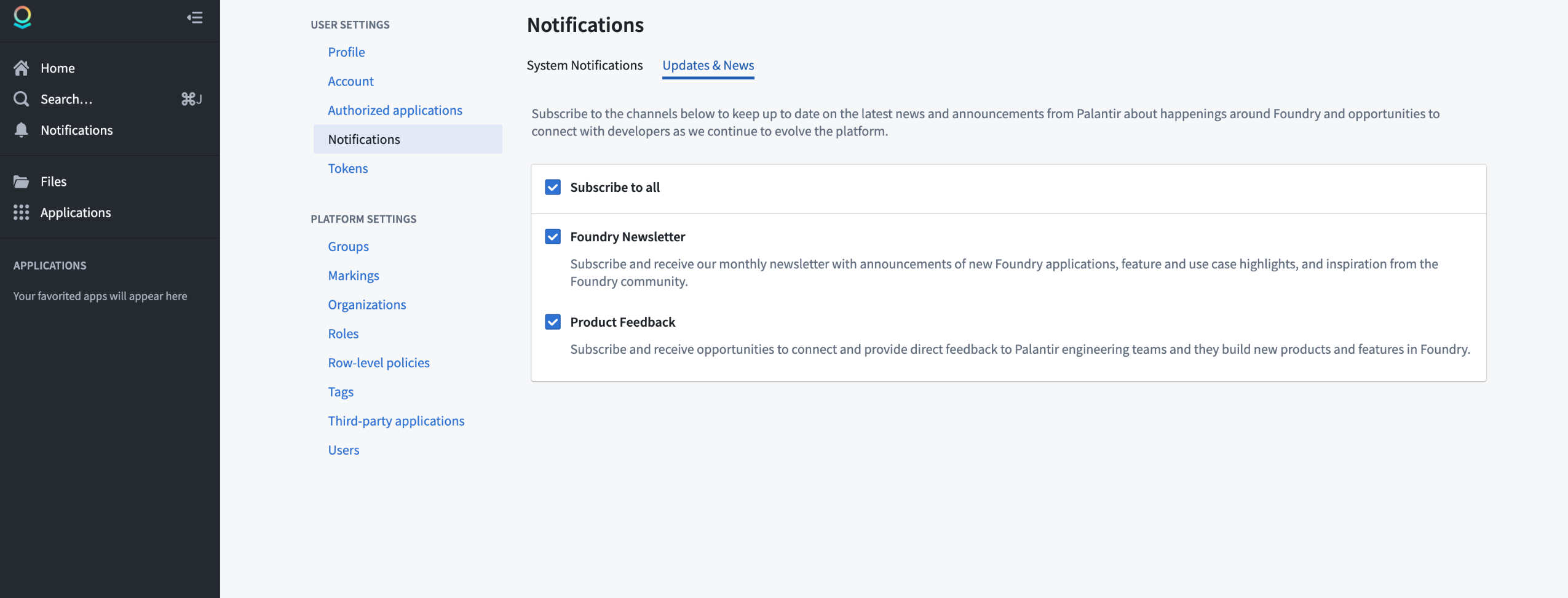
*Notifications*
**Note for platform administrators:** Platform administrators should also register their email addresses in the [Foundry Control Panel settings for **Contact information**](../../administration/platform-communications/index.md) in order to receive important communications related to platform administration, user support, service disruption announcements, and security updates. *Note that these communications are designed for platform administrators and are separate from the Foundry Newsletter and Product Feedback channels (designed for all users) described above.*
## Widget generation in Workshop, powered by AIP
Date published: 2023-10-17
You can now produce specific widgets in Workshop using natural language prompts, thanks to the support of AIP. Supported Workshop widget types are clearly indicated by an AIP icon displayed in the widget picker dialog.
To use, simply describe the widget you would like to add to your module using natural language, and AIP will generate a widget preview. You can then choose to incorporate it into the module. If not, press **Try again** to return to the text prompt, where you can provide more clarifying information.
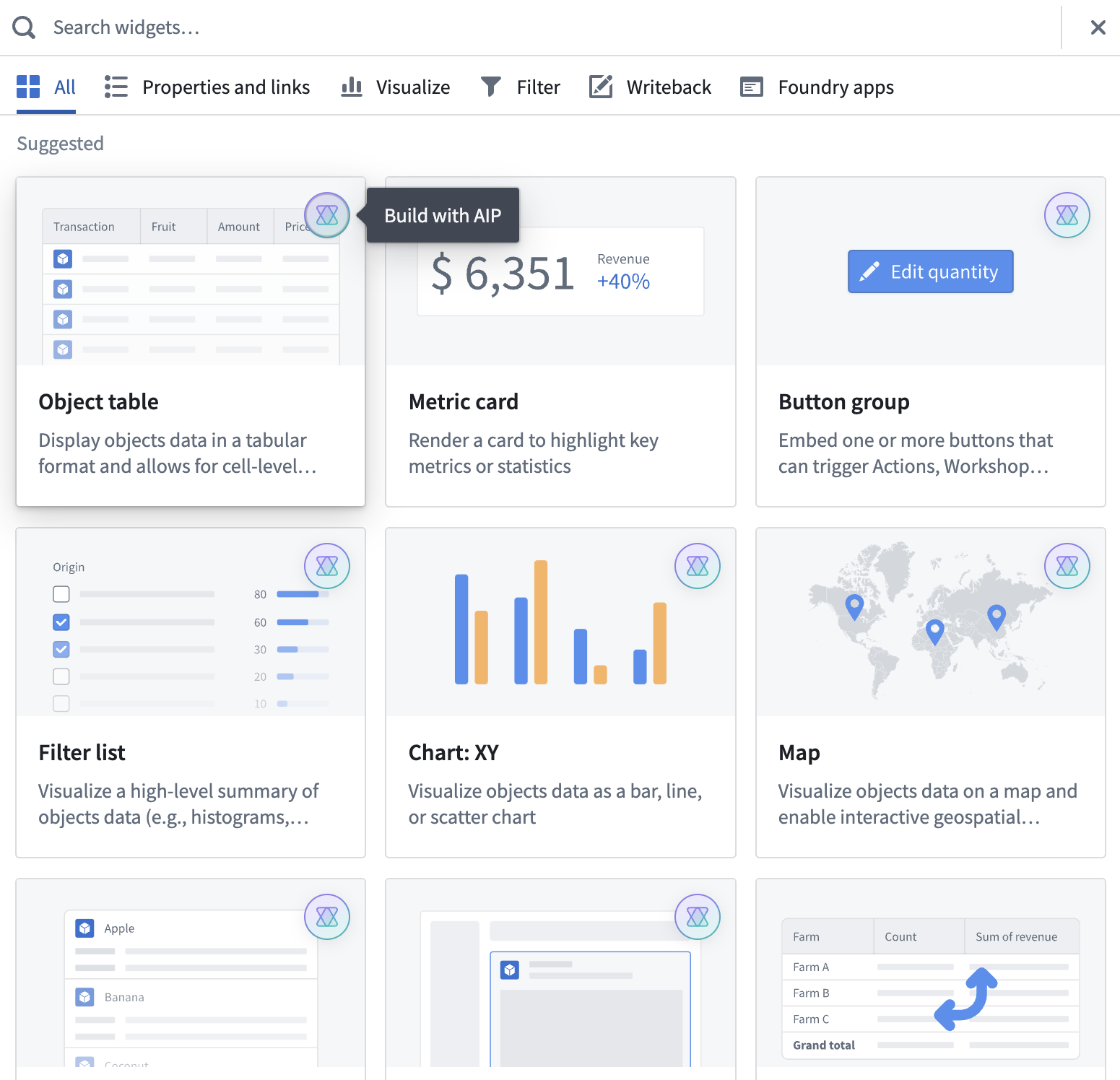
*A sample list of widget types marked with an AIP icon to indicate support for widget generation using AI*
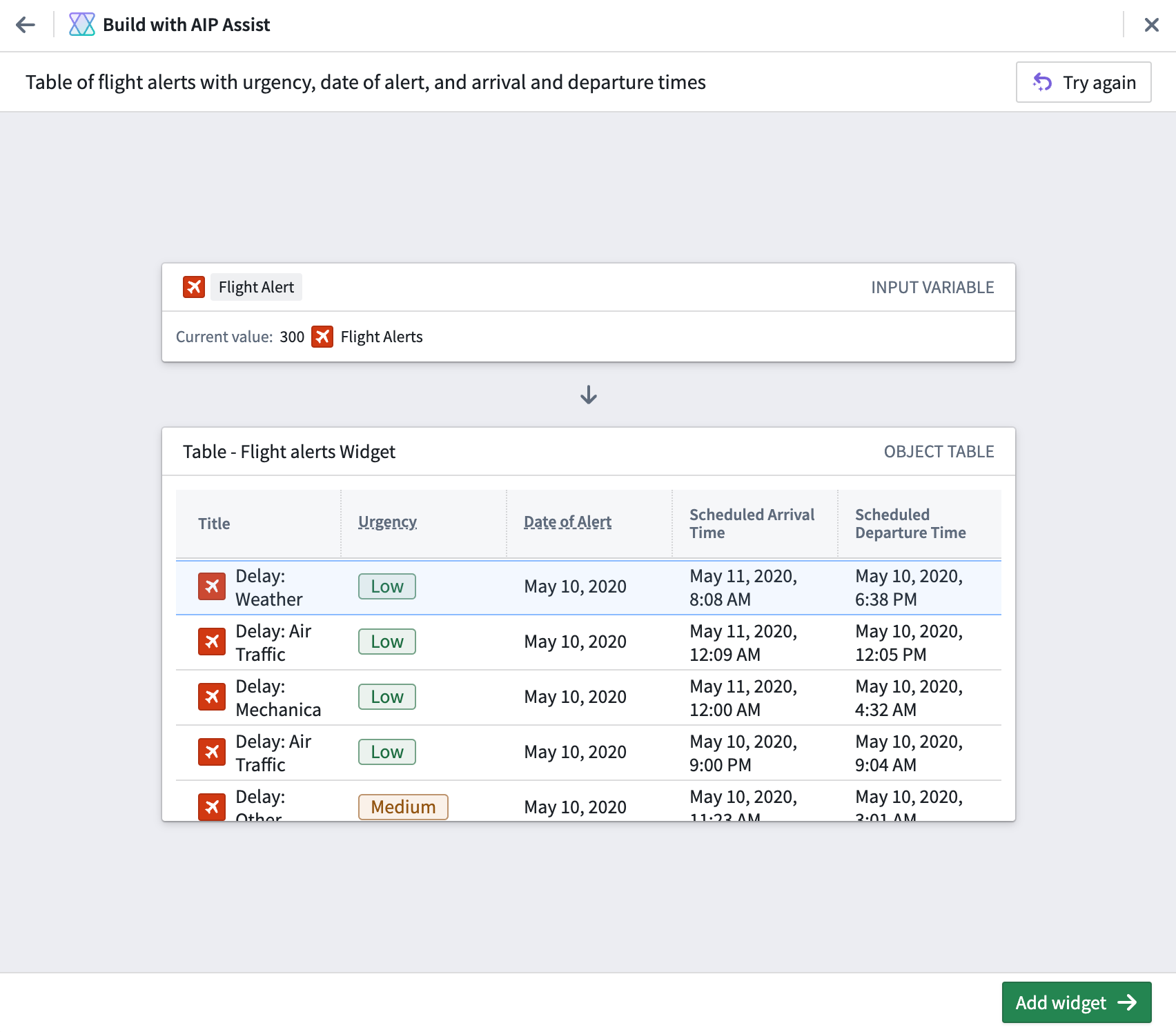
*A sample Workshop widget generated by AIP through the use of natural language*
## Introducing Outbound applications \[GA]
Date published: 2023-10-17
[Outbound applications](../../administration/configure-outbound-applications/index.md) provide a new method for administrators to manage OAuth 2.0 connections to external systems from workflows built in Foundry.
Managed at the Organization level, an outbound application represents a bundle of configurations required for Foundry to behave as an OAuth 2.0 *client*. The application makes requests to another system that can behave as an OAuth 2.0 *server*.
### Create an outbound application in Control Panel
Outbound applications are created within **Outbound applications** in Control Panel, under **Organization settings**. To view this page, you must have access to the **Manage outbound applications** workflow, which is granted by default to the `Organization administrator` role in Control Panel.
If you have access to multiple Organizations, be sure to select the Organization in which you wish to create your outbound application. All users of this Organization with permission to set up sources in Data Connection will be able to select any outbound application as an authorization mechanism for their connection.
### Point-and-click configuration
Outbound applications has been built with a focus on simplified workflows. To create and configure a new outbound application, users interact with an intuitive step-by-step wizard. Settings can be easily adjusted as needed, with users receiving interactive validation for input formats.
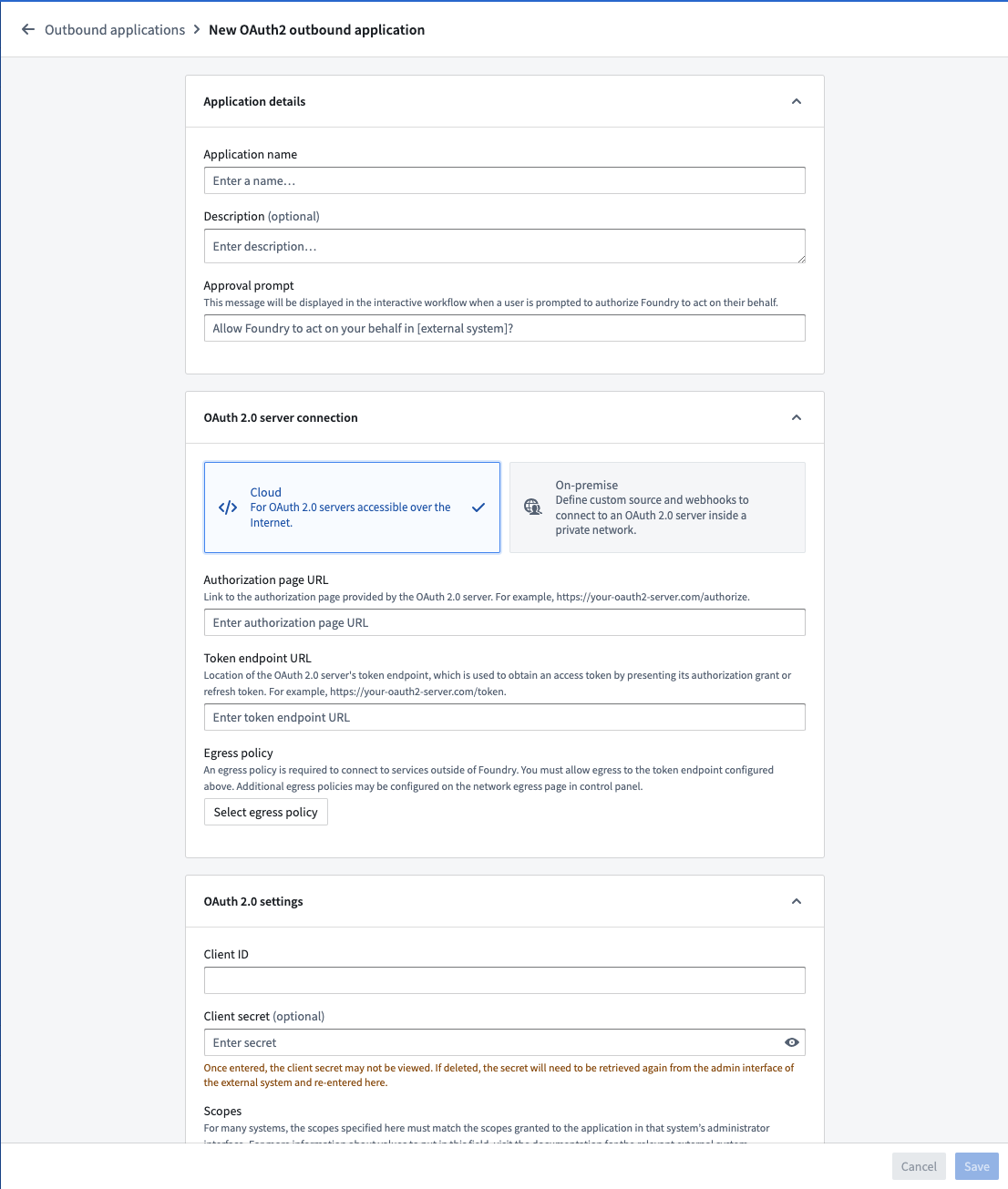
*Create an outbound application workflow*
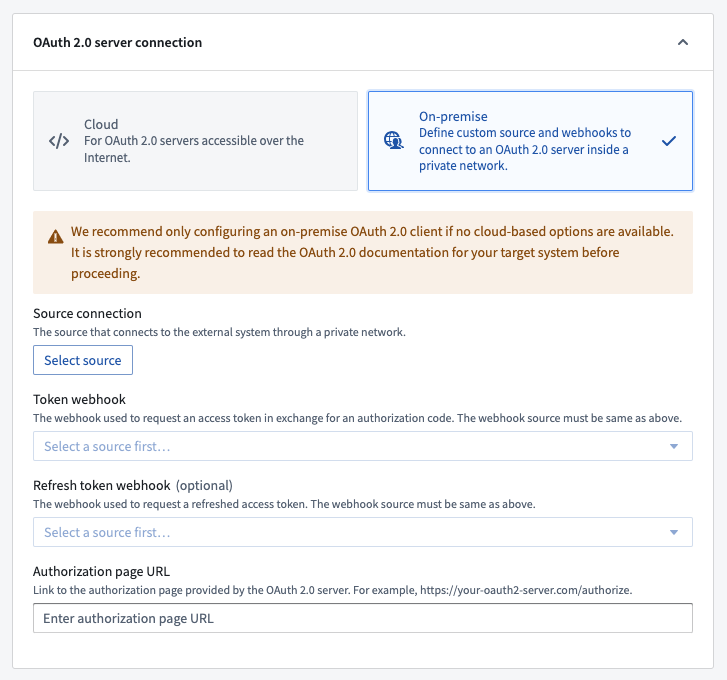
### Direct cloud and on-premise OAuth server support
To set up an outbound connection that is accessible over the Internet, a [direct connection](../../administration/configure-outbound-applications/index.md#configuration-options) is recommended.
For OAuth servers that require a non-standard token handshake, [custom webhook-based handshakes](../../administration/configure-outbound-applications/index.md#legacy-custom-webhook-based-oauth-20-handshakes) via [REST API](../../available-connectors/rest-apis/index.md) sources using an [agent runtime](../../data-connection/set-up-agent/index.md) are also supported. This method requires writing your own requests to perform the OAuth 2.0 handshake.
### Using an outbound application
Once an outbound application is created and enabled, it may be used as the authentication method for a domain in a [REST API source](../../available-connectors/rest-apis/index.md). When configuring a domain, select **OAuth 2.0** and then select the desired outbound application from the dropdown.
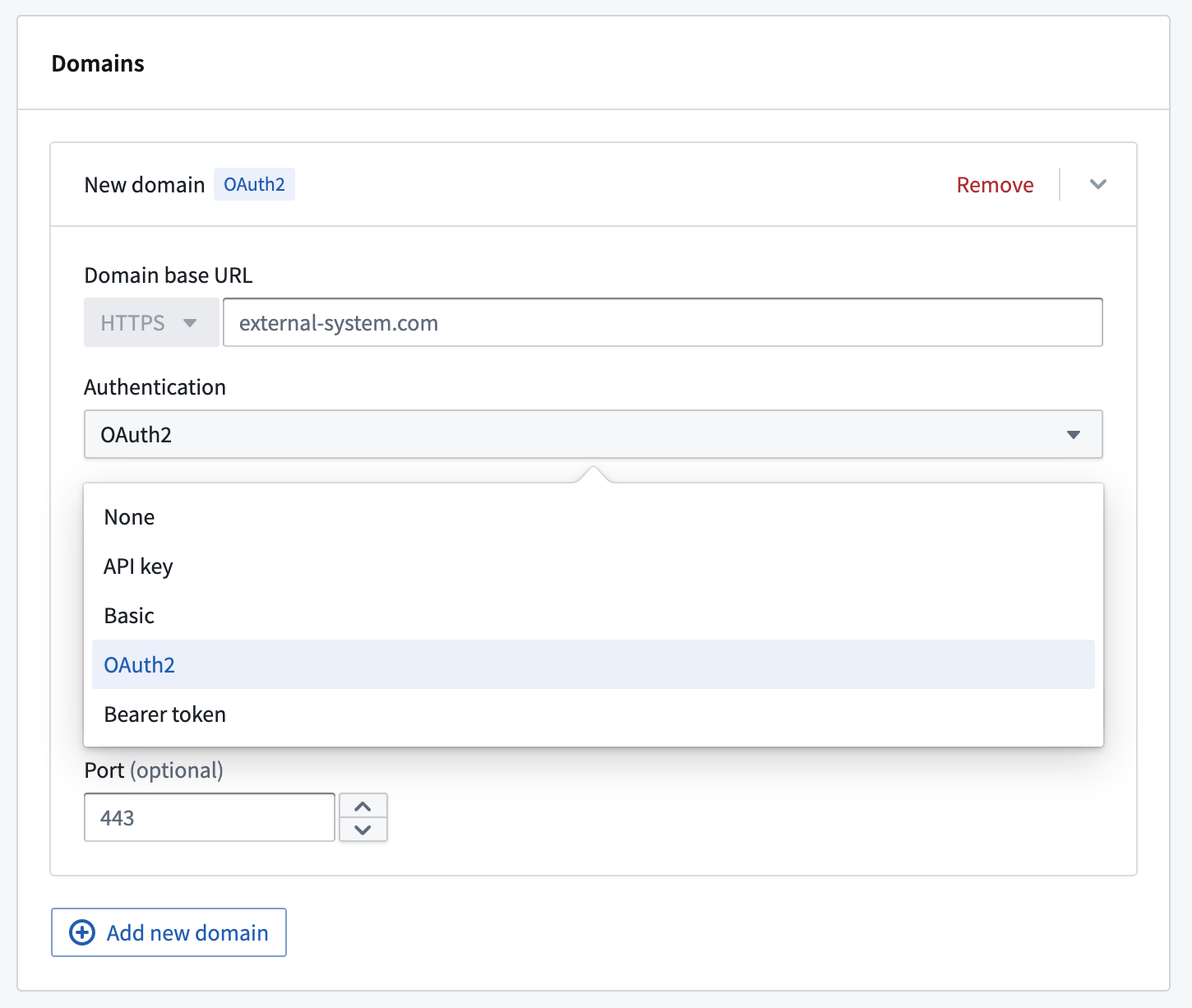
*Setting the authentication method for a domain in a REST API source.*
Any webhooks using a domain with OAuth 2.0 configured will result in an interactive prompt for each user the first time they attempt to run it. Webhooks are typically triggered by Actions in Workshop. When running an Action, users will be prompted to authorize Foundry to interact with the system on their behalf by logging into the OAuth 2.0 server.
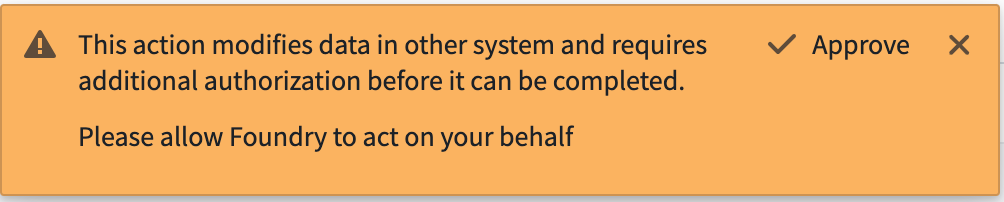
*User prompts to authorize Foundry to interact with the system*
If a token refresh workflow is configured, users are unlikely to see this prompt again unless the authorization is revoked in the external system or the outbound application is reset. If no refresh workflow is configured, the end user will see the authentication pop-up anytime the resulting token expires. Tokens often expire within minutes or hours, and we encourage use of the refresh flow for a better user experience.
For more on Outbound applications, see the [documentation](../../administration/configure-outbound-applications/index.md).
## Introducing Model Assets \[GA]
Date published: 2023-10-17
Model Assets are the recommended approach to integrate all machine learning (ML) and artificial intelligence (AI) models into Foundry. Model Assets provide a consistent method for integrating models into Foundry's ModelOps application, Modeling Objectives, and directly into operational applications via Workshop, Slate, data transforms, and functions on models.
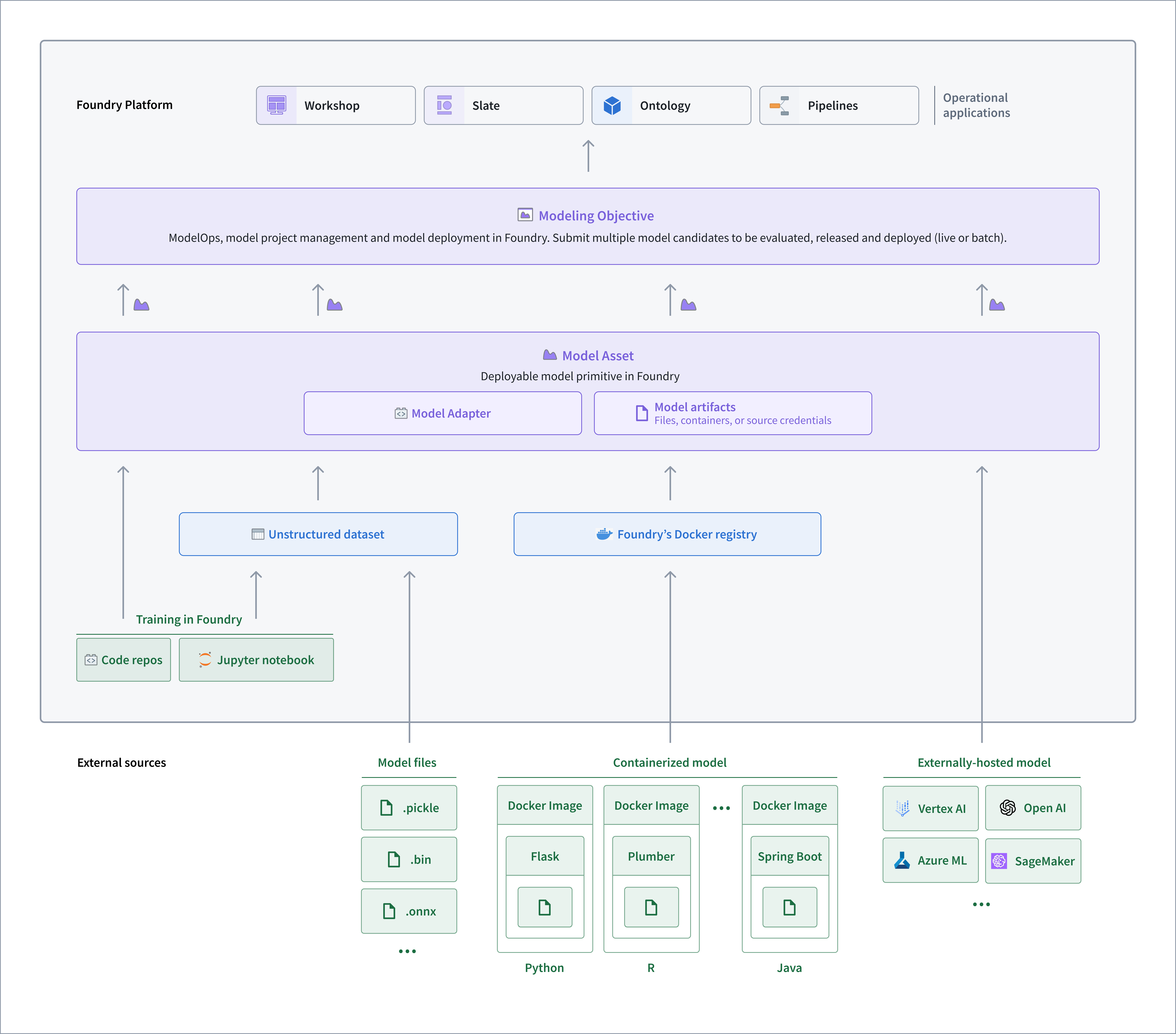
*Model import diagram*
### How can I use a Model Asset?
You can create a Model Asset in a number of ways to enable the deployment of any model inside Foundry, including:
* [Models trained in Foundry with Code Repositories](../../model-integration/tutorial-train-code-repositories/index.md)
* [Model files trained outside of Foundry and saved to Foundry as an unstructured dataset](../../integrate-models/import-huggingface-models/index.md#import-the-model-files-as-a-dataset)
* [Models containerized outside of Foundry and pushed into the Foundry docker registry](../../integrate-models/upload-image-container-model/index.md)
* [Models trained and hosted outside of Foundry](../../integrate-models/external-model-connection/index.md)
The consistent interface of a model asset enables machine learning engineers, data scientists, and project teams to easily use models in Foundry applications. Teams can update model weights, architectures, or even hosting infrastructure without migration or downtime. Foundry automatically tracks and maintains the lineage of data and models, providing a comprehensive project history that includes all models, their performance metrics, and releases.
Use the new ModelAdaptor interface defined in the new `palantir_models` Python SDK to unlock all the benefits of Model Assets.
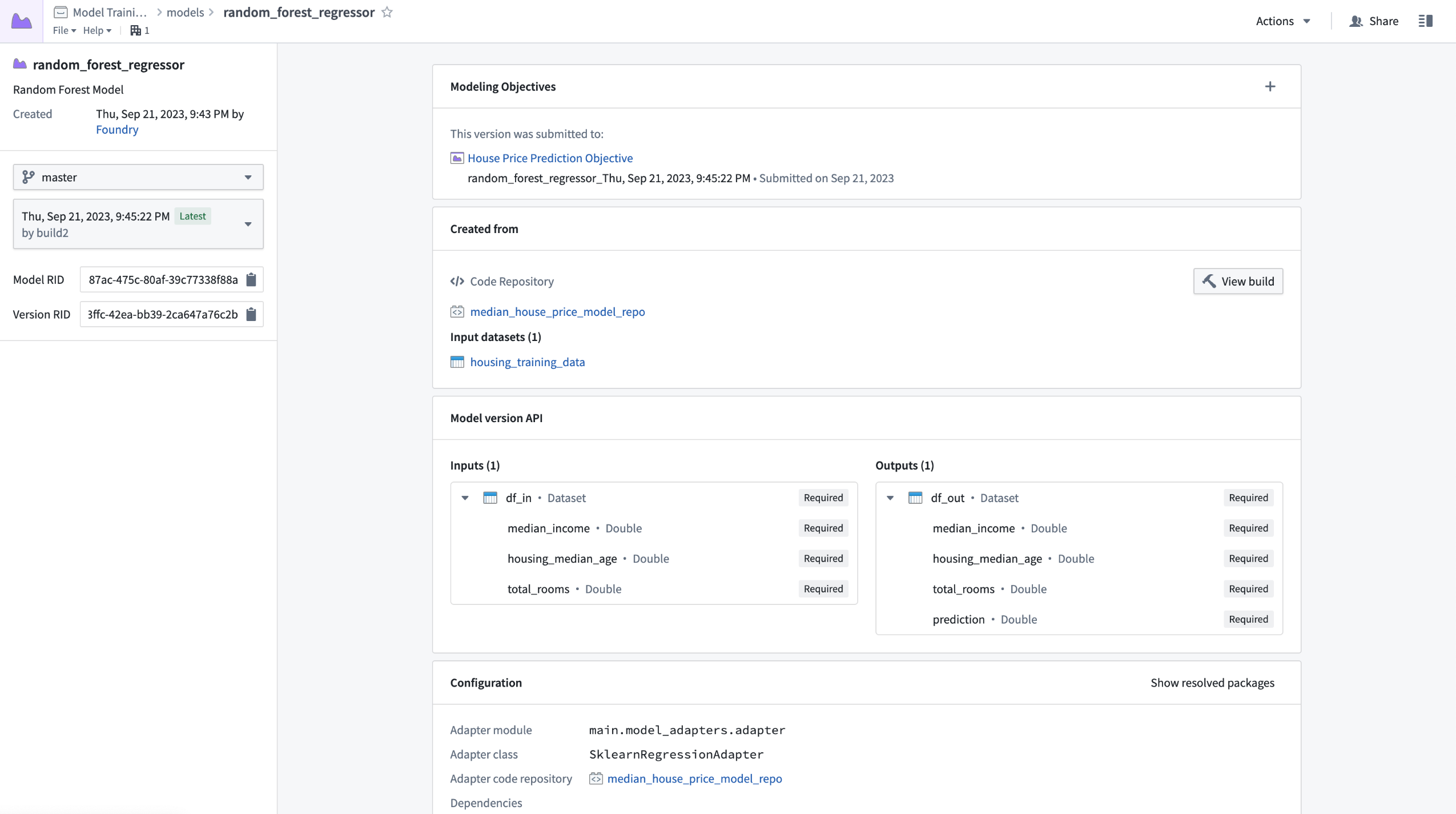
### The next generation of models in Foundry
Model Assets (authored with `palantir_models`) are now recommended over dataset models (authored with `foundry_ml`). Model Assets not only offer the same functionality as Dataset Models but also deliver additional features, including:
* Increased flexibility that enables data scientists to define custom model serialization, deserialization, and inference logic via the model adapter
* Simplified dependency management by bundling model dependencies alongside the model automatically, removing the need for shared Python libraries, custom stages and re-solving environments at deployment time
* Natively secured credentials and egress policies for connecting to externally hosted models
* Execution of containerized model logic in Rubix - Palantir's Kubernetes environment
* Support for multi-input and multi-output model transforms
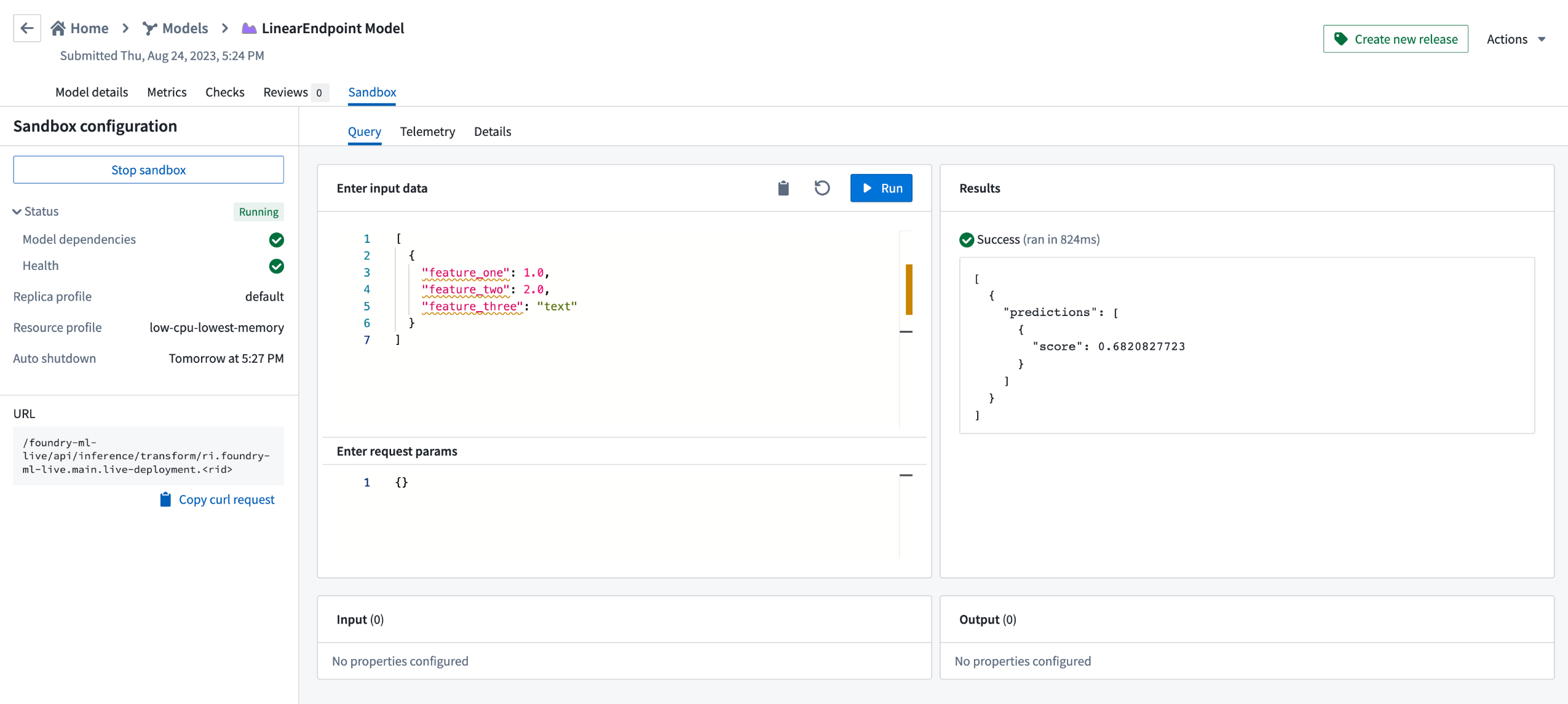
To get started with Model Assets, review the updated [Model training tutorial](../../model-integration/tutorial-intro/index.md), and complementary documentation on:
* [Externally hosted models](../../integrate-models/external-model-connection/index.md)
* [Container-backed models](../../integrate-models/upload-image-container-model/index.md)
* [ModelAdapter API reference](../../integrate-models/model-adapter-reference/index.md)
We look forward to your feedback on Model Assets and encourage you to contact Palantir Support if you are facing any issues or wish to submit feature requests.
## Blueprint 5 is now available in Slate
Date published: 2023-10-17
We are excited to announce that Slate now includes [Blueprint 5 ↗](https://blueprintjs.com/docs/), providing you with the latest styling options for use within your Slate documents.
The editing experience within Slate has also been updated, unlocking reusability with the rest of the platform and providing more modern styling options for application builders, including:
* An updated icon library, featuring new icon fonts. See the [CSS API for icons in Blueprint 5 ↗](https://blueprintjs.com/docs/#core/components/icon) for usage details.
* Modernized styling and fonts, to match with the rest of the platform. (Note that [Blueprint does not come with its own fonts ↗](https://blueprintjs.com/docs/#core/typography.ui-text); available fonts are based on Palantir’s brand.)
Existing applications that include the use of Blueprint 1, 3, or 4 CSS classes will **remain unchanged** and should still look as expected. However, we recommend users update to the newest design library whenever possible to take advantage of the latest features.
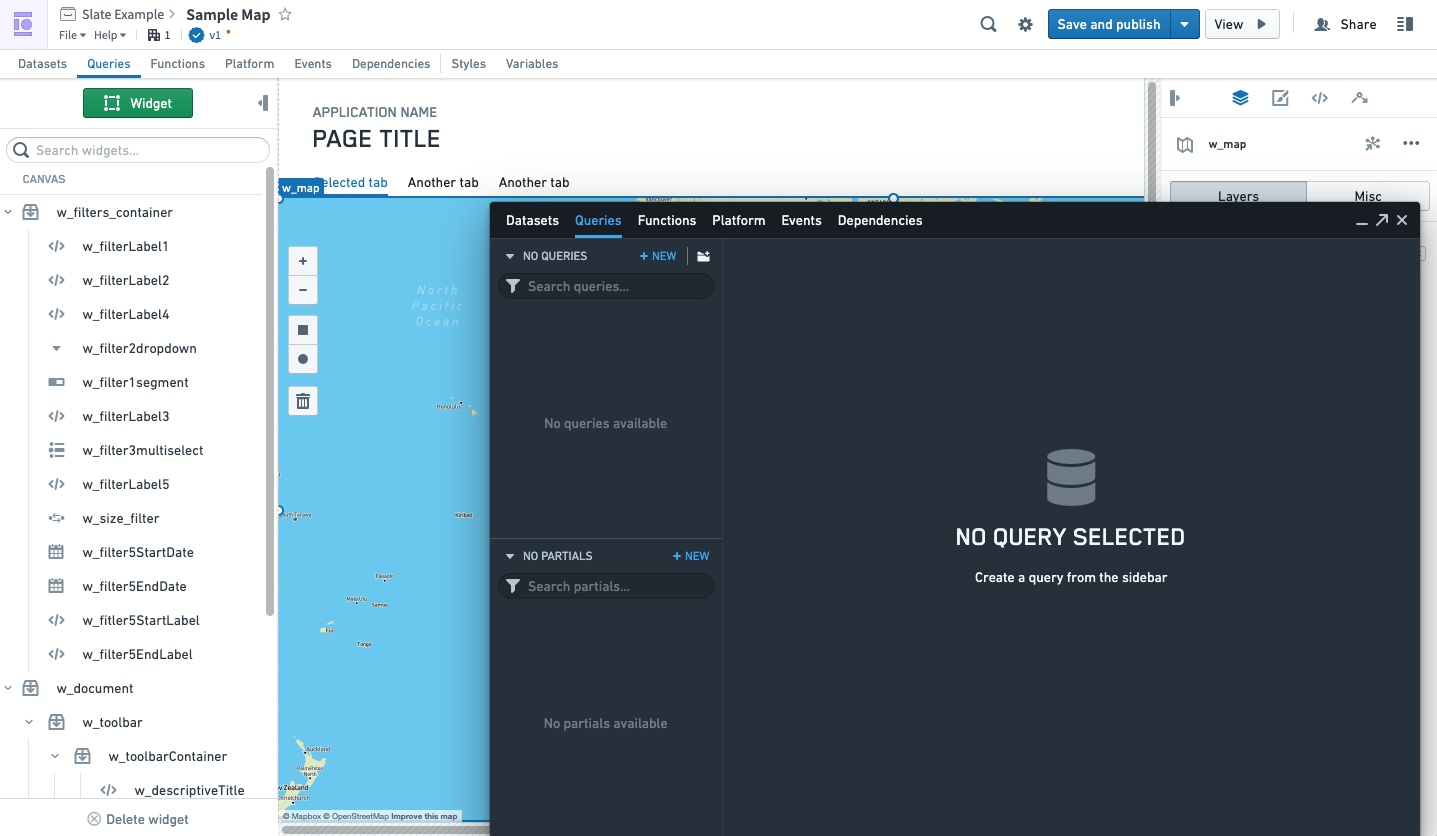
*Previous Slate interface*
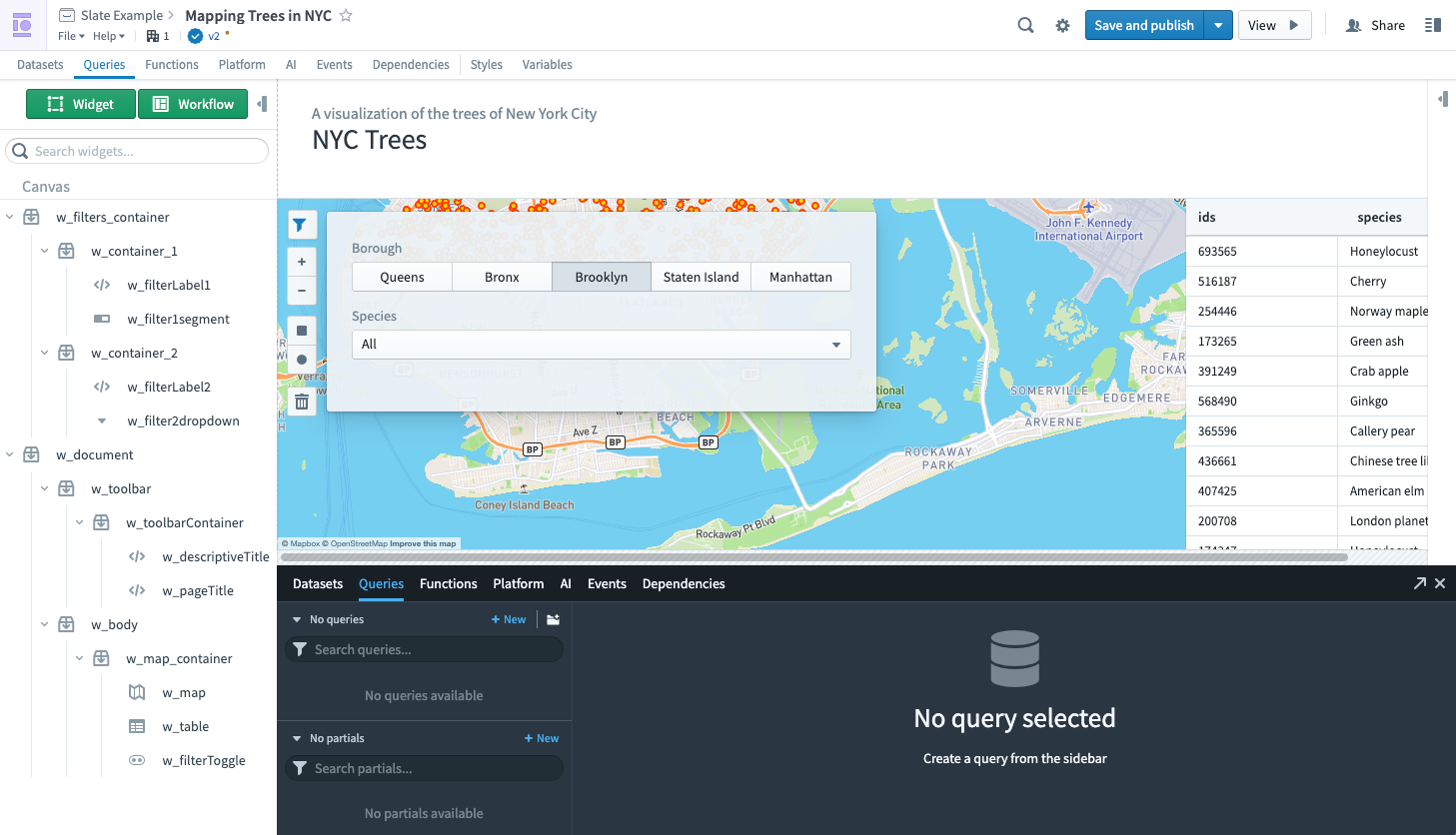
*New Slate interface*
Slate is still in the process of migrating to use Blueprint 5 APIs, so the look and feel will continue to be updated over time. Stay tuned for more improvements to come.
For more on Slate, see the [documentation](../../slate/overview/index.md).
## New AIP-powered features for Code Repositories
Date published: 2023-10-12
We are excited to announce three new AIP-powered features for Code Repositories called AI error enhancer (GA), AIP for Code Repositories (GA), and code autocomplete (beta). For additional details on each, review the [AIP features in Code Repositories documentation](../../code-repositories/aip-features/index.md). To use these features, your stack must have [AIP enabled](../../aip/enable-aip-features/index.md).
### AI error enhancer \[GA]
In Code Repositories (Checks and Preview) and Builds (Job Tracker), you can now use the **Explain** option to be provided a more comprehensive explanation of the error and suggestions for code changes when available. Additionally, you can also view source information used by LLM to generate the explanation and recommended solution.
### AIP for Code Repositories \[GA]
AIP in Code Repositories can now Explain code snippets or entire files for understanding your code better, find bugs in your code, or translate your code into another language, such as Python, SQL, Mesa, and Java. To access, select the relevant code snippet and open the **Ask AIP Assist** menu or right-select on the editor and choose the desired option.
You can toggle **Ask AIP Assist** functionality on and off by navigating to **Settings (purple cog icon) > Preferences > AIP Features**.
*Code Explanation*
*Find bugs*
*Translate code into other languages*
### Code autocomplete \[Beta]
Code autocomplete can now autogenerate code for you by parsing the file that is currently open if you are working on a Python repository. Review and accept autogenerated code by pressing `Tab`; to ignore, press `Esc` or start typing something else. You can toggle **AIP autocomplete** on or off directly in the editor status bar at the bottom of the window or by navigating to **Settings (purple cog icon) > Preferences > AIP Features**. Note that this beta feature is currently enabled only for Python repositories.
For additional details on each feature, review the [AIP features in Code Repositories documentation](../../code-repositories/aip-features/index.md).
## Introducing Virtual Tables \[GA]
Date published: 2023-10-12
Virtual Tables, a feature for working with data from supported platforms in a virtualized manner, is now generally available. Virtual Tables introduces a new data integration paradigm as it removes the need to store source data as a Foundry dataset, while empowering you to immediately build workflows that combine data from different source systems.
For direct connections to supported data sources, you now have the two following options:
* **Sync datasets:** To copy source data into a Foundry dataset, or
* **Register Virtual Tables:** Create a Virtual Table that acts as a pointer to source data.
Virtual Tables can be set up in Data Connection under the **Virtual Tables** tab.
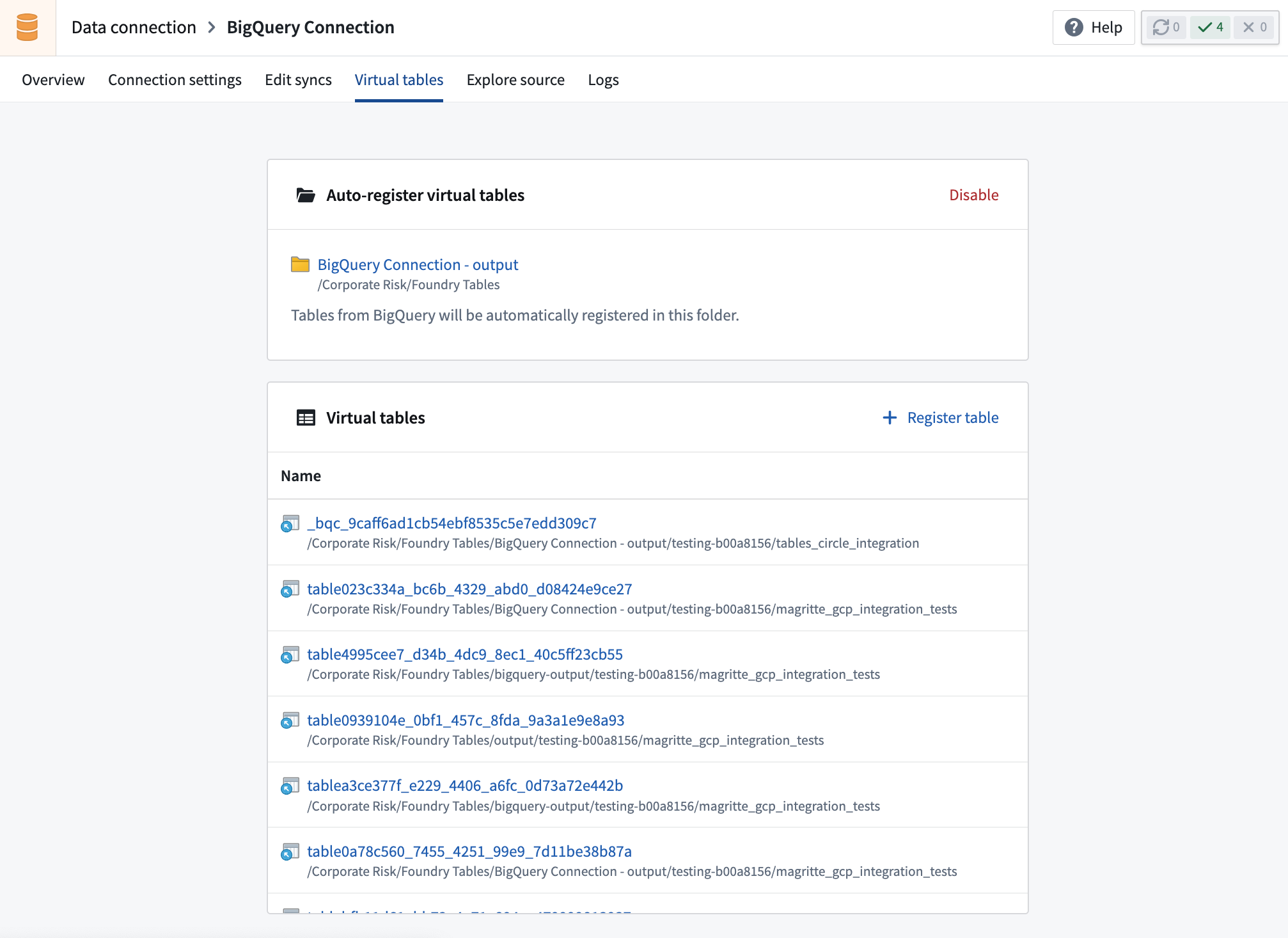
The following [sources](../../data-integration/virtual-tables/index.md#supported-sources) support Virtual Tables:
| Source | Supported formats | Manual registration | Automatic registration |
|---------------------------------------------------|----------------------------------------------|---------------------|------------------------|
| [Amazon S3](../../available-connectors/amazon-s3/index.md) | Delta, Parquet | Yes | |
| [Azure Data Lake Storage Gen2 (Azure Blob Storage)](../../available-connectors/onelake-and-azure-blob-filesystem/index.md) | Delta, Parquet | Yes | |
| [BigQuery](../../available-connectors/bigquery/index.md) | Table, View, Materialized view | Yes | Yes |
| [Snowflake](../../available-connectors/snowflake/index.md) | Table, View, Materialized view | Yes | Yes |
Once registered, Virtual Tables can be used in various [Foundry applications](../../data-integration/virtual-tables/index.md#supported-foundry-workflows), most notably:
* **Contour** for analysis
* **Pipeline Builder** for pipelining, as well as the creation of downstream Foundry datasets or objects
* **\[Coming soon] Python transforms** support for use in Code Repositories
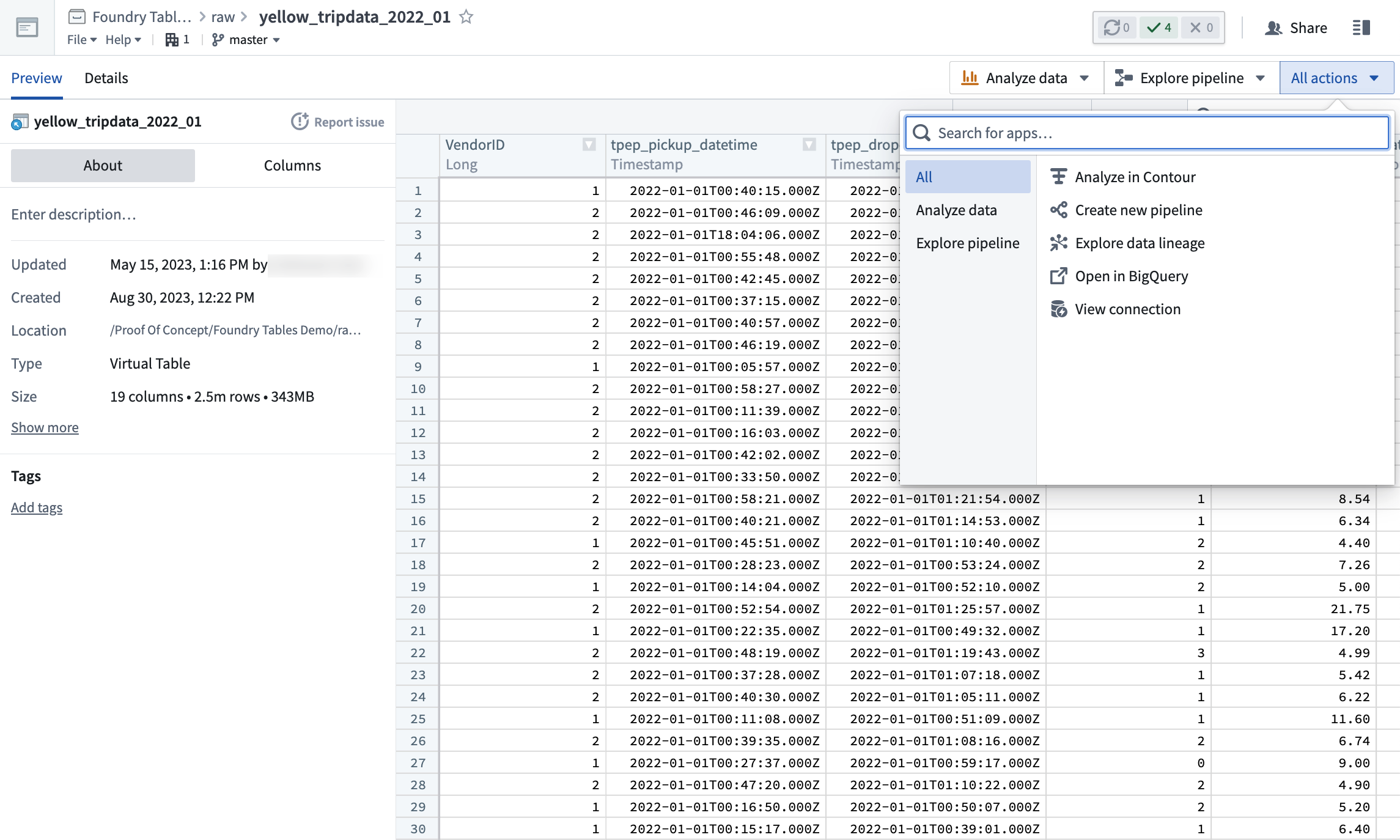
In general, Virtual Tables can be used to back most common Foundry workflows by either:
* Directly interacting with the Virtual Table, or,
* Creating a transformation pipeline backed by a Virtual Table that outputs Foundry datasets or objects. These outputs can be used as normal in the platform.
For more details, review the [Virtual Tables documentation](../../data-integration/virtual-tables/index.md).
## Application Access replaces Foundry Suite \[Migration]
Date published: 2023-10-04
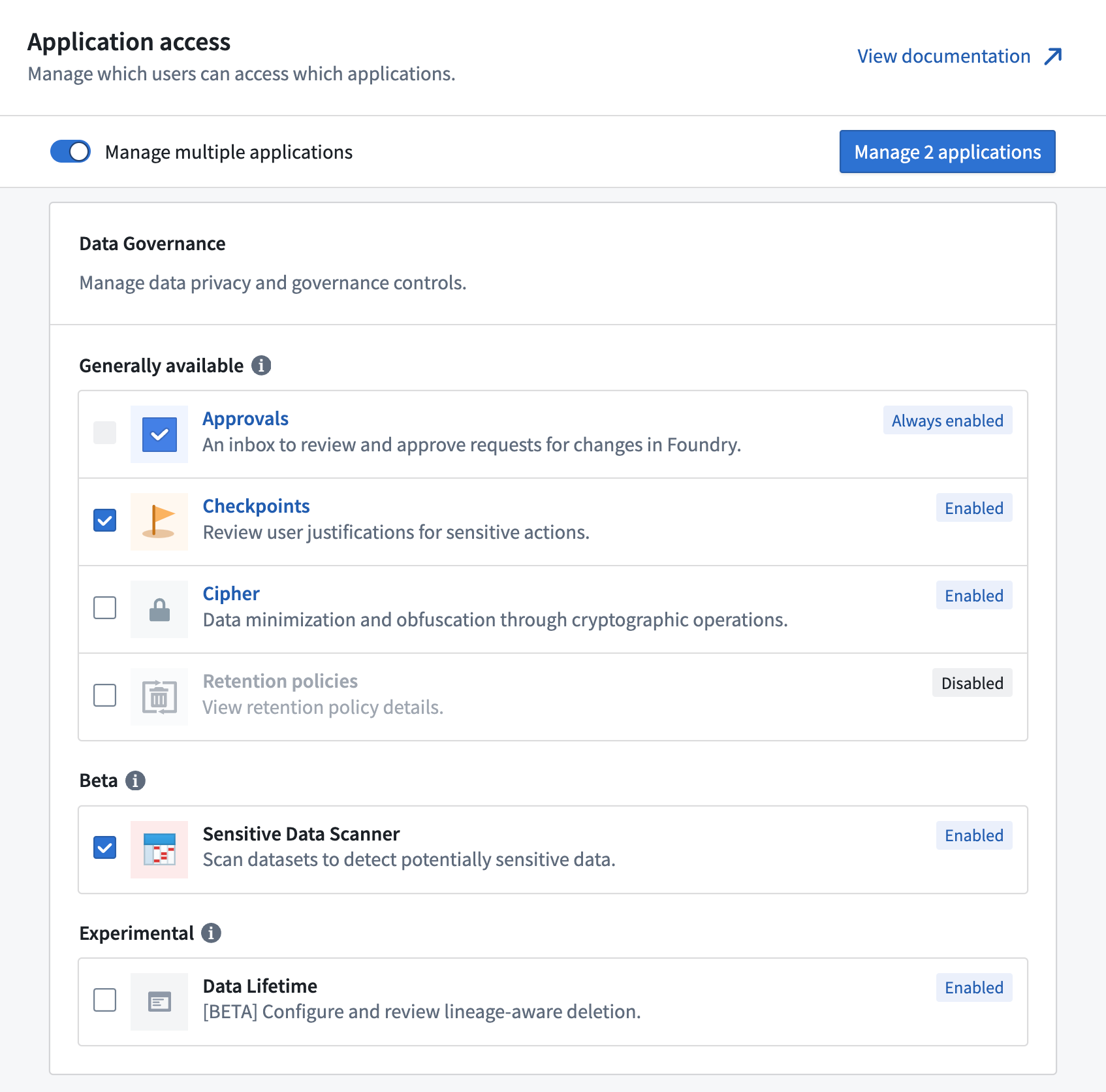
The Foundry Suite section in Control Panel is migrating to a new page called **Application access**, which will serve as the new view for customizing access to specific tools within Foundry. Any access that was previously configured via Foundry Suite still applies, with no changes to users. The Foundry Suite navigation entry will redirect to **Application access** and be removed in a few weeks.
The new **Application access** view surfaces the [lifecycle stage](../../platform-overview/development-life-cycle/index.md) of each application, grouping each category's applications by their lifecycle stage. When an application's lifecycle stage changes, it is highlighted at the top of the page. This capability allows you to adjust access accordingly, such as enabling an application when it becomes generally available, or restricting access to an application in the sunset or planned deprecation phases. By default, an application's enablement status will carry over when the lifecycle stage changes, except when an application becomes deprecated, in which case it defaults to disabled.
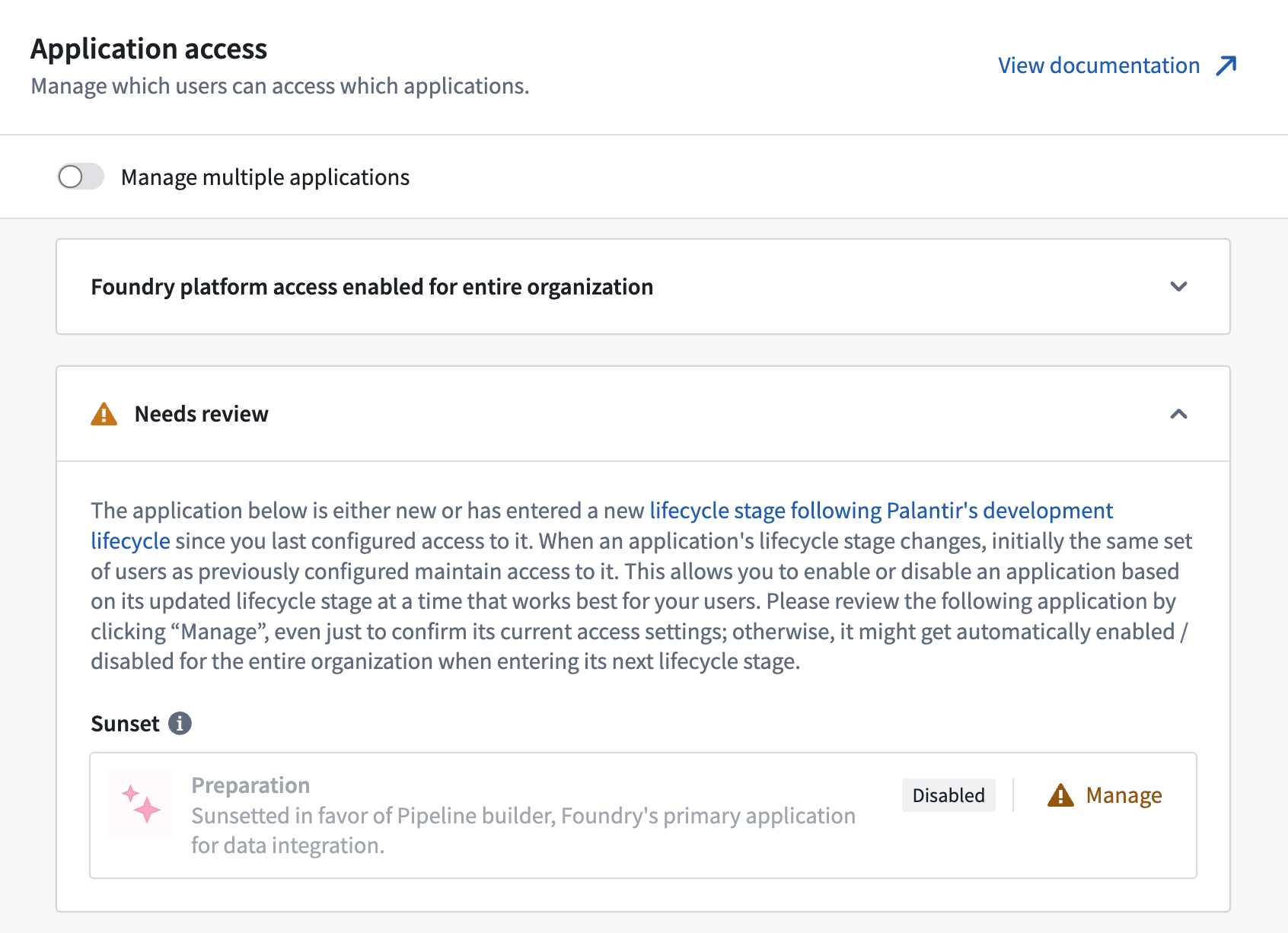
Additionally, applications are now displayed on a single page, which provides a better overview and allows you to find specific applications more quickly. Applications will still be grouped by category, but these categories are no longer used for access control, as all applications are configured individually. By selecting the **Manage multiple applications** toggle, you can manage multiple applications in bulk and set up the same access restriction for each of them.
## Pipeline Builder: Generate pipelines with AIP
Date published: 2023-10-04
AIP can now help you generate new data transformation logic in Pipeline Builder. With a series of user prompts, AIP can access the full suite of proprietary data transformations available to you across Pipeline Builder and recommend the one most suited to your specific needs. Pipelines augmented by AIP behave the same as previous pipelines written by you, enabling seamless integration with your existing workflows.
Consistent with Palantir's security standards, this capability operates with full transparency. AIP provides an explanation of the rationale for suggestions, using metadata to generate logic, all without exposing the underlying data.
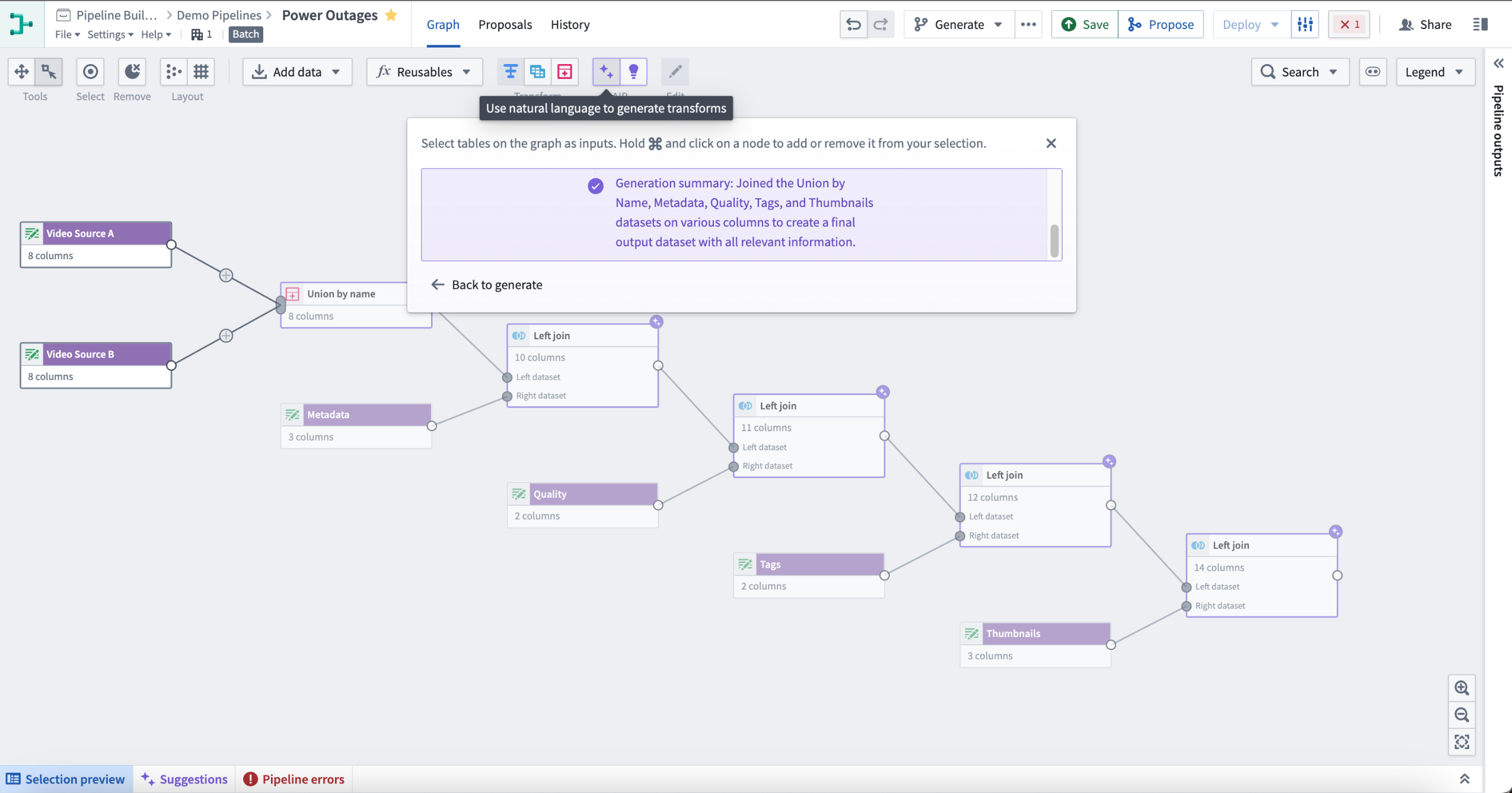
To use Generate, select the purple icon with two stars labeled AIP in the top center of your Pipeline Builder graph. Following the instructions in the pop-up window, select nodes on the graph as inputs. Hold and select on a node to add or remove it from your selection. Next, enter the prompt for AIP to evaluate, then select Generate to start the run.
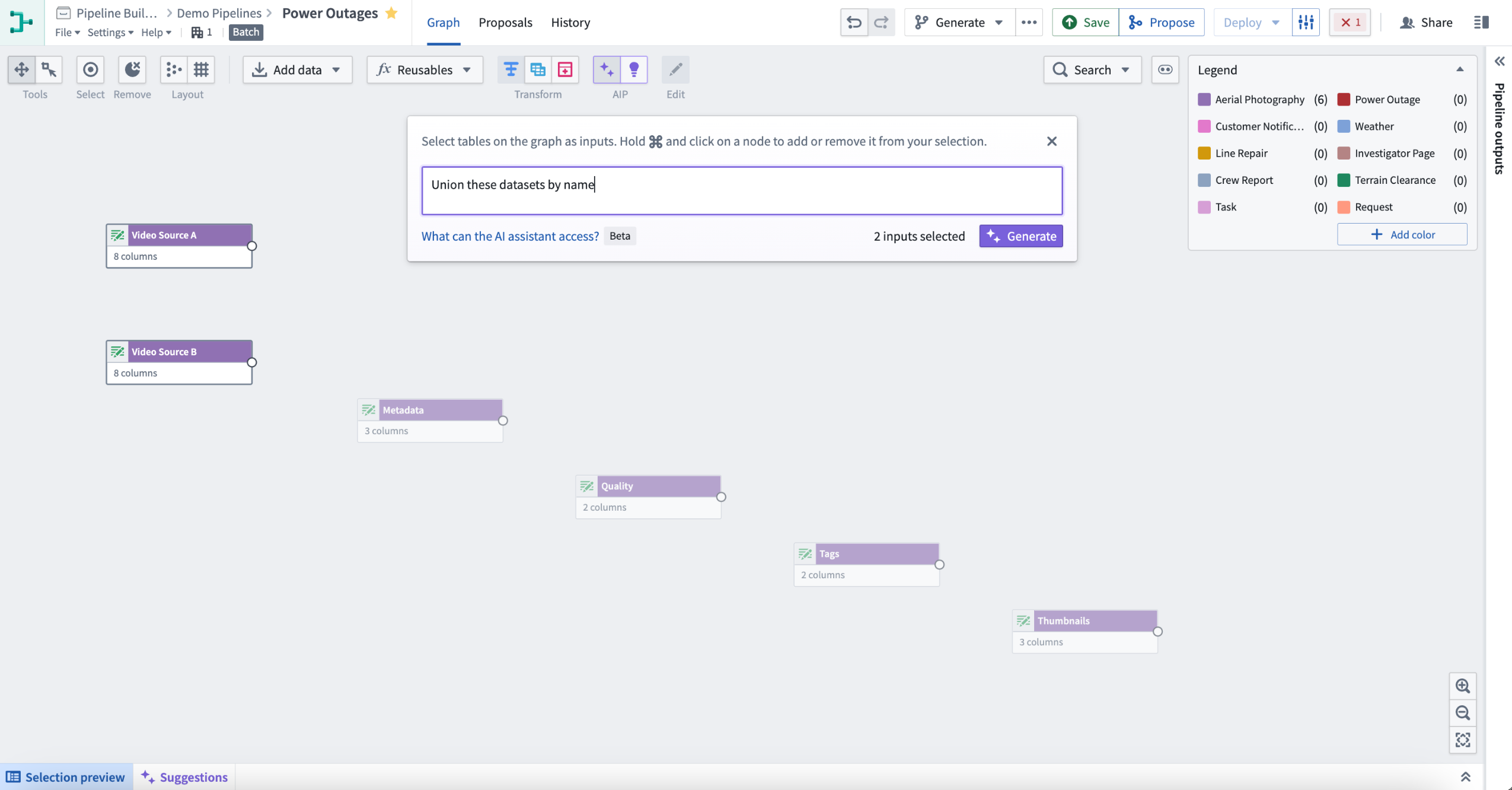
This will return one or more transform nodes highlighted in purple alongside a description of the generated transforms.
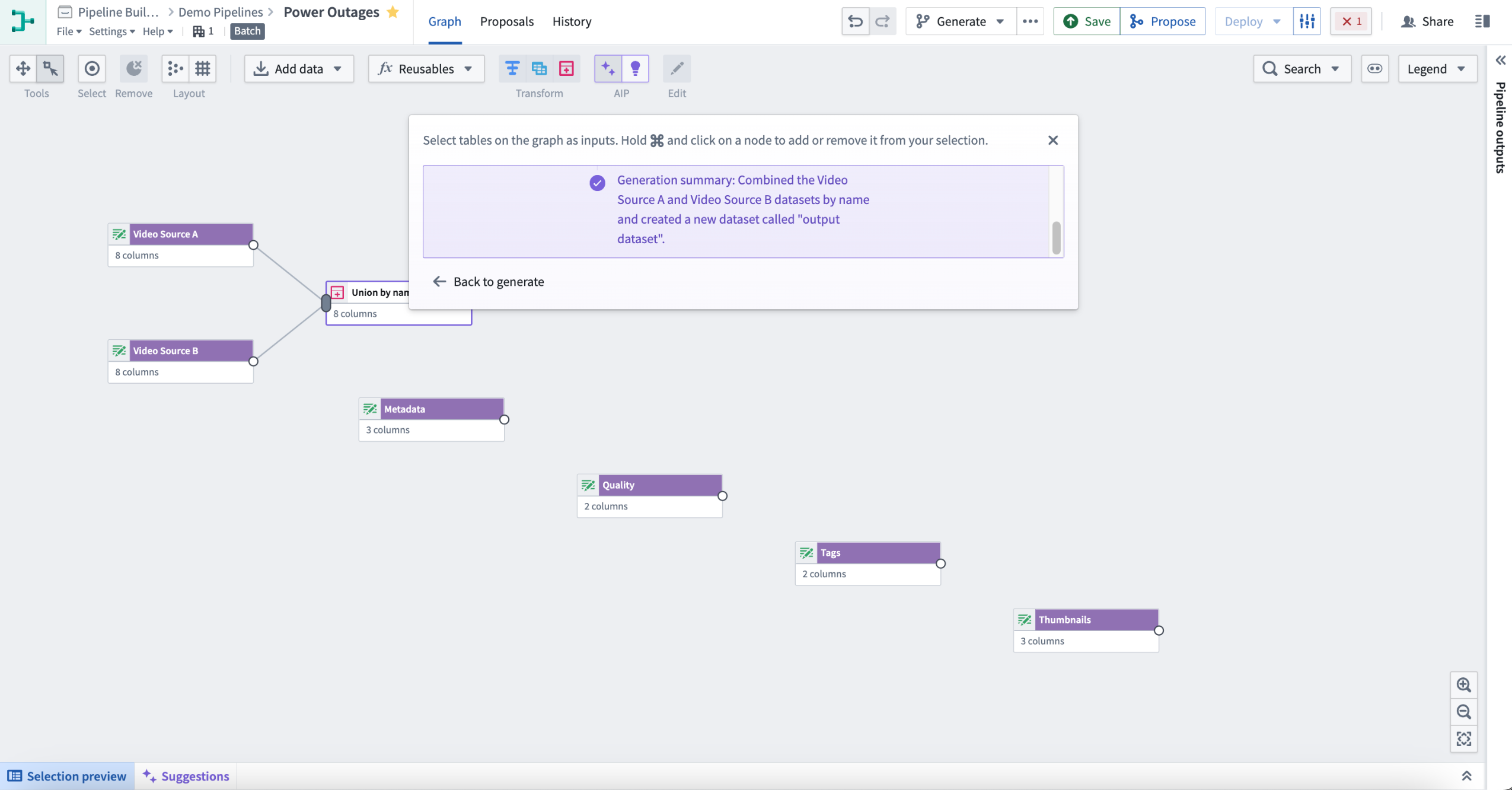
To review your recent prompts, select the input box and choose an entry to retry. This will automatically reselect the related inputs.
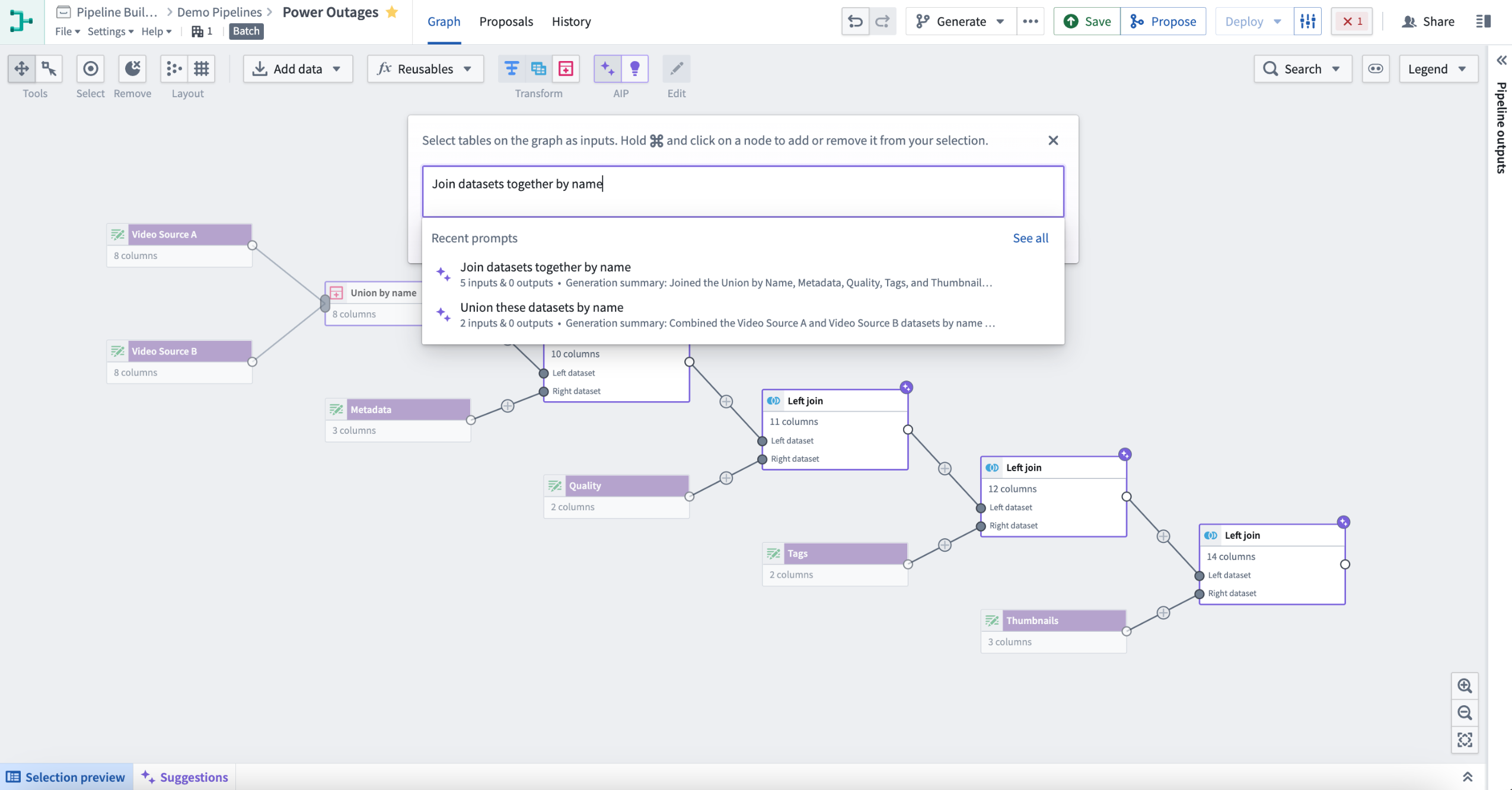
Once satisfied with your changes, open a proposal to merge them into the main branch. Select the Generate button to prompt AIP to auto-generate a description of your proposal.
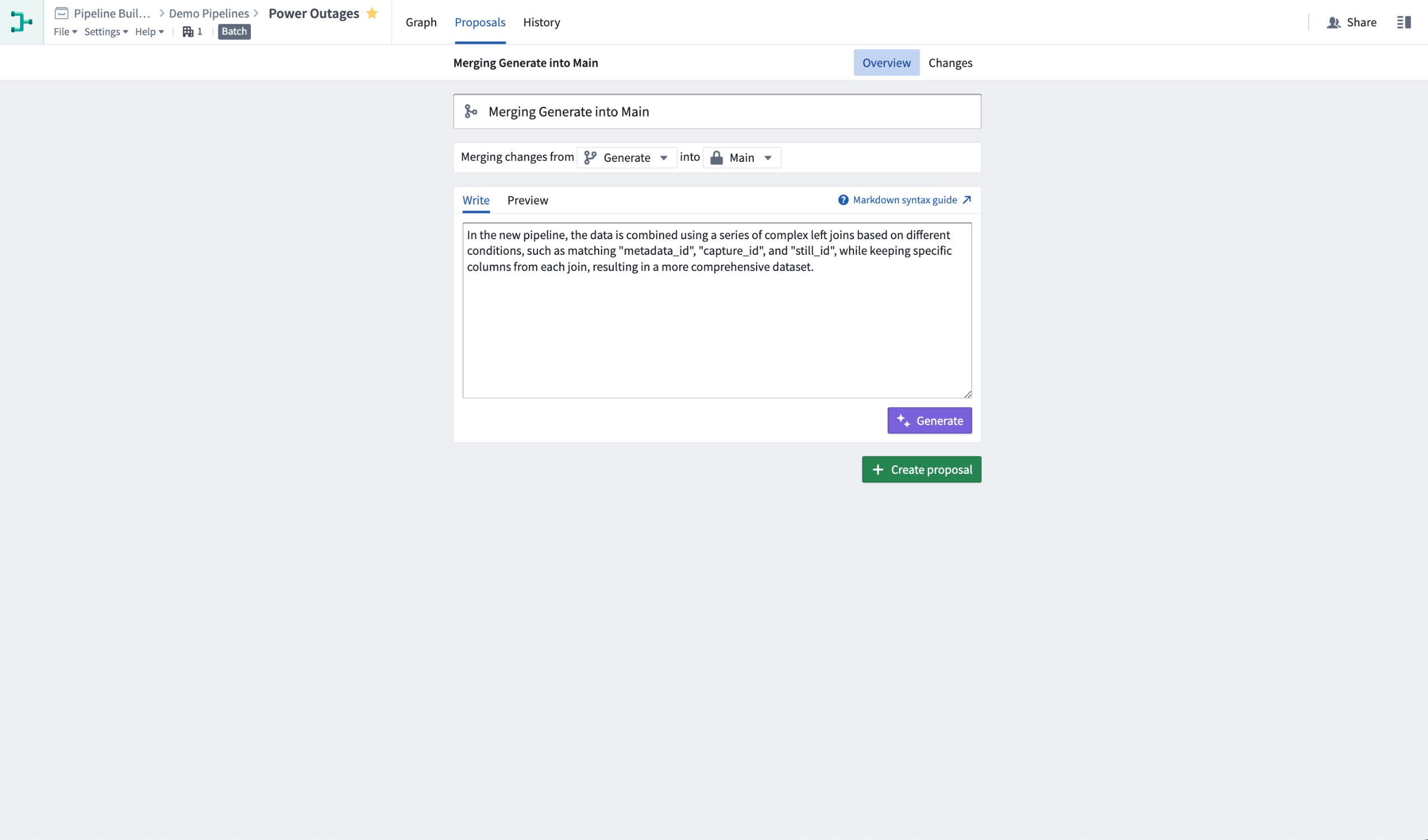
Prior to generating an auto-description, you can also choose to include additional context, bring attention to particular changes, or even start writing a rough proposal description into the text box. AIP will use the information you provide to enhance its proposal description. The generated description will be added below your text, with a clear separation.
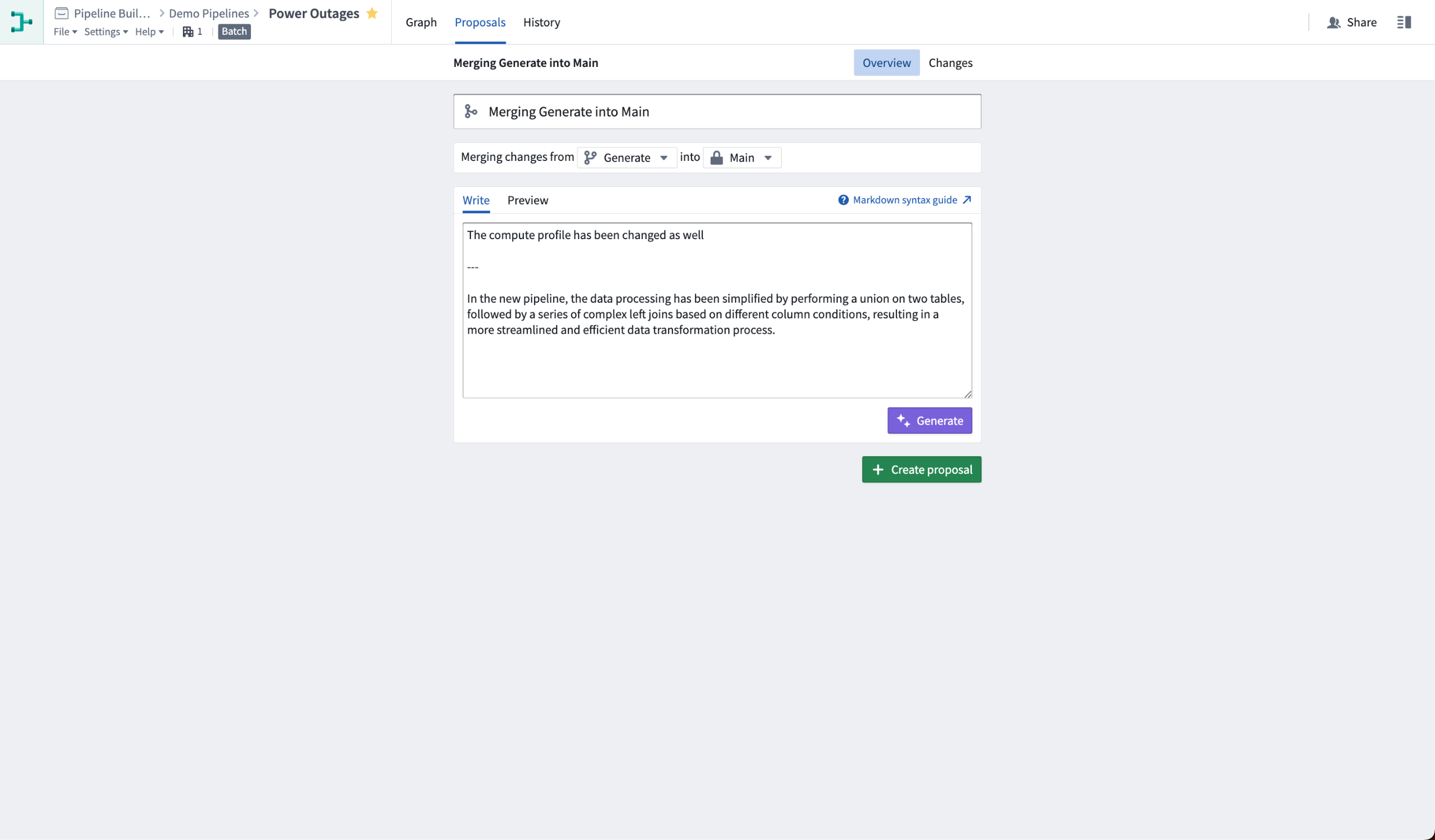
Learn more about our full set of [AIP features in Pipeline Builder](../../pipeline-builder/pipeline-builder-aip/index.md).
## Streaming transforms are now migrating to Java 17 \[Migration/Deprecation]
Date published: 2023-10-02
Per the ["Streaming transforms migration to Java 17 scheduled end of September 2023 \[Migration/Deprecation\]"](../2023-08/index.md#streaming-transforms-migration-to-java-17-scheduled-end-of-september-2023-migrationdeprecation) announcement, all streaming transforms are beginning to migrate their runtimes from Java 11 to Java 17 to take advantage of the latter’s improved performance and security posture. This migration will roll out gradually over the next week across Palantir Foundry enrollments.
Notably, the Java 17 runtime introduces a breaking change that prevents reflective access to members of internal JDK classes. As a result, we have taken measures to restore the old access behavior for all core Flink functionality to prevent adverse impact from the change except in the case where user-authored code (such as a [Foundry UDF definition](../../transforms-java/user-defined-functions/index.md)) accesses a restricted class and has not yet been remediated. Where a stream is affected, the stream build will fail with an exception containing the following message:
* `java.lang.IllegalAccessException: class cannot access class (in module ) because module does not export to unnamed module @.`
If a stream fails in this way and is a UDF transform, review the instructions in the related previous announcement as linked above to identify and remove the component making the illegal access.
Should the failing stream not be a UDF transform, contact your Palantir administrator for assistance remediating the affected stream.
***
## Additional highlights
#### Data Integration | Code Repositories
Date published: 2023-10-31
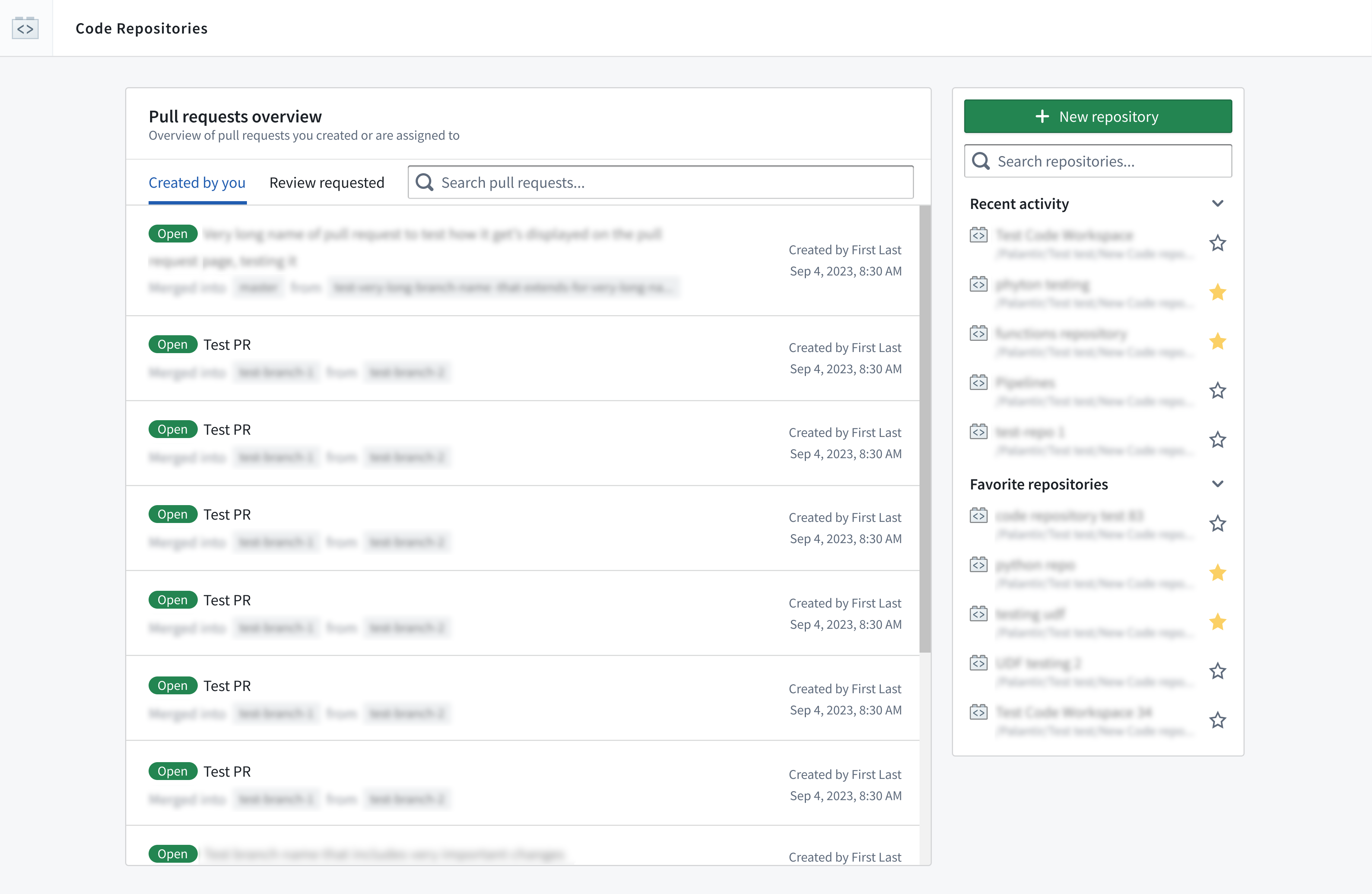
**Code Repository Landing Page** | View all Code Repository pull requests in one place with the new landing page. Instead of searching through individual repositories, you can now use the landing page to search the platform in seconds, as well as keep track of incoming review requests and the status of your own pull requests at a glance.
 #### Data Integration | Code Repositories
Date published: 2023-10-31
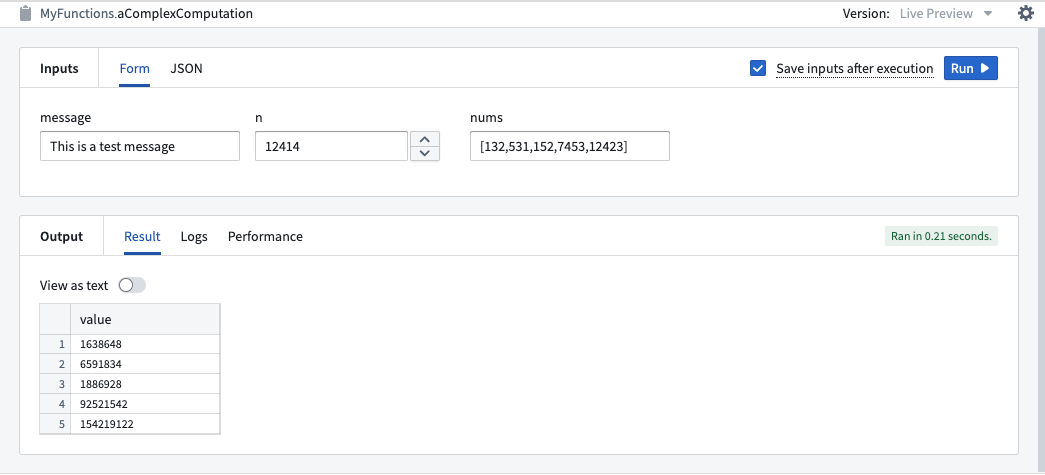
**Enhanced Function Input Management** | Users can now save function inputs for later use in Code Repositories by ticking the **Save inputs after execution** checkbox before running a function. This feature is available for both live preview and published functions. Saved configurations are stored under the current working branch and are unique to each user. Additionally, the Functions panel has been updated for a more intuitive user experience, with clear separation between the **Inputs** and **Output** sections. Finally, navigation tabs for easy access to panel menus have been introduced.
#### Data Integration | Code Repositories
Date published: 2023-10-31
**Enhanced Function Input Management** | Users can now save function inputs for later use in Code Repositories by ticking the **Save inputs after execution** checkbox before running a function. This feature is available for both live preview and published functions. Saved configurations are stored under the current working branch and are unique to each user. Additionally, the Functions panel has been updated for a more intuitive user experience, with clear separation between the **Inputs** and **Output** sections. Finally, navigation tabs for easy access to panel menus have been introduced.
 #### Model Integration | Modeling
Date published: 2023-10-31
**Model Inference History** | Live deployments in the Modeling Objective app can now be configured to record all input requests and output responses to a model inference history dataset. This helps simplify the creation of model monitoring, continuous training, and auditing flows.
#### Artifact Repositories
Date published: 2023-10-31
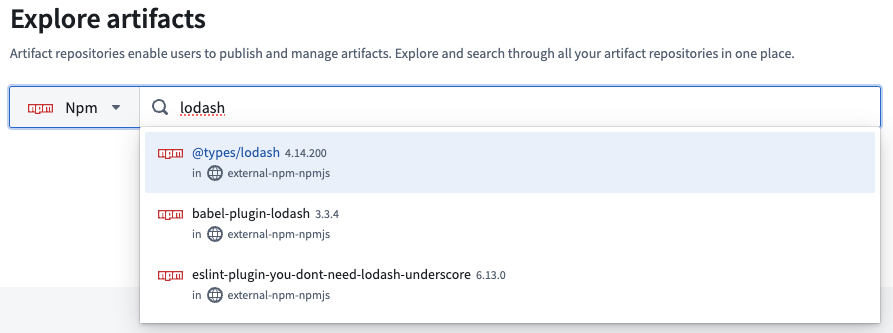
**Support for npm packages in Artifacts** | Users can now publish npm packages within Artifact repositories by following a new set of instructions provided in Artifacts app. In addition, it is now possible to search for npm packages, both within existing Artifacts repositories, and across the global npm ecosystem by using the search bar on the Artifacts landing page.
#### Model Integration | Modeling
Date published: 2023-10-31
**Model Inference History** | Live deployments in the Modeling Objective app can now be configured to record all input requests and output responses to a model inference history dataset. This helps simplify the creation of model monitoring, continuous training, and auditing flows.
#### Artifact Repositories
Date published: 2023-10-31
**Support for npm packages in Artifacts** | Users can now publish npm packages within Artifact repositories by following a new set of instructions provided in Artifacts app. In addition, it is now possible to search for npm packages, both within existing Artifacts repositories, and across the global npm ecosystem by using the search bar on the Artifacts landing page.
 #### Data Integration | Code Repositories
Date published: 2023-10-23
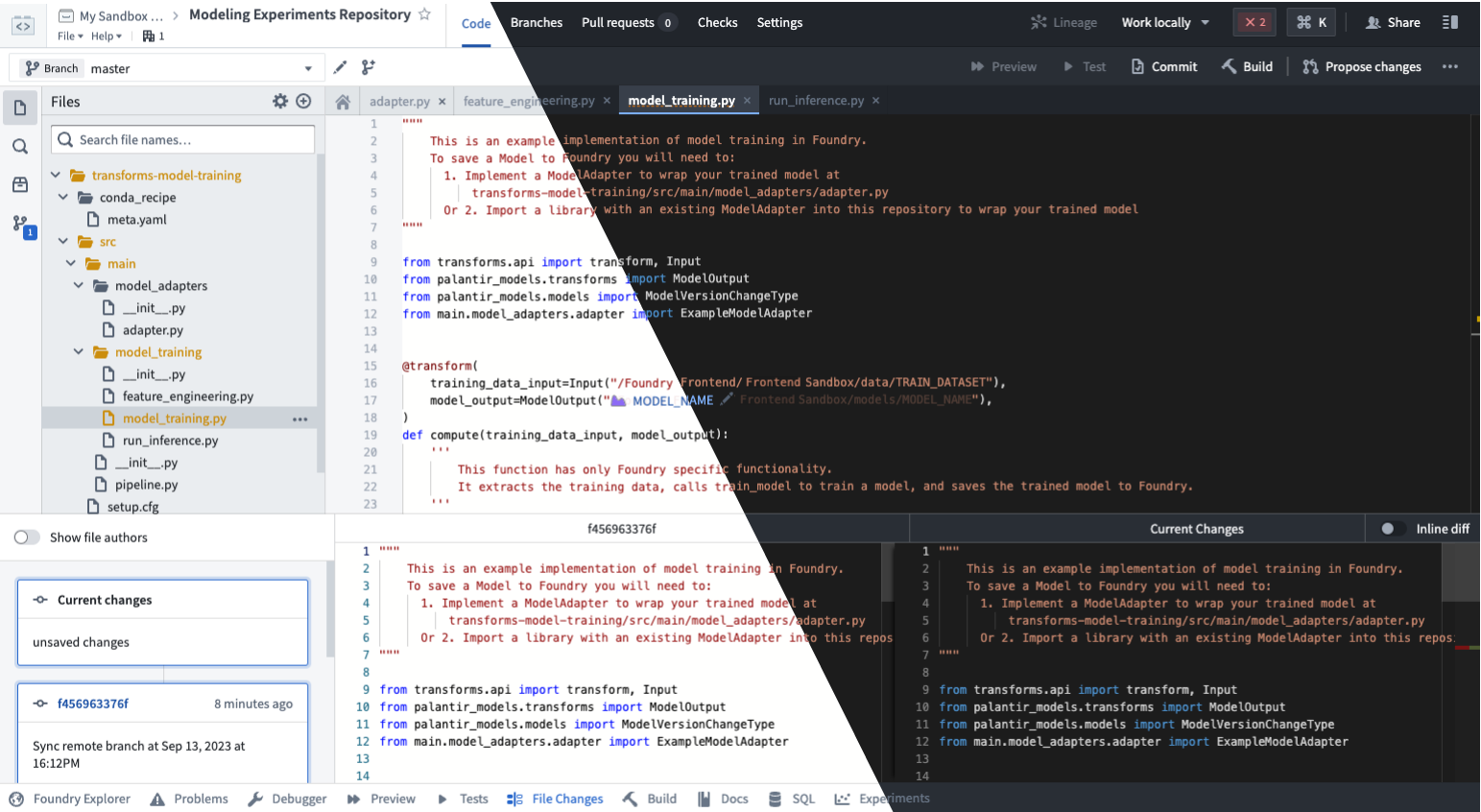
**Enable Dark Mode for Code Repositories** | Users can now enjoy a consistent dark mode experience throughout Code Repositories. To enable dark mode, navigate to your repository's settings and set the syntax highlighting theme to **Dark**. This enhancement applies dark mode to all elements within Code Repositories.
#### Data Integration | Code Repositories
Date published: 2023-10-23
**Enable Dark Mode for Code Repositories** | Users can now enjoy a consistent dark mode experience throughout Code Repositories. To enable dark mode, navigate to your repository's settings and set the syntax highlighting theme to **Dark**. This enhancement applies dark mode to all elements within Code Repositories.
 #### Data Integration | Pipeline Builder
Date published: 2023-10-23
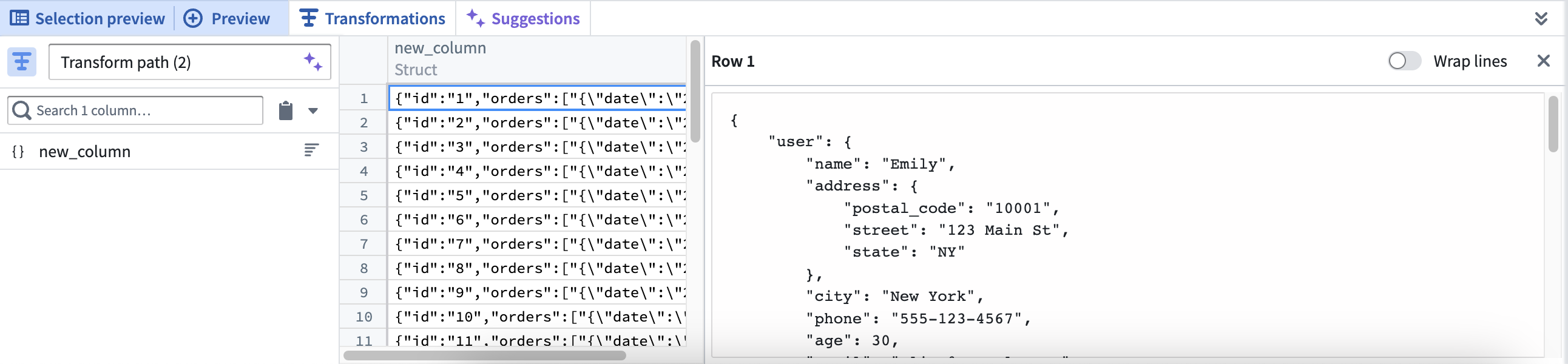
**Large string preview** | Dataset preview now contains a panel for previewing large strings, structs, maps and arrays. Right-select a cell in the preview table and choose **View cell content** to open a text panel with the full string, struct, map or array displayed. The panel supports browser search (`Cmd+F` or `Ctrl+F`) for searching through the text and has a switch to toggle line wrapping.
#### Data Integration | Pipeline Builder
Date published: 2023-10-23
**Large string preview** | Dataset preview now contains a panel for previewing large strings, structs, maps and arrays. Right-select a cell in the preview table and choose **View cell content** to open a text panel with the full string, struct, map or array displayed. The panel supports browser search (`Cmd+F` or `Ctrl+F`) for searching through the text and has a switch to toggle line wrapping.
 #### App Building | Slate
Date published: 2023-10-19
**Improved asynchronous support in Slate** | Slate now offers improved asynchronous function support, allowing users to efficiently manage promise-based operations. This enhancement enables the creation of JavaScript timeouts using promises and async/await functions from various libraries, leading to better performance and increased flexibility in user workflows.
#### Data Integration | Pipeline Builder
Date published: 2023-10-19
**Preview panel for large values** | A new panel in Pipeline Builder can be used to preview large strings, structs, maps, and arrays. This formatted text area allows users to easily navigate and search through the content.
#### Quicksearch
Date published: 2023-10-17
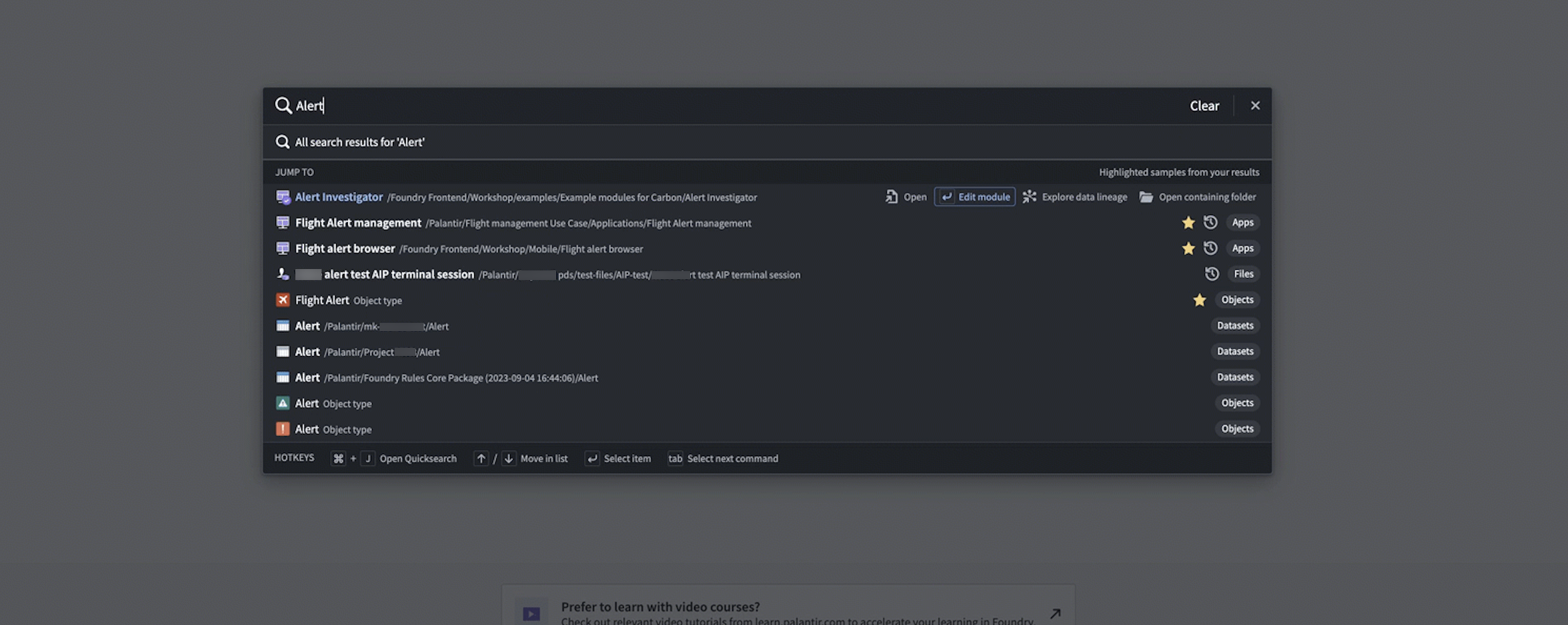
**Improvements to Quicksearch** | Users can now rapidly perform navigation commands via tab, providing a more efficient and user-friendly experience.
For instance, an Object Type Quicksearch result can be opened in the Ontology Manager instead of Object Explorer, bringing a user directly to Object Type configuration information, instead of search results. Builders may also navigate directly to the Editor interface in Slate and Workshop, rather than opening the module and then separately opening the editor. Finally, the streamlined search workflow enables users to open the containing folder for any Foundry resource, instead of opening the resource directly.
#### Interventions
Date published: 2023-10-17
**Improved Upgrade Assistant Responsiveness** | Experience faster resource loading times in the Upgrade Assistant, with up to a 95% improvement when filtering by "resources assigned to me". This update provides a more responsive and efficient user experience.
#### Data Integration | Data Connection
Date published: 2023-10-17
**Google Ads Source Now GA** | The Google Ads source type is now generally available, supporting the syncs capability. Users can seamlessly sync data from Google Ads to Foundry datasets, enhancing data integration and analysis.
#### Data Integration | Data Connection
Date published: 2023-10-17
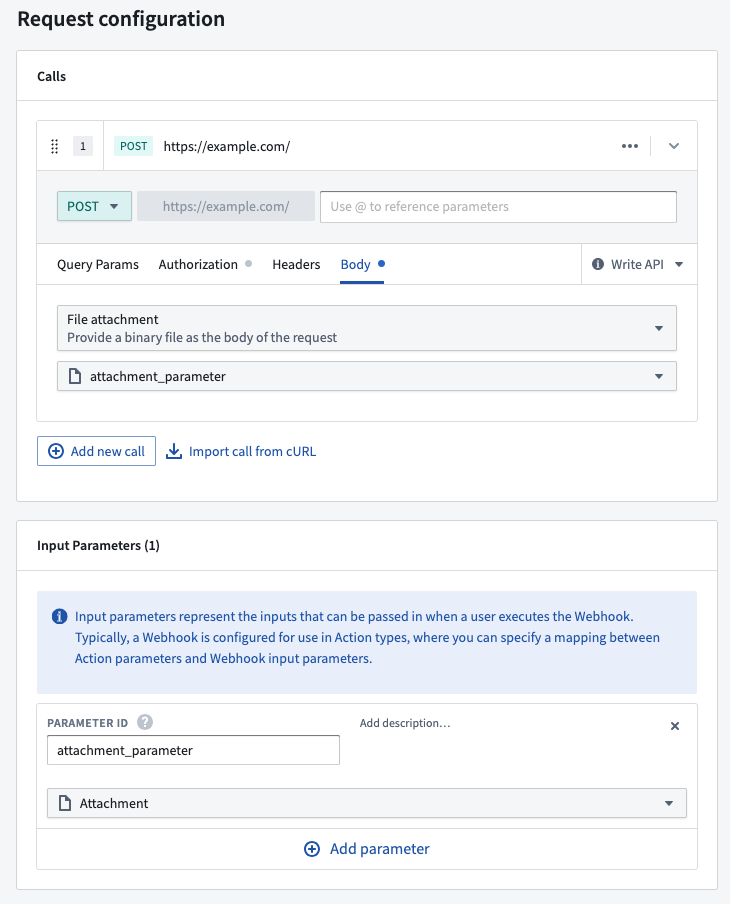
**Enhanced Webhooks with Attachment Support** | Users can now include an attachment parameter when using Webhooks with Actions, enabling the ability to send files to external APIs as part of executing a Foundry action. This enhancement provides greater flexibility and integration options for users working with Webhooks and Actions.
#### App Building | Slate
Date published: 2023-10-19
**Improved asynchronous support in Slate** | Slate now offers improved asynchronous function support, allowing users to efficiently manage promise-based operations. This enhancement enables the creation of JavaScript timeouts using promises and async/await functions from various libraries, leading to better performance and increased flexibility in user workflows.
#### Data Integration | Pipeline Builder
Date published: 2023-10-19
**Preview panel for large values** | A new panel in Pipeline Builder can be used to preview large strings, structs, maps, and arrays. This formatted text area allows users to easily navigate and search through the content.
#### Quicksearch
Date published: 2023-10-17
**Improvements to Quicksearch** | Users can now rapidly perform navigation commands via tab, providing a more efficient and user-friendly experience.
For instance, an Object Type Quicksearch result can be opened in the Ontology Manager instead of Object Explorer, bringing a user directly to Object Type configuration information, instead of search results. Builders may also navigate directly to the Editor interface in Slate and Workshop, rather than opening the module and then separately opening the editor. Finally, the streamlined search workflow enables users to open the containing folder for any Foundry resource, instead of opening the resource directly.

#### Interventions
Date published: 2023-10-17
**Improved Upgrade Assistant Responsiveness** | Experience faster resource loading times in the Upgrade Assistant, with up to a 95% improvement when filtering by "resources assigned to me". This update provides a more responsive and efficient user experience.
#### Data Integration | Data Connection
Date published: 2023-10-17
**Google Ads Source Now GA** | The Google Ads source type is now generally available, supporting the syncs capability. Users can seamlessly sync data from Google Ads to Foundry datasets, enhancing data integration and analysis.
#### Data Integration | Data Connection
Date published: 2023-10-17
**Enhanced Webhooks with Attachment Support** | Users can now include an attachment parameter when using Webhooks with Actions, enabling the ability to send files to external APIs as part of executing a Foundry action. This enhancement provides greater flexibility and integration options for users working with Webhooks and Actions.
 #### Data Integration | Data Connection
Date published: 2023-10-17
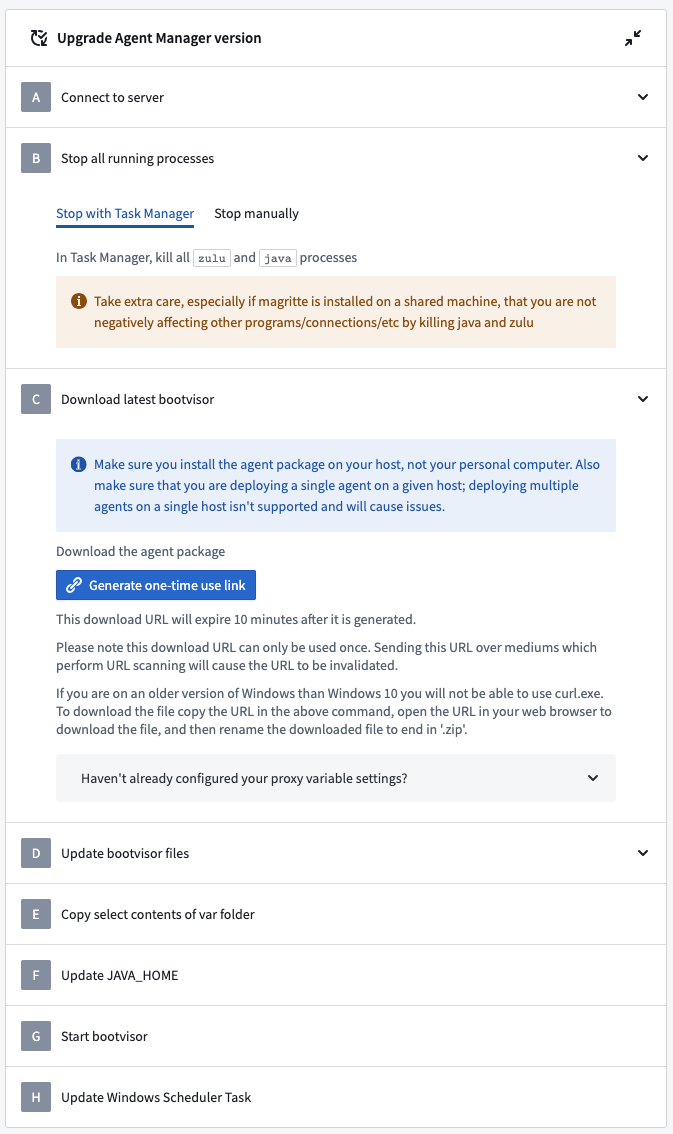
**Interactive Windows Agent Upgrade Instructions** | This release introduces interactive instructions for upgrading Windows agents in the Data Connection application. To access these instructions, navigate to an outdated Windows agent and visit the **Agent Settings -> Configuration** sub-tab. Users will now find step-by-step guidance on upgrading their agents, enhancing the overall user experience. [Learn more about running agents on Windows hosts](../../data-connection/agent-configuration-reference/index.md#install-on-a-windows-host).
#### Data Integration | Data Connection
Date published: 2023-10-17
**Interactive Windows Agent Upgrade Instructions** | This release introduces interactive instructions for upgrading Windows agents in the Data Connection application. To access these instructions, navigate to an outdated Windows agent and visit the **Agent Settings -> Configuration** sub-tab. Users will now find step-by-step guidance on upgrading their agents, enhancing the overall user experience. [Learn more about running agents on Windows hosts](../../data-connection/agent-configuration-reference/index.md#install-on-a-windows-host).
 #### Data Integration | Data Connection
Date published: 2023-10-17
**Amazon SQS Connector GA** | The Amazon SQS connector is now generally available in Foundry. Users can access this connector through the "New Source" workflow in Data Connection, enabling streaming syncs and streaming exports capabilities.
#### Data Integration | Data Connection
Date published: 2023-10-17
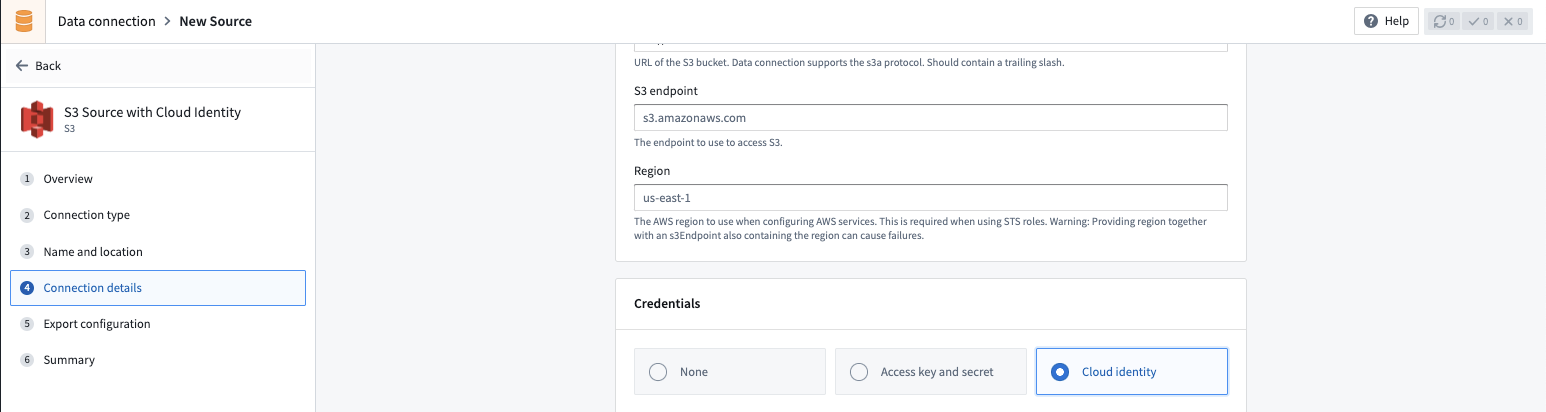
**Cloud identities are now supported as an authentication option for S3** | The [S3 connector](../../available-connectors/amazon-s3/index.md) in [data connection](../../data-connection/overview/index.md) now supports using a [Cloud Identity](../../administration/configure-cloud-identities/index.md) to authenticate and access S3. Cloud identities allow you to authenticate to cloud provider resources without the use of static credentials, and where available, it is the recommended way to connect to S3.
#### Data Integration | Data Connection
Date published: 2023-10-17
**Amazon SQS Connector GA** | The Amazon SQS connector is now generally available in Foundry. Users can access this connector through the "New Source" workflow in Data Connection, enabling streaming syncs and streaming exports capabilities.
#### Data Integration | Data Connection
Date published: 2023-10-17
**Cloud identities are now supported as an authentication option for S3** | The [S3 connector](../../available-connectors/amazon-s3/index.md) in [data connection](../../data-connection/overview/index.md) now supports using a [Cloud Identity](../../administration/configure-cloud-identities/index.md) to authenticate and access S3. Cloud identities allow you to authenticate to cloud provider resources without the use of static credentials, and where available, it is the recommended way to connect to S3.
 #### Analytics | Contour
Date published: 2023-10-17
**Restricted Dashboard Access** | Introducing a new analysis setting that limits viewer access to the dashboard. When enabled, users with view-only permissions on the analysis will be unable to navigate to the analysis from the dashboard view.
#### Security | Projects
Date published: 2023-10-12
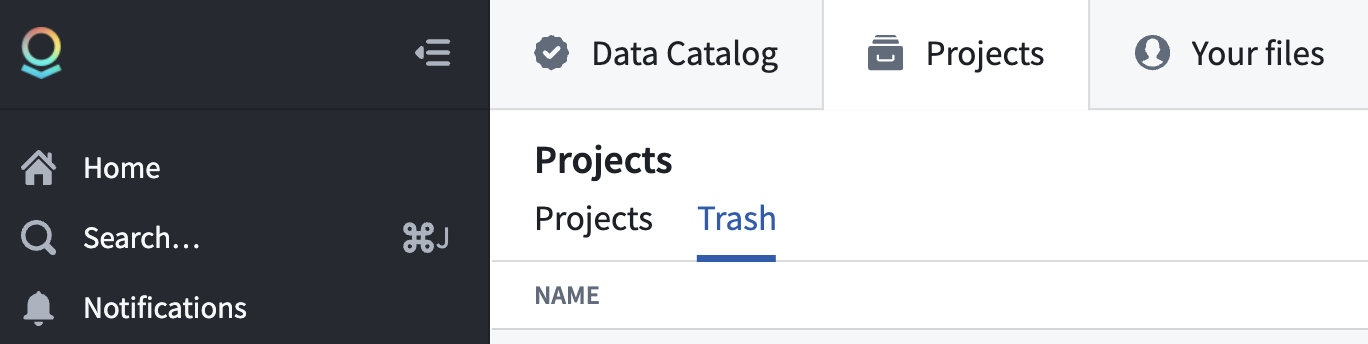
**Projects in Trash** | Users can now view trashed Projects. Permissioned users, including Project owners, can choose to restore or permanently delete the Project.
#### Analytics | Contour
Date published: 2023-10-17
**Restricted Dashboard Access** | Introducing a new analysis setting that limits viewer access to the dashboard. When enabled, users with view-only permissions on the analysis will be unable to navigate to the analysis from the dashboard view.
#### Security | Projects
Date published: 2023-10-12
**Projects in Trash** | Users can now view trashed Projects. Permissioned users, including Project owners, can choose to restore or permanently delete the Project.
 #### Analytics | Notepad
Date published: 2023-10-12
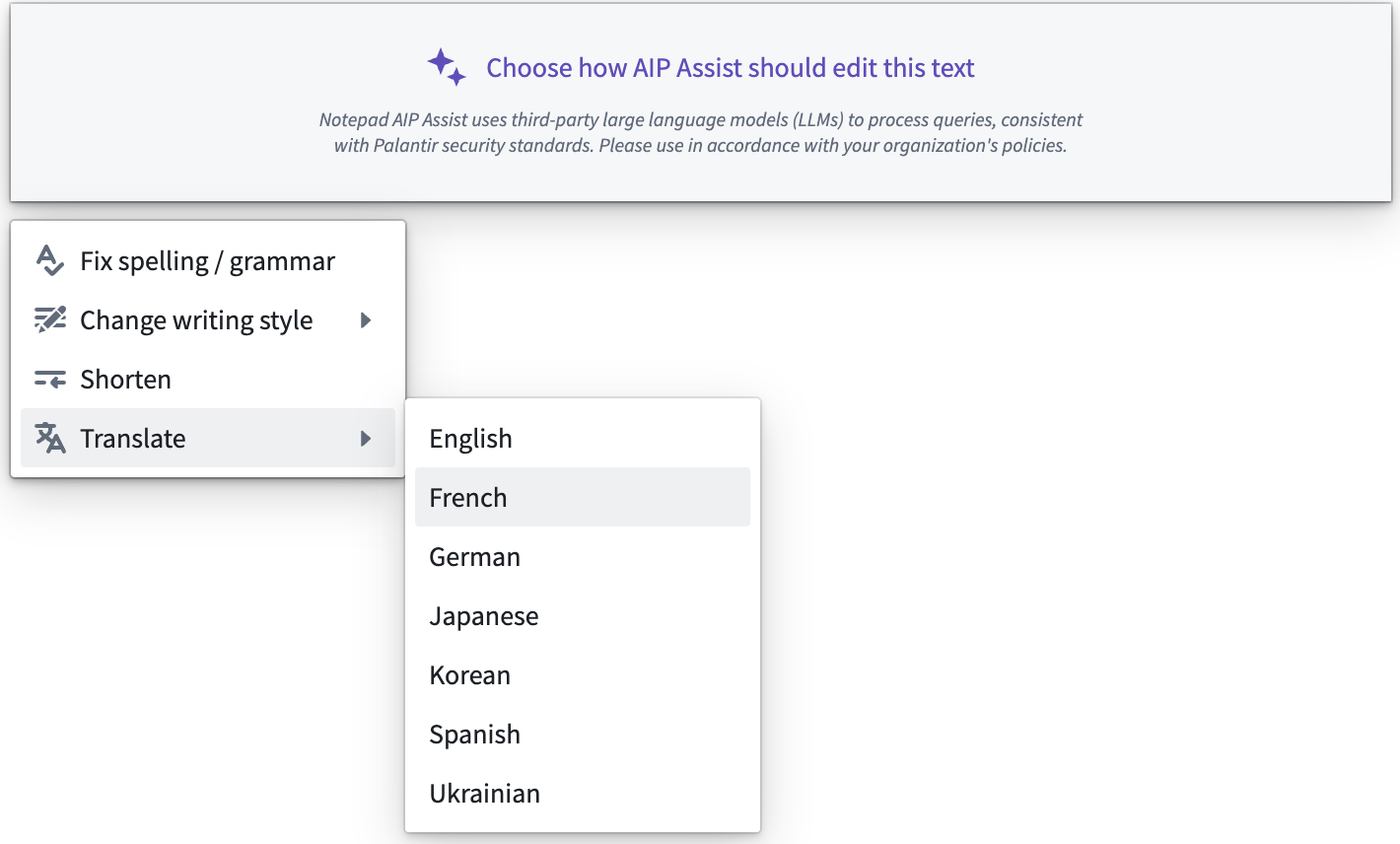
**AIP in Notepad** | AIP can now support with text and list block modification. Users can now easily shorten, change the tone of, spellcheck, and translate their text with the help of AIP.
#### Analytics | Notepad
Date published: 2023-10-12
**AIP in Notepad** | AIP can now support with text and list block modification. Users can now easily shorten, change the tone of, spellcheck, and translate their text with the help of AIP.
 #### App Building | Slate
Date published: 2023-10-12
**New `redirectToUrl` action type** | Slate now includes a `redirectToUrl` action type, enabling programmatic redirects to different URLs. This enhancement allows for seamless redirection on page load or when interacting with interface elements.
#### Foundry Developer Console
Date published: 2023-10-12
**Enhanced AIP Integration with Ontology SDK** | Where AIP is enabled, users can now add basic AIP logic-backed functions to their Ontology SDK, including functions that take user input and call a model. Support for calling additional tools will be introduced in future updates.
#### Foundry Developer Console
Date published: 2023-10-04
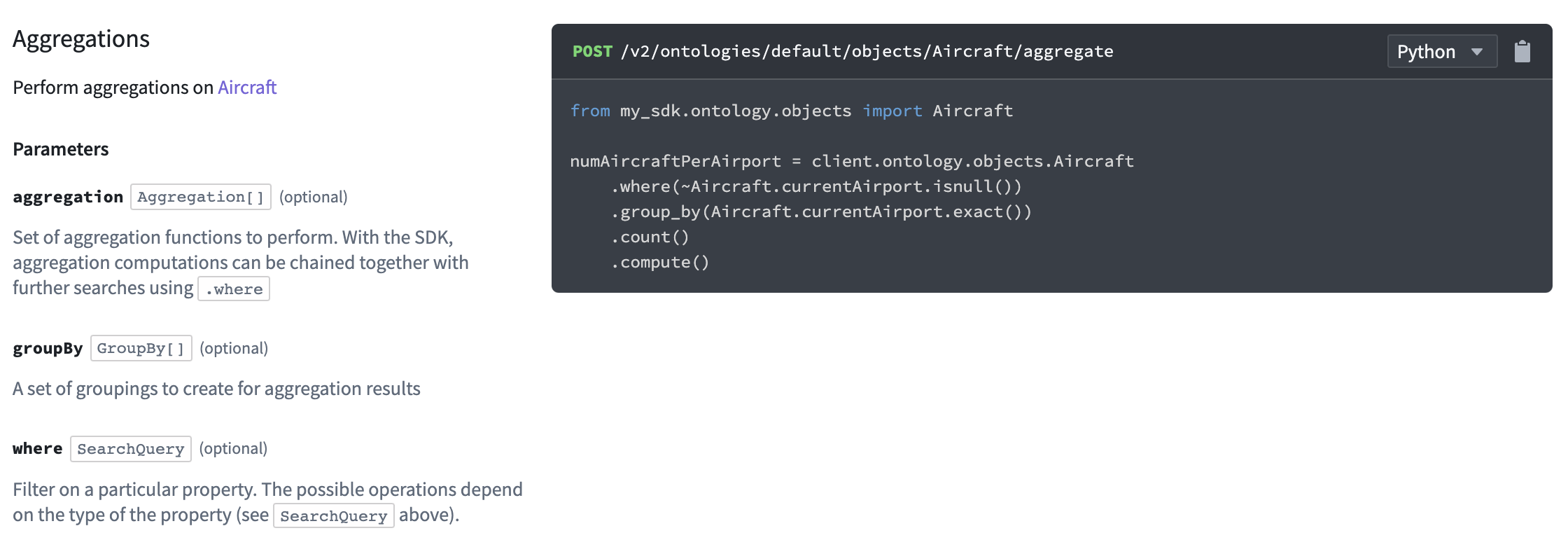
**Python Ontology SDK Supports Aggregations** | Users can now aggregate object data with the Python Ontology SDK. Aggregations can range from a simple `count()` of objects to multiple named aggregations over groups of objects.
**Simple example:**
```
num_aircraft = client.ontology.objects.Aircraft
.count()
.compute()
```
**Complex example:**
```
cost_statistics = client.ontology.objects.Aircraft
.groupBy(Aircraft.type.exact())
.groupBy(Aircraft.dateManufactured.by_days(180))
.aggregate({
"most_expensive": Aircraft.unitCost.max(),
"least_expensive": Aircraft.unitCost.min(),
"average_cost": Aircraft.unitCost.average(),
})
.compute()
```
#### App Building | Slate
Date published: 2023-10-12
**New `redirectToUrl` action type** | Slate now includes a `redirectToUrl` action type, enabling programmatic redirects to different URLs. This enhancement allows for seamless redirection on page load or when interacting with interface elements.
#### Foundry Developer Console
Date published: 2023-10-12
**Enhanced AIP Integration with Ontology SDK** | Where AIP is enabled, users can now add basic AIP logic-backed functions to their Ontology SDK, including functions that take user input and call a model. Support for calling additional tools will be introduced in future updates.
#### Foundry Developer Console
Date published: 2023-10-04
**Python Ontology SDK Supports Aggregations** | Users can now aggregate object data with the Python Ontology SDK. Aggregations can range from a simple `count()` of objects to multiple named aggregations over groups of objects.
**Simple example:**
```
num_aircraft = client.ontology.objects.Aircraft
.count()
.compute()
```
**Complex example:**
```
cost_statistics = client.ontology.objects.Aircraft
.groupBy(Aircraft.type.exact())
.groupBy(Aircraft.dateManufactured.by_days(180))
.aggregate({
"most_expensive": Aircraft.unitCost.max(),
"least_expensive": Aircraft.unitCost.min(),
"average_cost": Aircraft.unitCost.average(),
})
.compute()
```
 #### Analytics | Contour
Date published: 2023-10-04
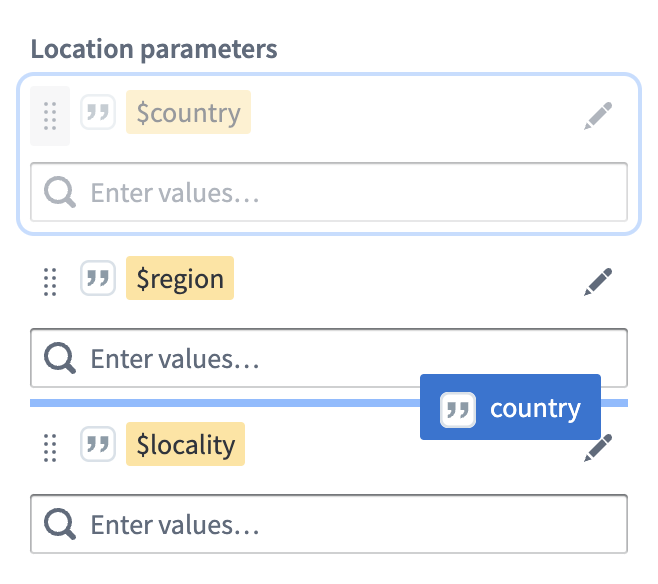
**Enhanced parameter organization** | Users can now effortlessly reorder parameters in the parameters sidebar by dragging and dropping them, providing a more organized and customizable experience for both ungrouped parameters and those within groups.
#### Analytics | Contour
Date published: 2023-10-04
**Enhanced parameter organization** | Users can now effortlessly reorder parameters in the parameters sidebar by dragging and dropping them, providing a more organized and customizable experience for both ungrouped parameters and those within groups.
 #### Analytics | Contour
Date published: 2023-10-04
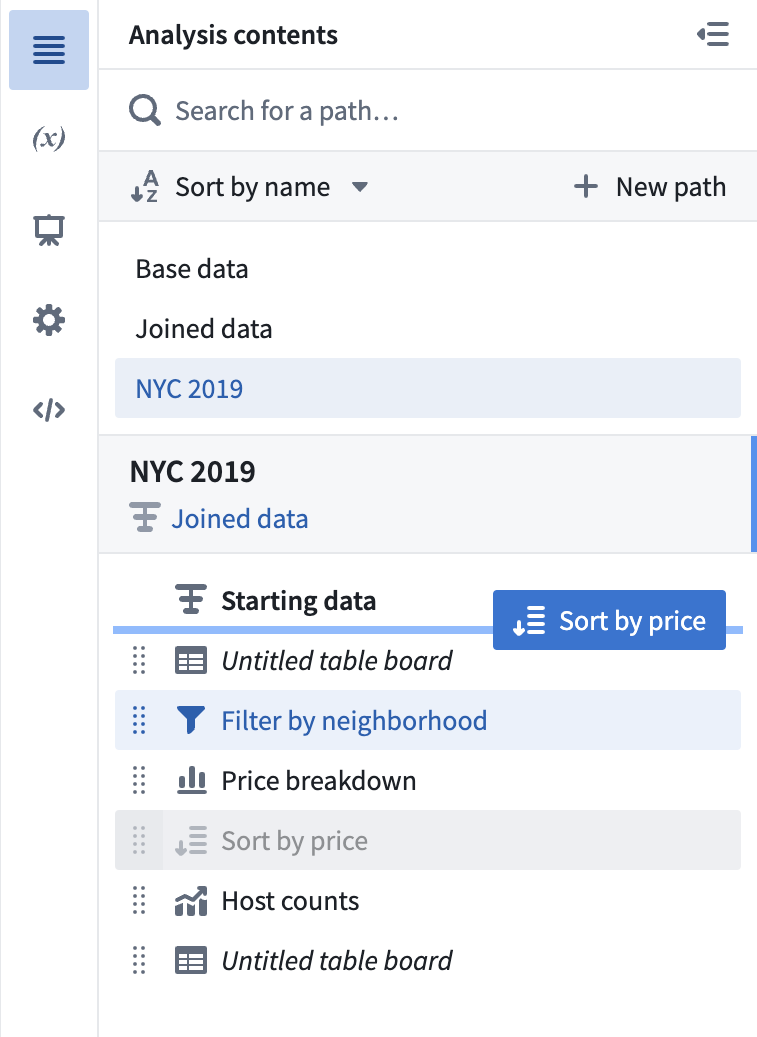
**Enhanced contents panel navigation** | The **Analysis contents** side panel now includes a dedicated section displaying all boards within the selected path, allowing users to easily navigate and rearrange their boards.
#### Analytics | Contour
Date published: 2023-10-04
**Enhanced contents panel navigation** | The **Analysis contents** side panel now includes a dedicated section displaying all boards within the selected path, allowing users to easily navigate and rearrange their boards.
 #### Data Integration | Pipeline Builder
Date published: 2023-10-04
**Schedule Outputs Directly in Pipeline Builder** | Users can now create and edit schedules for their Pipeline Builder outputs directly within the application, streamlining the workflow and eliminating the need to switch between Pipeline Builder and Data Lineage. Simply select a trigger and set of targets or job groups to build, and manage your schedules with ease. Note that schedules with advanced configurations can still only be edited in Data Lineage.
#### App Building | Workshop
Date published: 2023-10-04
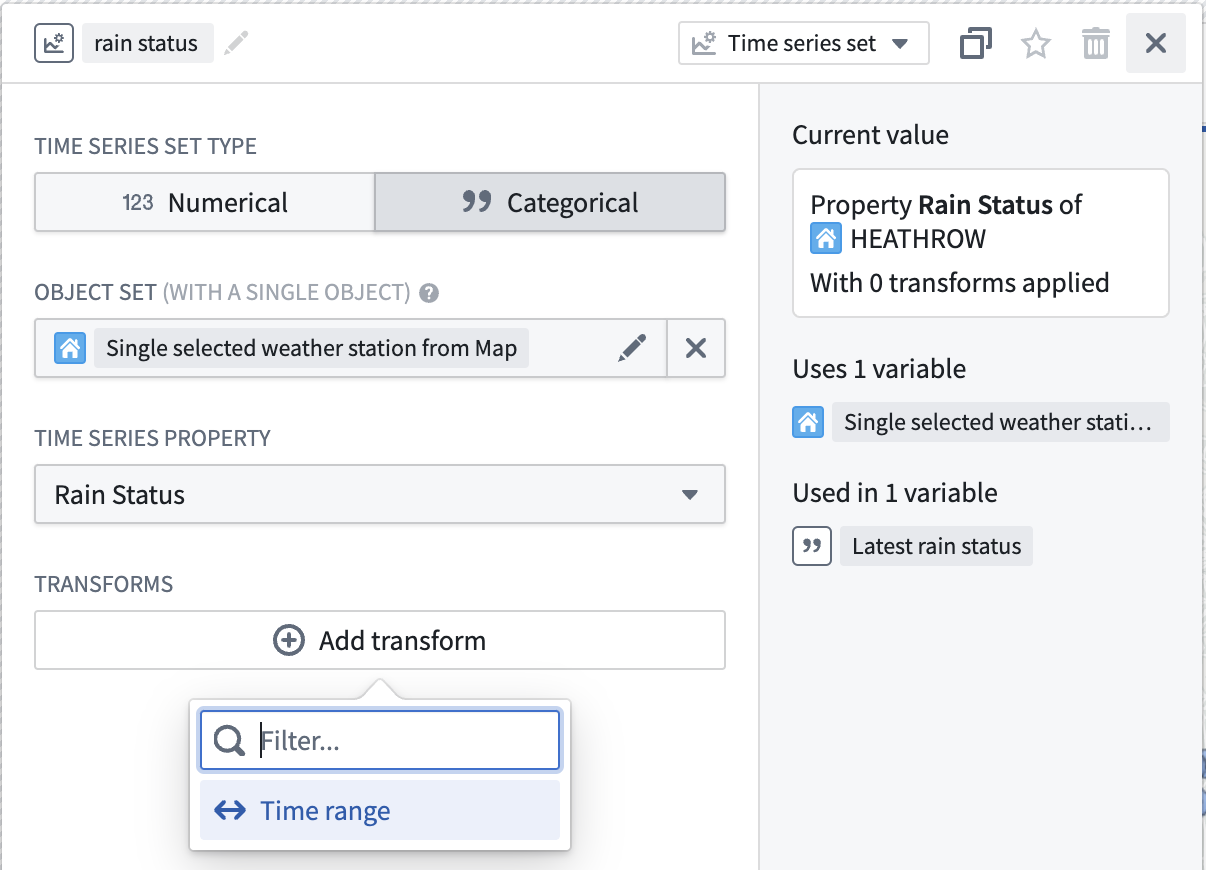
**Categorical Series support in Workshop** | Workshop's support for [time series properties (TSPs)](../../workshop/time-series-properties/index.md) now includes basic support for categorical TSPs. Coupled with the recently added support for creating categorical TSPs in Pipeline Builder and the existing support in Quiver, Vertex, and Object Explorer, this rounds out our first step in supporting categorical TSPs throughout Foundry in a first-class way.
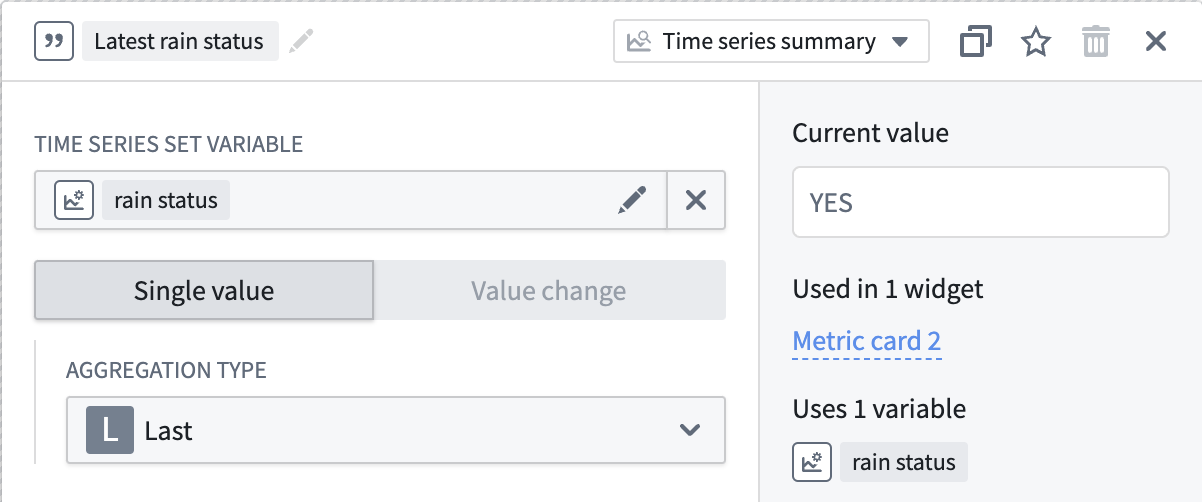
Users can now create string-type [Single Value time series summary variables](../../workshop/time-series-properties/index.md#time-series-summarizers) with the **First** or **Last** aggregation types currently supported. Users can now also create categorical [time series set variables](../../workshop/concepts-variables/index.md#variable-types) to use as inputs to these summarizers. Categorical time series set variables currently support the [time range transform](../../workshop/time-series-properties/index.md#time-range).
String-type time series summary variables can be used in the [**Metric Card**](../../workshop/widgets-metric-card/index.md) widget, and categorical time series set variables can be used to add a visualization to a Metric Card.
The [**Object Table**](../../workshop/widgets-object-table/index.md) widget supports displaying the **Last** Single Value for a categorical TSP, along with its line for visualization.
Future development work will consider support in the **Chart: XY** and **Map** widgets, as well as additional configurability within the **Object Table** widget and the two variable types.
#### Data Integration | Pipeline Builder
Date published: 2023-10-04
**Schedule Outputs Directly in Pipeline Builder** | Users can now create and edit schedules for their Pipeline Builder outputs directly within the application, streamlining the workflow and eliminating the need to switch between Pipeline Builder and Data Lineage. Simply select a trigger and set of targets or job groups to build, and manage your schedules with ease. Note that schedules with advanced configurations can still only be edited in Data Lineage.
#### App Building | Workshop
Date published: 2023-10-04
**Categorical Series support in Workshop** | Workshop's support for [time series properties (TSPs)](../../workshop/time-series-properties/index.md) now includes basic support for categorical TSPs. Coupled with the recently added support for creating categorical TSPs in Pipeline Builder and the existing support in Quiver, Vertex, and Object Explorer, this rounds out our first step in supporting categorical TSPs throughout Foundry in a first-class way.
Users can now create string-type [Single Value time series summary variables](../../workshop/time-series-properties/index.md#time-series-summarizers) with the **First** or **Last** aggregation types currently supported. Users can now also create categorical [time series set variables](../../workshop/concepts-variables/index.md#variable-types) to use as inputs to these summarizers. Categorical time series set variables currently support the [time range transform](../../workshop/time-series-properties/index.md#time-range).
String-type time series summary variables can be used in the [**Metric Card**](../../workshop/widgets-metric-card/index.md) widget, and categorical time series set variables can be used to add a visualization to a Metric Card.
The [**Object Table**](../../workshop/widgets-object-table/index.md) widget supports displaying the **Last** Single Value for a categorical TSP, along with its line for visualization.
Future development work will consider support in the **Chart: XY** and **Map** widgets, as well as additional configurability within the **Object Table** widget and the two variable types.
 #### Administration | Control Panel
Date published: 2023-10-02
**Foundry in Ukrainian is now GA** | Foundry's Ukrainian translation is now GA. Review the documentation on [configuring available languages](../../administration/configure-platform-experience/index.md#configure-available-languages) to enable the Ukrainian language translation.
#### Administration | Control Panel
Date published: 2023-10-02
**Foundry in Ukrainian is now GA** | Foundry's Ukrainian translation is now GA. Review the documentation on [configuring available languages](../../administration/configure-platform-experience/index.md#configure-available-languages) to enable the Ukrainian language translation.