# Announcements
## Code Repositories development experience improvements
Date published: 2023-09-21
The development experience for Palantir Foundry's Code Repositories application has been optimized with a collection of improvements as follows:
* [**Task Runner, a new Code Repositories functionality**](../../transforms-python/use-python-libraries/index.md#task-runner), allows users to run supported commands such as `install`, `formatCode`, `tasks`, and `whoneeds`. When Task Runner is enabled, adding a package from the Libraries tab in the left panel will now install the requested package on top of your current environment, instead of provisioning a Code Assist workspace as before. The additional logs generated during this stage help provide clarity should debugging be required. In addition, the complex filters and preview input configuration interface has been improved for ease of use.
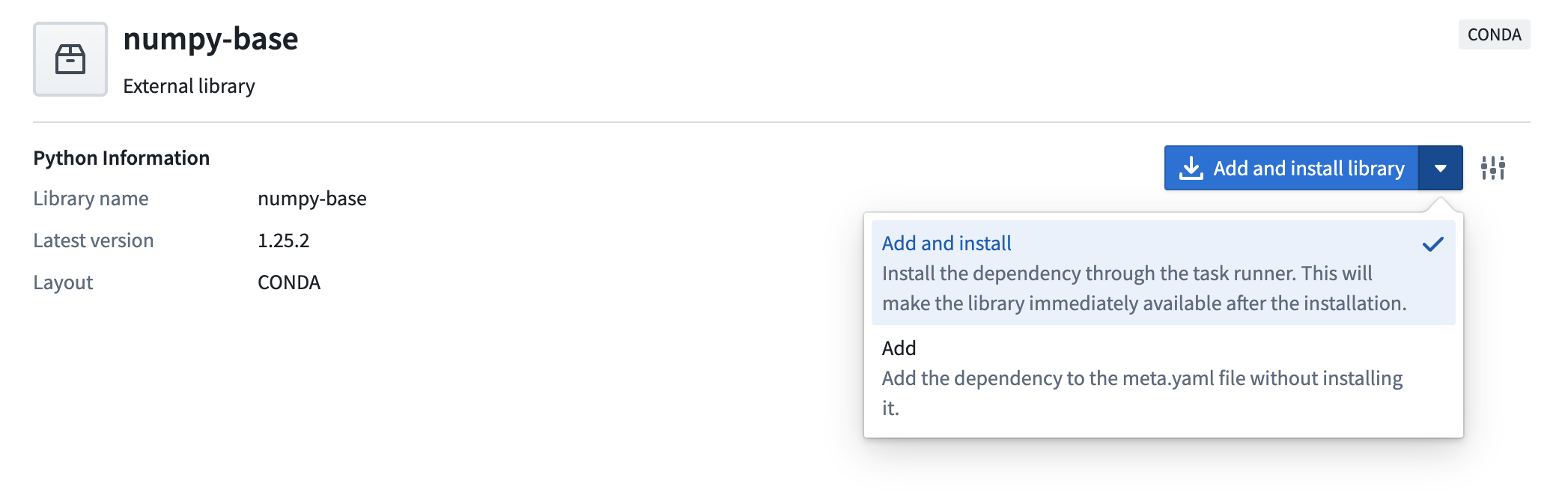
*Add and install packages using Task Runner*
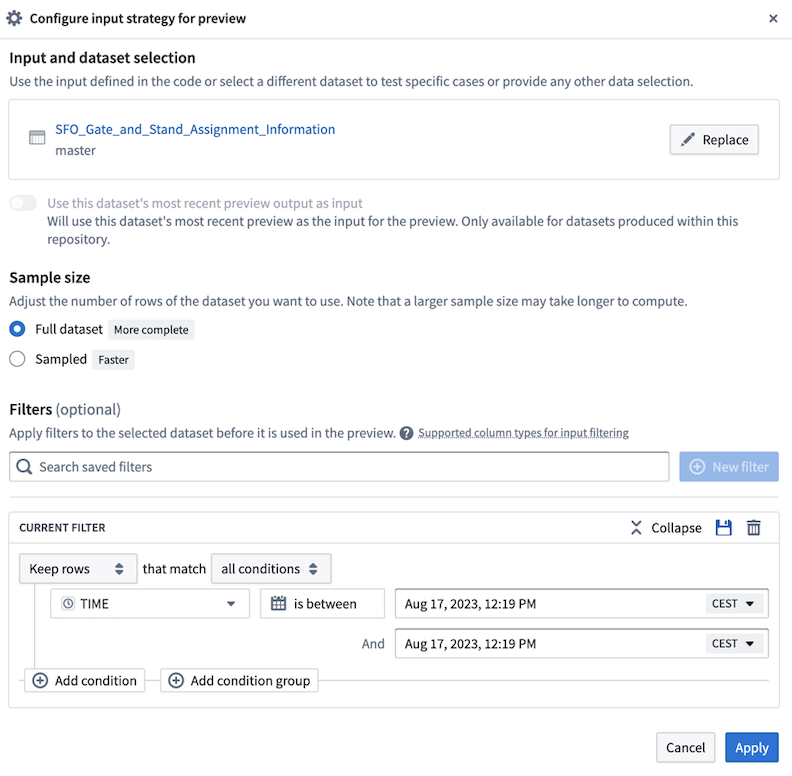
*Complex filters and Preview input configuration interface improvements*
* **Speedier development in Python:** On average, [checks are now 20-30 seconds faster on cloud environments](index.md#improved-checks-for-python-repositories-now-in-effect), with initial checks benefitting from an added lockfile on creation of a new repository in lieu of immediate “superseded” checks. Library installs are faster overall and users can now either add a package to be installed later or install a package without re-creating a workspace in Conda and the present run environment. The test environment is not updated as part of this step.
* **Artifacts speed improvements:** Code Assist can persist caches and speed up checks when there are no changes to an environment. ZSTD compression support was extended to Artifacts and to Mamba resulting in speedier environment resolutions and installations than before.
* **Improvement on the non-Linux local development experience:** Added `conda-forge` as an artifacts backing repository for all repositories out-of-the-box. In addition, `noarch` Python library templates make it easier for developers to create and manage cross-platform libraries.
* **Added Python formatting support:** Choose between `black` and `ruff` linters to ensure coding style consistency.
* **Automatic generation of relevant configs:** You can now run the `vscode` Gradle task locally.
* **Enhanced local development support on macOS and Windows:** Local preview is supported via Gradle. You also now have a streamlined front-end for repository upgrades and Code assist.
* **Spark Preview Loader optimizations:** Previews of up to 1 M rows (previously 10k) now possible, combined with a faster loading time by 4-5x.
* **Easier navigation in checks logs:** Navigate directly to the build in Job tracker by selecting buildRIDs directly from within the checks logs.
## Ontology SDK (TypeScript and Developer Console) \[GA], Python SDK \[Beta]
Date published: 2023-09-19
The Ontology SDK (OSDK) typescript version and the new Developer Console application are now GA on all stacks. The Python SDK is currently in beta and on track to GA by the end of October 2023.
The Ontology Software Development Kit (OSDK) allows you to access the full power of the Ontology directly from your development environment. You can generate the Ontology SDK with the Developer Console, a new portal for creating and managing third party applications using Palantir APIs. For more details and instructions, see our [public docs](../../ontology-sdk/overview/index.md).
### What is the Ontology SDK and Developer Console?
The Developer Console is a new application that lets you generate an Ontology SDK for ergonomic access to Ontology APIs. The SDK can be generated as a TypeScript NPM package and as Python PyPi/Conda packages (beta). The Ontology SDK package includes only the entities from the Ontology defined by the developer in the Developer Console.
Developers can use the Ontology SDK to easily read from the Ontology, write back to Foundry via Actions, execute Ontology Functions and much more. Using the SDK provides a type-safe way of interacting with our APIs.
Developers can then effectively treat Foundry as a backend, relying on the infrastructure and central Ontology management that Foundry provides and allowing for more focus on application development unique to their organization.
*A GIF showing the Ontology SDK integrating Foundry Ontology resources in a code editor.*
### Why use the Ontology SDK?
* **Accelerated development:** The OSDK enables ergonomic access to Ontology APIs, allowing you to read and write back to the Ontology with just a few lines of code.
* **Strong type-safety:** The functions and types generated for the OSDK are based off of the selected subset of the Ontology you are developing with. Everything is pulled from your Ontology, so you can query and explore your data right in your editor.
* **Centralized maintenance:** Take advantage of the fact that the Ontology is built and managed centrally in Foundry, allowing you to focus on application building rather than investing duplicate effort in maintaining and building the data foundation for your application.
* **Cross-team awareness:** Using the Developer Console will make applications show up in Foundry’s provenance system just like a native Slate or Workshop app, ensuring that any changes to the ontology which impact your application can be evaluated based on their impact.
* **Secure by design:** The OSDK is generated with a token scoped only to the Ontological entities you want your application to access.
### How do I use it?
The Ontology SDK is generated through the Developer Console, a new Foundry tool through which you can create and manage applications built to use Palantir APIs. Open the Developer Console from the Applications Portal in the workspace navigation bar, or search using `CMD + J` (MacOS) or `CTRL + J` (Windows).
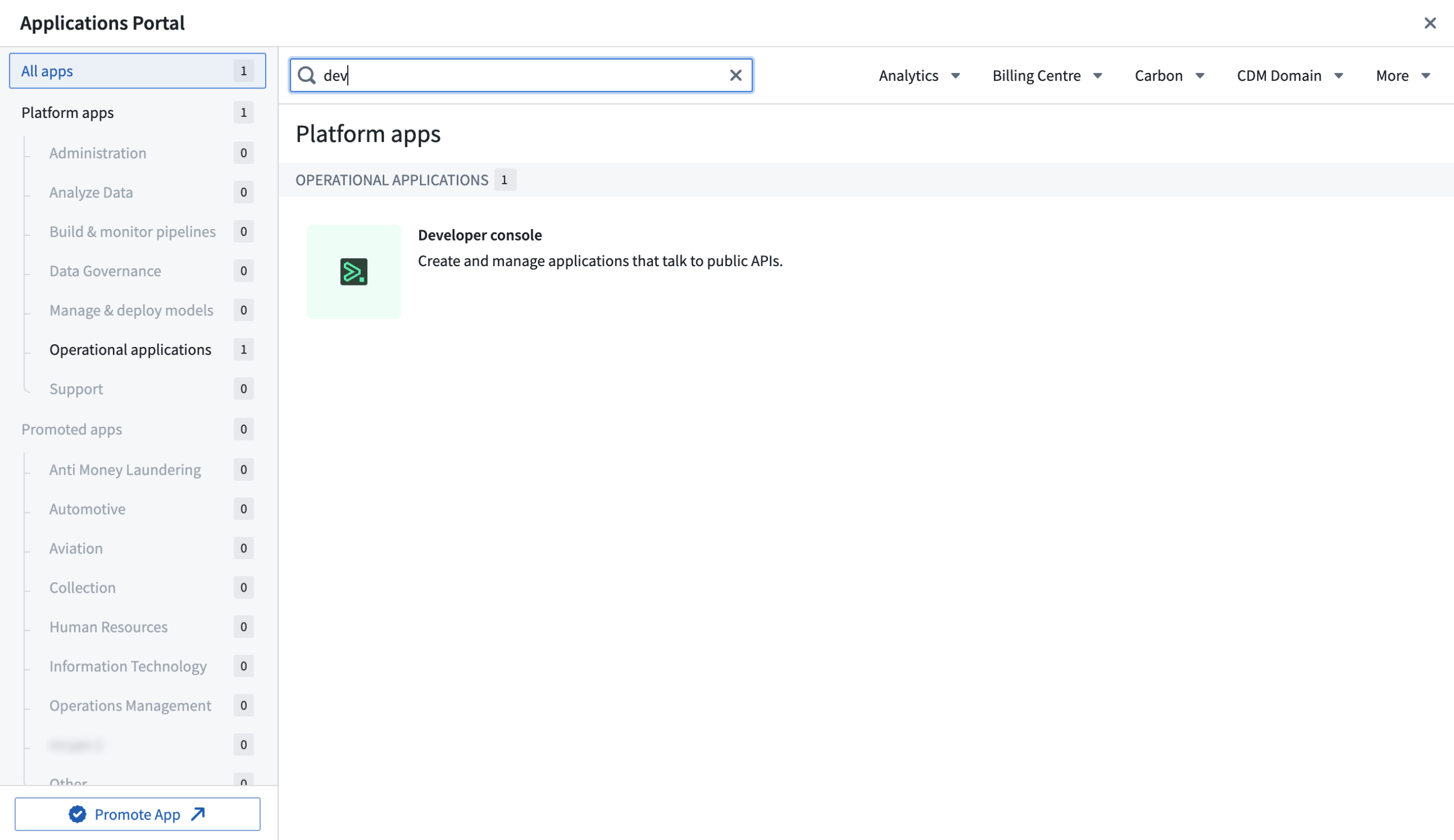
*Search for the Developer Console in the Applications Portal.*
Though both the Ontology SDK and Developer Console will be available to all enrollments, you can choose to opt-out of the Developer Console by disabling it in [Control Panel](../../administration/overview/index.md) or configuring granular access for a given group in the **Access applications** page.
Documentation on how to use the [Ontology SDK and Developer Console](../../ontology-sdk/overview/index.md) is available, including walkthroughs for different application workflows. There is also a [starter TypeScript/React-based application in our public repository ↗](https://github.com/palantir/ontology-starter-react-app) to help you get started.
The Developer Console provides customized documentation for each application based on the selected Ontology entities.
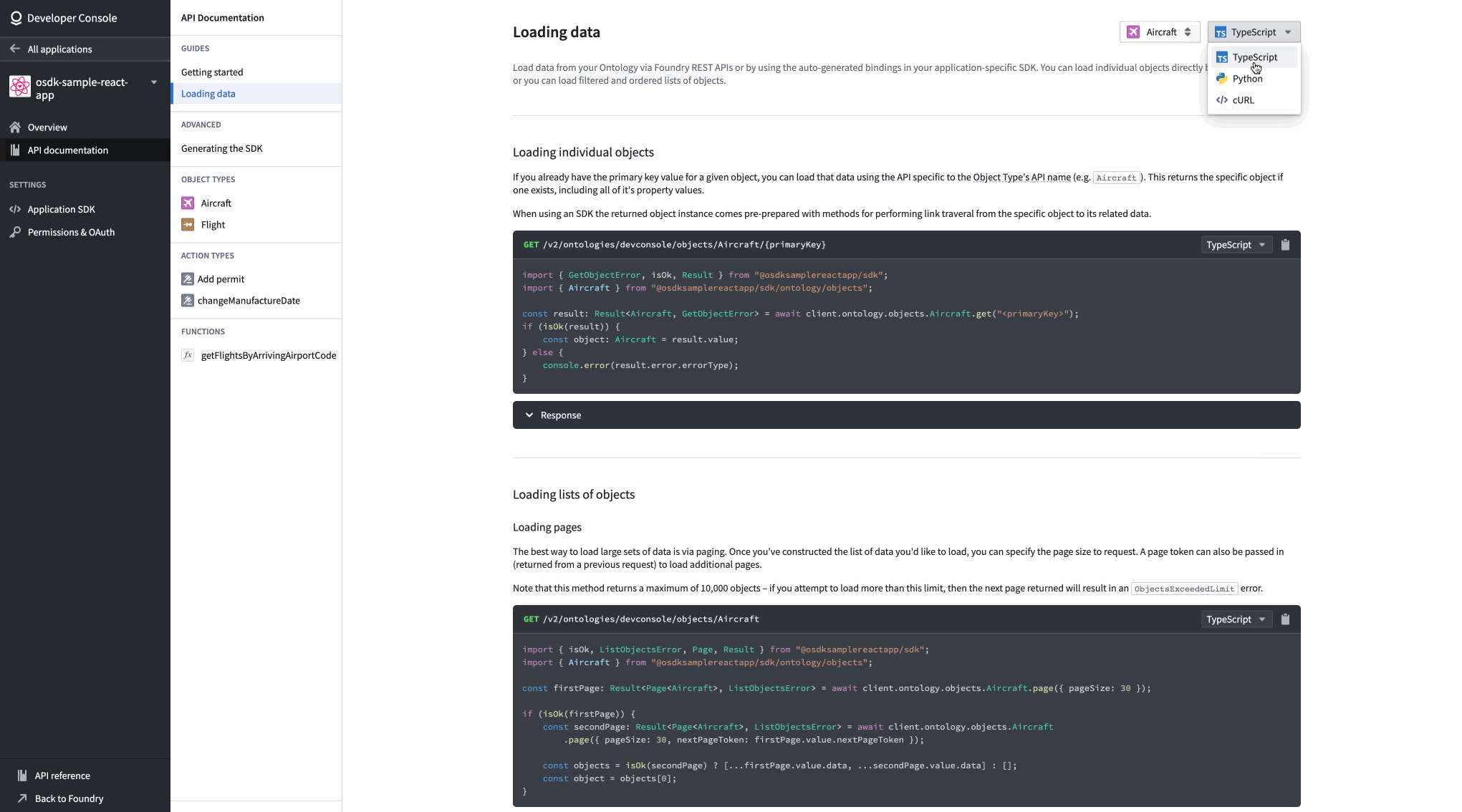
*A view of API documentation for an Aircraft object type in the Developer Console.*
### What is on the development roadmap?
* **Python SDK:** We recently announced beta support for the Python SDK package and are working towards GA by October.
* **Additional capabilities:** We are working on adding more Foundry capabilities into the SDK, including deployed models and Large Language Models (LLM) through Foundry LMS.
## Introducing Sensitive Data Scanner \[Beta]
Date published: 2023-09-19
Sensitive Data Scanner (SDS, formerly known as "Foundry Inference") helps organizations discover and secure sensitive data within their Palantir Foundry datasets. Available now in [beta](../../platform-overview/development-life-cycle/index.md#beta), governance users can use SDS to specify patterns of sensitive data to identify and the automated action to take when matching data is found. In addition, users can benefit from an updated interface to accurately track and monitor launched scans.
### Improved landing page interface
The Sensitive Data Scanner landing page now includes a progress bar serving as a status summary of the datasets that were scanned for each one-time scan. The color-coded bar fills proportionately to the number of datasets that match a particular condition over the total number of datasets in queue for scanning:
* **Blue:** Datasets currently undergoing or pending scanning.
* **Orange:** Datasets matching a condition.
* **Green:** Datasets not matching any condition.
* **Red:** Datasets where the scan failed or skipped.
* **Gray:** Canceled scans.
Additionally, you can easily review the categorization of each dataset under a particular scan by selecting a dropdown arrow to the right of each scan item.
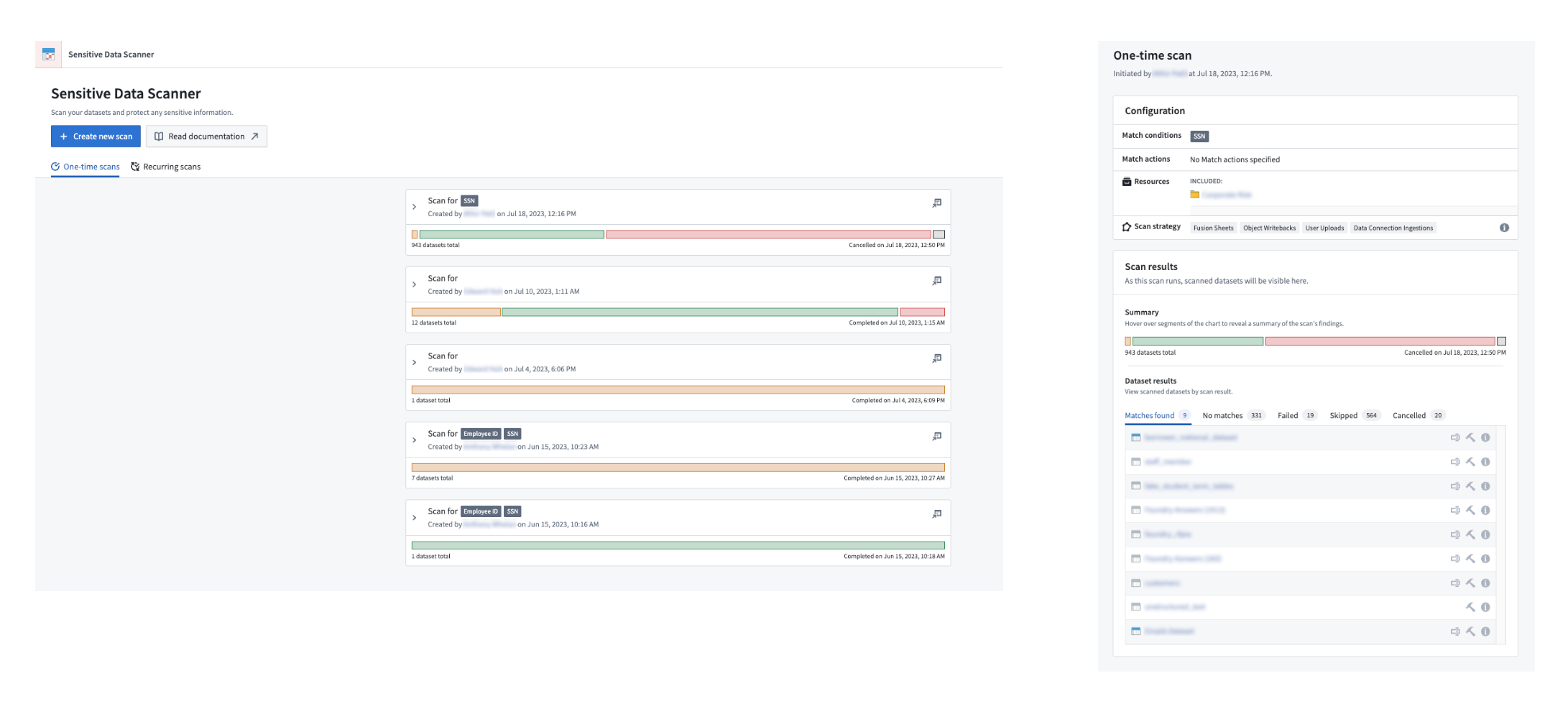
*A detailed view of a one-time scan showing the different categorization of files*
### Estimate your scan compute time
Users can also review the number of datasets that are queued for scanning by Sensitive Data Scanner, providing an estimate of how long the scan may take while encouraging review of the scope of a scan where necessary.
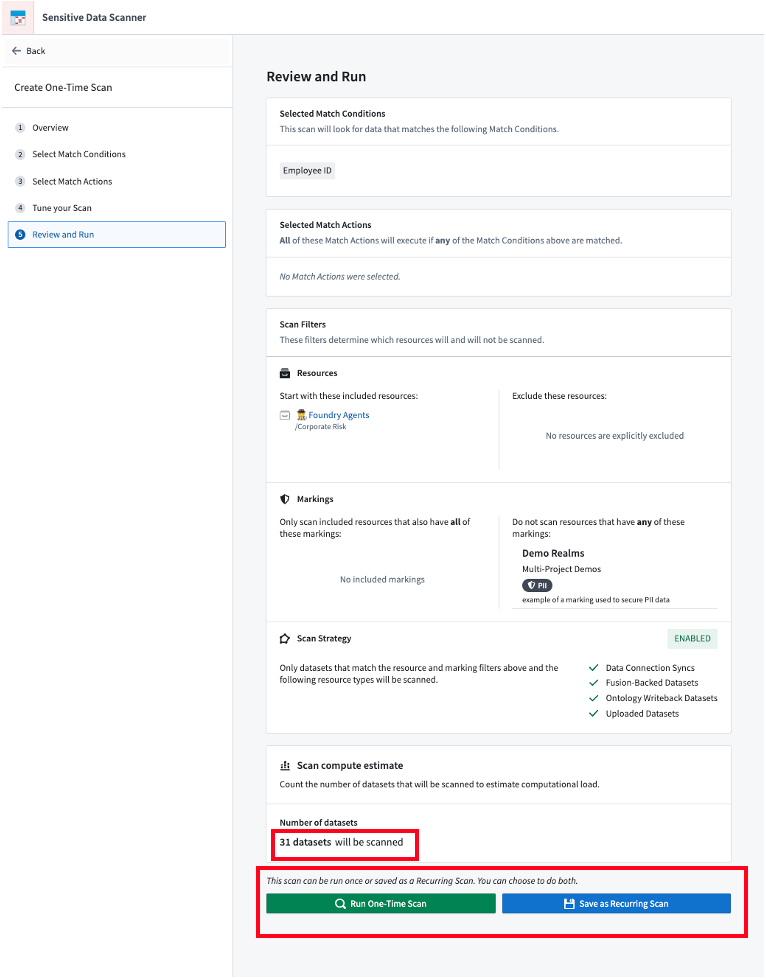
*The final step of setting up a scan shows the number of datasets that will be scanned and provides users the option of creating a one-time scan or a recurring scan.*
### Generate regex match conditions with AIP
You can now generate regular expression match conditions using AIP (on stacks where AIP is enabled) without needing to write the regex yourself. To use this feature, provide a natural-language prompt describing your desired data format, then select **Generate** during the **Select match conditions** step when creating a one-time scan.
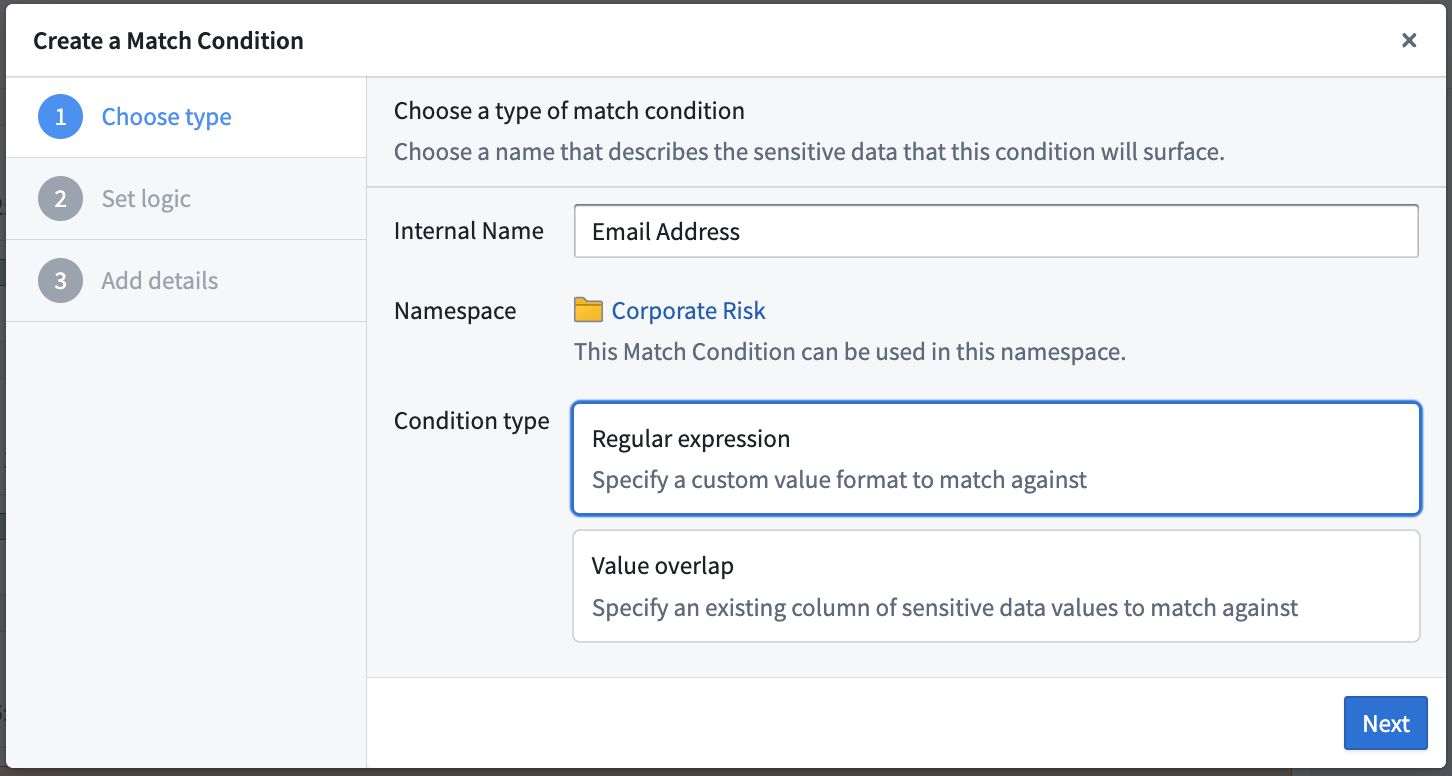
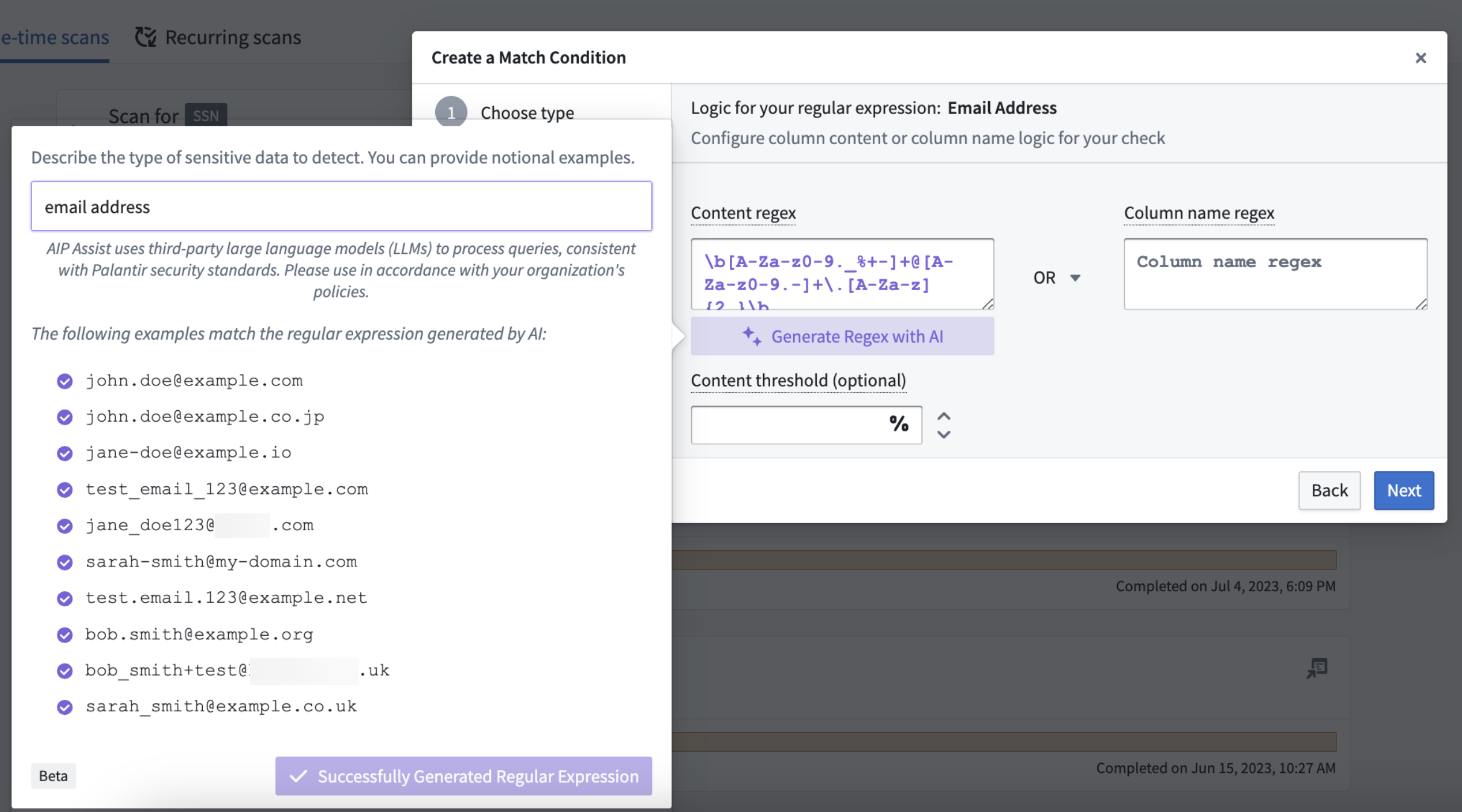
*User generating a regex match condition for email addresses using AIP*
For more information, review the [Sensitive Data Scanner](../../sensitive-data-scanner/overview/index.md) documentation.
## Improved checks for Python repositories now in effect
Date published: 2023-09-19
We have updated checks performance across Python repositories on Foundry stacks with targeted improvements. To note, the average P95 checks completion time (the time taken to run checks from start to finish) across all Python jobs on internal stacks decreased from 2 minutes 15 seconds in March 2023 to approximately 1 minute and 15 seconds in June 2023, a decrease of 44.4%.
### Improvements for faster checks
Our recent work to improve check efficiency includes the following updates.
#### Zstandard (ZST) compression for Conda packs
Previously “`gzip` compression", ZST has been implemented to enable significantly faster compression and decompression for [`conda-pack` ↗](https://conda.github.io/conda-pack/), essential for running the `condaPackRun` and/or `condaPackTest` tasks in your checks.
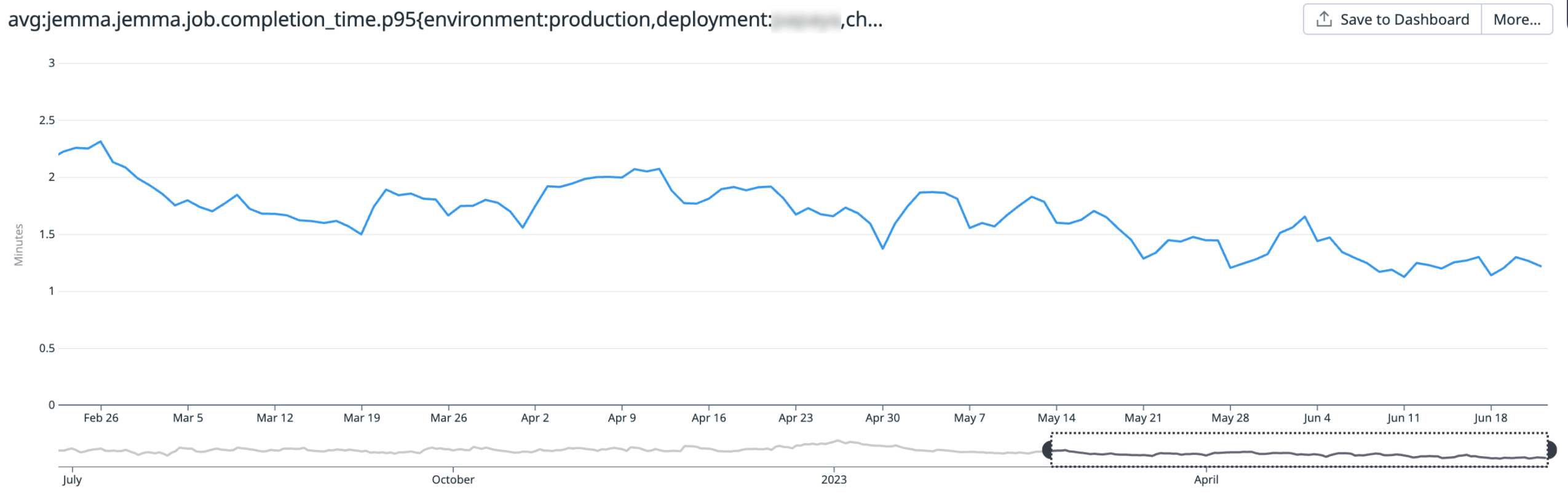
*A chart displaying the average P95 checks completion time (down from 2m 15s in March 2023 to ~1m 15s in June 2023)*
#### Jemma-managed caches are no-longer double-compressed
Jemma, our checks runner, no longer double-compresses files. Instead, files are compressed using ZST, resulting in a decrease of resource usage and CPU time.
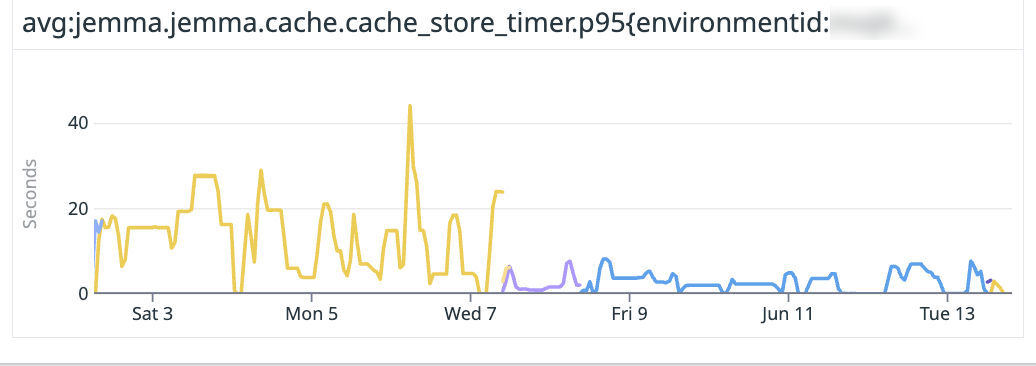
Avoiding double-compression and using `zst` to compress the cache directories result in a significantly faster compression speed (20MBs → 80MB/s). Shown below is the time taken to compress the cache directory and store the compressed file.
#### Faster Gradle Conda tasks
The following common tasks will run faster by leveraging base Docker images and updating Gradle tasks where noted:
* `condaInfo`: Bundle the Conda installer into the Docker image used to run checks.
* `setupPythonEnv`: Bundle Conda installers for supported Python versions (major and minor) into the Docker image used for checks.
* `vscode`: Switch from Gradle's `@InputFiles` to `@Input` to decrease task execution from 13 seconds to less than 1 second.
#### Custom Gradle caching for Conda packs
Use custom Gradle caching to avoid inefficiencies that cause the double-compression of Conda packs, resulting in wasted compute time and overall slower performance. This improvement also benefits from the ability of the artifacts cache layout to refresh the TTL of entries based on usage.
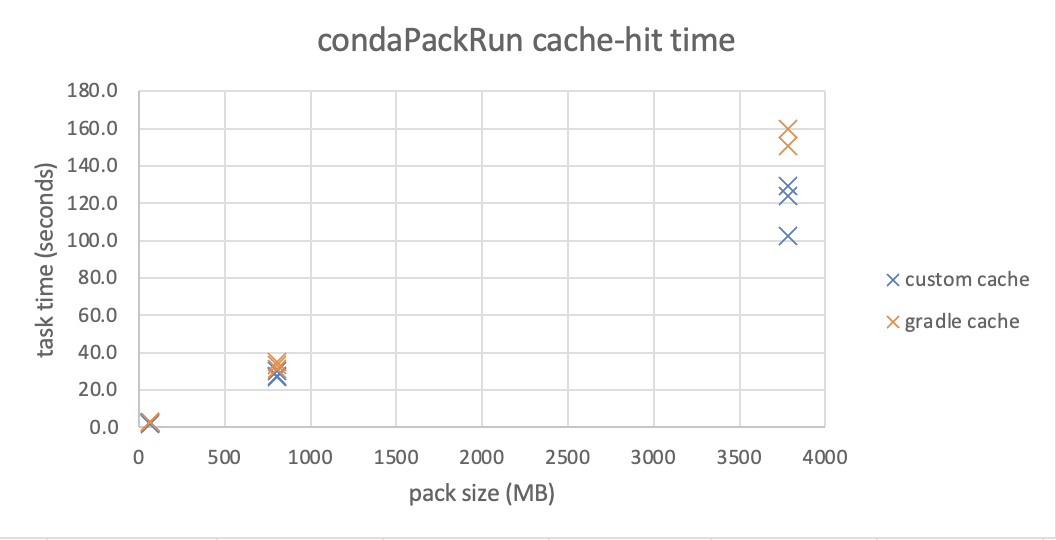
Below is a chart from an early prototype that shows the time required to run a task, using our custom caching mechanism. Note that the improvements become more substantial as the environment grows larger, such as in modeling-related packages.
### What is next on the development roadmap?
We are currently working on enhancements to speed up [Code Assist](../../code-repositories/navigation/index.md#status-bar) at launch and improve the resolution and installation of test environments.
## Introducing support for semantic search in Foundry \[Beta]
Date published: 2023-09-11
This feature is now generally available. Read the [latest announcement](../2023-11/index.md#support-for-semantic-search-in-foundry-is-now-available-ga).
***
## Additional highlights
### Source Control enabled, new feature flag, and minor changes
Date published: 2023-09-28
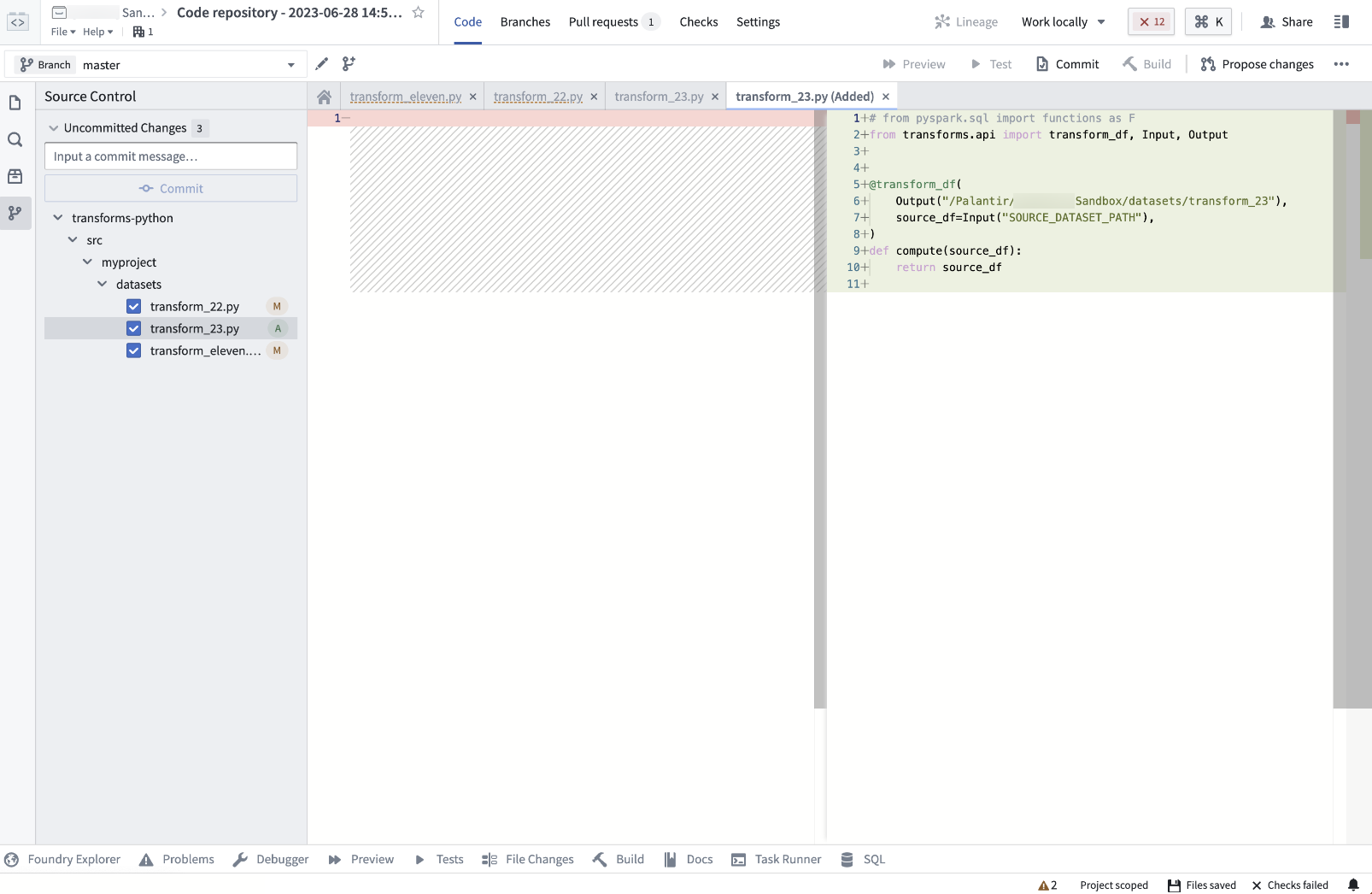
**\[Data Integration/Code Repositories]** Code Repositories users now have access to the Source Control feature, a new panel that displays file changes and allows users to commit them to a remote repository. Learn more in the [associated highlight](../2023-08/index.md#data-integration--code-repositories/).
 ### S3-compatible API is now GA
Date published: 2023-09-26
**\[Foundry S3 Proxy]** The S3-compatible API for Foundry datasets has been made generally available. The API for obtaining credentials is considered stable and now offers the ability to use temporary as well as static credentials. For more details and instructions on how to get started with this API and use it with standard AWS clients and SDKs, review the [documentation](../../data-integration/foundry-s3-api/index.md).
### Configurable edit-only properties in Ontology Manager
Date published: 2023-09-26
**\[Ontology/Ontology Management]** Users can now set up edit-only properties for object types in OSv2 within the Ontology Manager. These properties are not tied to any column and can only obtain their values through Actions, providing more flexibility in managing object types.
### New Foundry Rules home page and streamlined setup process
Date published: 2023-09-26
\[**Ontology/Foundry Rules]** [Foundry Rules](../../foundry-rules/core-concepts/index.md) allows users to author rule-based logic that connects seamlessly to a data transformation pipeline.
Access the new home page of the Foundry Rules application to see workflow setup and configuration. Setting up a new Rules workflow is powered by Foundry Marketplace, providing value quicker while requiring less upfront configuration.
You can also access Foundry Rules by selecting a Rules workflow configuration from **Files**.
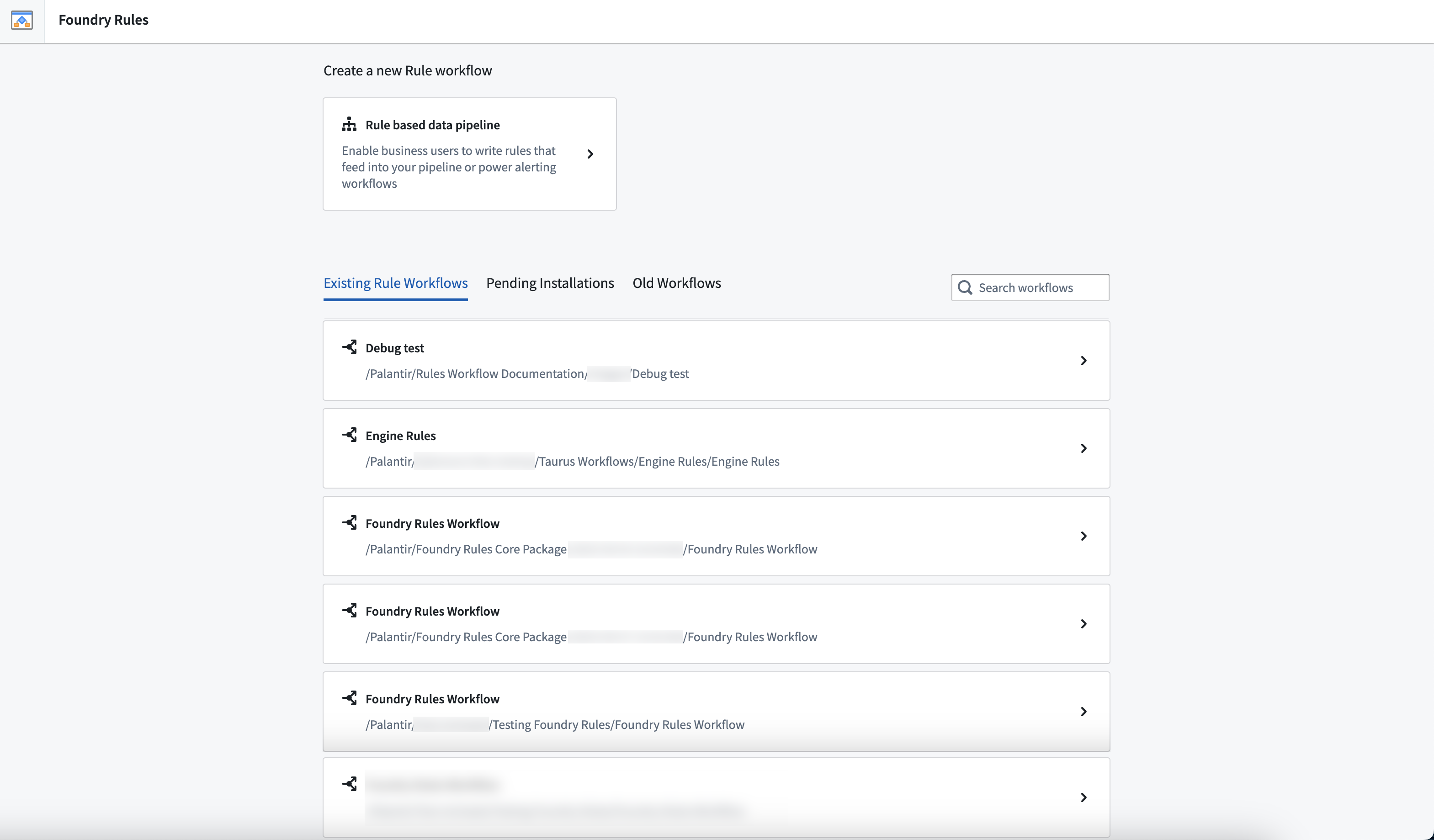
*Foundry Rules workflow overview list*
### Enhanced proposal review functionality
Date published: 2023-09-26
**\[Data Integration/Pipeline Builder]** Users can now add comments to their proposal reviews, enabling them to approve with a message or reject proposals with a reason. This update provides greater flexibility and communication during the review process.
### Phonograph deindex countdown in Ontology Management
Date published: 2023-09-26
**\[Ontology/Ontology Management]** The Ontology Management App now displays a countdown for automatic deindexing of unused tables in the Phonograph section for object types and many-to-many link types. This feature helps users to be aware of the remaining time before the automatic deindexing occurs.
### AIP Generate now generally available in Pipeline Builder
Date published: 2023-09-26
**\[Data Integration/Pipeline Builder]** AIP Generate is now GA in Pipeline Builder, allowing users to create new data transformation logic with a single prompt. This feature simplifies the process of writing complex data transformations while maintaining transparency and legibility in generated logic.
### Introducing value embed widget for Notepad templates
Date published: 2023-09-13
**\[Analytics / Notepad]** The value embed widget lets users insert text from a template input directly into a document. Users can add a value embed widget into a Notepad template, and configure it with a string template input. When documents are generated from the template, text is inserted in place of the widget. [Learn more about the value embed widget](../../notepad/widgets-value-embed/index.md).
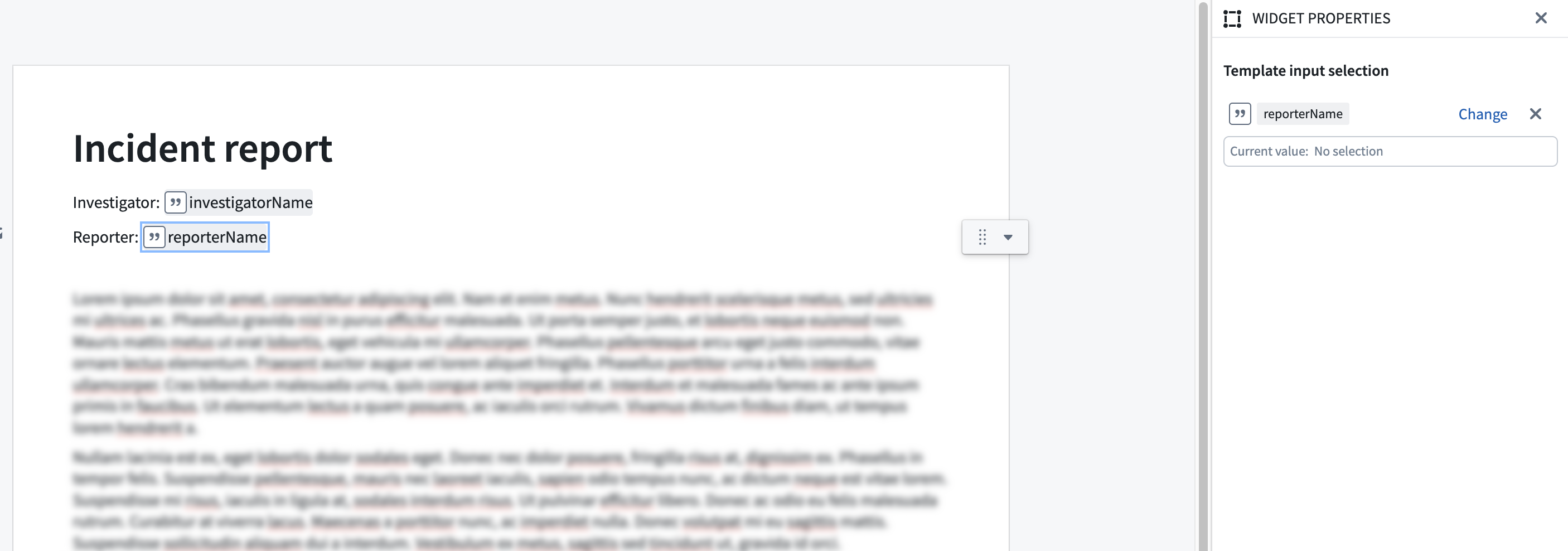
*Picture of Notepad template with two value embed widgets*
### Usability improvements to Quiver AIP
Date published: 2023-09-13
**\[Analytics/Quiver]** The AIP window has been removed from the next actions menu and is now a floating, draggable, and resizable modal window. This update enables users to maintain an unobstructed view of object set properties and visualizations on the canvas while writing prompts. Processing of user prompts now occurs in the background with the AIP window minimized, so users are able to continue their workflows while waiting for a result. Additionally, the AIP buttons have been renamed to better reflect their functionality; AIP Generate will generate cards in the analysis, while AIP Configure will update a card configuration.
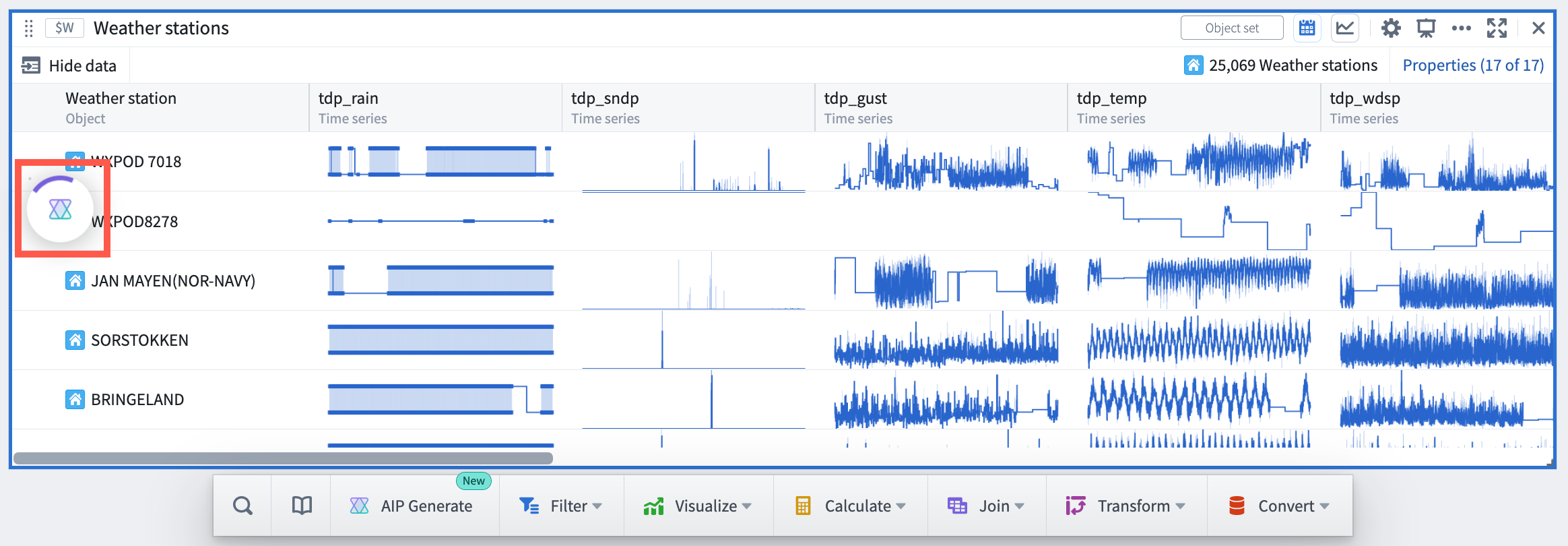
*Quiver AIP minimized during runtime*
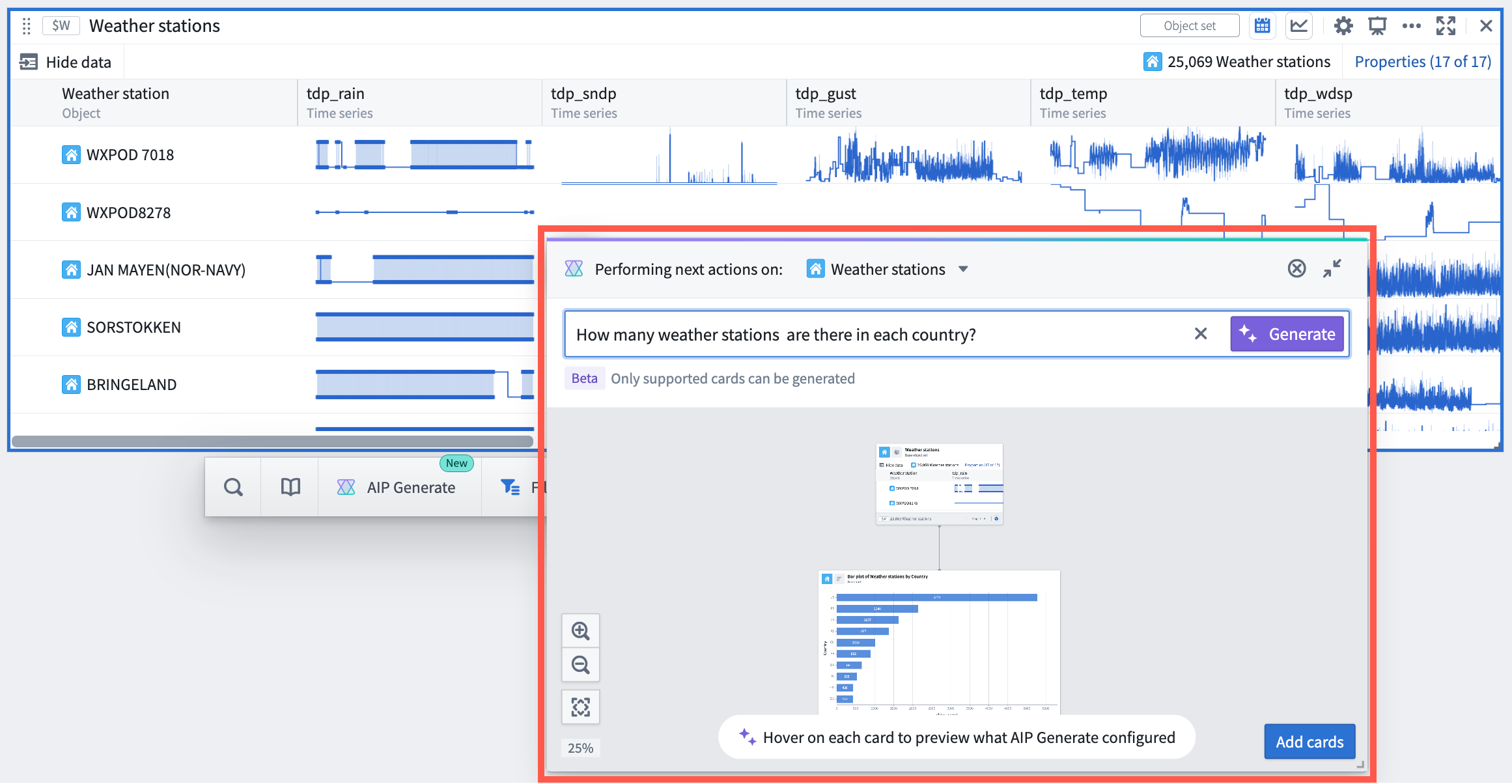
*New Quiver AIP modal window*
### AIP next actions suggestions and prompt completion
Date published: 2023-09-13
**\[Analytics/Quiver]** The AIP window now includes suggestions for possible next actions to be taken on the object or object set based on their properties and Quiver cards that support AIP. Additionally, when typing a prompt, AIP displays possible completions for the prompt. Both features help users discover new opportunities to use AIP to explore and analyze Ontology data.
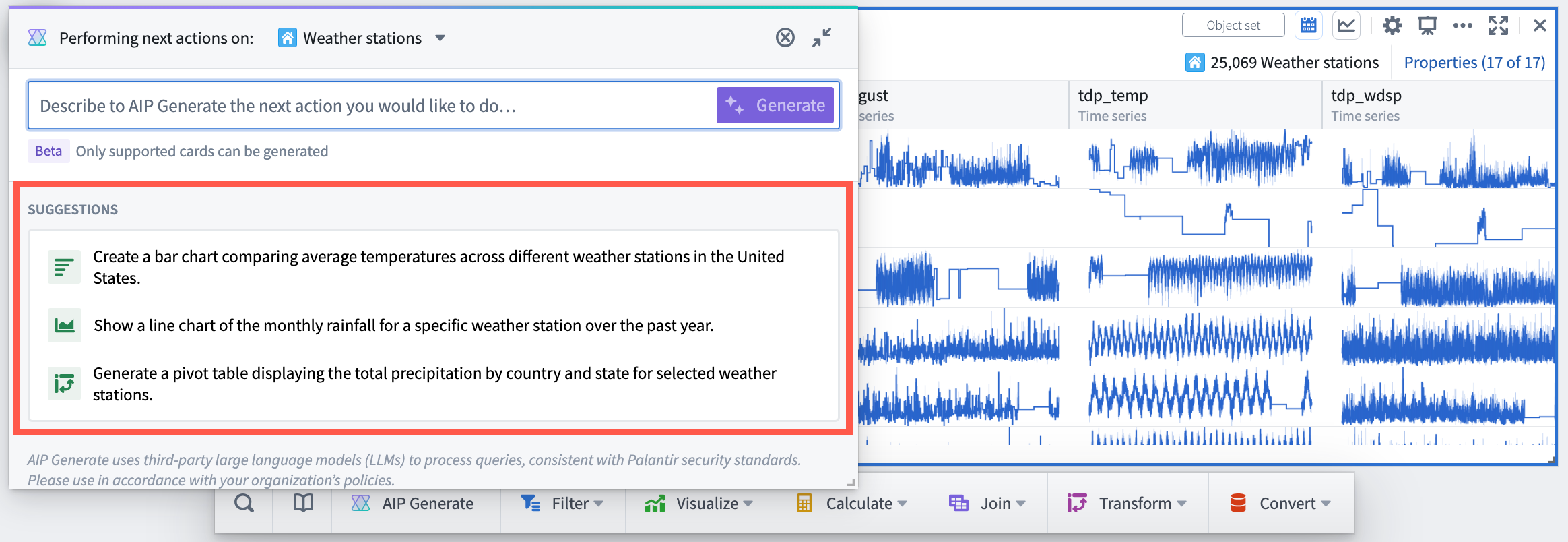
*AIP modal window with AIP suggested next actions on the selected object set*
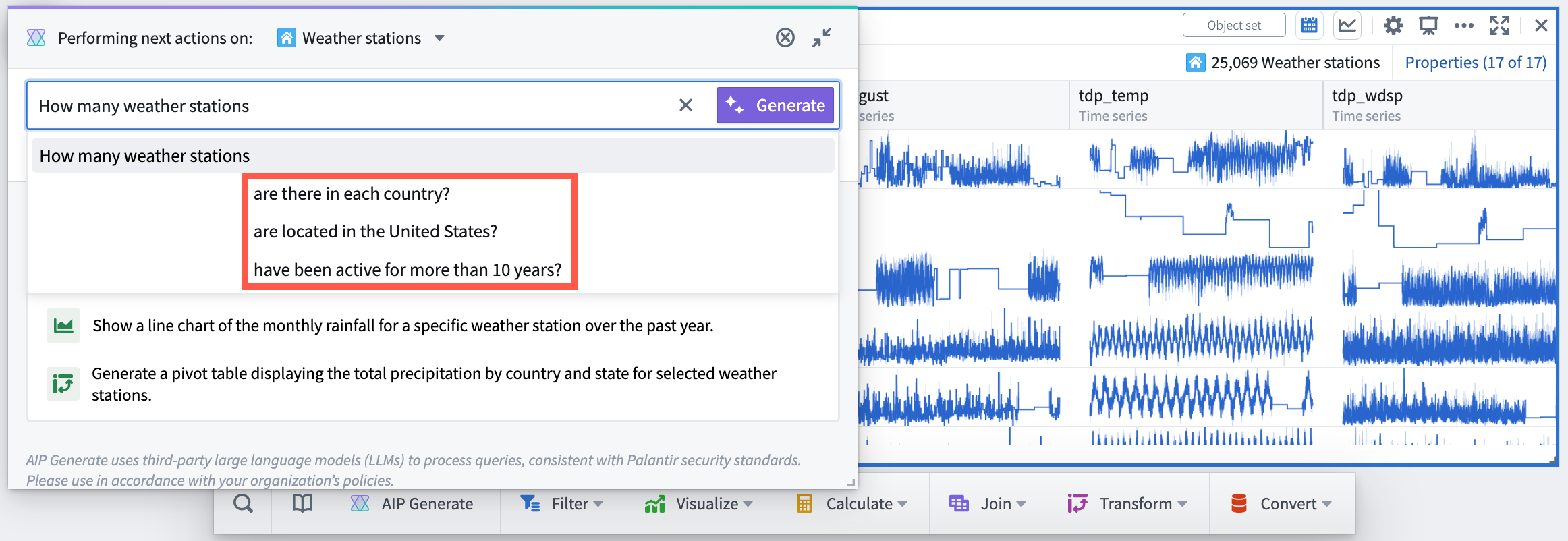
*AIP modal window with prompt completions*
### User-defined functions in Pipeline Builder
Date published: 2023-09-13
**\[Data Integration / Pipeline Builder]** User-defined functions let you run your own arbitrary Java code in Pipeline Builder or in Code Repositories that can be versioned and upgraded. You can now create your own user-defined function (UDF) to incorporate external Java libraries or reuse complex logic across pipelines. Contact your Palantir representative to enable UDFs in Pipeline Builder, and [learn more in our documentation](../../transforms-java/user-defined-functions/index.md).
### Quicksearch is now the only supported search interface \[Quicksearch GA / Legacy search Deprecation]
Date published: 2023-09-11
**\[Quicksearch]** After two months of widespread availability, Quicksearch is now the sole search interface in Foundry. [As proactively announced in July](../2023-07/index.md#foundry-quicksearch-enabled-by-default), the legacy search interface has now been deprecated. Users who opted out of the new search experience during the transition will now be rolled into Quicksearch. See the [Quicksearch documentation](../../compass/quicksearch/index.md) and the [Quicksearch GA announcement](../2023-05/index.md) for more details.
### Access graph now available
Date published: 2023-09-05
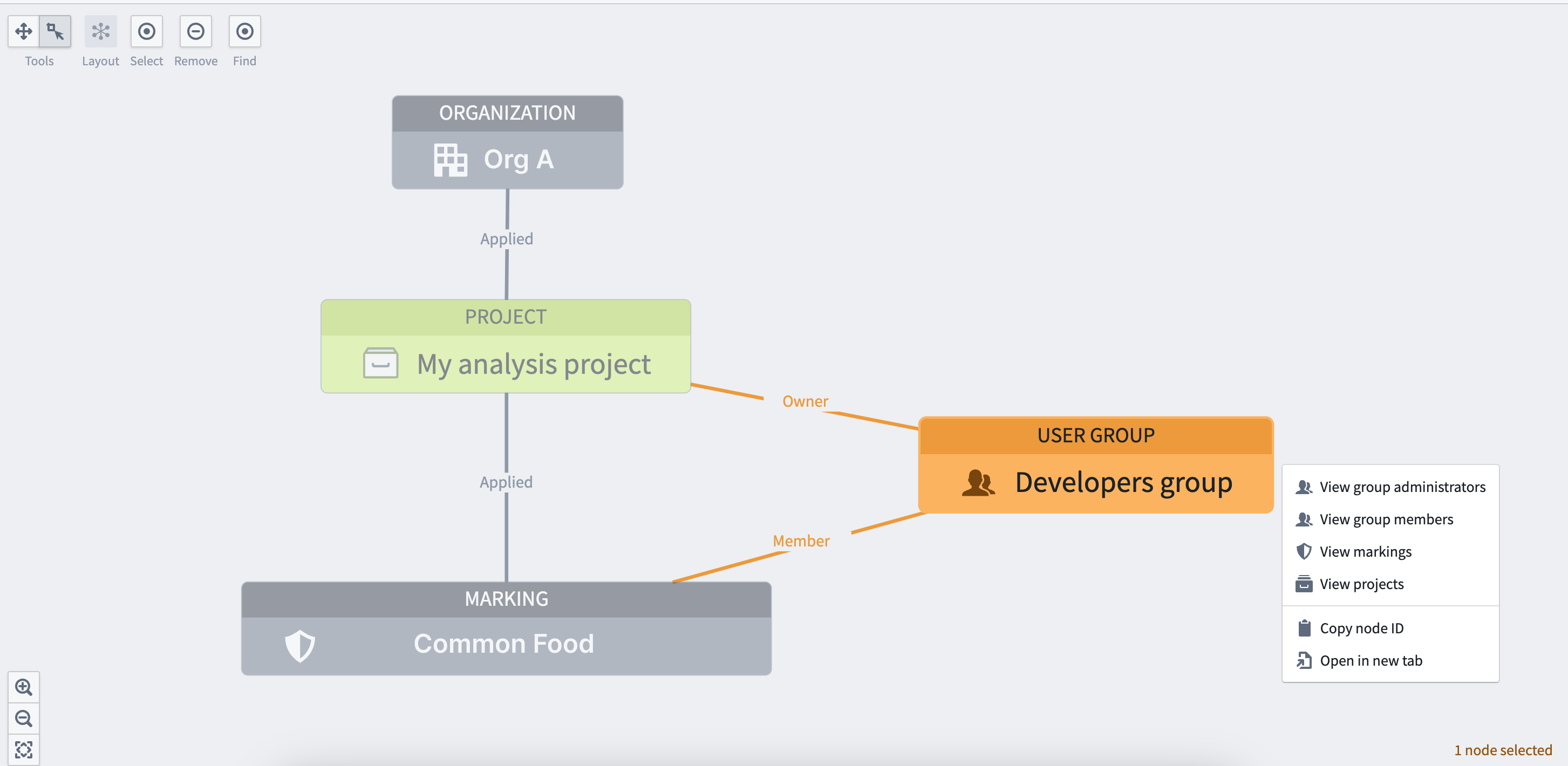
**\[Security / Projects]** A graph-based view, commonly known as Access Graph, can now be used to visualize relationships between entities like projects, users, groups, and markings to make checking permissions simpler. For more information, refer to [Checking permissions documentation](../../security/checking-permissions/index.md).
### Quicksearch now integrated with resource selector
Date published: 2023-09-05
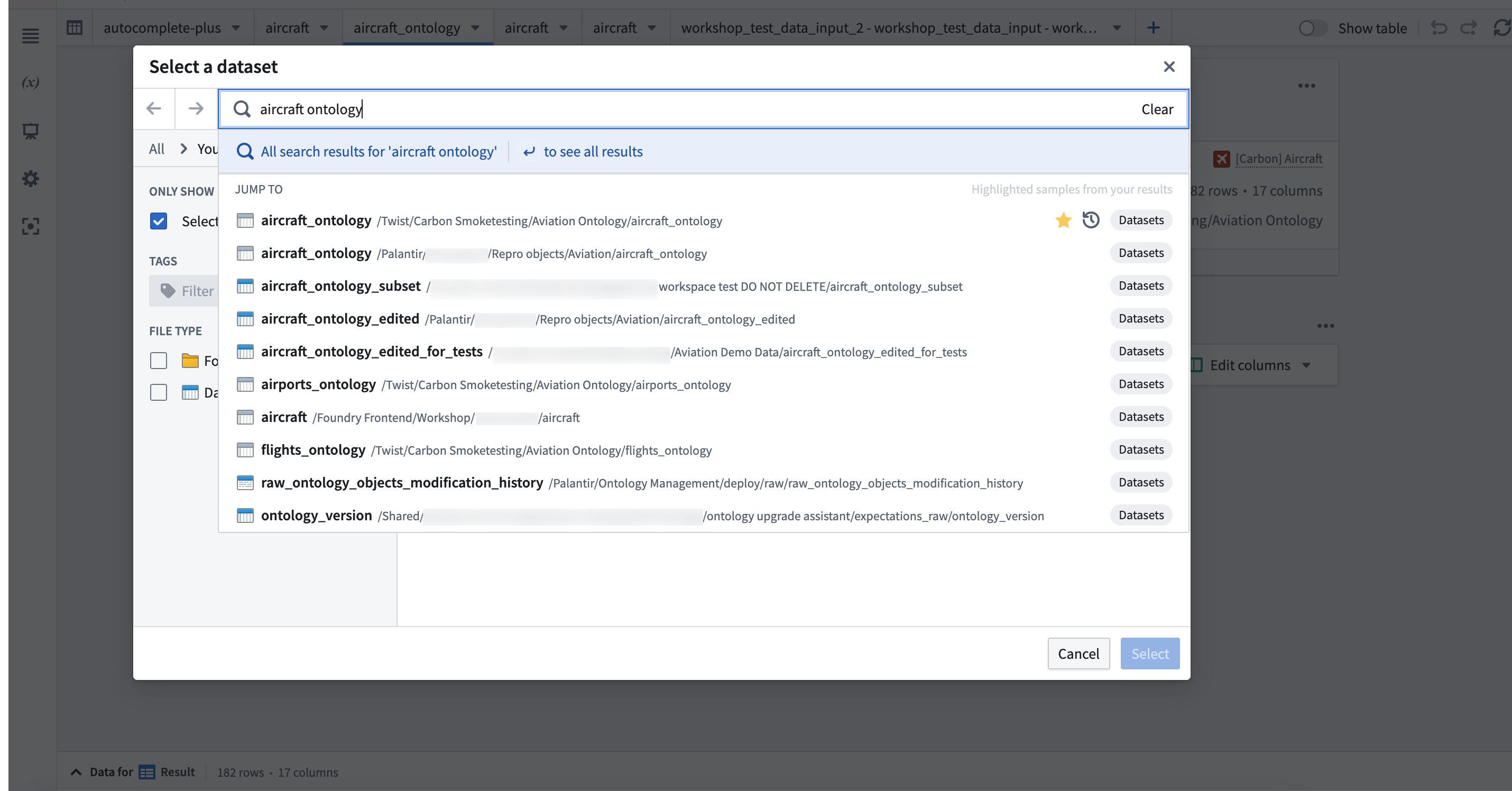
**\[Model Integration: Workspace]** The Quicksearch integration in the resource selector allows users to search for resources quicker without having to wait for panels to load. With results fetched based on names and ranked by search relevance, the Quicksearch bar streamlines navigation while still offering the option to perform a full search.
### Create budgets using Resource Management
Date published: 2023-09-05
**\[Administration: Resource Management]** Use the **Budgets** tab in the Resource Management application to create financial budgets against compute usage.
### Custom approval policies for pipeline collaboration
Date published: 2023-09-05
**\[Data Integration: Pipeline Builder]** Introducing custom approval policies for pipeline proposals, enabling users to require reviews from a configurable list of individuals or groups. Enhance version control and safely collaborate on production pipelines by gating changes that affect the main branch. Choose between none, permission-based (edit), and custom policies (groups and users) when configuring your policy.
### Favorites Section on Ontology home page
Date published: 2023-09-05
**\[Ontology: Ontology Management]** Introducing a new **Favorites** section on the Ontology home page, displaying all favorited object types for easy access. Users can reorder or disable this section as needed and it will be enabled by default for those with favorite object types.
### S3-compatible API is now GA
Date published: 2023-09-26
**\[Foundry S3 Proxy]** The S3-compatible API for Foundry datasets has been made generally available. The API for obtaining credentials is considered stable and now offers the ability to use temporary as well as static credentials. For more details and instructions on how to get started with this API and use it with standard AWS clients and SDKs, review the [documentation](../../data-integration/foundry-s3-api/index.md).
### Configurable edit-only properties in Ontology Manager
Date published: 2023-09-26
**\[Ontology/Ontology Management]** Users can now set up edit-only properties for object types in OSv2 within the Ontology Manager. These properties are not tied to any column and can only obtain their values through Actions, providing more flexibility in managing object types.
### New Foundry Rules home page and streamlined setup process
Date published: 2023-09-26
\[**Ontology/Foundry Rules]** [Foundry Rules](../../foundry-rules/core-concepts/index.md) allows users to author rule-based logic that connects seamlessly to a data transformation pipeline.
Access the new home page of the Foundry Rules application to see workflow setup and configuration. Setting up a new Rules workflow is powered by Foundry Marketplace, providing value quicker while requiring less upfront configuration.
You can also access Foundry Rules by selecting a Rules workflow configuration from **Files**.

*Foundry Rules workflow overview list*
### Enhanced proposal review functionality
Date published: 2023-09-26
**\[Data Integration/Pipeline Builder]** Users can now add comments to their proposal reviews, enabling them to approve with a message or reject proposals with a reason. This update provides greater flexibility and communication during the review process.
### Phonograph deindex countdown in Ontology Management
Date published: 2023-09-26
**\[Ontology/Ontology Management]** The Ontology Management App now displays a countdown for automatic deindexing of unused tables in the Phonograph section for object types and many-to-many link types. This feature helps users to be aware of the remaining time before the automatic deindexing occurs.
### AIP Generate now generally available in Pipeline Builder
Date published: 2023-09-26
**\[Data Integration/Pipeline Builder]** AIP Generate is now GA in Pipeline Builder, allowing users to create new data transformation logic with a single prompt. This feature simplifies the process of writing complex data transformations while maintaining transparency and legibility in generated logic.
### Introducing value embed widget for Notepad templates
Date published: 2023-09-13
**\[Analytics / Notepad]** The value embed widget lets users insert text from a template input directly into a document. Users can add a value embed widget into a Notepad template, and configure it with a string template input. When documents are generated from the template, text is inserted in place of the widget. [Learn more about the value embed widget](../../notepad/widgets-value-embed/index.md).

*Picture of Notepad template with two value embed widgets*
### Usability improvements to Quiver AIP
Date published: 2023-09-13
**\[Analytics/Quiver]** The AIP window has been removed from the next actions menu and is now a floating, draggable, and resizable modal window. This update enables users to maintain an unobstructed view of object set properties and visualizations on the canvas while writing prompts. Processing of user prompts now occurs in the background with the AIP window minimized, so users are able to continue their workflows while waiting for a result. Additionally, the AIP buttons have been renamed to better reflect their functionality; AIP Generate will generate cards in the analysis, while AIP Configure will update a card configuration.

*Quiver AIP minimized during runtime*

*New Quiver AIP modal window*
### AIP next actions suggestions and prompt completion
Date published: 2023-09-13
**\[Analytics/Quiver]** The AIP window now includes suggestions for possible next actions to be taken on the object or object set based on their properties and Quiver cards that support AIP. Additionally, when typing a prompt, AIP displays possible completions for the prompt. Both features help users discover new opportunities to use AIP to explore and analyze Ontology data.

*AIP modal window with AIP suggested next actions on the selected object set*

*AIP modal window with prompt completions*
### User-defined functions in Pipeline Builder
Date published: 2023-09-13
**\[Data Integration / Pipeline Builder]** User-defined functions let you run your own arbitrary Java code in Pipeline Builder or in Code Repositories that can be versioned and upgraded. You can now create your own user-defined function (UDF) to incorporate external Java libraries or reuse complex logic across pipelines. Contact your Palantir representative to enable UDFs in Pipeline Builder, and [learn more in our documentation](../../transforms-java/user-defined-functions/index.md).
### Quicksearch is now the only supported search interface \[Quicksearch GA / Legacy search Deprecation]
Date published: 2023-09-11
**\[Quicksearch]** After two months of widespread availability, Quicksearch is now the sole search interface in Foundry. [As proactively announced in July](../2023-07/index.md#foundry-quicksearch-enabled-by-default), the legacy search interface has now been deprecated. Users who opted out of the new search experience during the transition will now be rolled into Quicksearch. See the [Quicksearch documentation](../../compass/quicksearch/index.md) and the [Quicksearch GA announcement](../2023-05/index.md) for more details.
### Access graph now available
Date published: 2023-09-05
**\[Security / Projects]** A graph-based view, commonly known as Access Graph, can now be used to visualize relationships between entities like projects, users, groups, and markings to make checking permissions simpler. For more information, refer to [Checking permissions documentation](../../security/checking-permissions/index.md).

### Quicksearch now integrated with resource selector
Date published: 2023-09-05
**\[Model Integration: Workspace]** The Quicksearch integration in the resource selector allows users to search for resources quicker without having to wait for panels to load. With results fetched based on names and ranked by search relevance, the Quicksearch bar streamlines navigation while still offering the option to perform a full search.

### Create budgets using Resource Management
Date published: 2023-09-05
**\[Administration: Resource Management]** Use the **Budgets** tab in the Resource Management application to create financial budgets against compute usage.
### Custom approval policies for pipeline collaboration
Date published: 2023-09-05
**\[Data Integration: Pipeline Builder]** Introducing custom approval policies for pipeline proposals, enabling users to require reviews from a configurable list of individuals or groups. Enhance version control and safely collaborate on production pipelines by gating changes that affect the main branch. Choose between none, permission-based (edit), and custom policies (groups and users) when configuring your policy.
### Favorites Section on Ontology home page
Date published: 2023-09-05
**\[Ontology: Ontology Management]** Introducing a new **Favorites** section on the Ontology home page, displaying all favorited object types for easy access. Users can reorder or disable this section as needed and it will be enabled by default for those with favorite object types.