# Use your registered LLM \[Legacy]
:::callout{theme="warning" title="Legacy"}
This page documents how to use an LLM registered via the legacy function interface method, which was replaced by the [registered models implementation](../bring-your-own-model/index.md) in March 2026 as the recommended approach. The TypeScript examples on this page use the TypeScript v1 function API, as the function interface method [applies to TypeScript v1 only](../../functions/language-feature-support/index.md#typescript-v1-vs-typescript-v2) and has no TypeScript v2 equivalent. If you use registered models, your model is available automatically in the model selector across AIP applications, and no additional steps are required.
:::
The following page details how to use a registered LLM in the Palantir platform. To learn how to register an LLM, visit [Register an LLM using function interfaces](../chat-completion-function-interface-quickstart/index.md).
## AIP Logic
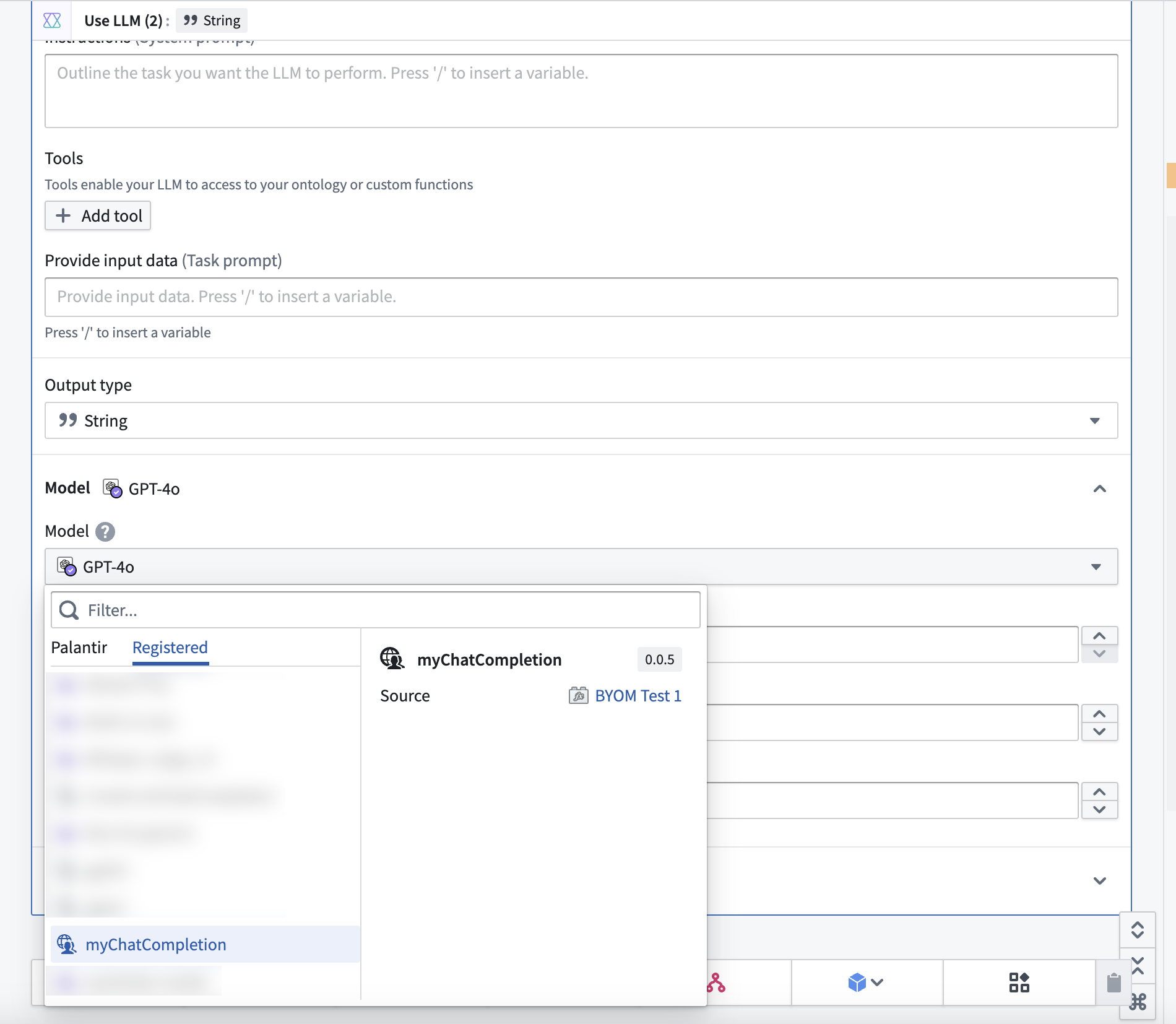
You can use your function natively in AIP Logic. To do so, select the **Use LLM** board as you normally would, then select the **Registered** tab in the model dropdown and select your function.
## Pipeline Builder \[Beta]
:::callout{theme="neutral" title="Beta"}
LLMs in Pipeline Builder are in the [beta](../../platform-overview/development-life-cycle/index.md) phase of development and may not be available on your enrollment. Functionality may change during active development.
:::
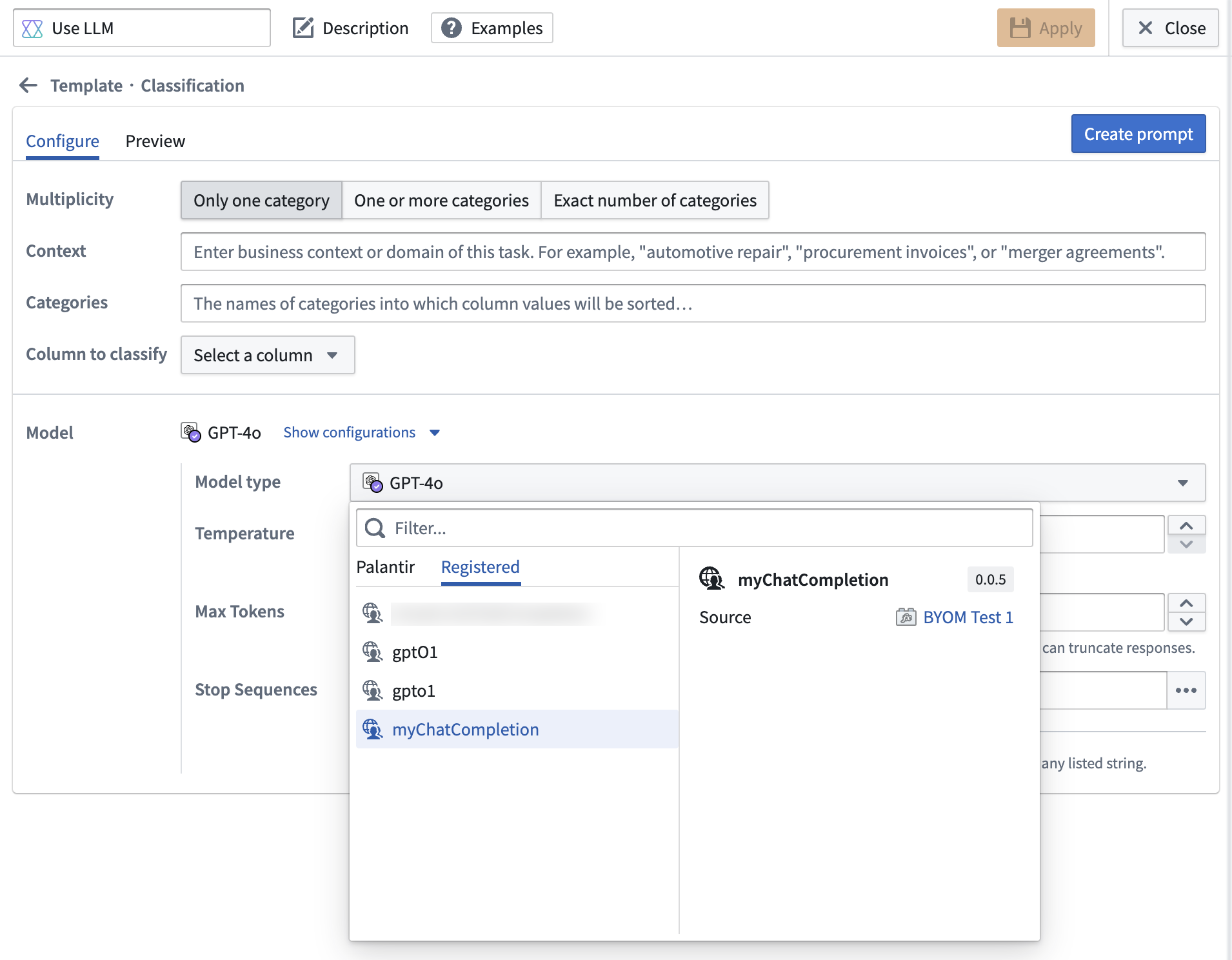
You can use your function natively in Pipeline Builder LLM transforms. To do so, select the **Use LLM** transform as you normally would, then expand **Show configurations** in the **Model** section. From the **Model type** dropdown, select the **Registered** tab and choose your LLM (shown in the example below as `myChatCompletion`).
### Use without configuring webhooks
As the BYOM workflow in Pipeline Builder does not yet support webhooks, you can instead make calls to external systems using direct Source egress. However, you must have a REST source configured for your external system. [Register an LLM using function interfaces](../chat-completion-function-interface-quickstart/index.md) first, then skip the section on configuring a webhook for your source.
Once you have a REST source, you can write a TypeScript function using the `ChatCompletion` functional interface. This step loosely mirrors the steps in the [second part of register an LLM documentation with a TypeScript function](../chat-completion-function-interface-quickstart/index.md#implement-the-chatcompletion-interface-with-a-typescript-function), but the repository imports and code will look a bit different without a webhook.
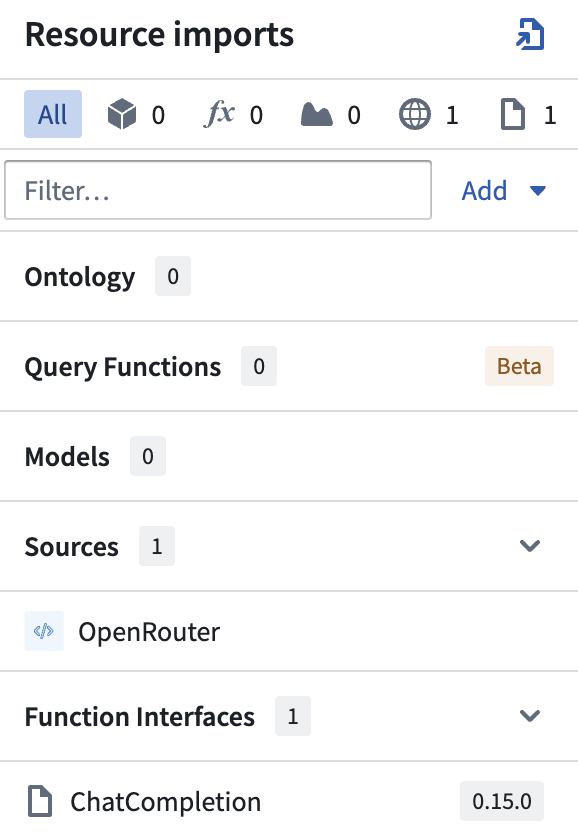
First, import your source and open the `ChatCompletion` functional interface in the sidebar:
 Then, your function signature should implement the `@ChatCompletion` and `@ExternalSystems` decorators:
```typescript
import { ExternalSystems } from "@foundry/functions-api";
import { MySourceApiName} from "@foundry/external-systems/sources";
import { ChatCompletion } from "@palantir/languagemodelservice/contracts";
import { FunctionsGenericChatCompletionRequestMessages, GenericChatMessage, ChatMessageRole, GenericCompletionParams, FunctionsGenericChatCompletionResponse } from "@palantir/languagemodelservice/api";
@ExternalSystems({sources: [MySourceApiName]})
@ChatCompletion()
public async myFunction(
messages: FunctionsGenericChatCompletionRequestMessages,
params: GenericCompletionParams
):
Promise {
// todo: implement function logic here
}
```
Finally, implement your function logic to reach out to your externally-hosted model:
```typescript
import { ExternalSystems } from "@foundry/functions-api";
import { MySourceApiName} from "@foundry/external-systems/sources";
import { ChatCompletion } from "@palantir/languagemodelservice/contracts";
import { FunctionsGenericChatCompletionRequestMessages, GenericChatMessage, ChatMessageRole, GenericCompletionParams, FunctionsGenericChatCompletionResponse } from "@palantir/languagemodelservice/api";
@ExternalSystems({sources: [MySourceApiName]})
@ChatCompletion()
public async myFunction(
messages: FunctionsGenericChatCompletionRequestMessages,
params: GenericCompletionParams
):
Promise {
// You can access the source's URL
const url = MySourceApiName.getHttpsConnection().url;
// And the decrypted secret values stored on the source
const token = MySourceApiName.getSecret("additionalSecretMySecretApiName");
// Make the external request with the fetch method to process the input messages.
// You can also include any secrets required for auth here.
const response = await MySourceApiName.fetch(
url + '/api/path/to/external/endpoint',
{
method: 'GET',
headers: {"Authorization": "Bearer ${token}"}
});
const responseJson = await response.json();
if (isErr(responseJson)) {
throw new UserFacingError("Error from external system.");
}
// Depending on the format of response returned by your external system, you may have to adjust how you extract this information from the response.
return {
completion: responseJson.value.output.choices[0].message.content ?? "No response from AI.",
tokenUsage: {
promptTokens: responseJson.value.output.usage.prompt_tokens,
maxTokens: responseJson.value.output.usage.total_tokens,
completionTokens: responseJson.value.output.usage.completion_tokens,
}
}
}
```
Now, you can return to the [Register an LLM using function interfaces section on testing](../chat-completion-function-interface-quickstart/index.md#testing) to continue with the following steps:
1. Test your function in live preview.
2. Tag and release a version.
3. Create a builder pipeline.
4. Select your function-backed model from the user-provided models tab of the **Use LLM** model picker.
## Propagate rate limit errors
By defining [error types](../../functions/typescript-error-types/index.md) on your `ChatCompletion` function, you can propagate rate limit errors such that downstream applications like AIP Logic and Pipeline Builder can automatically perform retries.
To configure your function to properly propagate these errors, you must:
1. Declare the `ChatCompletionError` error type on your function, and
2. Return a `RateLimitExceeded` error.
### Declare the `ChatCompletionError` type on your function
The `ChatCompletion` interface already defines an error type called `ChatCompletionError` that you can import and use for your implementation like so:
```typescript
// index.ts
import { FunctionsResult } from "@foundry/functions-api";
import { ChatCompletion, ChatCompletionError } from "@palantir/languagemodelservice/contracts/ChatCompletion";
import {
FunctionsGenericChatCompletionRequestMessages,
GenericCompletionParams,
FunctionsGenericChatCompletionResponse
} from "@palantir/languagemodelservice/api";
@ChatCompletion()
public myFunction(
messages: FunctionsGenericChatCompletionRequestMessages,
params: GenericCompletionParams,
): FunctionsResult {
// TODO: Implement the body
}
```
### Return a `RateLimitExceeded` error
With the `ChatCompletionError` error type declared on your function, you can return a rate limit error as in the code snippet below:
```typescript
return FunctionsResult.err("LanguageModel:RateLimitExceeded", { retryAfterMillis: 20000 });
```
The `retryAfterMillis` field allows you to specify how much time (in milliseconds) a caller should wait before retrying your function.
Both AIP Logic and Pipeline Builder implement an exponential backoff retry strategy with jitter, meaning that they will wait for an exponentially increasing amount of time, plus a random amount of additional time, before retrying your function. This strategy helps to prevent clients from repeatedly hitting rate limits, while also avoiding a sudden surge of requests.
For the OpenAI example described in this tutorial, you can make a [remote request](../../functions/api-calls/index.md) to the configured REST source in order to catch and propagate error responses with a 429 status code. The 429 status code identifies a rate limit error response, as noted in [OpenAI's documentation on error codes ↗](https://developers.openai.com/api/docs/guides/error-codes). An example implementation is provided below.
```typescript
import { ExternalSystems, FunctionsResult } from "@foundry/functions-api";
import { OpenAI } from "@foundry/external-systems/sources";
import { ChatCompletion, ChatCompletionError } from "@palantir/languagemodelservice/contracts/ChatCompletion";
import {
ChatMessageRole,
FunctionsGenericChatCompletionRequestMessages,
FunctionsGenericChatCompletionResponse,
GenericChatMessage,
GenericCompletionParams,
} from "@palantir/languagemodelservice/api";
export class MyFunctions {
@ChatCompletion()
@ExternalSystems({ sources: [OpenAI] })
public async myFunction(
messages: FunctionsGenericChatCompletionRequestMessages,
params: GenericCompletionParams,
): Promise> {
// Make fetch call to OpenAI
const apiKey = OpenAI.getSecret("additionalSecretAPIKey");
const baseUrl = OpenAI.getHttpsConnection().url;
const response = await fetch(`${baseUrl}/v1/chat/completions`, {
method: "POST",
headers: new Headers({
"Authorization": `Bearer ${apiKey}`,
"Content-Type": "application/json",
}),
body: JSON.stringify({
model: "gpt-4o",
messages: convertMessages(messages),
}),
});
// Handle OK response
if (response.ok) {
const result = await response.json();
return FunctionsResult.ok({
completion: result.choices[0].message.content ?? "No response from OpenAI.",
tokenUsage: {
promptTokens: result.usage.prompt_tokens,
completionTokens: result.usage.completion_tokens,
maxTokens: result.usage.total_tokens,
},
});
}
// Handle 429 rate limit response
if (response.status === 429) {
return FunctionsResult.err("LanguageModel:RateLimitExceeded", { retryAfterMillis: 20000 });
}
// Handle other errors
...
}
}
function convertMessages(
messages: FunctionsGenericChatCompletionRequestMessages,
): Array<{ role: string; content: string; }> {
return messages.map((genericChatMessage: GenericChatMessage) => {
return { role: convertRole(genericChatMessage.role), content: genericChatMessage.content };
});
}
function convertRole(role: ChatMessageRole): "system" | "user" | "assistant" {
switch (role) {
case "SYSTEM":
return "system";
case "USER":
return "user";
case "ASSISTANT":
return "assistant";
default:
throw new Error(`Unsupported role: ${role}`);
}
}
```
Then, your function signature should implement the `@ChatCompletion` and `@ExternalSystems` decorators:
```typescript
import { ExternalSystems } from "@foundry/functions-api";
import { MySourceApiName} from "@foundry/external-systems/sources";
import { ChatCompletion } from "@palantir/languagemodelservice/contracts";
import { FunctionsGenericChatCompletionRequestMessages, GenericChatMessage, ChatMessageRole, GenericCompletionParams, FunctionsGenericChatCompletionResponse } from "@palantir/languagemodelservice/api";
@ExternalSystems({sources: [MySourceApiName]})
@ChatCompletion()
public async myFunction(
messages: FunctionsGenericChatCompletionRequestMessages,
params: GenericCompletionParams
):
Promise {
// todo: implement function logic here
}
```
Finally, implement your function logic to reach out to your externally-hosted model:
```typescript
import { ExternalSystems } from "@foundry/functions-api";
import { MySourceApiName} from "@foundry/external-systems/sources";
import { ChatCompletion } from "@palantir/languagemodelservice/contracts";
import { FunctionsGenericChatCompletionRequestMessages, GenericChatMessage, ChatMessageRole, GenericCompletionParams, FunctionsGenericChatCompletionResponse } from "@palantir/languagemodelservice/api";
@ExternalSystems({sources: [MySourceApiName]})
@ChatCompletion()
public async myFunction(
messages: FunctionsGenericChatCompletionRequestMessages,
params: GenericCompletionParams
):
Promise {
// You can access the source's URL
const url = MySourceApiName.getHttpsConnection().url;
// And the decrypted secret values stored on the source
const token = MySourceApiName.getSecret("additionalSecretMySecretApiName");
// Make the external request with the fetch method to process the input messages.
// You can also include any secrets required for auth here.
const response = await MySourceApiName.fetch(
url + '/api/path/to/external/endpoint',
{
method: 'GET',
headers: {"Authorization": "Bearer ${token}"}
});
const responseJson = await response.json();
if (isErr(responseJson)) {
throw new UserFacingError("Error from external system.");
}
// Depending on the format of response returned by your external system, you may have to adjust how you extract this information from the response.
return {
completion: responseJson.value.output.choices[0].message.content ?? "No response from AI.",
tokenUsage: {
promptTokens: responseJson.value.output.usage.prompt_tokens,
maxTokens: responseJson.value.output.usage.total_tokens,
completionTokens: responseJson.value.output.usage.completion_tokens,
}
}
}
```
Now, you can return to the [Register an LLM using function interfaces section on testing](../chat-completion-function-interface-quickstart/index.md#testing) to continue with the following steps:
1. Test your function in live preview.
2. Tag and release a version.
3. Create a builder pipeline.
4. Select your function-backed model from the user-provided models tab of the **Use LLM** model picker.
## Propagate rate limit errors
By defining [error types](../../functions/typescript-error-types/index.md) on your `ChatCompletion` function, you can propagate rate limit errors such that downstream applications like AIP Logic and Pipeline Builder can automatically perform retries.
To configure your function to properly propagate these errors, you must:
1. Declare the `ChatCompletionError` error type on your function, and
2. Return a `RateLimitExceeded` error.
### Declare the `ChatCompletionError` type on your function
The `ChatCompletion` interface already defines an error type called `ChatCompletionError` that you can import and use for your implementation like so:
```typescript
// index.ts
import { FunctionsResult } from "@foundry/functions-api";
import { ChatCompletion, ChatCompletionError } from "@palantir/languagemodelservice/contracts/ChatCompletion";
import {
FunctionsGenericChatCompletionRequestMessages,
GenericCompletionParams,
FunctionsGenericChatCompletionResponse
} from "@palantir/languagemodelservice/api";
@ChatCompletion()
public myFunction(
messages: FunctionsGenericChatCompletionRequestMessages,
params: GenericCompletionParams,
): FunctionsResult {
// TODO: Implement the body
}
```
### Return a `RateLimitExceeded` error
With the `ChatCompletionError` error type declared on your function, you can return a rate limit error as in the code snippet below:
```typescript
return FunctionsResult.err("LanguageModel:RateLimitExceeded", { retryAfterMillis: 20000 });
```
The `retryAfterMillis` field allows you to specify how much time (in milliseconds) a caller should wait before retrying your function.
Both AIP Logic and Pipeline Builder implement an exponential backoff retry strategy with jitter, meaning that they will wait for an exponentially increasing amount of time, plus a random amount of additional time, before retrying your function. This strategy helps to prevent clients from repeatedly hitting rate limits, while also avoiding a sudden surge of requests.
For the OpenAI example described in this tutorial, you can make a [remote request](../../functions/api-calls/index.md) to the configured REST source in order to catch and propagate error responses with a 429 status code. The 429 status code identifies a rate limit error response, as noted in [OpenAI's documentation on error codes ↗](https://developers.openai.com/api/docs/guides/error-codes). An example implementation is provided below.
```typescript
import { ExternalSystems, FunctionsResult } from "@foundry/functions-api";
import { OpenAI } from "@foundry/external-systems/sources";
import { ChatCompletion, ChatCompletionError } from "@palantir/languagemodelservice/contracts/ChatCompletion";
import {
ChatMessageRole,
FunctionsGenericChatCompletionRequestMessages,
FunctionsGenericChatCompletionResponse,
GenericChatMessage,
GenericCompletionParams,
} from "@palantir/languagemodelservice/api";
export class MyFunctions {
@ChatCompletion()
@ExternalSystems({ sources: [OpenAI] })
public async myFunction(
messages: FunctionsGenericChatCompletionRequestMessages,
params: GenericCompletionParams,
): Promise> {
// Make fetch call to OpenAI
const apiKey = OpenAI.getSecret("additionalSecretAPIKey");
const baseUrl = OpenAI.getHttpsConnection().url;
const response = await fetch(`${baseUrl}/v1/chat/completions`, {
method: "POST",
headers: new Headers({
"Authorization": `Bearer ${apiKey}`,
"Content-Type": "application/json",
}),
body: JSON.stringify({
model: "gpt-4o",
messages: convertMessages(messages),
}),
});
// Handle OK response
if (response.ok) {
const result = await response.json();
return FunctionsResult.ok({
completion: result.choices[0].message.content ?? "No response from OpenAI.",
tokenUsage: {
promptTokens: result.usage.prompt_tokens,
completionTokens: result.usage.completion_tokens,
maxTokens: result.usage.total_tokens,
},
});
}
// Handle 429 rate limit response
if (response.status === 429) {
return FunctionsResult.err("LanguageModel:RateLimitExceeded", { retryAfterMillis: 20000 });
}
// Handle other errors
...
}
}
function convertMessages(
messages: FunctionsGenericChatCompletionRequestMessages,
): Array<{ role: string; content: string; }> {
return messages.map((genericChatMessage: GenericChatMessage) => {
return { role: convertRole(genericChatMessage.role), content: genericChatMessage.content };
});
}
function convertRole(role: ChatMessageRole): "system" | "user" | "assistant" {
switch (role) {
case "SYSTEM":
return "system";
case "USER":
return "user";
case "ASSISTANT":
return "assistant";
default:
throw new Error(`Unsupported role: ${role}`);
}
}
```