# Bring your own model to AIP
Bring-your-own-model (BYOM), also known as registered models in the Palantir platform, is a capability that provides first-class support for customers who want to connect their own LLMs or accounts to AIP across Palantir developer products. These products include AI FDE, AIP Analyst, AIP Chatbot Studio, AIP Logic, Workshop, TypeScript functions in Code Repositories, Pipeline Builder, and more.
To provide more flexibility and enable capabilities like self-hosted models for data sovereignty, the platform supports multiple ways to back registered models; review the [model sources](#model-sources) section below to learn more.
## When to use
Based on LLM support and viability, we generally recommend using Palantir-provided models from model providers (for example, OpenAI, Azure OpenAI, AWS Bedrock, xAI, GCP Vertex), or self-hosted open-source models by Palantir (such as Llama models).
However, you may prefer to bring your own models or accounts to AIP. We recommend using registered models only when you cannot use Palantir-provided models for legal and compliance reasons, or when you have your own fine-tuned or otherwise unique LLM that you would like to leverage in AIP.
:::callout{theme="success"}
We introduced a new implementation of registered models in March 2026 to provide a streamlined integration optimized for the most common model provider APIs, which this page describes. This new implementation offers improved performance and operational functionality across additional AIP applications, such as AI FDE and AIP Analyst. It also supports native tool calling and reasoning while providing infrastructure tooling for AIP, such as rate limit enablement, usage observability in [Resource Management](../../resource-management/overview/index.md), permissions control in [Control Panel](../../administration/control-panel/index.md), and a model selector. Because of these enhancements, we recommend using the new implementation instead of the previous method of registering an LLM using [function interfaces](../../functions/function-interfaces/index.md).
If you previously registered a model using function interfaces, review the [Register an LLM using function interfaces \[Legacy\] documentation](../chat-completion-function-interface-quickstart/index.md). Contact Palantir Support if you have a use case that is not well addressed by registered models.
:::
## Supported applications and features
The registered models BYOM implementation supports the following AIP applications and other platform capabilities:
* [AI FDE](../../ai-fde/overview/index.md)
* [AIP Analyst](../../aip-analyst/overview/index.md)
* [AIP Chatbot Studio](../../chatbot-studio/overview/index.md)
* [AIP Logic](../../logic/overview/index.md)
* [Workshop](../../workshop/overview/index.md) (through AIP Chatbot Studio or AIP Logic)
* [TypeScript functions](../../functions/typescript-v2-getting-started/index.md) in [Code Repositories](../../code-repositories/overview/index.md)
Additionally, the implementation provides the following AIP infrastructure tools:
* Model selector across AIP applications
* [Control Panel](../../administration/control-panel/index.md) permissions and enablement
* [Resource Management](../../resource-management/overview/index.md) application rate limits and usage observability
## Unsupported applications and features
The registered models BYOM implementation does not currently support the following applications or features:
* [AIP Assist](../../assist/overview/index.md), including [code assist in a Code Repository](../../assist/application-integrations/index.md#aip-assist-in-code-repositories)
* Pipeline Builder's [**Generate**](../../pipeline-builder/pipeline-builder-aip/index.md#generate) and [**Explain**](../../pipeline-builder/pipeline-builder-aip/index.md#explain) features
## Model sources
You can back a registered model with either of the following sources:
* **REST API source:** Connect an externally hosted model provider or account through a REST API source in Data Connection. This is the recommended path when your model exposes a standard provider API. More information can be found in the documentation on [how to register and use your own model](../rest-api-backed-models/index.md#how-to-register-and-use-your-own-model).
* **Compute module:** Back the model with a model server you host in a [compute module](../../compute-modules/overview/index.md), on your own hardware and GPUs, on-premise or air-gapped, or as a custom proxy layer. Review the documentation on [models backed by compute modules](../compute-module-backed-models/index.md) to learn more.
## Features supported for registered models
### LLM rate limits
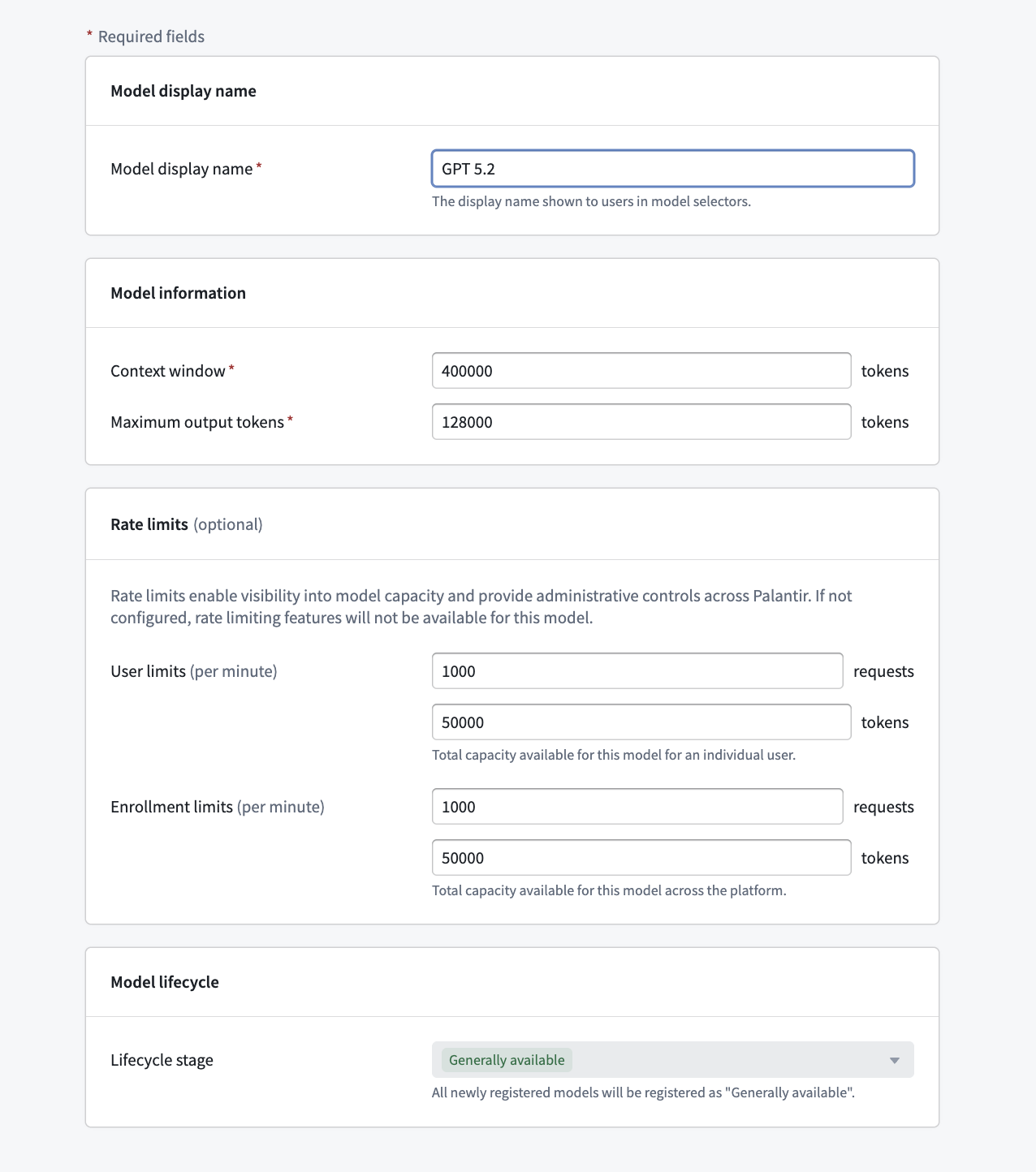
Registered models support LLM rate limits in the same way as Palantir-provided models. **Enrollment administrators** must define enrollment-level and user-level rate limits during [model registration](../rest-api-backed-models/index.md#how-to-register-and-use-your-own-model).
* **Enrollment rate limits** apply to all rate limiting at the project level.
* **Project-level rate limits** default to 70 percent of the enrollment limit, but can be configured in the Resource Management application under the **AIP usage and limits** tab.
* **User rate limits** govern per-user consumption in AI FDE, AIP Analyst, and other user-attributed applications.
### Permissions and enablement
* **Registering models:** Only **Enrollment administrators** can register new models or edit registrations in Control Panel. The administrator must also have `Owner` or `Editor` permissions on the associated Data Connection source to register, edit, or delete a registered model.
* **Source permissions are severed at registration:** Once a model is registered, its association with the underlying Data Connection source is decoupled from end-user access. End users do not need any permissions on the source to use the registered model; access is governed solely by the registered model enablement configured in Control Panel.
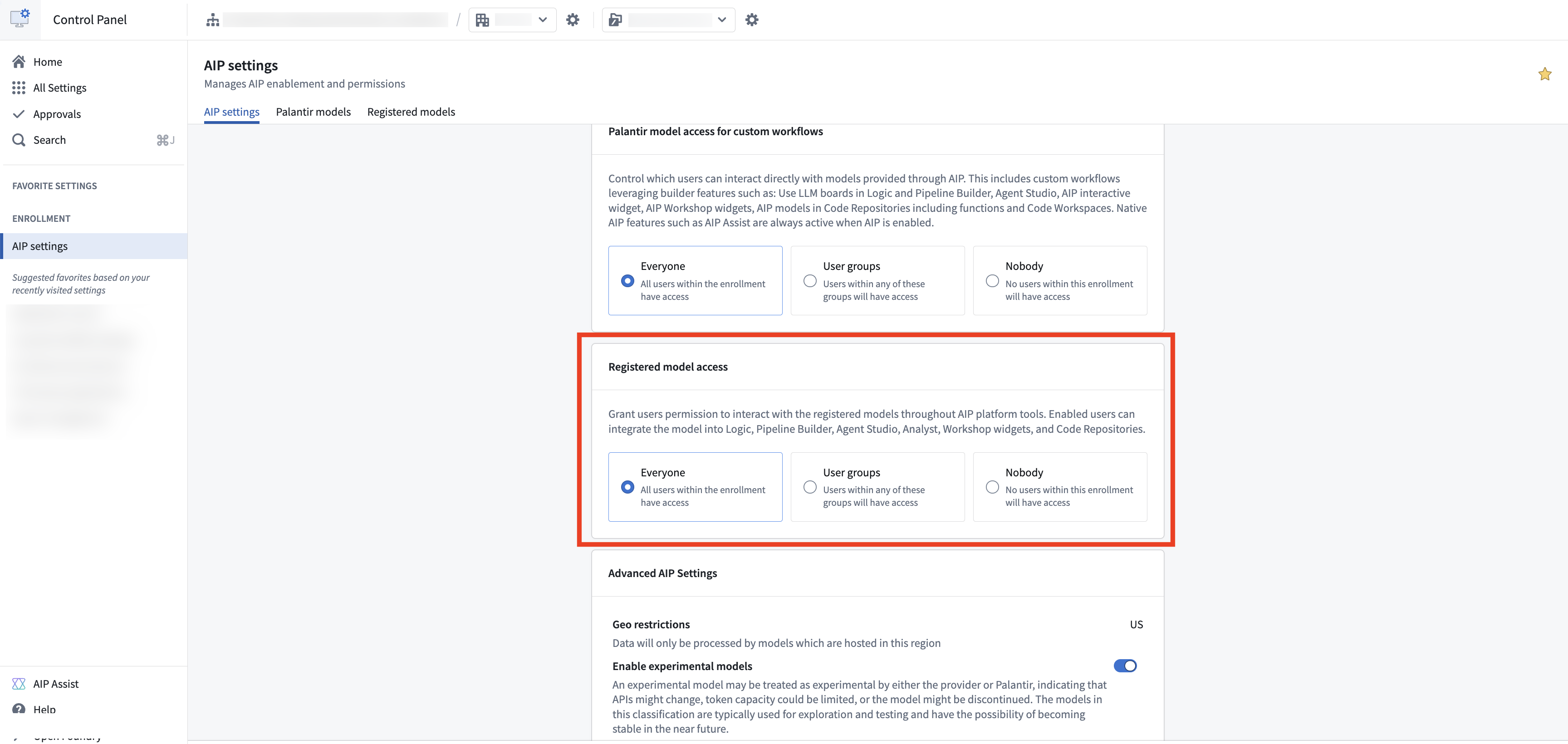
* **Using registered models:** Permissions to build with registered models or to use them as an end user are managed through the registered models enablement settings in Control Panel. Access can be granted to the entire enrollment or to specific user groups, similar to how standard AIP enablement works.
* **Disabling a model:** A registered model can be disabled at any time in Control Panel's **AIP settings** extension, preventing it from being used across AIP applications.
## Frequently asked questions
### Is it possible to use a self-hosted model?
Yes. You can self-host a model in a compute module and register it as a [model backed by a compute module](../compute-module-backed-models/index.md). Follow the instructions in the guide to [self-hosting models](../self-host-models/index.md).
### Do registered models support Markings?
Yes. **Enrollment administrators** can [control LLM data access with mandatory Markings](../control-llm-data-access-with-markings/index.md) in Control Panel. A registered model without a model-specific policy uses the enrollment policy. A model-specific policy completely replaces the enrollment policy, including when **Allow any data** overrides an enrollment allowlist.
### How are costs handled for registered models?
Palantir does not charge an additional platform fee for the use of registered models. Costs for calls to your externally hosted model are billed directly by your model provider. Registered model costs do not appear in the Resource Management application.
### Why are AIP Assist and Pipeline Builder's Generate and Explain features not supported?
These are native platform features that rely on evaluations and tests of Palantir-provided models, and we cannot guarantee that they work or provide a good quality offering with unfamiliar customer models. There are no plans to support these native assistant capabilities with registered models.